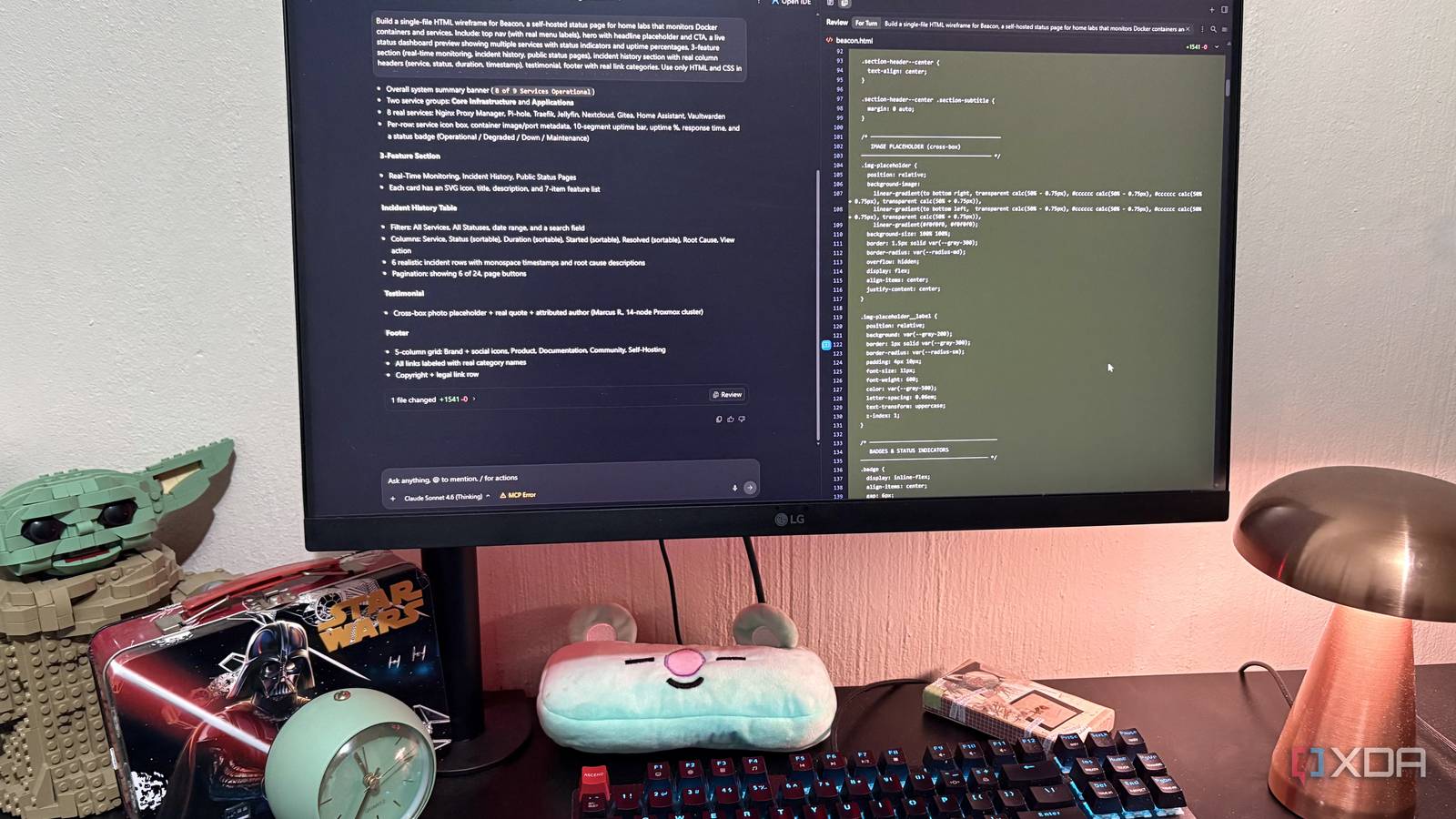
Published Aug 11, 2026, 2:00 PM EDT Nolen began their writing career in 2019, with three years dedicated to editing the Creative section at MakeUseOf. Their expertise lies at the crossroads of technology and creativity, covering areas like photography, video editing, and graphic design. Outside of work, you'll often find Nolen diving into a good book, writing their own stories, or playing video games. Coding tools that lean on frontier models are getting compared against each other constantly right now, and most of the results come down to benchmark scores and puzzles. Neither of which really tells you what any of them are like to actually build something with. I wanted to put these three to the test specifically because I've been leaning on all of them a lot lately for document and productivity work, but I wanted to use them the way most people do, which is for generating code. Claude Code, Google Antigravity, and a local LLM all got the same prompt: a single-file HTML wireframe for a self-hosted status page called Beacon. Wireframes were the deliberate choice here because they strip out the visual polish and force the tool to make structural decisions about hierarchy and layout. Want to stay in the loop with the latest in AI? The XDA AI Insider newsletter drops weekly with deep dives, tool recommendations, and hands-on coverage you won't find anywhere else on the site. Subscribe by modifying your newsletter preferences! Claude Code's GUI made the setup easy But it fought me a little on the first couple of iterations Claude Code was the first one I tested, running in the desktop app rather than the terminal, on Opus 4.7 with thinking on high. Before running the actual test, I built a wireframe skill so I wouldn't have to re-prompt the wireframe conventions every session. Skills encode reusable instructions that load automatically when a prompt matches, which keeps the output consistent across runs. So you're basically writing a search query the tool will try to trigger on. There's no slash-menu autocomplete like there is for commands, so I was mostly trusting it to trigger on the right prompts, and it did. My first output was underwhelming though. The structure was there, sort of, but it was thin. It perhaps gave me the lowest fidelity wireframe out of the bunch, which, if that were the criteria, it would have been fine. But it generated gray bars where content should have been, and not much sense of what actually belonged in them. So I tightened the skill instructions to distinguish image placeholders from actual content structure with real labels doing real work. I re-ran the Beacon prompt and the output was a step up. A proper dashboard with service categories, an incident table with columns for Service, Status, Duration, and Timestamp, a categorized footer split into Product/Resources/Company/Legal, and status counters showing Services 14, Operational 12, Degraded 1, Down 1. Nav labels landed correctly for a real self-hosted product too - Features, Integrations, Docs, Pricing, GitHub. It took a couple of runs to get something usable, and it did technically hit all the beats in the prompt, but it just didn't feel as put-together as I expected. Antigravity required a little more work upfront But what came out made it worth it Antigravity uses the same SKILL.md standard as Claude Code, so my wireframe skill file was already portable. The catch is there's no dedicated skill-creation UI like Claude Code has - you can prompt Antigravity to scaffold the folder for you, but I just ended up building it myself using good 'ol Notepad because that was quicker. Once the folder was in place, the skill triggered fine on the Beacon prompt, and Antigravity actually surfaces which skill it used in a "Skills Used" panel in the right sidebar. That's transparency you don't get in Claude Code, so here you can immediately tell whether the tool matched your prompt to the right skill or wandered off. I ran the Beacon prompt against Sonnet 4.6 with Thinking, and the output kind of caught me off guard. It was a system summary banner reading 8 of 9 Services Operational, two grouped sections for Core Infrastructure and Applications, eight named services with container image and port metadata attached, 10-segment uptime bars, and status badges for every state the wireframe should cover. The incident history table came with real filters, sortable columns, six realistic incident rows with monospace timestamps and root cause descriptions, and pagination. Even the testimonial had an attributed author with actual context. This is the point in the test where my assumptions started to get challenged. I'd gone in figuring Claude Code would take this pretty easily since Opus 4.7 is the more capable model, and instead Antigravity gave me something that read like a designer's wireframe rather than a code tool's attempt at one. Google Antigravity My local LLM shipped the task Just not the one I asked for Local LLMs don't have a native skill system like Claude, least not without some configuration, but given they're just .md files, you don't need a system anyway. Just upload the file into a session or add it to a system prompt. I went with a system prompt covering the wireframe configurations so that I could save it as a preset along with the sampling and parameter settings tuned for coding. I also enabled my filesystem MCP so it could write the files itself instead of me having to copy-paste the output. Just for reference, I was running this with Qwen 3.5 9B on my 8GB VRAM set to around 40k context length in LM Studio. Then I ran the Beacon prompt. The file wrote to the right folder on the first try with no issues at all. So far so good. Then I opened the file, and Qwen had completely ignored the wireframe brief. What I got was a fully styled design with color everywhere - blue CTA buttons, green uptime bars, red critical badges, the works. The design itself is genuinely solid, actually, with Home Assistant, Plex, Nextcloud, Pi-hole, Jellyfin, and Portainer service cards, uptime percentages, a Recent Incidents table with severity color-coding, a testimonial, and a footer with real links. If you handed me that file with no context I'd think it came from a competent designer. But that's not what I asked for. And this is the honest limitation of running local at this scale: it's that smaller models tend to prioritize what's in your user prompt over what's in the system prompt when the two conflict. "Wireframe" as a concept lost to "status page" as a concrete reference, and no preset tuning was going to change that. LM Studio Not the ranking I had in my head going in Antigravity delivered the best wireframe of the three, and although I knew it was a real candidate, I kind of assumed Claude Code would nail this. Google's tool running Sonnet 4.6 beat Anthropic's own desktop tool running Opus 4.7, which tells me the model isn't the whole story on tasks like this - the agentic loop wrapped around it matters just as much. Claude technically followed the brief, but it was just so underwhelming. My local LLM actually surprised me even more, and it might have taken the crown if it didn't ignore so many of the instructions, but what it improvised on its own exceeded my expectations.
I gave Claude Code, Antigravity, and my local LLM the same coding project, and only one of them understood the assignment
Full Article
Original Source
Read the full article at Xda-developers →KhanList aggregates and links to publicly available news content. We do not host full articles from third-party sources. Always verify important information with original sources.