
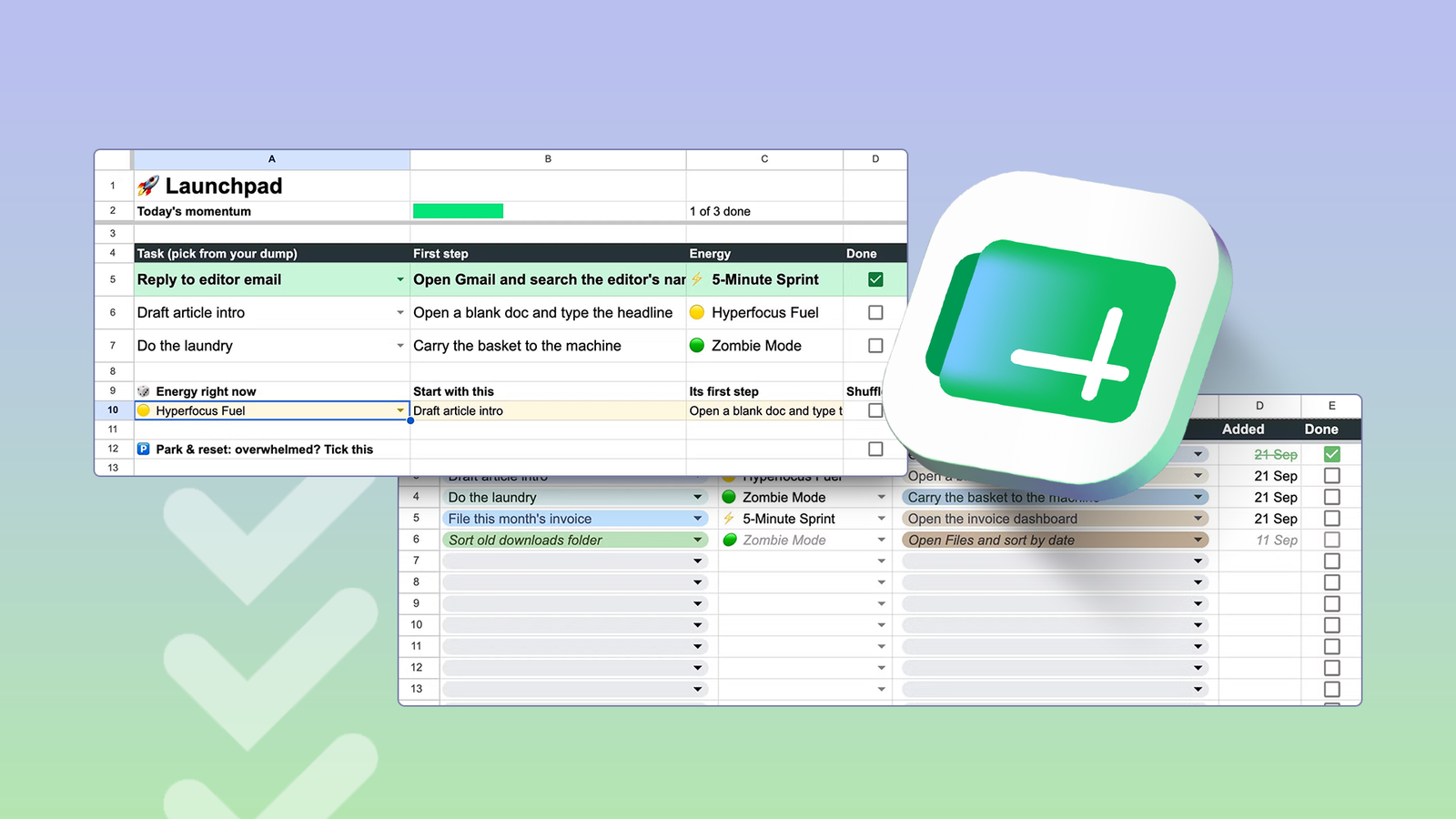
Published Sep 23, 2026, 8:00 AM EDT Irene Okpanachi is a Features writer covering Android devices, laptops, portable projectors, VR headsets, software, and AI recorders for Android Police and Talk Android. She has five years' experience across the Tech, E-commerce, and Food niches, with over 1,000 posts published. The Tech space is where she geeks out most, particularly Android. Irene holds certifications in Graphic Design (HerTechTrail), Writing in Plain Language (LinkedIn), and English for IT (Cisco Networking Academy). Beyond writing, Irene is a gamer, singer/songwriter, food lover, and a Jack of all trades. I've never been a fan of Google Sheets. I blame it on my neurodivergence and the overstimulating cells in the app's interface. They make it hard for me to know where to look, regardless of whether I access them on my personal computer or mobile devices. Thankfully, AI has taken the complexity off my mind, despite my reservations about it. I can now build a task system that shows me only what I need to see. That's better for my focus than task manager apps, which put every pending task in front of me at once and pressure me to act. Here's how I streamlined daily activities with Google's go-to data manager. To do or not to do is the question The answer really depends on your brain type Credit: Lucas Gouveia / Android Police Digital to-do lists like Todoist, TickTick, and Notion let you rank tasks, set deadlines, and organize projects, but they rarely work for an ADHD brain. Standard task apps assume we flow with a priority-based nervous system, where an item's importance or due date creates enough motivation to act.However, our brains operate on what psychiatrist Dr. William Dodson calls an interest-based nervous system.Task importance alone means very little without a challenge, passion, or someone nearby to keep us grounded. It's why we quickly lose interest in flat activity lists. Realizing those tools fell short led me to Google Sheets, where I built a custom alternative.I'd used Gemini to automate a bill-splitting tracker with custom scripts and formulas before. It was only natural to design another system tailored to how my brain works. Gemini brings clarity to a Claude-y mind It inspired the best template for my overactive headspace I spent time going over my habits with Gemini and working out my patterns. Otherwise, I was obliged to repeat them. My greatest tendency was to abandon productivity tools within a week, even after carefully setting them up. Thankfully, plenty of psychologists and ADHD researchers publish work I can consult for free. I asked Gemini to find and summarize clinical studies on the condition and its relation to task completion. Example prompt: I want to build the ultimate ADHD task manager template for myself on Google Sheets. Search and consult clinical medical books and research on ADHD executive dysfunction to explain why to-do apps fail me. Then use those insights to design an unconventional, genius template that focuses on helping me start tasks rather than just sorting chores. I also uploaded e-books I had downloaded on my device, including Dr. Russell A. Barkley's Taking Charge of Adult ADHD. It meant my template was realistically tied to trusted sources instead of generic productivity advice. It was tempting to let Gemini build the spreadsheet, especially because it offered to. But throughout my time using ChatGPT, Claude, and Gemini, I've found Claude strongest at code. I've used it to vibe code several apps lately. So instead, I copied Gemini's detailed breakdown and fed it to the third-party tool. They never forget their lines, and always play their parts Claude generated a single Apps Script file of about 380 lines of elements. Then I created a new Google Sheet and navigated to Extensions > Apps Script. I named the project ADHD Task Manager, then overwrote the placeholder code in Code.gs with Claude's script and saved it. The script has two functions. SetupTemplate creates the spreadsheet from scratch, while installTriggers schedules the emails and the nightly reset.I selected the former from the dropdown at the top of the editor and clicked Run. Google made me authorize it, after which I switched to the spreadsheet. The dropdowns, formulas, checkboxes, and color rules were just as I wanted. I also edited the preset tasks and replaced them with real ones. Next, I returned to Apps Script and ran the installTriggers function. Apps Script triggers run on a project's time zone, which might not match your phone or Google account. Click the gear icon (Project Settings) in the Apps Script sidebar and set your correct time zone from the dropdown to keep your schedule accurate. Showing up has never been easier My task manager rewards me for it The formulas and triggers in my spreadsheet run automatically. My main job is adding tasks to a Brain Dump tab, along with a first step as small as opening an app. I also pick which tasks to work on myself. If Sheets chose for me, the tasks would feel assigned, and I'd avoid them. It's like being told to do the dishes while you're already washing them. Suddenly, you don't want to. The psychologist Jack Brehm called it "reactance" in 1966. When a choice feels taken away, we resist it, even if we meant to do it anyway. Many people with ADHD feel it more intensely. A better alternative is the automated morning email with suggested tasks. It encourages me to start without telling me what to do. Then,I open a Launchpad tab and pick my tasks from its dropdowns, which list everything in my Brain Dump. When I finish a task, I tick its checkbox in the Done column. The row changes color, and a progress bar at the top fills by a third. The task also moves to a Dopamine Vault tab with the time I finished it.The rest of the Launchpad is optional.Below the three task rows is a randomizer I use when I can't decide what to pick, or when my energy drops and I want a lighter task.I may set it to Zombie Mode, and it suggests an easier activity. At the bottom is a Park & Reset checkbox for overwhelming days. Ticking it greys out my three tasks and shows three easy substitutes instead, like drinking water or closing a browser tab. I untick the box when I'm ready to return to my list. The Launchpad empties itself by the end of the day, and finished chores leave the Brain Dump. Those I haven't touched in a week turn grey and fade from view instead of turning into glaring, overdue warnings. Sheets is a bedspread for laying out new ideas Setting up the custom task manager on my computer and using it day to day on my Android phone has been refreshing. I would've liked to pin it to my home screen as a widget, but Sheets only offers one widget for creating new spreadsheets. So I copied my spreadsheet's link and opened it in Google Chrome. Then I created a shortcut from the browser menu. Now it opens with one tap. My task manager is only one way to use Sheets for productivity. It's amazing that I've barely scratched the surface of all it can do.
I finally tamed my ADHD paralysis by replacing Android task manager apps with a simple Google Sheet template
Full Article
Original Source
Read the full article at Androidpolice →KhanList aggregates and links to publicly available news content. We do not host full articles from third-party sources. Always verify important information with original sources.