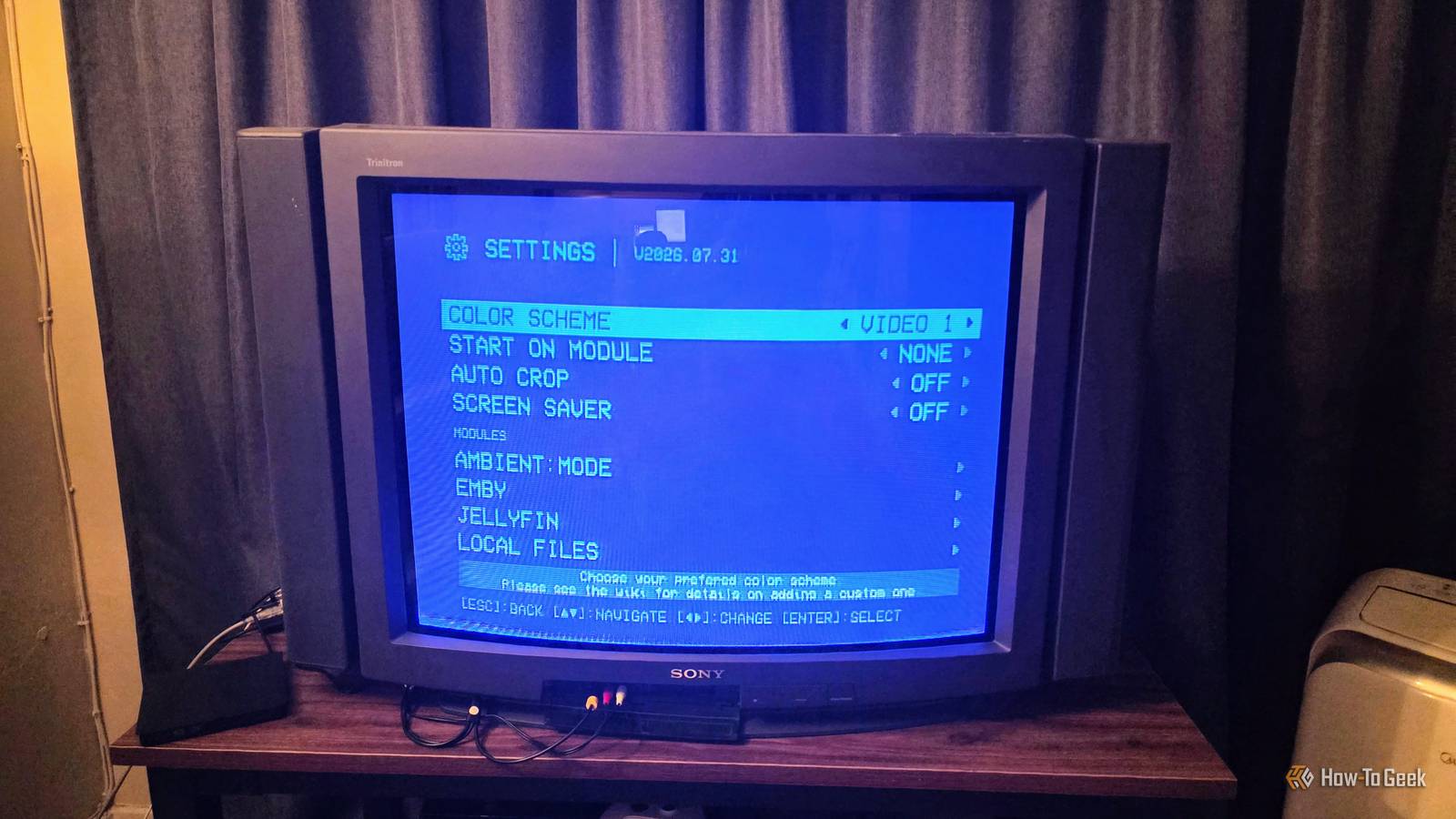
Published Aug 9, 2026, 8:00 AM EDT Sydney Butler is a technology writer with over 20 years of experience as a freelance PC technician and system builder and over a decade as a professional writer. He's worked for more than a decade in user education. On How-To Geek, he writes commerce content, guides, opinions, and specializes in editing hardware and cutting edge technology articles. Sydney started working as a freelance computer technician around the age of 13, before which he was in charge of running the computer center for his school. (He also ran LAN gaming tournaments when the teachers weren't looking!) His interests include VR, PC, Mac, gaming, 3D printing, consumer electronics, the web, and privacy. He holds a Master of Arts degree in Research Psychology with a minor in media and technology studies. His masters dissertation examined the potential for social media to spread misinformation. Outside of How-To Geek, he hosts the Online Tech Tips YouTube Channel, and writes for Online Tech Tips, Switching to Mac, and Helpdesk Geek. Sydney also writes for Expert Reviews UK. He also has bylines at 9to5Mac, 9to5Google, 9to5Toys, Tom's Hardware, MakeTechEasier, and Laptop Mag. I love having a vintage CRT to watch older content and play retro video games. I love it so much, apparently, that I now have six of the darn things taking up space. I've had a blast watching DVDs and LaserDisc content, and, of course, playing video games on original hardware that was designed to be seen this way. However, I also have a bunch of SD content on my Plex server, which led me to look for a solution to bring these two technologies together. My current setup is sweet, but it could be better The quest for zero defect Some time ago, I lucked out and found a 34-inch Sony Trinitron TV with amazing picture and sound for sale by its original owner. For $75, this back-breaking beauty came home with me, and I've been enjoying the heck out of it ever since. My first attempt at getting Plex to run on this TV involved a few key components: A Raspberry Pi 4B with 1GB of RAM. This is the last Pi to ship with composite outputs, though you can solder it back in on a Pi 5. I did not want to waste my Pi 5 on a simple job like this. LibreElec as the operating system using the unofficial Kodi Plex plugin. An "air mouse" with a USB receiver. Some no-name model from the supermarket that cost $5. The right 3.5mm to 3-RCA AV cable. This was a rough process because LibreElec has sort of moved away from analog video output, and in the end I only got this to work thanks to ChatGPT rewriting the entire config file to get an image to show on my TV. The sound still didn't work, so I was forced to use a separate USB sound card. Credit: Sydney Louw Butler / How-To Geek Still, it meant I could spend my weekends like this. Credit: Sydney Louw Butler / How-To Geek Ignore the small CRT; that's my walking-around TV. 240-MP promises a modern experience on retro hardware Was this made for me?! That's when I found out about the 240-MP project by Anthony Caccese. This is a media front-end designed specifically for CRT TVs. It looks like the OSD from a late 1990s or early 2000s VCR, but it allows access to Plex, Jellyfin, local file playback, and more. It starts out with the nostalgic blue, but you can actually change the color scheme to something else, like this snappy red-and-white. Credit: Sydney Louw Butler / How-To Geek Truth be told, the setup I was using was difficult to read onscreen, had poor performance (1GB of RAM probably wasn't helping) and was prone to fall over whenever there was an update. Since 240-MP promised a CRT-centric experience and I only needed an SD card to try it out, I went ahead and read the manual. Raspberry Pi 4 Model B Brand Raspberry Pi CPU Cortex-A72 (ARM v8) With the Raspberry Pi 4 Model B, you can create all kinds of fun projects, and upgrade gadgets around your home. Alternatively, install a full desktop OS and use it like a regular computer. The installation was way easier than I thought it would be What's a little SSH-ing between friends? I'm not going to go through the entire installation process here step-by-step for two good reasons. One is that it would take an entire dedicated article to do so, and the second is that the instructions would probably be out of date when you read it. Instead, you should follow the 240-MP instructions on its Github page. These will always be up-to-date and cover all the different systems that the software can run on, which all need different steps. To give you an idea, here's what I had to do to get it running on my Raspberry Pi 4, connected to my Sony Trinitron CRT: Use the official Raspberry Pi imager to install the Raspberry Pi Lite OS on an SD card. Set up SSH while installing Pi OS Lite. Replace the contents of the Config.txt file on that SD card with text provided by the project developer, editing out anything not relevant to my model of Raspberry Pi. Insert the SD card and boot the Pi for a first-time run. Reboot it and SSH into the Pi from another computer. Run raspi-config and expand the storage and also enable auto login. Run the provided bash script to install 240-MP. Run 240-MP Activate the Plex module Link Plex Good to go! From here I was ready to just start watching content from my Plex library. Credit: Sydney Louw Butler / Plex The whole thing took an hour at most, and a lot of that was just waiting for the script to run while I got on with other things. Finally, I have the perfect CRT interface for my TV 240-MP strips away everything from Plex. There are no thumbnails and no tiny text I can't read. My solution, using LibreElec, Kodi, and the unofficial Plex plugin, was functional, but it was ugly and awkward to use. This not only makes my TV's interface look period-correct, but it's also fast and simple to use with my USB air mouse. The most important information is still there too. You can see the synopsis, change audio and subtitle tracks, and more. The picture quality is as good as you can expect from composite over CRT. You can, of course, use this front-end with an HD TV, but that's more for novelty than any practical purpose. If you're still enjoying the final afterglow of the tube era like I am, though, 240-MP is a godsend.
I finally found the perfect interface for my CRT TVs, and it looks like a 1990s VCR
Full Article
Original Source
Read the full article at Howtogeek →KhanList aggregates and links to publicly available news content. We do not host full articles from third-party sources. Always verify important information with original sources.