
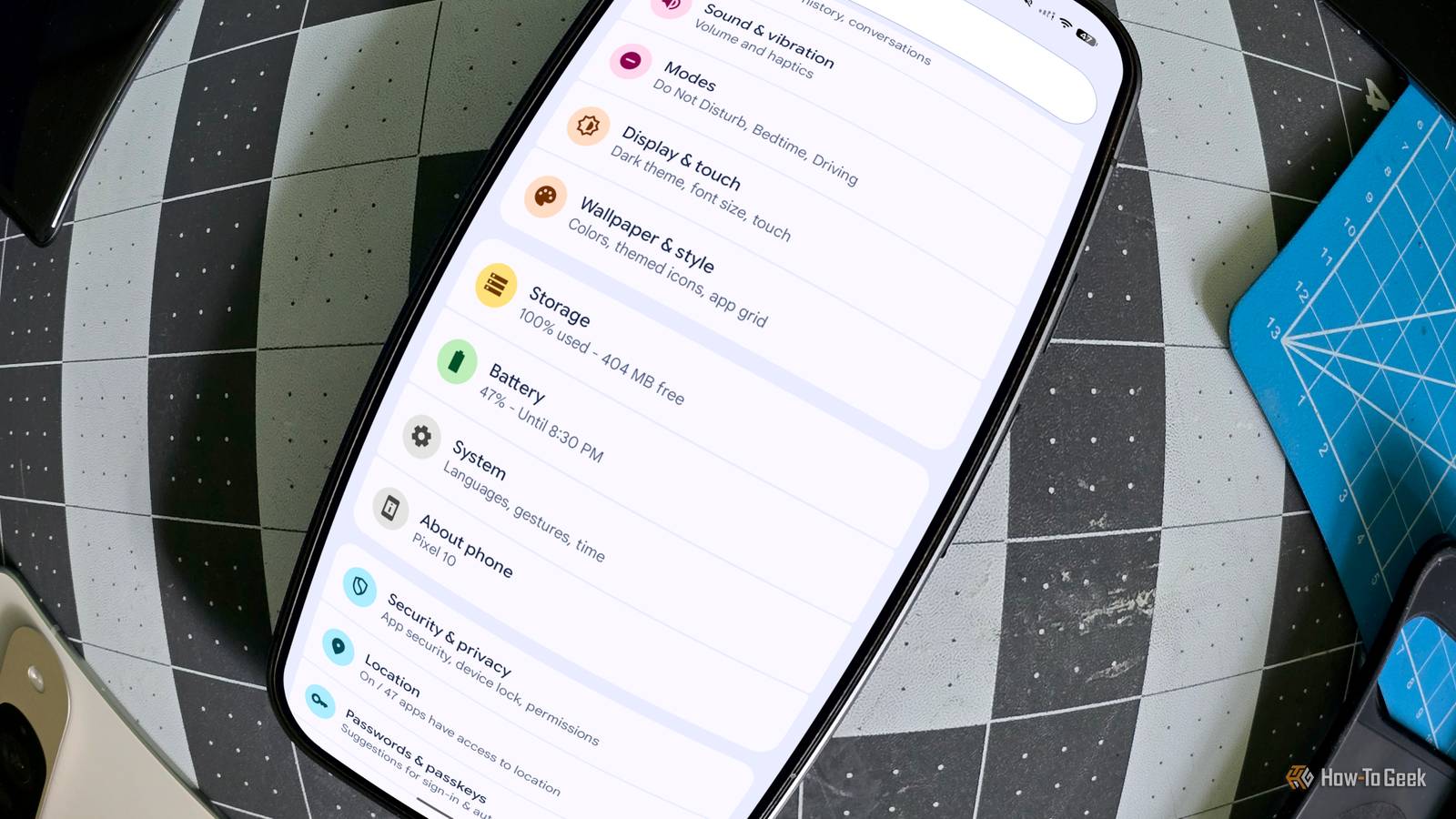
Published Sep 10, 2026, 6:30 AM EDT Joe Fedewa has been writing about technology for over a decade. Android and the rest of the Google ecosystem have been a focus for years, as well as reviewing devices, hosting podcasts, filming videos, and writing tutorials. Joe loves all things technology and is also an avid DIYer and food blogger. He has written thousands of articles, hundreds of tutorials, and dozens of reviews. Before joining How-To Geek, Joe worked at XDA-Developers as Managing Editor and covered news from the Google ecosystem. He got his start in the industry covering Windows Phone on a small blog, and later moved to Phandroid where he covered Android news, reviewed devices, wrote tutorials, created YouTube videos, and hosted a podcast. From smartphones to Bluetooth earbuds to Z-Wave switches, Joe is interested in all kinds of technology. After several years of jailbreaking and heavily modifying an iPod Touch, he moved on to his first smartphone, the HTC DROID Eris. He's been hooked ever since. More than ever, people are trying to get the most out of their phone’s storage. If you want more storage, it will cost you — literally. But what actually happens on your Android phone if you hit the storage limit, or even just get close? I ventured to find out. Pushing my phone to the max Never saw a “download” button I didn’t like Contrary to what you may think from my weird external storage “inventions,” I don’t actually use very much storage on my phone. For the better part of the last year, I’ve been comfortably using a Pixel 10 with only 128GB of storage. So, I needed to get busy if I was going to fill up my phone. The question is, what’s the best way to fill up a phone quickly? Unfortunately, the digital version of The Odyssey in 4K isn’t out yet — there goes that idea. There are plenty of other movies to download, though, including a bunch that I already own. I loaded up Plex on my Pixel 10 and started downloading movies from my library. 21.9GB worth, to be exact. That’s the entire Back to the Future trilogy, Star Wars Episode IV and V, and Watchmen. Amazingly, that still didn’t put me at max capacity. Most people assume photos and videos take up the most storage space, but that’s not true. The real culprit is apps. With that in mind, I went on a downloading spree in the Play Store. Eventually, I got to a point where I couldn’t install any more. I’d done it — 128/128GB: 100% full. Android makes this difficult The numbers kept changing on me There’s one thing I want to point out before I talk about how my phone behaved. As I was trying to get as close to 100% capacity as possible, I noticed that Android seemed to be doing some minor housekeeping in the background. The numbers weren’t adding up. I’d check the Android settings and see a number like “515 MB free,” then I’d download something else, check back, and see it had jumped up to “734 MB free.” This back-and-forth dance went on for a bit until I seemed to finally clear a threshold. Similar to how it handles running apps, I assume that Android silently manages cached data and other temporary files to provide more space. But it can only do so much. A bloated Android phone is very noticeable Your phone doesn’t like to feel full I won’t bury the lede any further — my Pixel 10 was not happy at max capacity. The first sign of danger was a notification that said, “Storage space running out: Some system functions may not work.” Performance degraded very quickly after that. First, the Play Store forces you to uninstall apps if you attempt to download new ones. You’re brought to a screen with a list of installed apps that Google thinks “you might not need.” Only after you uninstall enough to clear the needed space are you able to continue with the download. Ironically, the Play Store crashed several times as I was trying to do this. The home screen became unresponsive, started to crash, and stopped loading widgets. In fact, pretty much any app I tried to use would freeze up completely or take ages to do anything. The Pixel 10 is not the most powerful phone on the market, but it felt like a $50 bargain device with the worst MediaTek processor you could imagine. It wasn’t only the software that was affected, either. The phone got noticeably hotter than usual, and the tap-to-wake screen gesture simply stopped working. Even using the physical unlock button, I would often see a black screen for a couple of seconds before anything would load. Benchmarks don't tell the whole story I wanted to run some benchmarks to quantify the difference in performance. The benchmarking app really did not like how full the phone was. It took me several attempts just to get a benchmark to run without crashing. Unfortunately, this wasn’t as educational as I’d hoped. Despite multiple crashes, once the app finally completed the benchmarking process, the results were perfectly normal. I ran the same test with a comfortable 27GB of free space and scored nearly exactly the same. Slightly worse, actually! Now, I’m sure I did something wrong with the benchmarks. What I can tell you is that my Pixel 10 was unusable when the storage was full. There is simply no way I could continue to use a phone in that condition. However, after clearing out all the extra junk, the phone quickly felt good as new. It’s very clear to me that Android performance deteriorates when storage is close to full.
I filled my Android phone to 100% capacity to see what would happen
Full Article
Original Source
Read the full article at Howtogeek →KhanList aggregates and links to publicly available news content. We do not host full articles from third-party sources. Always verify important information with original sources.