
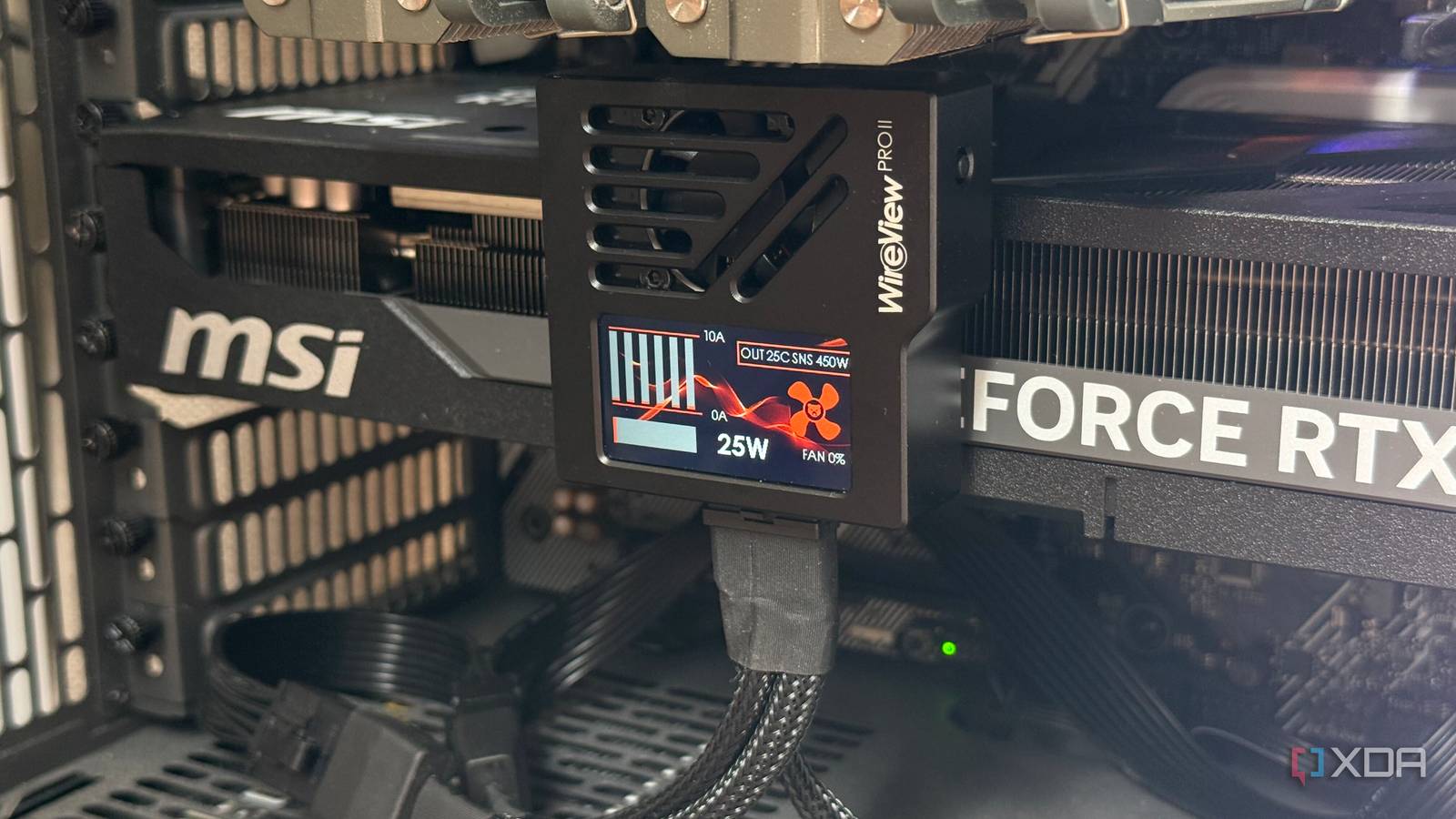
Published Sep 25, 2026, 12:01 PM EDT His love of PCs and their components was born out of trying to squeeze every ounce of performance out of the family computer. Tinkering with his own build at age 10 turned into building PCs for friends and family, fostering a passion that would ultimately take shape as a career path. Besides being the first call for tech support for those close to him, Ty is a computer science student, with his focus being cloud computing and networking. He also competed in semi-pro Counter-Strike for 8 years, making him intimately familiar with everything to do with peripherals. Recently, I pulled my RTX 5080 out of my system while doing some maintenance, and, quite concerningly, the 12V-2x6 connector that was plugged into the front of my card was quite warm. Not the usual warmth that emits from your system after a long gaming session, but a warmth that seemed...off. I recalled that Steve from Hardware Unboxed recently experienced something similar, and ended up experiencing a failure on his RTX 5090, and that was enough for me to shop around for some kind of protection. I settled on the WireView Pro II from Thermal Grizzly, and while the 5080 doesn't push even close to the same wattage as the 5090, cards have experienced catastrophic melting failures at and around the TDP of the 5080. This tool doesn't fix the connector itself, but it can shut things down before any damage happens, and that's good enough for me. What the WireView Pro II actually measures It's a really neat piece of tech The WireView Pro II is essentially a power adapter for your GPU that includes a screen, an integrated fan, and some optional temperature probes. It plugs into the card's 12V-2x6 socket, your cable plugs into it, and it measures current on each individual pin along with voltage, temperature, and total power. On my MSI RTX 5080 Shadow 3X OC, it sits over the card's connector and sends the cable straight down, so there's no tight bend right at the plug. About 10 minutes into Kingdom Come: Deliverance II at 4K, it showed 321W flowing through the connector. That figure only covers the 16-pin plug, since power the card draws from the PCIe slot never passes through the WireView. The bars on the front represent per-pin amperage readings, and I was seeing roughly 4.5A per pin, which checks out with the math. The hottest sensor, on the side that mates with the card, read 41 degrees Celsius. That's warm enough to notice with your fingers and nowhere near the 80°C default alarm. It can't tell me what my plug was doing before the WireView went in, but it suggests what I felt was ordinary. The temperature climbed to about 50 Celsius later, which still isn't concerning on its own. It also shows which power tier the cable is advertising through its sense pins. I'm running the triple 8-pin adapter that came with the card, and it signals 450W, which is what Nvidia specifies for the RTX 5080. Now, if a reading stays over its limit for more than 10 seconds, the WireView will flag it on screen and sound an alarm. These limits are set to 10A per pin, 600W total, and 80 degrees on the connector. That alone doesn't save your system, but what does is an included Y-splitter that can tie into your motherboard's power switch, allowing it to shut the system down in the event of a high reading. What it doesn't do is load balance, which is an entirely different approach to protecting your GPU. Why a GPU power plug needs a babysitter 12v-2x6 and 12VHPWR do not have a good reputation The 12V-2x6 connector can carry up to 600W across six 12V pins, and the spec only requires each pin to handle 9.2A. At full load, that works out to a safety factor of roughly 1.1, compared with about 1.7 for the old 8-pin PCIe connector. There isn't much room for error here, and while it's true that on paper, everything checks out with the 5090, in reality, there are more variables at play. One of the biggest variables is contact resistance. Every plug has some, but it varies from pin to pin, and it gets worse as contacts wear from being plugged and unplugged. Six wires in parallel split the current based on how much each path resists it, so when one contact degrades, its share gets pushed onto the others. The bad contact heats up on its own, and the pins picking up its slack heat up too, since heating rises with the square of the current. The connector's thin margin leaves little room to absorb that, and on cards that don't balance the load across the pins, nothing corrects for it. An EVGA 3090 Ti with its three shunts color-coded, feeding three different power phases.Credit: TechPowerUp Forums (User: taka) Nvidia has considered this before: the RTX 3090 Ti split its wires across three shunt resistors, so it could see and balance the load between groups. However, the Founders Edition RTX 4090 and 5090 treat all six as a single input, and these are the cards that spawned this entire product category in the first place. At 575W, a 5090 averages roughly 8A per pin even when everything is working as intended. My 5080 is a different story. Its 360W rating works out to about 5A per pin at most, and MSI doesn't advertise any per-pin sensing on the Shadow. For me, the WireView is a diagnostic tool and peace of mind, not a necessity. The 12V-2x6 revision did fix one failure mode by shortening the sense pins, so a plug that isn't fully seated shouldn't deliver power. It doesn't help a fully seated plug with one degraded contact, and that's exactly what per-pin monitoring is for. Active load balancing is another approach Adding real-time balancing to a card that doesn't have it The WireView Pro II simply takes the information it gets from the plug and acts upon it reactively, but there are other products that take a more proactive approach. Aqua Computer's Ampinel tries to do just that, sitting inline like the WireView but instead of just reacting to potentially hazardous readings, it uses series MOSFETs to raise the voltage drop on whichever line is overloaded, nudging current onto the others. It has a similar monitoring setup to the WireView, featuring an OLED screen with per-line current, an alarm system, and a shutdown path. Balancing still doesn't fix the core issue The connector itself is the problem, and it's on Nvidia Balancing doesn't add capacity, and it also doesn't fix the connector itself. The card decides how much total current it needs, so relieving one overloaded wire means shifting that current onto the others. That's definitely better than letting a single pin cook itself, but it's still a band-aid solution for a connector that's already short on headroom. A contact that's degrading will continue to do so while the balancer compensates for it. Both of these approaches, reactive and proactive, are valid ways to keep your valuable card from cooking itself to death, and which one you ultimately choose to use on your card is probably better than nothing at all, though if you're like me and own a lower-wattage card, the chances of a failure are lower than if you're pushing the limits of Nvidia's flagship GPU. WireView Pro II The WireView Pro II is a device for measuring the power consumption of graphics cards. The 2nd Pro generation offers additional monitoring features in the form of per-pin power measurement, as well as an extended warranty and a TFT-IPS display.
I felt my GPU connector get dangerously warm, so I bought a $140 babysitter for my power cables
Full Article
Original Source
Read the full article at Xda-developers →KhanList aggregates and links to publicly available news content. We do not host full articles from third-party sources. Always verify important information with original sources.