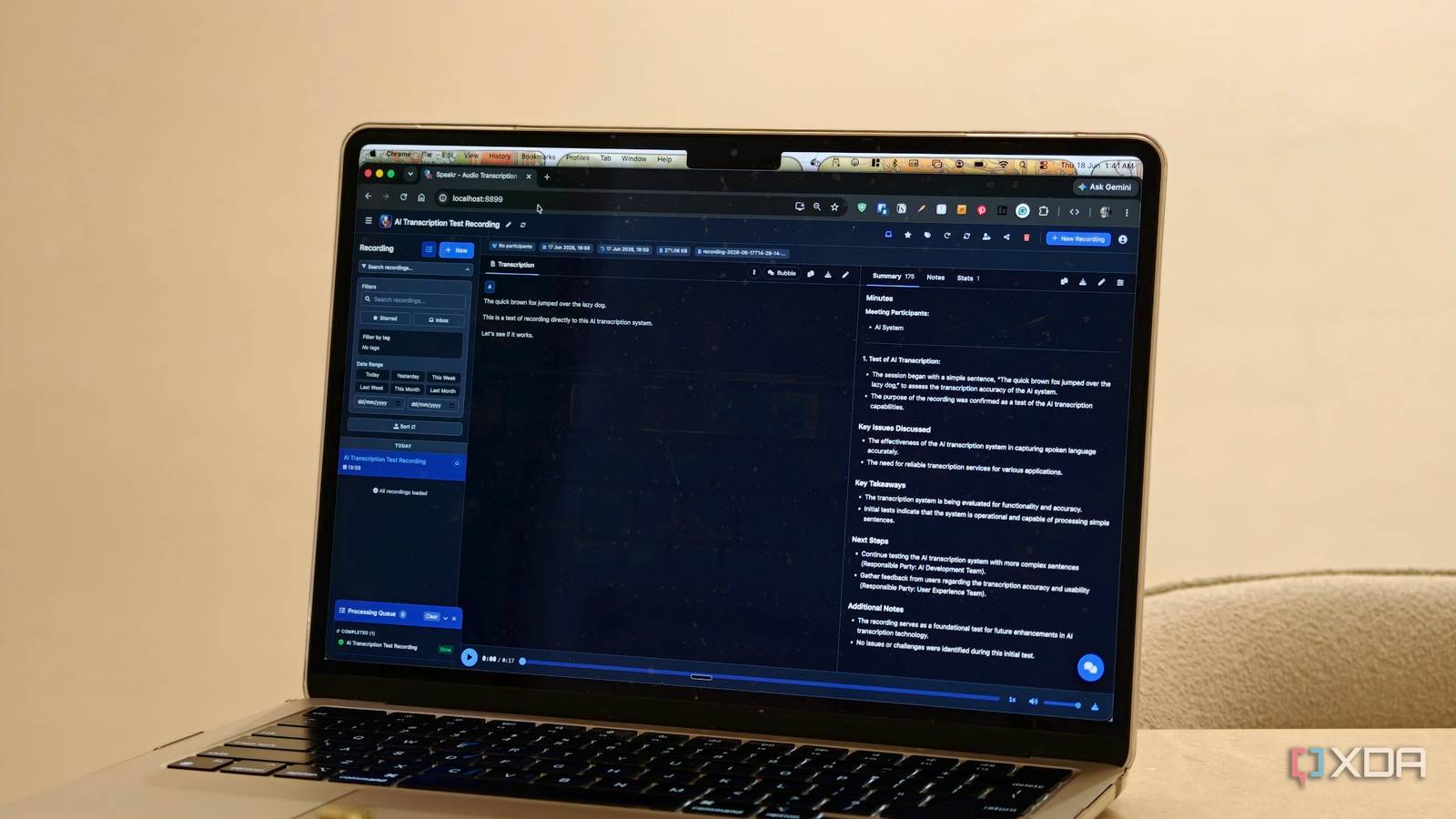
Published Aug 5, 2026, 8:30 AM EDT Dhruv Bhutani has been writing about consumer technology since 2008, offering deep insights into the personal technology landscape through features and opinion pieces. He writes for XDA-Developers, where he focuses on topics like productivity, networking, self-hosting, and more. Over the years, his work has also appeared in leading publications such as Android Police, Android Authority, CNET, PCMag, and more. Outside of his professional work, Dhruv is an avid fan of horror media spanning films and literature, enjoys fitness activities, collects vinyl records, and plays the guitar. Like most journalists, I spend a significant portion of my day in meetings, interviews, and even calls. I tend to record these calls because they can contain nuggets of information, briefings, and more. Unfortunately, manually revisiting these recordings is perhaps the most tedious part of my workflow. I do need accurate transcripts and searchable notes, but I don't want to upload every conversation to a cloud service or pay for a monthly transcription service. Yes, I've used Otter.ai, but the free version is just too limiting, and the paid version, well, like I said, I don't want to pay for it. I installed this open-source app called Speakr on my home server. The app gives me automatic transcriptions and AI summaries, as well as searchable transcripts. It even has speaker recognition, which comes in very handy for briefings with multiple people. Basically, it's Otter.ai but running on my computer. Ever since I set it up, this is the app I've used to transcribe all my calls and meetings. Transcriptions and a fully searchable archive Transcripts synced with recordings make reviewing discussions much easier Credit: As far as workflows go, mine is pretty straightforward. Once I'm done with a meeting or interview, I save the recording and usually upload it to Otter.ai. Now that recording goes to Speakr. I've paired it with a local LLM, and as soon as I upload the file, it automatically starts transcribing it and identifying different speakers. Both the audio file and the transcript are stored in a searchable archive, so instead of leaving the recordings in a folder on my NAS, I now also have a home for all of these meeting recordings and transcripts. Since a significant portion of my recordings consists of meetings and pre-briefing calls for products, speaker recognition is an important feature for me. Having each speaker separated inside the transcript makes it much easier to follow the discussion and identify who said what. This also comes in handy for interviews when I don't have to replay entire sections just to identify the speaker. I can scroll through quickly and find what I am looking for. The other feature that comes in extremely handy on a day-to-day basis is the fact that the transcript is synchronized with the original recording. As good as AI transcription has gotten, it is not perfect, and mistakes do happen. If I want to verify a quote that I'm not sure was transcribed correctly, I can simply click on the relevant section of the transcript and play the original audio. When you're dealing with hour-long calls, this saves a massive amount of time compared to manually scrubbing through recordings looking for a specific sentence. There's no going back once you're used to a feature like this. As far as features go, Speakr also allows you to create AI summaries. I'll be honest, it's not a feature that I use all that much. I know a lot of people get use out of creating meeting notes from audio recordings when using Otter.ai, but in my workflow it's not very necessary. That said, I can't complain about an extra feature. Moreover, Speakr goes a step further and lets you create hyper-specific prompts. If you want to get summaries that preserve key talking points and extract notable quotes, you can absolutely do that. That's the beauty of self-hosted and open-source software. Handles more than just transcriptions From local LLMs to cloud models, there's a lot of flexibility here I'll let you in on a secret. I use the transcription service in some unorthodox ways that it wasn't really designed for. You see, Speakr isn't limited to just uploaded files. If you want to capture a quick discussion or ideas, you can record directly in the browser. These recordings become a part of the same archive and transcripts as everything else. Often, when I'm drafting an article while getting my steps in on my walking pad, I'll speak the article into Speakr and have it create a transcript. It's rarely a ready-to-go article, but it saves me a lot of time typing while also getting my workout in. Elsewhere, there's a built-in AI chatbot as well that you can use to query your longer transcripts. Think things like asking it to identify if a specific date or timeline was discussed, or if you are looking for a specific quote from a speaker. It's a nice-to-have addition, though it didn't work perfectly in my experience. Finally, being a self-hosted piece of software, there's a lot of flexibility in how you want to transcribe your files. You can tap into OpenAI's API and a handful of other providers, or self-host WhisperX if you want to run everything on your own server. To be sure, the quality of transcription does take a bit of a dip with local models, but generally speaking, local LLMs have gotten significantly better and, unless your recordings are very dense or heavily accented, a local LLM should handle it just fine. The broader point is that you have a lot of flexibility in how you run your setup, and even cloud-hosted models cost barely any pennies. You no longer have to spend a significant amount every month to get a decent transcription. An excellent alternative to paid transcription services Most of my use of Speakr is as a self-hosted alternative to Otter.ai. However, it has become much more than a transcription tool for me. It's my personal archive of audio recordings. Additionally, it's become a way for me to generate summaries, turn my thoughts into text by speaking to it, and extract information from long meetings. If you already run a home server and find yourself in a lot of meetings and calls, this one's a no-brainer alternative to Otter.ai. Speakr Speakr is a Docker-based self-hosted transcription tool that helps you capture, transcribe, and label speakers in your audio content.
I ditched Otter.ai for a self-hosted app that transcribes every meeting and stores it all in one searchable place
Full Article
Original Source
Read the full article at Xda-developers →KhanList aggregates and links to publicly available news content. We do not host full articles from third-party sources. Always verify important information with original sources.