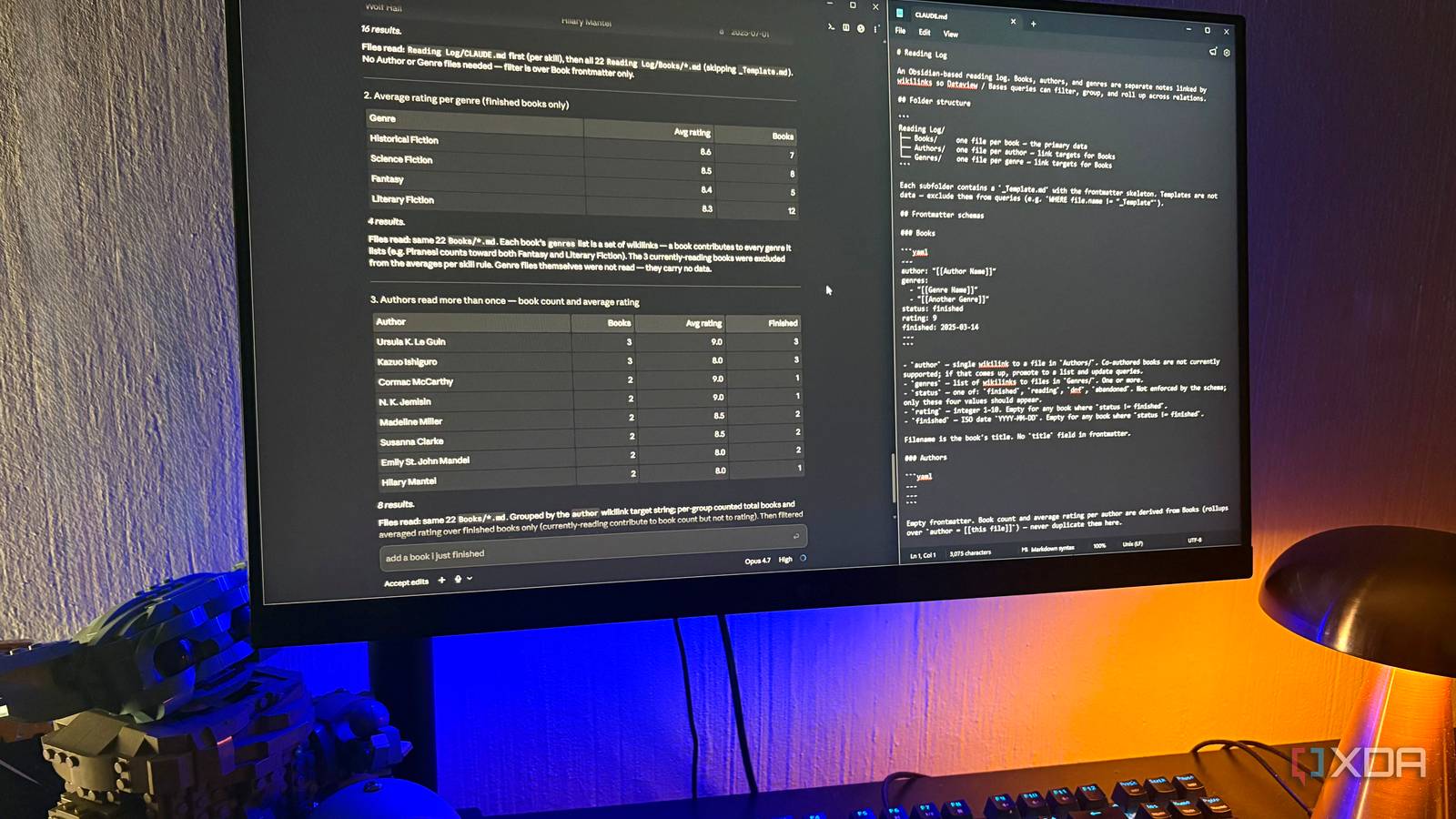
Published Jul 29, 2026, 10:30 AM EDT Nolen began their writing career in 2019, with three years dedicated to editing the Creative section at MakeUseOf. Their expertise lies at the crossroads of technology and creativity, covering areas like photography, video editing, and graphic design. Outside of work, you'll often find Nolen diving into a good book, writing their own stories, or playing video games. Notion is one of those apps where databases are both the reason people stay and the reason people eventually leave. The maintenance side of them starts outweighing what you actually get out of them, at least, that was the case for me. There are plenty of alternatives, some of my favorites being Obsidian and AFFiNE, but none of them do databases the way Notion does, and I wouldn't actually want them to. What I actually wanted was the behavior of a database without any of the UI around it. Something plain that could point at any folder. I ended up finding it in a place I wasn't looking, and it turned out to be one file in Claude Code… Want to stay in the loop with the latest in AI? The XDA AI Insider newsletter drops weekly with deep dives, tool recommendations, and hands-on coverage you won't find anywhere else on the site. Subscribe by modifying your newsletter preferences! The setup is three folders and two config files And one of them handles the entire database pipeline Notion databases are basically structured tables where every row is its own page. You can add properties to entries, filter and sort views, link entries across databases with relations, and roll up data from those relations to get aggregates. The latter is probably what most people stick around for because it's genuinely useful. My goal was to replicate that behavior without the database itself existing and needing to be maintained. I set it up on my reading log first because the data was already clean and the relations were more obvious than in any other of my folders, but I'm using this same pattern on other folders and projects. The entire setup is a folder with three subfolders - Books, Authors, Genres - and each book file has YAML frontmatter with all the important fields I wanted. Author as a wikilink, genres as a list of wikilinks, status, rating, finished date, and so on. Then there's CLAUDE.md at the folder root, which documents the schema so any Claude Code session picks up the rules without me having to re-explain them. And then the actual one file - the skill. I told Claude Code what I wanted it to handle - filtered questions over the Books frontmatter, aggregated ratings and counts across the wikilink relations, and multi-hop questions that follow those relations more than one step. Claude wrote the skill from that and saved it to the skills folder, and it's been running the whole setup since. Filtered views without ever building a view The view Notion makes you build in advance, I ask for on the spot I'm not going to pretend that filtered views in Notion aren't superior; you just pick which columns to show, choose the sort, and save the view with a name so you can find it again. However, this is not something you want to adjust every single time. So any time your question changes even slightly, you're back in the panel adjusting things and making new filters. Instead, in Claude Code I asked for every book I'd finished with a rating of 8 or higher, as a table sorted by rating. It's just one short sentence, and I got a clean table with title, author, rating, and finished date, sorted correctly and with the count at the bottom. Underneath the result there was a "Files read" note that told me exactly what got walked - CLAUDE.md plus every file in Books. No need to rebuild an index whenever I add a new book. And it's not even that it's faster than a saved Notion view, it's that I never had to build the view in the first place. Rollups across relations, with no rollup properties to configure Notion's flagship power feature turned out to be one prompt Rollups are the feature Notion power users swear by, and rightly so; they're where the aggregation stuff actually happens. But setting them up in Notion means adding a relation property on one database, then a rollup property that references it, then picking the aggregation type from a dropdown. Every rollup is a schema change, and once you've built a few it can quickly turn into a mess you just end up abandoning like I did. So, now I simply ask Claude Code for the average rating per genre across all my finished books. Same one sentence pattern, and I got a table back with genres, averages, and book counts. And the "Files read" note, once again, shows what's actually happening - the Genre files themselves weren't read, because they don't carry any data. All the aggregation happened by walking the Books folder, resolving each book's genre wikilinks, and grouping from that side. The derived-data rule from CLAUDE.md pays off here specifically because there's nothing to keep in sync or to update when I add a new book. Following relations across two hops is where Notion gets tedious But this setup makes it simpler Multi-hop is where Notion's databases can start getting frustrating. Following relations across two hops, like "every author I've read more than once, with book count and average rating", is technically possible but you'll be stacking rollup fields, sometimes formulas, and often a linked database view to make the result readable. And every one of those is now a schema commitment you have to maintain. I asked for every author I'd read more than once, with book count and average rating. Same one-sentence pattern as the other two queries. What came back was a table of 8 authors, sorted by book count, with the average rating next to each. It also handled an edge case I never spelled out: currently-reading books counted toward the book count but not toward the rating average, because they don't have a rating yet. It's this case-by-case reasoning that Notion formulas encode, but it happened here without me having to ask for it. Turns out I didn't need a database What actually worked was skipping the database entirely. The markdown files hold the data, the wikilinks hold the relations, and one skill file teaches Claude Code how to read the whole thing as a database when I ask it to. It's not a very clever setup, the opposite actually, but that's the whole point. I think it's the least infrastructure I've ever pointed at a database problem, which is what makes it so much easier to use.
I ditched Notion entirely after adding one file to my Claude Code setup
Full Article
Original Source
Read the full article at Xda-developers →KhanList aggregates and links to publicly available news content. We do not host full articles from third-party sources. Always verify important information with original sources.