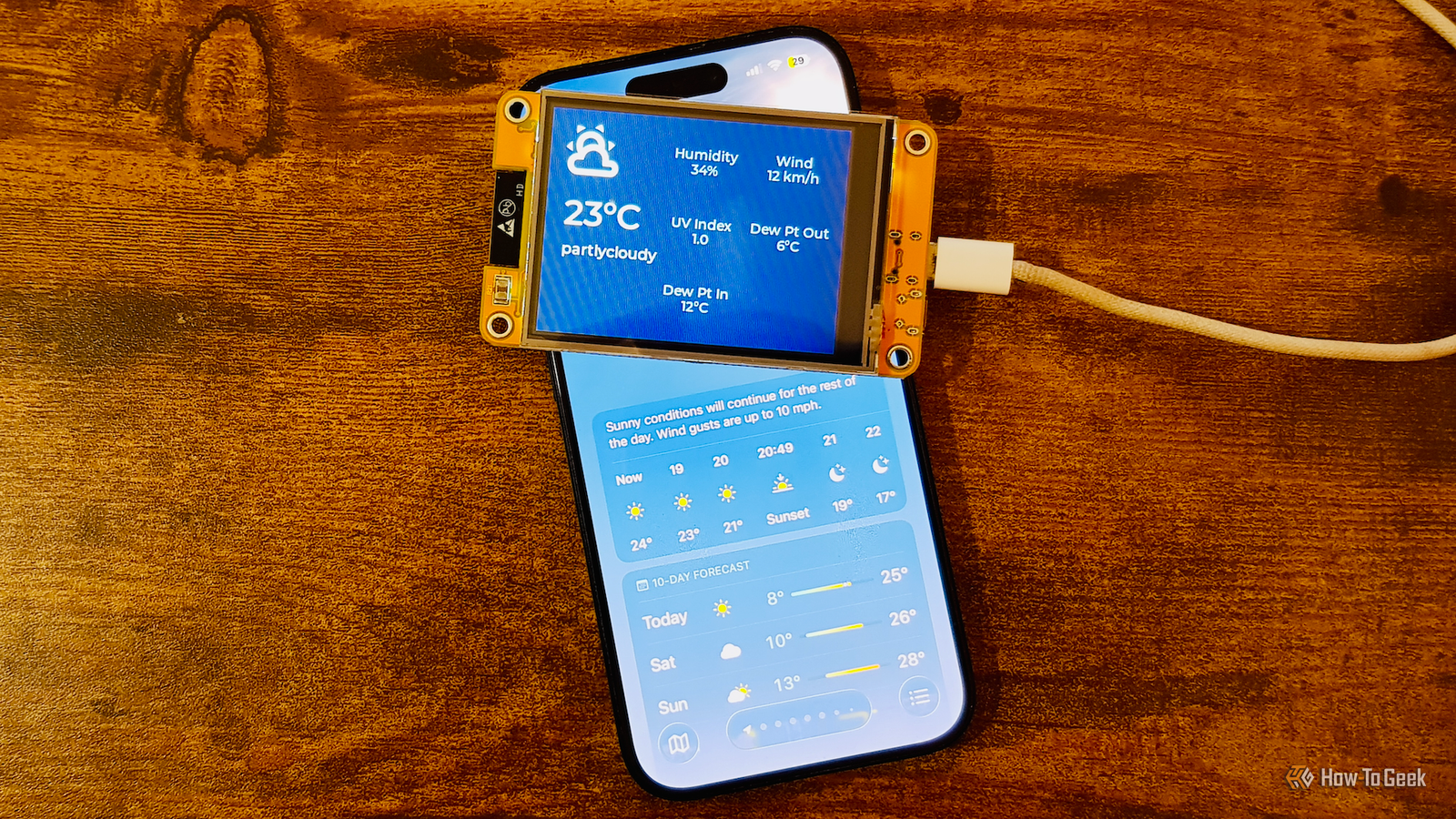
Published Aug 10, 2026, 10:00 AM EDT Adam has a degree in Engineering and has a life-long interest in technology. He has been writing for over a decade for various print and online publications, with a focus on consumer tech. He joined How-To Geek in 2024 while working at Pocket-lint. As well as being a long-term fan of Apple products, he also has a strong interest in smart home tech, running a Home Assistant server at home to automate all his smart home devices. He believes that the ideal smart home should work with minimal interaction from the user, with automations running as if by magic rather than requiring you to push buttons on a control panel. You can find more of his work on Muck Rack. Where I live, the weather is the default subject for small talk. Weather apps can give you a lot of information about your local weather conditions, but I wanted a better option. A cheap ESP32 project turned out to be far more useful than relying on my phone. Getting the information is too much effort Credit: Adam Davidson / How-To Geek There's only one weather app I've ever truly loved, and that was Dark Sky. It looked great, but more importantly, it had incredibly accurate hyperlocal weather information. When Dark Sky said it was about to rain in my location, it would almost always start within the next few minutes. Sadly, Apple bought Dark Sky, folded some features into the stock Weather app, and then killed off Dark Sky for good. Apple's Weather app just isn't as good. I even built my own weather widget that uses AI to generate an image of the current weather conditions to replace the stock weather widget. The trouble is that weather information is something that I want to be able to check at a glance. Using a phone app, I have to pull out my phone, unlock it, and then find the relevant app before I can see the weather data, which feels like far too much effort. The Cheap Yellow Display seemed like a perfect solution A cheap ESP32-powered touchscreen display The solution was a device called the ESP32-2432S028R. It's not the most memorable name in the world, but thanks to the fact that the product is yellow, has a display, and is relatively inexpensive, it's more affectionately known in the maker community as a Cheap Yellow Display (CYD). The CYD is a self-contained development board built around an ESP32-WROOM-32 module with Wi-Fi and Bluetooth. The key difference from a typical ESP32 board is that it comes with an integrated 2.8-inch TFT touchscreen display. The screen has a 240x320 resolution with a resistive touch layer on top, and since everything is on one board, there's no need for wiring, soldering, or breadboards. Out of the box, there may be some basic demo software, but you’ll need to flash it with appropriate firmware to turn it into something useful. That's part of what makes it so popular; it's general-purpose hardware that you can use for whatever purposes you see fit. The other thing that makes it popular is that you can buy one for $15 or less, which is where it earns the "C" part of CYD. Building my weather dashboard with ESPHome and Home Assistant Compiling on my Home Assistant host did not go well Credit: Adam Davidson / How-To Geek The tiny screen is still plenty big enough to display a lot of useful weather information. All I needed was a way to get that data to the CYD, and a way to make it display that data. There were three pieces of the puzzle. ESPHome is a tool that lets you write a simple YAML text file describing what you want an ESP-based device to do. ESPHome then turns that text file into working firmware, saving you from having to write C++ code yourself. Light and Versatile Graphics Library (LVGL) is responsible for what appears on the screen. Instead of having to calculate pixel positions, you can use LVGL to describe what you want to see on the screen, and it handles all the rendering for you. ESPHome has built-in support for LVGL, so I could create a single YAML file that would set up the Wi-Fi and touchscreen as well as describe what I wanted the screen to display, such as weather icons and a grid of statistics including temperature values and wind speeds. Home Assistant was the final part of the equation. A weather dashboard needs data to display, and Home Assistant was the source of this data. I already had a weather entity set up with data provided by Met.no that gives me current information such as the weather conditions, temperature, wind speed, outdoor dew point, and more. I also had some custom sensors, including an indoor dew point sensor based on temperature and humidity readings from smart home devices within my home. Using ESPHome, whenever any of these sensors update, the values get pushed to the CYD over the network, so the screen is always showing the latest data available in Home Assistant. My tiny weather dashboard is far more useful than my phone I can see the information I want at a glance Credit: Adam Davidson / How-To Geek I have the CYD set up in my home office, which is where I spend most of my time during the week. At a glance, I can see the current weather conditions without the need to pull out my phone or find the right app. Even better, I get to choose exactly what is displayed. The weather apps on my phone can't tell me the indoor dew point of my house, for example. Comparing it with the outdoor dew point is really useful during the winter, as it lets me see when opening the windows would reduce the humidity in my home, and when it's better to leave them shut. The only thing that's left to do is to get a 3D-printed enclosure for the CYD, as currently it looks a little, well, cheap and yellow. Maybe this is the excuse I need to finally buy a 3D printer of my own. If you're not happy with your current solution, build your own The reason I set this up was that I just wasn't using my phone's weather apps at all. I wanted something I could check instantly, and the CYD made that possible for less than $15. Sometimes, you just have to roll your own.
I ditched my phone's weather app for a $15 ESP32 display
Full Article
Original Source
Read the full article at Howtogeek →KhanList aggregates and links to publicly available news content. We do not host full articles from third-party sources. Always verify important information with original sources.