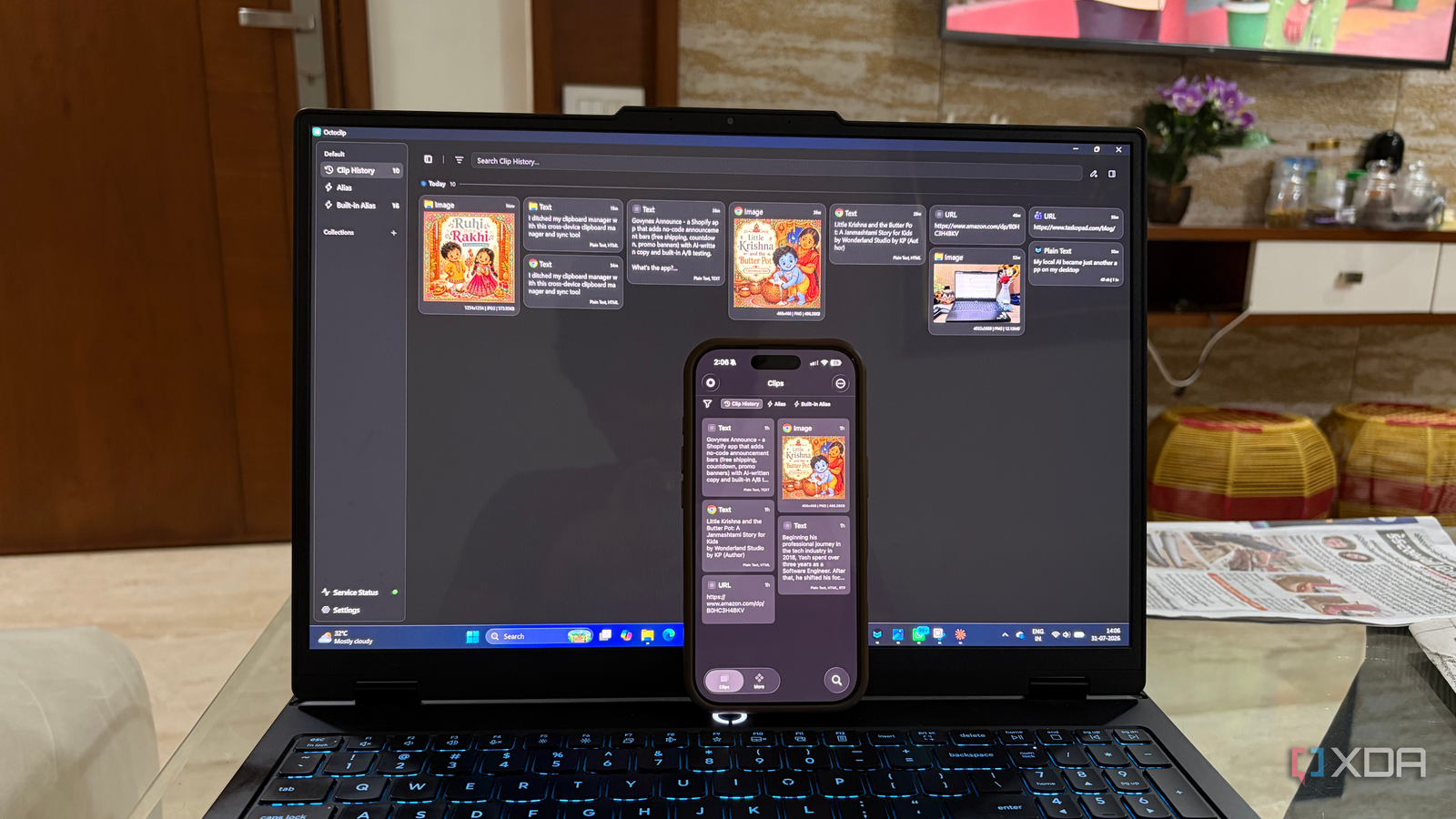
Published Aug 4, 2026, 5:00 PM EDT Beginning his professional journey in the tech industry in 2018, Yash spent over three years as a Software Engineer. After that, he shifted his focus to empowering readers through informative and engaging content on his tech blog – DiGiTAL BiRYANi. He has also published tech articles for MakeTechEasier. He loves to explore new tech gadgets and platforms. When he is not writing, you’ll find him exploring food. He is known as Digital Chef Yash among his readers because of his love for Technology and Food. Lately, my workflow revolves around AI tools much more than it used to. I'm constantly copying prompts, AI responses, code snippets, research, and links while switching between my desktop, laptop, and phone. My clipboard manager still does a good job of remembering everything I copy, but that's no longer my biggest problem. These days, I need that content to be available wherever I'm working next. After looking for a better solution, I came across OctoClip. It combines clipboard syncing with simple file transfers, which turned out to be a much better fit for the way I work today. What OctoClip actually is More than just another clipboard manager When I first installed OctoClip, I expected it to be another clipboard manager with a cleaner interface and a few extra features. After spending some time with it, I realized it belongs in a slightly different category. Instead of focusing only on storing clipboard history, OctoClip combines clipboard syncing with lightweight file sharing, making it easier to move content between devices. It works across Windows, macOS, Linux, Android, and iPhone, so it isn't tied to a single operating system. That makes it a practical option if, like me, you regularly switch between different devices during the day. Of course, it still does what I'd expect from a clipboard tool. It remembers copied items, lets me search through my clipboard history, pin important entries, and organize frequently used content into collections. But those features aren't what make it stand out. The real difference is that it treats the clipboard as something available across my entire setup rather than being limited to a single computer. Once I understood that, I stopped comparing it to traditional clipboard managers and started using it as a tool to keep my devices connected. OctoClip makes my clipboard available everywhere The synced clipboard handles more than just copied text The biggest difference I noticed wasn't a flashy new feature; it was how much smoother my everyday workflow became. Before using OctoClip, moving prompts, responses, research, code snippets, and reference links between devices usually meant sending myself messages, saving temporary notes, or repeating the same search on another computer. With OctoClip, those extra steps are mostly gone. I can start researching on my desktop, continue writing on my laptop, and still have the content I need ready to use. It keeps me focused on the work itself rather than on figuring out how to move information around. Beyond syncing my clipboard, I also appreciate the built-in productivity features. I can search older clipboard entries in seconds, pin important items so they don't get buried, mark frequently used snippets as favorites, and organize them into collections. I've created collections for AI prompts, Markdown templates, commonly used links, and writing snippets that I reuse across different articles. Those features save me time every day because I don't have to search through old documents or copy the same content repeatedly. Instead of treating my clipboard as a temporary holding area, I now use it as a searchable library of things I access regularly. That simple shift has made OctoClip much more useful than any traditional clipboard manager I've used. It still has limitations It's not the right fit for everyone As much as I enjoy using OctoClip, it isn't perfect. The biggest limitation is that some of its more advanced capabilities are locked behind a paid subscription. The free version is good enough to experience the core idea of cross-device clipboard syncing, but features like a longer clipboard history, larger storage limits, and other premium capabilities require an upgrade. If you rely heavily on your clipboard throughout the day, the subscription may be worth it, but it's something to keep in mind before switching. I also found that OctoClip makes the most sense if you regularly work across multiple devices. If you spend all your time on a single computer, a traditional clipboard manager may be all you need, and you'll probably miss very little. None of these limitations were deal-breakers for me. The convenience of having my clipboard follow me between devices ended up saving far more time than I expected, making it an easy replacement for my old clipboard manager. More than a clipboard manager I started using OctoClip because I wanted a better clipboard manager, but I ended up replacing part of my file-sharing workflow too. Whether it's a copied link, a block of text, a screenshot, or a small file, I no longer have to think about how I'll get it onto another device. Everything is available where I need it, without relying on messaging apps or cloud storage as a middleman. While the paid plan unlocks a few extra features, the core experience was enough to convince me to switch. It made me realize I wasn't just replacing a clipboard manager; I was replacing several small workarounds I had been relying on every day. OctoClip OctoClip is a cross-device clipboard manager that syncs copied text, images, files, and links across Windows, macOS, Linux, Android, and iPhone, making it easy to continue working anywhere.
I ditched my clipboard manager after finding this cross-device clipboard app
Full Article
Original Source
Read the full article at Xda-developers →KhanList aggregates and links to publicly available news content. We do not host full articles from third-party sources. Always verify important information with original sources.