
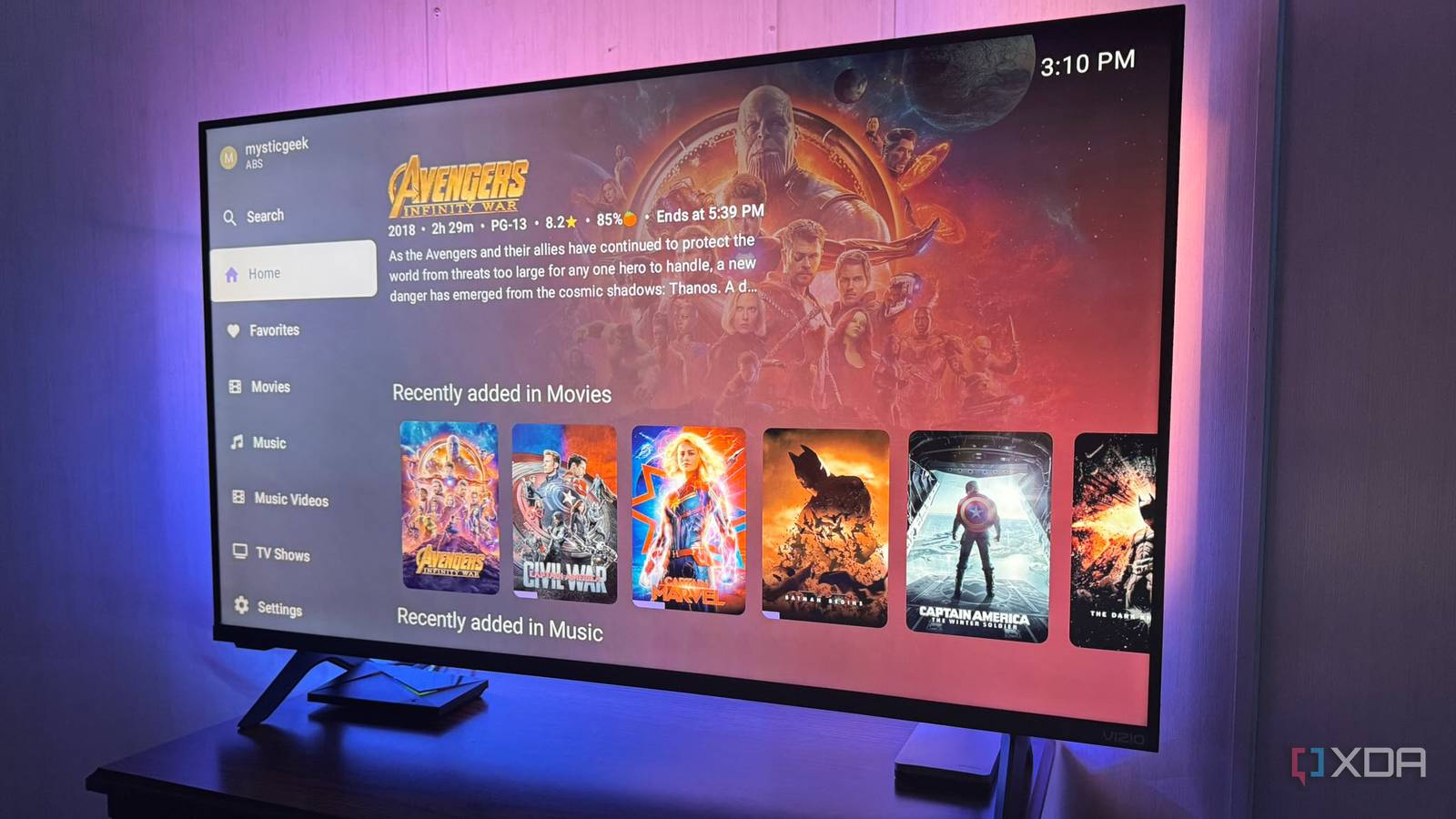
Published Sep 30, 2026, 8:31 AM EDT Based in rural Minnesota, Brian Burgess worked in IT for 10 years before finding his passion for writing about consumer technology. Brian earned his degree in computer and network technology in 2000. He held various IT positions, including help desk support, router installations for IBM, database administration, and other associate network administration roles. He's been a personal technology journalist for 18 years and has written thousands of articles about Microsoft products and services, Android, iOS, streaming, and more. He has written for notable tech sites including XDA, InformationWeek, How-To Geek, Byte, groovyPost, and others. When he is away from the keyboard, you will hear him playing guitar, working outdoors, and watching Star Trek. While the official Jellyfin client works well on most platforms, having the right client for my devices and media type is essential to get the most out of my self-hosted media server. I can consume all media through the official app, but some third-party clients work best for video on Android, while others suit movies and shows on TVs, and some cater specifically to music on phones or desktops. When I first set up my Jellyfin server, I started with the official client, but quickly realized it wasn't the best for every app or media situation. Luckily, the open-source project is full of alternative apps that help me get the most from my self-hosted media. Video clients for Android Getting more from movies and shows on mobile One of the cleaner client UIs for my Jellyfin videos on Android is the Findroid app. It has a simpler, less clunky interface, focuses on video, and brings a self-hosted Netflix-style video experience to my Pixel and other Android devices. It provides a native video player app on my phone. It also includes a bundled mpv/ExoPlayer engine that handles multiple codecs. So, whatever video file that's playable in MPV or VLC will play through Findroid from the server. Another great option for Android phones is Streamyfin, which also focuses on movies and shows with built-in MPV and offline video support. It also lets you partially control the server by showing active sessions, requesting media through Seerr/Jellyseerr, and managing playback experiences. If you manage multiple users, grab the Streamyfin Companion Plugin for server-side management of media for other users with the Jellyfin app. Streamyfin OS Android, Android TV, iOS, tvOS Streaming devices Theming capability for the big screen The official Jellyfin client is available on most streaming devices and smart TVs. However, my go-to is Moonfin for its customizable themes and solid big-screen playback. It has a lot of cool built-in theming capabilities. This means I can theme it like Hulu or Netflix, or change the sidebar's placement or look, giving me more control over the movies and shows I watch. I can customize displayed libraries, enable Seerr/JellySeerr integration, and it supports unique media types like comics and e-books. It also features live TV and DVR browsing. It can also be the client for an Emby media server, so it's nice to have that cross-server support if you need it. It is available on other devices, but I have found it to be the best option for streaming devices connected to TVs. It provides a full entertainment media center feel. It's available on pretty much every streaming device. Wholphin is another strong contender for watching your videos on Android TV on the big screen. It creates beautiful scenes for your content and has a responsive, simple interface that doesn't get fancy like Moonfin. Moonfin OS Windows, Linux, macOS, Android, iOS, Android TV, webOS, Tizen Rock out with Jellyfin Music-focused clients for your tunes Numerous Jellyfin clients handle all media on my server, or specifically video. I have ripped most of my CD collection to FLAC and MP3 files and added them to my server to play whenever I want. My favorite client that's built for music files is Jellybox. It acts as my self-hosted Spotify for desktop and mobile. It displays my music's full bitrate, codec, and sample rate. It also lets me easily download complete albums so I can listen while on the go. I don't like how the official client puts music on the back burner. Jellybox acts like a native music app on my phone or computer. I can easily sort through my music collection by album, artist, or genre, or search for something specific. It creates playlists based on the music I listen to most and lets me bring up lyrics while I listen. It's cross-platform and works on Android, iOS, PC, macOS, and CarPlay. The developers also note that Android Auto support is coming soon. Another dedicated music app for Jellyfin worth trying is Finamp, a Spotify-style player for self-hosted music files. It lets you browse through artists, songs, and albums with playback controls you would expect from a music player. Like Jellybox, you can sync music for offline playback on your device. If you want to turn the knob up to 11, try Symphonium on Android for a Plex-like music experience. It includes detailed views if you meticulously like to keep your music collection organized. The UI is more responsive than others I've tried, making navigation faster. It has some cool animated views and playback controls that perform quickly. It's Android-only, but a powerful music player if you have a large music library. Infuse for Jellyfin An elegant view on Apple devices Infuse is developed specifically for Apple devices and helps me consolidate multiple self-hosted media servers. However, I find it a better choice for viewing my Jellyfin content because it's easy to use and adds a vibrant client experience. Designed for Apple products, it has the polish I've come to expect from the interface on iPhone, Mac, and Apple TV. It makes Jellyfin feel like it belongs in the ecosystem, although Moonfin isn't shabby on this platform either. It is a native Jellyfin client for iOS, tvOS, and macOS with an intuitive and responsive user interface. Infuse makes it easy to move between movies and show libraries on all devices. It includes codec support that helps reduce server load. It also pulls in alternate artwork from TMDB that might not display from the Jellyfin server's metadata settings. Infuse Finding the right Jellyfin client to fit your media and devices You don't have to rely on the official client to enjoy your self-hosted media. Some handle certain types of media better on a specific device than others. What works well on one device might not work on another. For instance, it's hard to pick the best music client, which is a great problem to have. It's good to have choice, and Jellyfin's open-source nature provides exactly that, with new clients rolling out all the time. I keep testing them to see which ones handle my media the best.
I ditched Jellyfin’s official app for alternative clients that fit my devices better
Full Article
Original Source
Read the full article at Xda-developers →KhanList aggregates and links to publicly available news content. We do not host full articles from third-party sources. Always verify important information with original sources.