
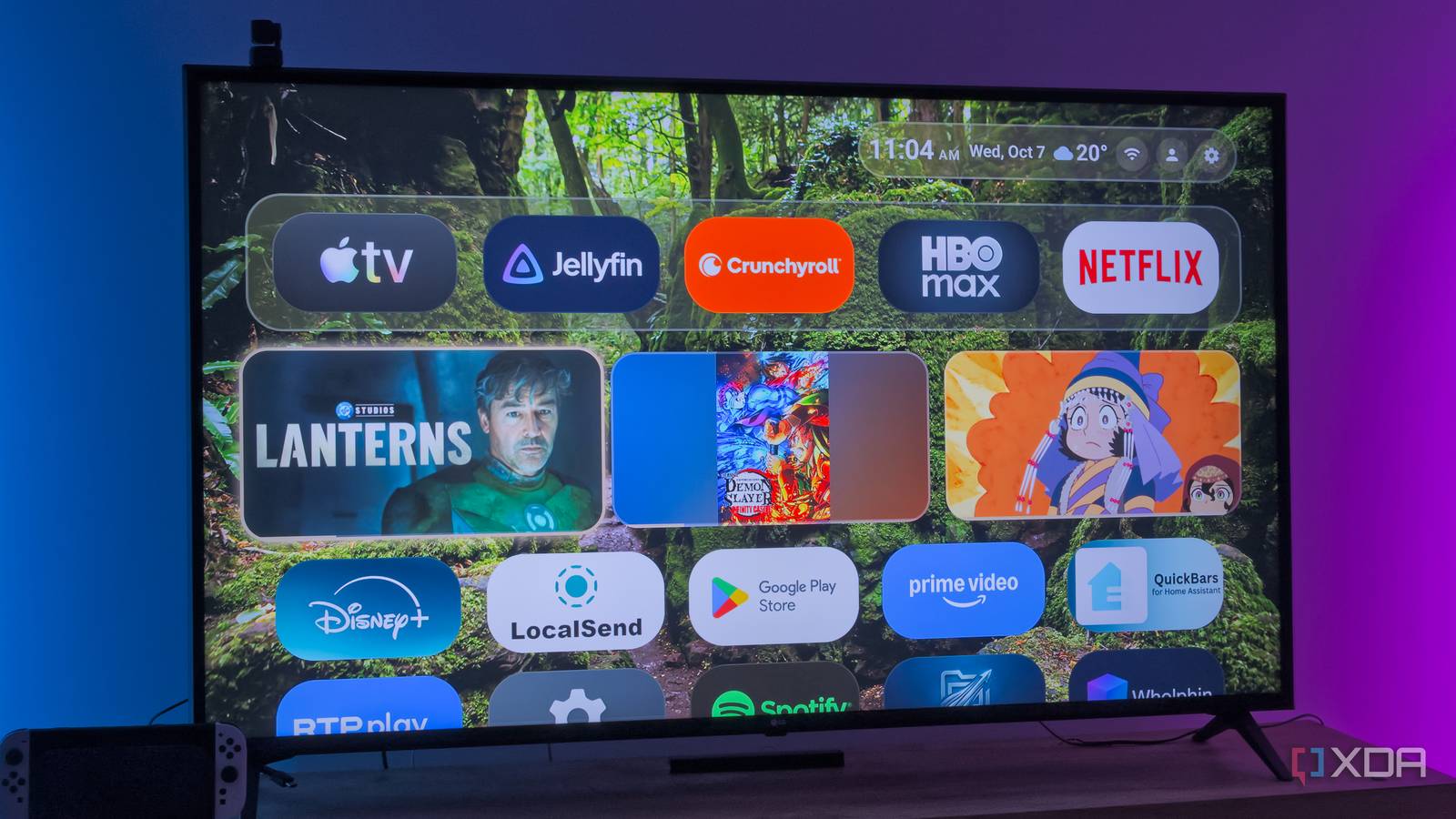
Published Oct 7, 2026, 11:30 AM EDT João has been covering the tech world for over 7 years, with a heavy focus on laptops and the Windows ecosystem. I also love all things tech and videogames, especially Nintendo, which he's always happy to talk about. Prior to joining XDA in 2021, he worked at Neowin: https://www.neowin.net/news/poster/jo%C3%A3o-carrasqueira/ My Chromecast with Google TV has been an excellent TV box ever since I bought it, and even in the age of smart TVs, it warrants its existence thanks to the robust software and capable hardware. But it's a good few years old now, and as Google has shoved more "features" into its launcher, that hardware is struggling to keep up. Buying a new TV box was tempting, but then I realized I could get a performance upgrade for free. All I had to do was skip Google's bloated launcher to get an experience that feels brand-new. And it was all thanks to Monet Launcher. Cutting the fluff Monet is lightweight and fast Right off the bat, one of the main problems with Google's launcher is that it tries to push ads, even if they're subtle. Content recommendations aren't always seen as ads, but that's kind of what they are, and there's an algorithm powering those suggestions, which may use a little extra power. Realistically, though, the launcher just isn't optimized for this older hardware anymore, and scrolling through the home screen can feel sluggish. Switching to Monet Launcher immediately makes things feel different, for the better. The simplified view still shows me everything I need: a lineup of content I was previously watching, a row of pinned apps, followed by a list of the remaining apps on my device. At the top, a clock and access to some quick settings. Conceptually, it's not all too different from the standard launcher, aside from the lack of "suggested" content. The main difference, however, is speed. Moving through my app list, scrolling my watch history, or even opening the launcher's settings — it all feels much smoother compared to Google's launcher, and it makes this Chromecast feel as good as new. It's beautiful, too And customizable Despite its lightweight nature, Monet is still a very customizable launcher, and it looks absolutely stunning to boot. You can choose from a wide range of wallpaper sources, including some built-in images, Reddit, Bing's picture of the day, or a background based on the weather in your current location, which I find very cool. It would be extra neat if said background also adapted to the time of day, but still. Whenever you change the wallpaper, the accent color of certain UI elements also changes to match, so the launcher always looks beautiful. That includes the row of pinned apps and the items at the top of the screen, as well as every surface in the launcher's menu. It creates a cohesive look, and it's even more impressive that it stays so performant. The customization options go beyond that, so you can change how items are presented in the main view, add or remove items from the status bar (such as weather information, a clock, or the current date), or even enable a widget area, which admittedly has many of the same widget options as what you can add to the taskbar. Still, there's a ton to love here. There are even more features Making your remote even more useful It's not just visual customization, either. Monet also has a ton of features hidden in its settings, many of which you can access by remapping buttons on your remote. One of my favorites is relatively simple: the app switcher. I can remap any button on the remote, such as the useless YouTube button, to open an overlay list of my recent apps. This way, I can switch between apps even faster without going through the launcher. Another one I like a lot is the Quick Menu, which lets me assign actions to the pointer buttons (as well as the OK button). I mapped the Netflix button on my remote to the Quick Menu, then I could assign quick actions like Monet's own settings, Android TV's settings, and an option to turn the screen off (while still playing sound). My wife uses Spotify somewhat often on the TV, so that last feature is pretty useful. Otherwise, Monet lets me set up a screensaver, automatically start a specific app after booting up the device, set timers, and more. It's a very versatile app. Some features require paying Hiding some cool stuff Everything I've discussed so far can be used with the free version of Monet, and it's already more than enough to make me love it. But there's actually a bit more to it that's locked behind the premium version of the app. I'm almost upset that I can't use some of these options for free, but considering how much I already get, it's hard to complain. The most notable of these features are different home-screen designs that make bigger changes to how things are laid out. A few themes are inspired by desktop operating systems, for example, while others simply remove certain elements. One example places the pinned app row at the bottom of the screen at all times, and there are a few others. Then there are some themes that simply combine specific backgrounds and accent colors. Aside from that, some widgets are also locked behind premium, including a weather forecast (the free version only shows the current weather) and a few others. Overall, what's locked behind the premium version isn't enough to make the free version any less special. They're just welcome extras. Monet made my Chromecast so much better It can't be understated how great Monet launcher has been for my Chromecast. Compared to the default launcher, it's just so much more responsive and visually appealing, but it builds on top of that with features that give me flexibility I could only dream of before. Anyone with an Android TV box should consider checking it out alongside alternatives like Kyu Launcher, which I also love. Monet Launcher
I ditched Google's bloated launcher for Monet, and my old Android TV box feels brand new
Full Article
Original Source
Read the full article at Xda-developers →KhanList aggregates and links to publicly available news content. We do not host full articles from third-party sources. Always verify important information with original sources.