
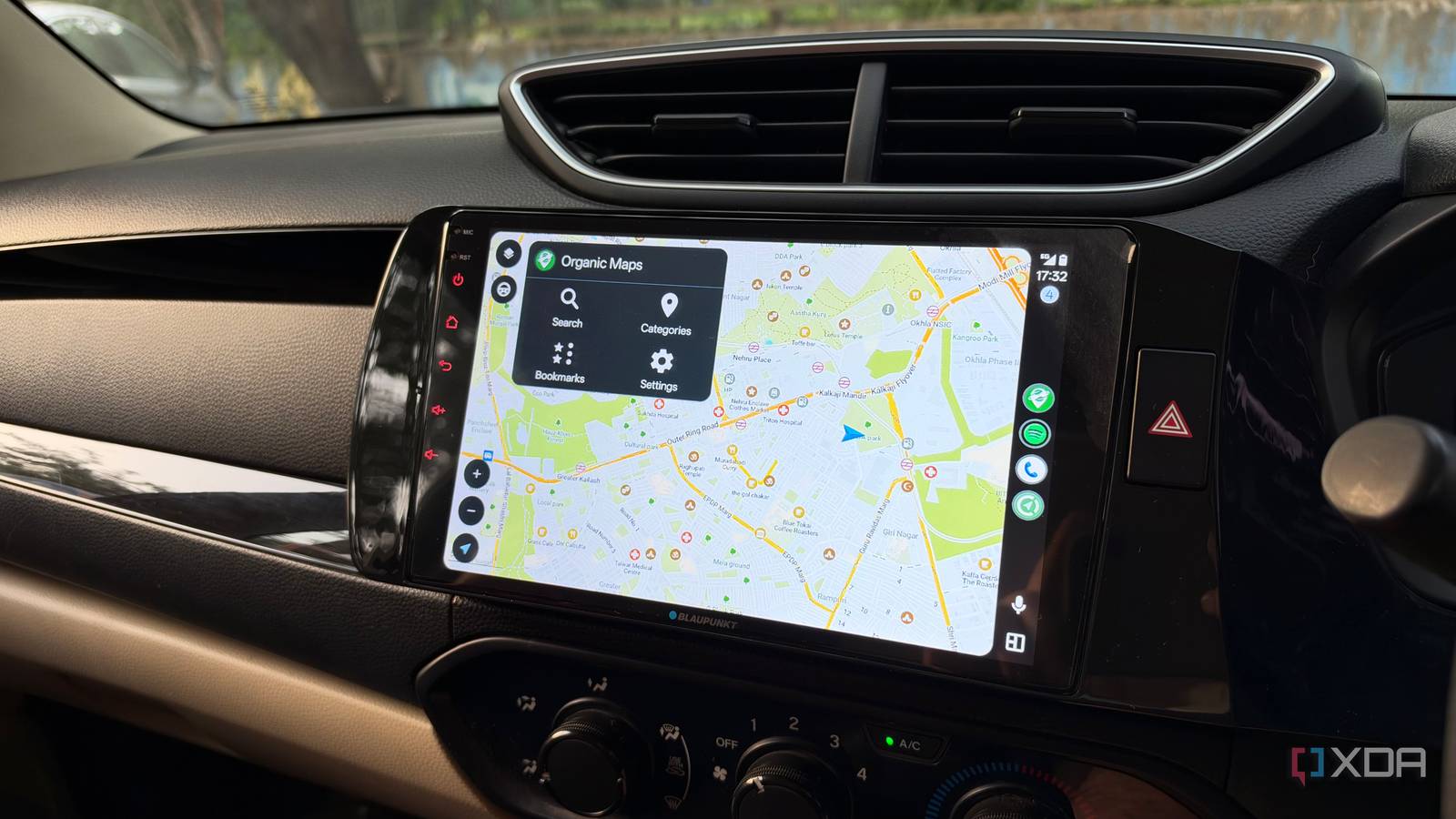
Published Nov 20, 2026, 3:00 PM EST Dhruv Bhutani has been writing about consumer technology since 2008, offering deep insights into the personal technology landscape through features and opinion pieces. He writes for XDA-Developers, where he focuses on topics like productivity, networking, self-hosting, and more. Over the years, his work has also appeared in leading publications such as Android Police, Android Authority, CNET, PCMag, and more. Outside of his professional work, Dhruv is an avid fan of horror media spanning films and literature, enjoys fitness activities, collects vinyl records, and plays the guitar. Google Maps is excellent, but as good as the app is at helping you find local businesses, opening hours, and more, it still has its limitations. Especially when you factor in just how dependent the app is on an internet connection. Look, mobile coverage isn't always consistent, especially when traveling outside major cities. Losing navigation connectivity just when I need it most can be a recipe for disaster if I'm out and about in the countryside. Now, I'm aware of Google Maps' built-in offline maps, but I wanted something a bit more robust. So, I started using Organic Maps instead. This free, open-source navigation app offers fully offline maps, turn-by-turn directions, and Android Auto integration. I've spent the past month using it almost every day for my drives and longer journeys. Honestly, I think I prefer it to Google Maps. All I had to do was download the maps once and never worry about having access to a working internet connection again. Organic Maps takes offline navigation much more seriously than Google Maps OpenStreetMap data powers a detailed, community-maintained experience Credit: There are a few things to know about Organic Maps before we get started. To begin with, the app is completely free and uses OpenStreetMap data. Maintained by a global community of contributors, the mapping database is plenty detailed. However, it's worth keeping in mind that it can't quite keep up with Google Maps in terms of business and home-address granularity. Additionally, since it's community-maintained, some regions will invariably be more up-to-date than others. But the bigger differences are in the interface and the app's approach to offline mapping. Google Maps also supports offline driving directions when your route stays within a downloaded area, but you have to download areas in advance, and you won't get traffic information or alternate routes while offline. Organic Maps takes a more intentional approach, with offline maps at the heart of the app. In fact, the app's search, maps, and routing functionality all work without requiring an active data connection. This means you don't need to think about whether your phone has a strong mobile connection before starting a journey or if you're driving through a poorly connected stretch of highway or an unfamiliar neighborhood. I've found this particularly useful when traveling beyond the usual parts of the city that I drive through. In fact, this feature came in handy when I drove over to a wildlife sanctuary with little to no connectivity. I had downloaded the local maps ahead of time, so it was no issue at all. I could look up my destination, plan a route, and start navigation without worrying about network availability. Organic Maps makes offline navigation as simple as pressing a button Download maps and navigate without an internet connection The actual navigation experience is simple and straightforward too. The basic navigation features will be instantly familiar to anyone who has used Google Maps. Tap the search button, enter your destination, and hit search. From there, it'll switch you over to turn-by-turn navigation and guide you to your destination. Downloading local maps is easy too. Tap the download maps option on your phone, select a country, then a city or state to download the local offline map. You can keep as many cities or countries offline as you want. That said, there is one aspect of Organic Maps worth keeping in mind. Offline navigation doesn't mean live navigation. Organic Maps does not offer live Google Maps-style traffic information. The other part of the experience that stood out for me was the rock-solid Android Auto integration. Once installed, the app appears in the Android Auto launcher and works with the car's infotainment system exactly like Google Maps. You can plan a route on your phone before getting into the car and start navigation straight from the car's dashboard when Android Auto connects, or configure everything from the car's screen. I found the interface to be surprisingly uncomplicated. Just a large map, your current position, the planned route, and route changes. You get voice guidance too, which makes getting around largely fuss-free. Another rather unique feature of Organic Maps is its ability to import and export bookmarks and tracks in standard formats like GPX, KML and KMZ. As someone who goes off-grid fairly often, this feature has quickly become one of my favorites. I can easily pull in a set of coordinates to reach with one single file, and the best part is that this even works with place markers like campsites that have no defined name. Finally, there's one more feature of Organic Maps that I've come to enjoy. That's privacy. At a time when Google Maps is flooding its interface with advertisements, recommendations, and more, Organic Maps keeps it simple across the board. Nothing leaves your phone; the maps and navigation work locally once the maps are cached, and you don't need to send every destination and request to an online mapping service. Organic Maps has become my go-to for offline navigation After a month of using Organic Maps, I doubt I'll be going back to Google Maps all that often. Yes, Google's navigation app has its uses. If I'm just within the city and need to check traffic status or business opening hours, it can come in handy. But for getting from one place to another, Organic Maps is more than good enough. More importantly, it gives you a dependable navigation system that works irrespective of mobile connectivity. I can download maps in advance, search for destinations, and use the same navigation experience through Android Auto. Organic Maps Organic Maps is a free, open-source offline navigation app for Android and iPhone, offering privacy-focused, ad-free maps, hiking trails, driving directions, bookmarks, and maps without tracking users or collecting data.
I ditched Google Maps for Organic Maps on Android Auto, and offline navigation never let me down
Full Article
Original Source
Read the full article at Xda-developers →KhanList aggregates and links to publicly available news content. We do not host full articles from third-party sources. Always verify important information with original sources.