
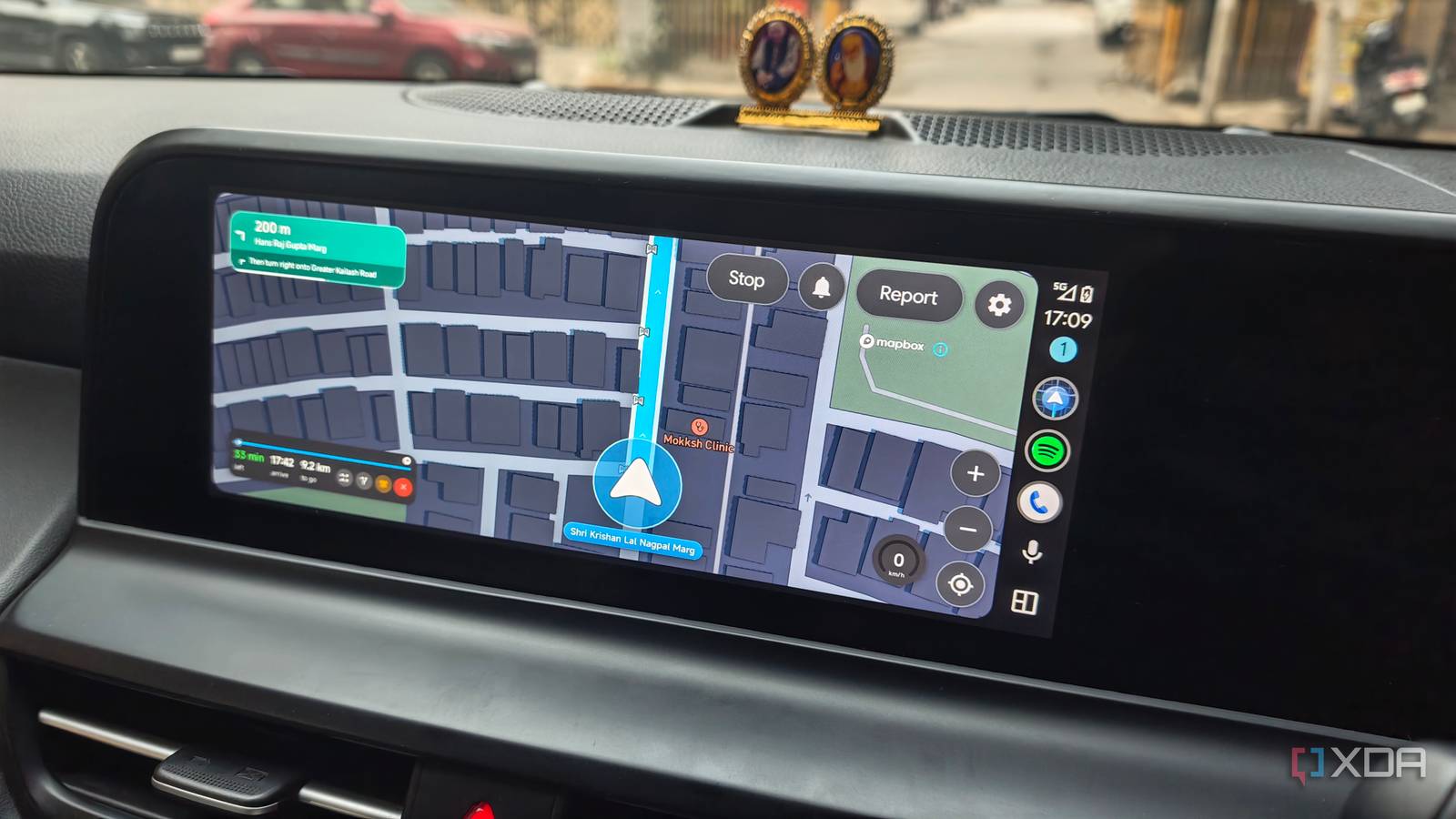
Published Nov 15, 2026, 8:30 AM EST Dhruv Bhutani has been writing about consumer technology since 2008, offering deep insights into the personal technology landscape through features and opinion pieces. He writes for XDA-Developers, where he focuses on topics like productivity, networking, self-hosting, and more. Over the years, his work has also appeared in leading publications such as Android Police, Android Authority, CNET, PCMag, and more. Outside of his professional work, Dhruv is an avid fan of horror media spanning films and literature, enjoys fitness activities, collects vinyl records, and plays the guitar. Like most people, I usually use Google Maps as my go-to navigation app. However, that doesn't mean I like everything about it. With the overindulgence of features like reviews, sponsored listings, and ads, the interface has become increasingly cluttered, and I often wish for a navigation app that focuses on the basics of getting me from point A to point B. I've tried a few alternatives like Organic Maps to solve this problem, but none of them stuck. Recently, I came across another app like that called Horizon Nav. This open-source app brings something unique to the mix, both on your phone and in Android Auto. The app is free, has no advertisements, doesn't require a user account, and focuses on the basics. While it might not be a flat-out alternative to Google Maps just yet, it makes a surprisingly convincing case for why navigation can be simple and just as useful. Useful navigation features with plenty of customization No advertisements, distractions or clutter Horizon Nav is an open-source, dual-purpose navigation app originally designed for Android-based head units, but the developer has added Android Auto support as well. However, that means the interface works just as well if you want to prop your phone up on a mount in your car. This matters to me because I swap between my cars often enough, and one has Android Auto while the other doesn't, and I don't want to keep switching navigation apps. The first thing you notice when you open the app is how little the interface throws at you. The map takes center stage with beautifully rendered graphics and navigation instructions that are easy to read. Immediately, you'll notice there are no advertisements or promotional placements. Just open the app, look up your destination, and get going. Even without looking at the app's other features, this is enough to convince me. Google Maps has become much more than a navigation tool, with business listings, reviews, saved places, recommendations, and more. These can be useful to some users, but I don't need them all the time, and neither do most people. Horizon Nav keeps the experience focused on the basics. You get all the essential interface tweaks you expect, including the option to swap between 2D and 3D modes. You can also toggle traffic, 3D buildings, streetlights, and cameras on or off. It goes without saying that you also get day and night modes, as well as the ability to switch to a satellite mode. The developer has gone above and beyond in including interface elements, some of which may come across as a bit superficial. For example, you can change how the interface looks when it's raining or show the sun's current position in the sky. Do these tweaks make a difference in actual use? Not so much, but they are definitely nice to have if you care about personalization. What's not superficial, though, is how the app closes in on junctions to make sure you take the right turn, something even Google Maps doesn't do quite that well. You'll also find standard features like voice search and more. All that to say, if you're looking for a quality navigation app, the basics and more are covered here. Setting up Horizon Nav requires a bit of grunt work OpenStreetMap and Mapbox are the backend providers Getting Horizon Nav up and running is fairly straightforward. To begin with, you'll need to install the APK from GitHub. No, the app isn't available on the Play Store. The next step is where things get interesting. The app doesn't use Google Maps as the backend; instead, it relies on OpenStreetMap and Mapbox for the data and rendering. You'll need to supply a free Mapbox API key. The app also works with TomTom if you prefer their routing service. Both services have generous free usage allowances, so you can comfortably use the mapping services without paying anything. As for Android Auto, since the app isn't distributed through the Play Store, you'll need to enable the unknown sources option in the developer settings for it to show up in the launcher. That usually does the trick. For my own use case, I depended more on the default on-device experience. Another caveat worth mentioning is that, for all it does right, Horizon doesn't have the wide network and community of Waze and Google Maps. So even though it supports traffic data, it won't be as accurate or up to date, and community reporting features like roadworks won't be as reliable. Horizon Nav is a reminder that navigation can and should be simple If you're perfectly satisfied with Google Maps as it stands today, you probably won't have a reason to install Horizon Nav. But if you're done with the bloated interface of Google Maps or the sheer number of business listings, it might be worth looking at alternatives, and Horizon Nav is one of the better ones I've come across recently. What makes the app interesting is how it takes an old-school approach to navigation while solving a real problem and giving you more ways to tweak the interface. Horizon Nav
I ditched Google Maps for a community-built Android Auto navigation app, and it's surprisingly good
Full Article
Original Source
Read the full article at Xda-developers →KhanList aggregates and links to publicly available news content. We do not host full articles from third-party sources. Always verify important information with original sources.