
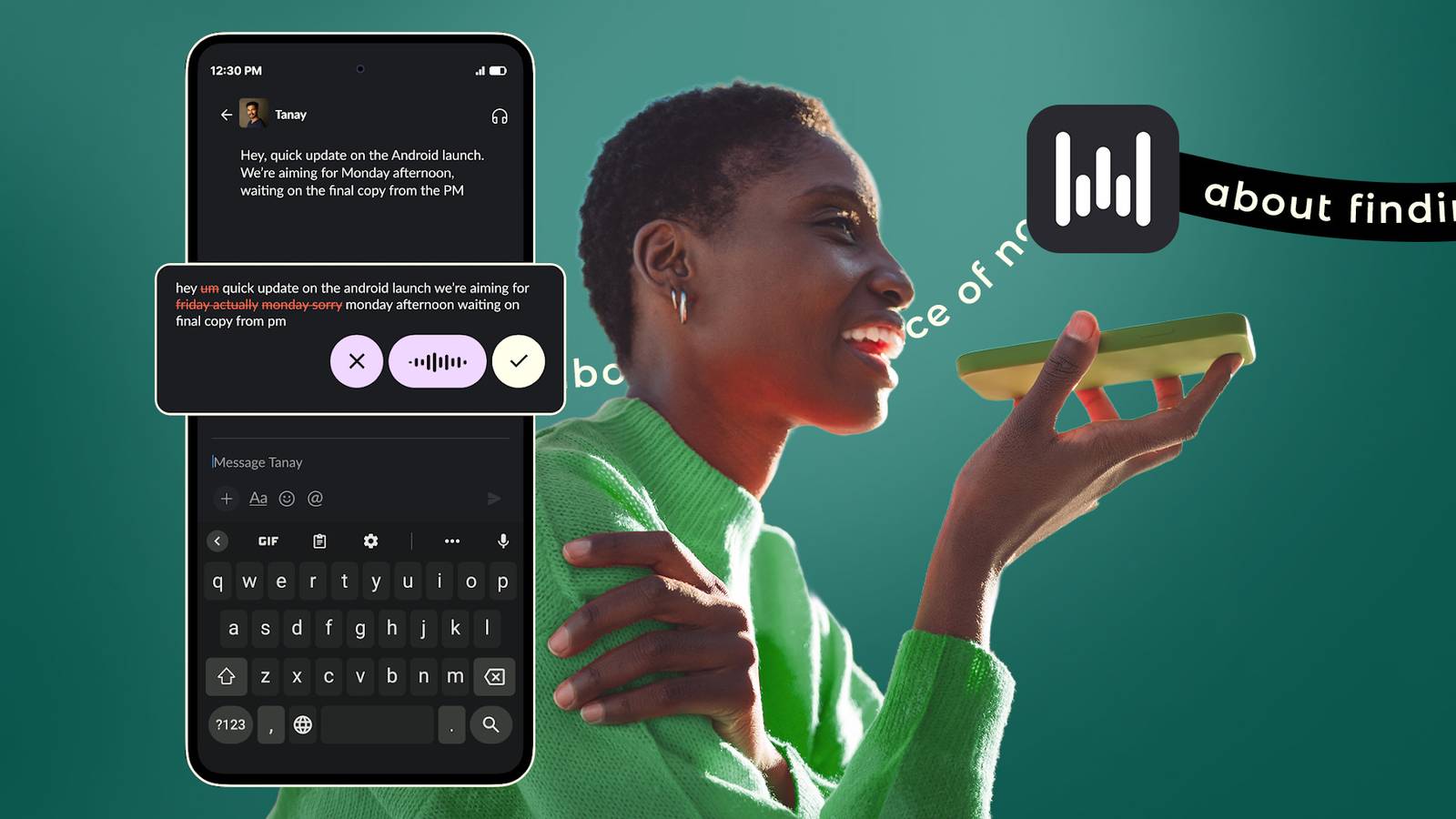
Published Aug 28, 2026, 6:00 AM EDT I cover Android with a focus on productivity, automation, and Google’s ecosystem, including Gemini and everyday apps. With a background in engineering and software development, I tend to go beyond surface-level tips and focus on how features fit into real workflows. Before joining AP, I wrote for tech publications such as Gizbot in 2023 and iJunkie (formerly known as iPhoneHacks) from 2021 to 2022. I've used Gboard's voice typing for years, and I always thought it was pretty good. However, after dictating a message, I'd fix a few mistakes and add some punctuation. Then I tried another voice-typing tool and realized I'd been doing too much cleanup. It understood when I changed my mind, eliminated unnecessary filler words, and transformed my natural speech into much clearer text. By comparison, Gboard's approach felt much more primitive. I didn't expect this new app to change the way I use voice typing, but now I find myself reaching for my keyboard a lot less. This app makes voice typing seamless Voice typing stopped feeling like dictation I started noticing the difference as soon as I tried Wispr Flow. Unlike Gboard's built-in voice typing, which turns what I say into text, Flow turns natural speech into cleaner, ready-to-use writing. It removes filler words, adds punctuation, formats lists, and understands when I correct myself while speaking. That last part was what really got me. I could start a sentence, change my mind, and keep talking instead of stopping to fix the transcription afterward. Say, "Let's meet at 4 — actually, make that 5," and Flow updates the sentence rather than leaving both versions in the text. The best part is that it doesn't replace my keyboard. On Android, Wispr Flow appears as a floating bubble whenever I'm in a text field, so I can still type normally and tap it when I want to dictate. Wispr Flow is available on Android 13 and newer, and it works across most apps with standard text fields. It's also available on Windows, Mac, and iPhone, meaning I can use the same service across my devices. It can turn something I say into an actual list I don't have to format my lists anymore With regular voice typing, if I want to make a list, I usually have to dictate the items and then go back and format them afterward. I can also dictate numbered lists by saying the numbers or sequence words as I speak. For instance, I can say "one, finish the report, two, send the presentation, three, call Sarah," and Wispr Flow turns it into a numbered list instead of leaving me with one long sentence. The same thing happens with longer thoughts. The app can recognize paragraphs and formatting as I speak, so I'm not left with one large block of text to organize afterward. If I want precision, I can say "comma" or "question mark." Otherwise, it attempts to infer punctuation from how I speak. Wispr Flow can learn the words Gboard keeps getting wrong I don't have to correct the same word twice One thing I like about Wispr Flow is that I don't have to keep correcting the same unusual word. If it repeatedly gets a name, company, product, or technical term wrong, I can add the correct version to its dictionary. For example, if Wispr Flow kept turning a name like "Mackenzie" into "McKenzie," I could teach it the spelling I use. When it's in the dictionary, Wispr Flow gives that word extra recognition priority during dictation. To add a word, open Wispr Flow, tap Dictionary at the bottom, tap the + button after the dictionary has loaded, enter the word, and tap Add. Then I can dictate a sentence containing that word to check that Wispr Flow recognizes it correctly. Wispr Flow needs an internet connection to transcribe your speech. The Android app greys out the bubble when you're offline. I can make Wispr Flow type entire blocks of text It can fill in the boring stuff Another feature I find useful is Snippets. Instead of dictating the same information over and over, I can create a short trigger phrase that the app expands into a much longer block of text. For example, saying my email signature can insert my entire saved signature, while a phrase like my address can insert a full address. To create one, open Wispr Flow, go to Snippets, tap the + icon, enter the phrase and the text you want it to insert, and save it. Wispr Flow can handle up to 4,000 characters in an expansion, including formatted text such as bullet points and numbered lists. Is Wispr Flow worth paying for? The free version might be enough for me The good news is that I don't have to pay anything to try it. Wispr Flow offers a free plan on Android and Windows. The paid Pro plan costs $15 per month, or $144 per year when billed annually, bringing it down to $12 a month. Pro offers unlimited dictation across platforms, longer meeting retention, and early access to new features. If all you want is to replace Gboard's voice typing with something that produces cleaner, more natural text, the free Android version gives you the main reason to switch. And if you start using Wispr Flow on your computer and phone all day, the $12 per month annual subscription starts to make more sense. I'm using voice typing a lot more now Since I started using Wispr Flow, I've come to prefer dictating instead of typing. Previously, I used voice typing with Gboard mainly when typing felt inconvenient. However, with Wispr Flow, I now instinctively choose to use my voice first, knowing I won't end up with a transcript that needs extra editing. I can speak naturally, correct myself, and let Wispr Flow handle much of the formatting.
I ditched Gboard voice typing for an app that turns my rambling into clean text
Full Article
Original Source
Read the full article at Androidpolice →KhanList aggregates and links to publicly available news content. We do not host full articles from third-party sources. Always verify important information with original sources.