
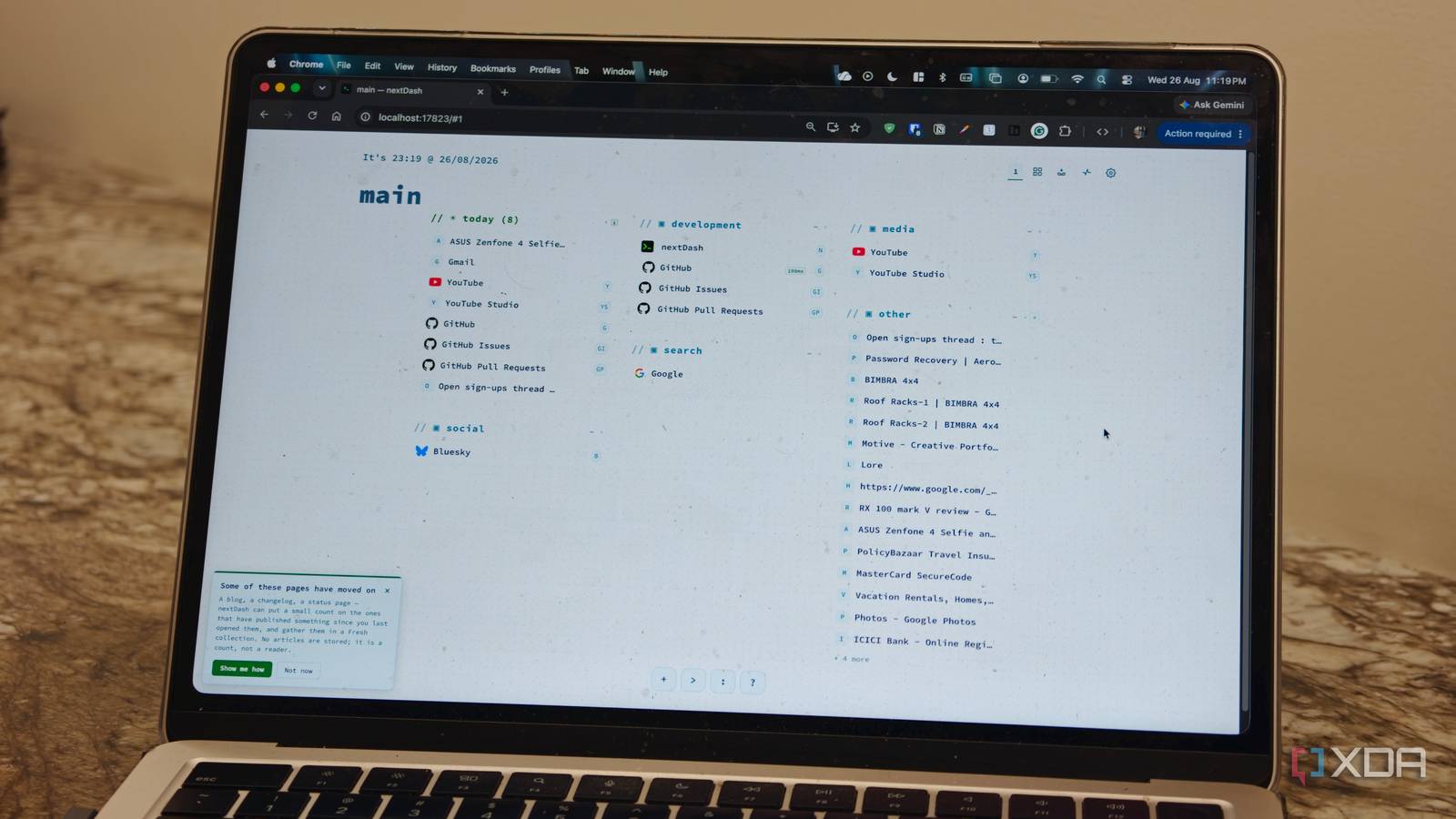
Published Sep 2, 2026, 5:30 PM EDT Dhruv Bhutani has been writing about consumer technology since 2008, offering deep insights into the personal technology landscape through features and opinion pieces. He writes for XDA-Developers, where he focuses on topics like productivity, networking, self-hosting, and more. Over the years, his work has also appeared in leading publications such as Android Police, Android Authority, CNET, PCMag, and more. Outside of his professional work, Dhruv is an avid fan of horror media spanning films and literature, enjoys fitness activities, collects vinyl records, and plays the guitar. I have a bad habit of bookmarking every interesting website I come across. Over time, my bookmarks folder has amassed hundreds of links, some of which are from websites that don't even exist anymore. However, as a digital hoarder, deleting these en masse is something I'm just not comfortable with. Look, keeping track of these links is far from easy. Chrome makes it a cinch to remember a URL, but it does nothing to help me find out if these links are still active. So, when I came across a tool that largely tries to solve that problem, I immediately jumped on it. NextDash is a self-hosted bookmark dashboard that checks the links I save and gives me tools to manage them. Not just that, the app is a full-fledged bookmark replacement dashboard giving you a much easier way to actually get to your bookmarks. The health dashboard keeps an eye on bookmarks Find broken or duplicate links automatically The biggest reason I installed nextDash is its health dashboard. The entire purpose of the dashboard is to check my bookmarks and identify any issues that crop up. But more than the health check, the way that nextDash handles the check is what makes it brilliant in my books. Anytime you run a health check in nextDash, it can identify everything from broken links to redirects, duplicate URLs and even issues in the bookmark itself. If you've got a selection of bookmarks that you access regularly, you can just add them to your dashboard for quick access, but the key reason I switch to nextDash is the built-in health check. Here's how I use it. One of the biggest reasons I save a lot of links is research. I might bookmark a product page, or a Github repository that's shaping up into a good project worth covering here on XDA. Sometimes, I'll bookmark documentation or just an article to catch up with later. Most of the time, these links work out just fine. However, every so often, as it happens, the page might have moved, or the link might have changed. In fact, there have also been instances when I saved the same bookmark twice. It's unnecessary redundancy. Chrome offers no way to handle any of that. NextDash does. Moreover, it does that while giving you plenty of control. Not every bookmark needs to be constantly checked. A bookmark link to my local server is going to stay the same. NextDash lets you set different checking modes for individual bookmarks. So, you can turn the built-in health check off for specific bookmarks. Since there's support for background checks, you don't even need the dashboard open for it to run on a schedule. I'll be honest, some of the data presented by nextDash isn't of too much use to me. I like the fact that I can get uptime history and response-time information, but, personally, it's not a feature I have a lot of use for. However, if you want to monitor a particular website to gauge reliability and uptime, nextDash's health checks could come in handy. Elsewhere, you can also use nextDash's health view as a clean-up tool. Since it gives you an overview of the links that are no longer working, it's easy enough to delete these from the health view than manually auditing hundreds of bookmarks. The inbox feature can turn nextDash into a read-it-later app Save now, organize later Like I mentioned earlier, nextDash is a full-fledged dashboard and if you want to use it like that, you certainly can. To that end, one of the most interesting and fairly unique features I've come across in the app is the Inbox. I'll often save a page because it looks useful. Web pages such as shopping links don't necessarily need a page, category or tag. NextDash gives me an inbox where I can put those links and deal with the organization aspect later. In case it even needs organization. I tend to use this place as my read-it-later list. The app is plenty extensible with integrations for Raycast, Alfred and even Apple Shortcuts. I'm just scratching the surface of what nextDash can do, but clearly there are a lot of possibilities here. Coming back to the inbox feature though, once I'm done with reading a link, I can choose to remove it or just move it to my main bookmarks collection if it is something I want to save and keep for the long term. You can organize it across pages, categories and tags. In fact, you can even build collections if you so choose. More than just a regular bookmark manager For a tool as jam-packed with features as nextDash, it's impossible to cover every single feature. Between using it as a read-it-later app, a tool to check bookmark health, or an inbox to catch up with things to read, it can serve a whole lot of use cases. It's part of what makes nextDash different from other book managers, of which plenty exist. It differentiates itself with a few features that add significant productivity to any workflow. nextdash Nextdash is a self-hosted bookmark dashboard with a built-in health check function.
I ditched Chrome bookmarks for a self-hosted dashboard that automatically deletes dead links
Full Article
Original Source
Read the full article at Xda-developers →KhanList aggregates and links to publicly available news content. We do not host full articles from third-party sources. Always verify important information with original sources.