
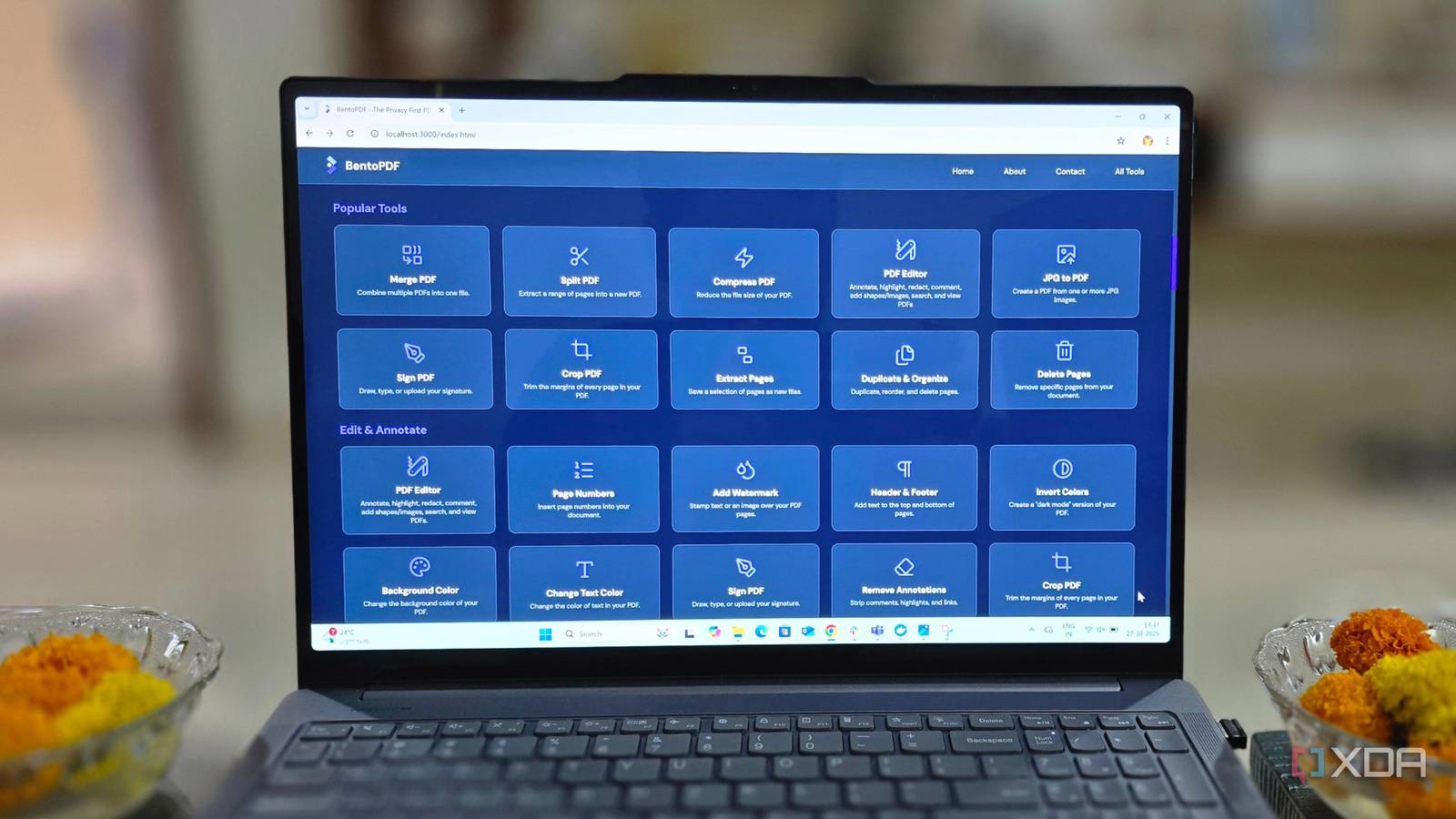
Published Aug 17, 2026, 7:30 AM EDT Abhishek is an author at XDA who covers computing. He has loved computers since he got the Lenovo G570 in 2012. Abhishek holds a master's degree in computer applications and began his writing career in 2018. He loves writing how-to articles, listicles, and informational posts on popular operating systems and web services. He closely follows the Windows Insider program and tests new Insider builds to discover upcoming experimental features and upgrades. His past work includes long-term collaborations with reputed publications like Tom's Hardware, and Windows Latest. When not writing anything, he is busy watching new episodes of One Piece or searching for something binge-worthy. Subscriptions are a growing menace, and every popular tool or service has one, but multiple plans. Each one of them tries to appear unique by adding a couple more features than the cheaper one, and adding sharing and collaboration options. But if I started paying for every trivial computer task like converting a PDF file or editing it, my wallet would bleed dry. Companies have also become pushy with marketing tactics and abrupt price changes, all of which make you wonder whether it's worth paying at all. Adobe Acrobat is one such tool that I could no longer bear with, and paying $15 a month for a tool I would occasionally use felt like cheating. Instead, I pivoted to a self-hosted, multifunctional, free PDF editor that acts as a perfect replacement. Wasting money is unwise Adobe Acrobat is a tough sell As I mentioned earlier, subscription totals can pile up to a staggering amount if you don’t pay attention. You’ve got streaming apps, YouTube, music apps, documentation tools, cloud storage, and all of that takes a huge amount of your paycheck. Some of these might be non-negotiable based on your requirements, but some can be easily discarded. Adobe Acrobat fits my description of a seldom-useful yet infuriatingly expensive tool I could easily replace with a self-hosted one. I already use NextCloud and Immich as a cloud storage and Google Photos alternative, so it was high time that I ditched this one, too. The entry-level Adobe Acrobat subscription costs $15, and it only offers basic PDF editing. Anything beyond that, like OCR scans or redacting content, or document comparisons, is only available in the Pro plan. Two more plans add AI integration and offer all the features in a single package. I highly doubt I’ll ever need these two plans, let alone the Pro version. BentoPDF can do most of the actions available in the Pro plan without charging a dime. That’s enough to convince anyone paying $180 annually just to edit PDFs. BentoPDF wasn’t my first choice I tried Stirling PDF before Stirling PDF is a big name in the self-hosted PDF editor segment, and I tried it for a few months. It's one of the most capable, powerful tools I’ve ever tried. It’s so vast that I didn’t get the chance to test each of the features to its limits. But a small policy change to add and enable pixel tracking by default made it a little less attractive for me. The tool later added the option to disable it and clearly mentioned it during setup, but there was one more problem. Stirling PDF has multiple features, but it's a very demanding tool to run on a small home server. It needs over 500MB of memory to run, and while that is nothing for a server with 4GB or more, it’s incredibly stressful for older laptops that already run tools like NextCloud and Immich in the background. Forget about running it on an extremely underpowered SBC like the Raspberry Pi Zero 2W. It has only 512MB of memory and cannot host the tool at all. BentoPDF is the opposite of Stirling PDF in terms of resource usage. It uses negligible memory and is even suitable for deployment on low-resource servers. It's one of those Docker containers that you can set up without thinking twice. But how does this magic work? The developer designed BentoPDF to leverage the client's computing power rather than the server's. So, all the actions that you perform in BentoPDF use your PC's computing power while the server only hosts the core files. BentoPDF is feature-rich Despite such a small footprint The idea of a low-resource usage tool gives off the impression that it might not be as feature-rich as you expect. There must be some huge trade-offs to squeeze it into such a package. But that's not the case with BentoPDF. I can do the same actions I do in Adobe Acrobat without feeling any restrictions. It can convert PDF files, compress them into a more manageable size, edit them to change details that I want, or redact items in them. BentoPDF can perform OCR on PDF documents and can batch-process whatever actions I want to do on a file. I tested it with large-sized PDF files, spanning hundreds of pages, and the tool didn't crash or become unresponsive. So it covers the features available in the basic Adobe Acrobat plan, plus features like OCR and advanced editing options found in higher-tier plans. Another interesting development that makes the tool useful for other document-tool users is support for Microsoft Office and OpenOffice file conversions. It wasn't there in the early builds and was recently added to avoid pushing users to sketchy web tools just to convert these document formats. So, if you download an Excel file and want to convert it to PDF, BentoPDF now offers that option. The last convincing factor for me was keeping my data off a third-party server. Some PDF documents are extremely private and sensitive, like my client's invoices, tax filings, and bank statements. These documents are best kept isolated and processed on my server, which gives me a greater sense of control. BentoPDF handles everything There are ample reasons to switch to a self-hosted PDF file editor, but the biggest selling point is whether the tool can match up to a paid one. BentoPDF doesn’t cut corners and offers a wide range of features, some of which are only available in paid versions of Adobe Acrobat. You can barely view and sign PDFs with the free version, and must pay at least $15 for basic edits and features. BentoPDF doesn’t require anything from you, runs quietly on your home server, and never needs to upload your sensitive data elsewhere. There are no email registrations, signups, or recurring payments, and honestly, Adobe can be more generous and offer some editing features in its free programs. BentoPDF BentoPDF provides fast, private, and free PDF tools. It processes files locally in your browser, ensuring privacy as your documents never reach their servers. It requires no account, offers all tools for free, and is built for speed.
I ditched Adobe Acrobat for a self-hosted PDF editor that uses less memory than my browser
Full Article
Original Source
Read the full article at Xda-developers →KhanList aggregates and links to publicly available news content. We do not host full articles from third-party sources. Always verify important information with original sources.