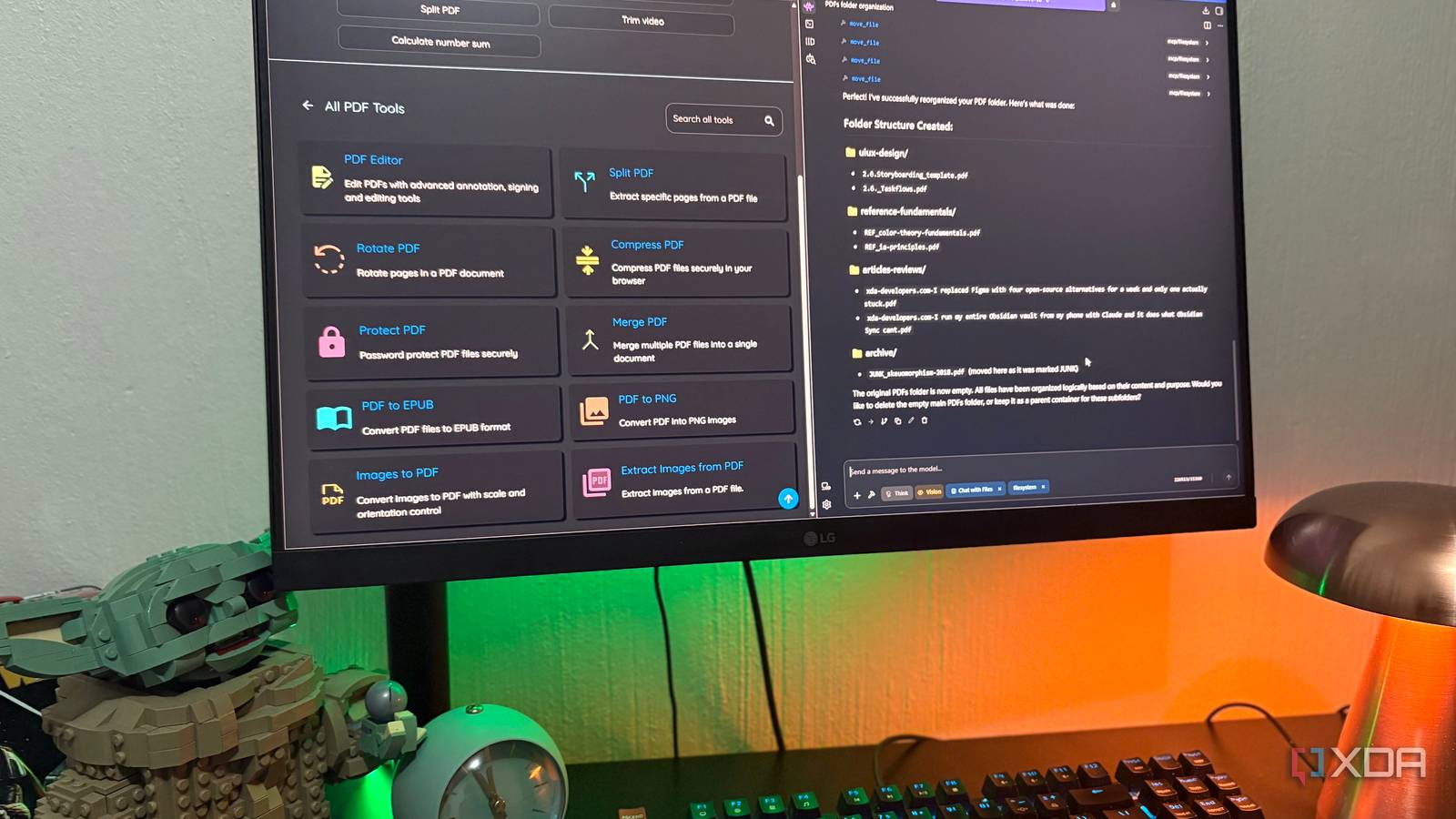
Published Jul 22, 2026, 8:30 AM EDT Nolen began their writing career in 2019, with three years dedicated to editing the Creative section at MakeUseOf. Their expertise lies at the crossroads of technology and creativity, covering areas like photography, video editing, and graphic design. Outside of work, you'll often find Nolen diving into a good book, writing their own stories, or playing video games. Adobe Acrobat has long felt unnecessary thanks to the myriad capable alternatives where you don't need a subscription for something as simple as editing a PDF. OmniTools is one of the best ones I've come across - it's browser-based, open-source, self-hostable in a single Docker command, and it handles the everyday PDF stuff without asking for an account or shipping your files to anyone's cloud. But editing was only ever half of what Acrobat did, and OmniTools alone doesn't cover the rest. Pairing it with a local LLM ended up being the move that made the self-hosted stack feel actually complete. Everything stays on my machine and the two tools cover the two very different jobs Acrobat used to bundle together. Want to stay in the loop with the latest in AI? The XDA AI Insider newsletter drops weekly with deep dives, tool recommendations, and hands-on coverage you won't find anywhere else on the site. Subscribe by modifying your newsletter preferences! The Acrobat alternative that does almost everything The self-hosted editor that can make paying for Adobe feel silly OmniTools is one of the more capable Acrobat alternatives out there, and I've been using it pretty much since I ditched Adobe overall. It's open-source, browser-based, and every file you feed it gets processed on the client side, so nothing ever touches a remote server. The cool thing is that it's not just a PDF editor; it handles everything from image editing, video editing, and audio editing to text and code. The PDF toolkit itself covers the everyday stuff most people open Acrobat for. You can split, merge, compress, rotate, protect, and convert to and from formats like PNG and EPUB, and there's a proper PDF editor in there for annotation and signing too. Not every advanced Acrobat feature is here, but the ones I actually reach for on a regular basis are, so my Acrobat sub genuinely hasn't been missed. The self-hosting side is one Docker command and a 28MB image, which is a smaller footprint than most of the screenshots I take. So it's a super quick and lightweight setup, especially for what it gives back. Acrobat still has the smarter tooling on paper - better OCR, AI Assistant, redaction with an audit trail, and more advanced features like those. They would be nice to have in OmniTools, but in reality I'm not reaching for them often enough to justify a monthly subscription. Overall, OmniTool has been the Acrobat alternative I've pointed people at for about a year now, however, it only handles the editing side of PDF workflows… OmniTools The half of Acrobat nobody mentions when they say to ditch it Editing isn't the only thing Acrobat handles Acrobat's file management lives in the cloud, not on your machine. You reach it through Documents > Your documents on Acrobat and everything you're managing has to be sitting in Adobe cloud storage for the tools to touch it. If your PDFs live in a folder on your disk, Acrobat isn't organizing them for you. The dashboard itself is fine and gets the job done. Each file gets a More menu with Rename, Move, Delete, and Download, and there's a Create a folder button for building out structure. It also connects to Dropbox, OneDrive, SharePoint, and Google Drive if you'd rather keep your files there. None of it reaches down to your actual local files though. And this is the part that self-hosted alternatives never solve for either. You get the editor, but you're still on your own for finding, sorting, and making sense of a folder of PDFs you already have. Which I'll be honest, I glossed over every time I've covered OmniTools before. Where the local LLM comes in Chat-with-files gets you halfway, an MCP gets you the rest Chat-with-files is the obvious starting point here. Most local runners have it now, and it does give you the intelligence side that OmniTools has no reason to include. I can drop a stack of PDFs into LM Studio and ask it to summarize, pull key points, build me a study guide out of research papers, or work through confidential information. All of this is super useful. But it's also not really a differentiator anymore since every runner ships something like it, and you're still opening files one at a time. The bigger unlock for me was adding the filesystem MCP. It's a Node.js server published on npm as @modelcontextprotocol/server-filesystem, maintained by the MCP team themselves, and it gives your model actual filesystem access - read, write, create and delete directories, move and rename, search, pull metadata, etc. Adding it in LM Studio is just an mcp.json edit. And then you point it at whichever folder you want it to have access to, and that's the only folder it can touch. { "mcpServers": { "filesystem": { "command": "npx", "args": [ "-y", "@modelcontextprotocol/server-filesystem", "ENTER YOUR DIRECTORY" ] } }} The catch is you need a model that's decent at tool calling. A lot of small local ones fall over here. I've been running Qwen 3.5 9B on 8GB of VRAM and it handles multi-step tool sequences without getting weird, so that's my recommendation if you're on similar hardware. What that combination actually gets you is stuff Acrobat's dashboard was doing. "Look at my PDFs folder and tell me what's in there." "Group these into categories and suggest folder names." "Create those folders and move the files into them." I've been running these sequences on a folder dedicated to PDFs, and it organized everything in minutes. So now the LLM handles the librarian side, OmniTools handles the editor side, and neither of them even needs to know the other exists. Acrobat was two products in a trenchcoat Acrobat was always doing two jobs. Editing was one, obviously, but organizing a pile of files somewhere was the other. OmniTools and the local LLM don't need to talk to each other, they just need to point at the same folder, and that's turned out to be good enough to serve as a full replacement.
I ditched Adobe Acrobat for a self-hosted alternative, and pairing it with a local LLM changed everything
Full Article
Original Source
Read the full article at Xda-developers →KhanList aggregates and links to publicly available news content. We do not host full articles from third-party sources. Always verify important information with original sources.