
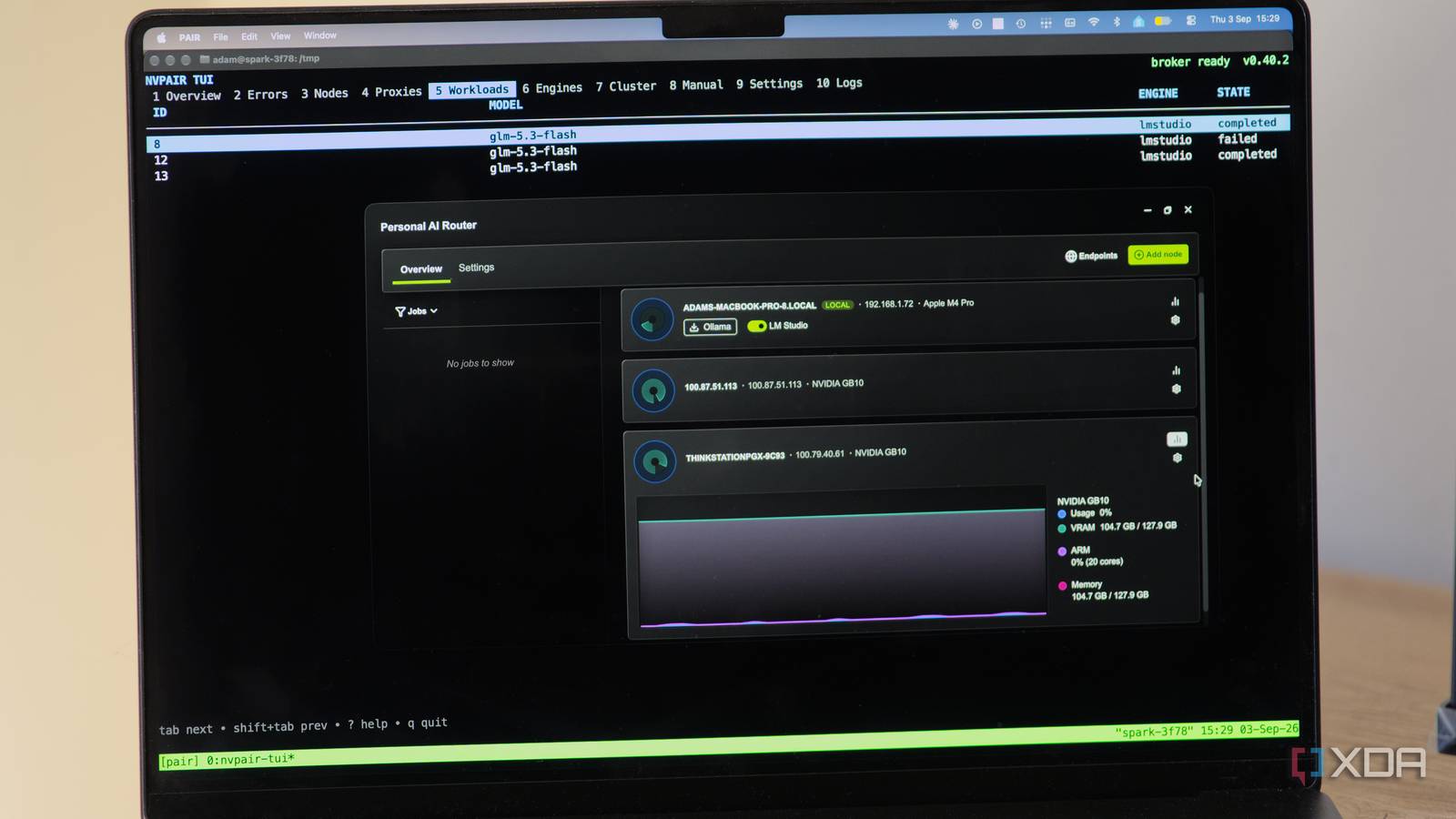
Published Sep 3, 2026, 12:00 PM EDT I’m Adam Conway, an Irish technology fanatic with a BSc in Computer Science and I'm XDA’s Lead Technical Editor. My Bachelor’s thesis was conducted on the viability of benchmarking the non-functional elements of Android apps and smartphones such as performance, and I’ve been working in the tech industry in some way or another since 2017. In my spare time, you’ll probably find me playing Counter-Strike or VALORANT, and you can reach out to me at adam@xda-developers.com, on Twitter as @AdamConwayIE, on Instagram as AdamConwayIE, or u/AdamConwayIE on Reddit. Sign in to your XDA account As part of Nvidia's IFA announcements, the company has unveiled its free, open-source tool called Personal AI Router, or PAIR, that takes every machine on your local network and puts them behind a single address your AI apps already know how to talk to. It's licensed Apache 2.0, it runs on Windows, Linux, and macOS, and it works with Ollama and LM Studio. Nvidia's pitch for it is that more than half of US households have two or more PCs and most of that hardware sits idle most of the day, which, in some households, is definitely hard to argue with. I know in my home, there's a lot of inactive silicon doing nothing in particular. I got the opportunity to test it out, but the catch is that I'm travelling at the moment, and every machine I'd want to test this on is at home in a different country. PAIR is LAN-first by design, so the sensible thing would have been to wait. Instead, I did what I suspect a fair few home lab people would do, which is try and throw Tailscale at it to see how far it gets me. As it turns out, the answer is that it was definitely further than it should. Nvidia's PAIR is a beta, but it only has room to grow. The macOS app in particular has some bugs, the desktop client lacks features the terminal client has, and at one point, PAIR deleted my own config file I'd written by hand. But the routing itself works, and once I figured out how to get it working in a way it was never designed for, I got it steering requests between two different models on two different machines through one endpoint. Oh, and it was all through an engine that PAIR doesn't support out of the box at all. Nvidia built this for subagent bottlenecks One task, dozens of model calls, one poor GPU Nvidia's PAIR is pitched as a solution to the bottleneck of an agent that likes to delegate. In this configuration, one lead agent takes a research or coding job, splits it into smaller pieces, and hands those pieces to specialist subagents that work in parallel. Your request goes in as one task, but the inference layer treats it as dozens of independent model calls. And if they all target the same local engine, things can slow down a lot while your other machines are doing zilch elsewhere. PAIR aims to fill that gap, and Nvidia describes it as a virtual inference router rather than a new inference engine. Ollama or LM Studio still runs the model, and PAIR just decides which machine gets each request. The agent keeps talking to the endpoint it already knows, so no harness needs rewriting. The assumption underpinning the entire idea is that a house is not a small data center. The expectation is that a gaming PC can suddenly become busy while playing a game, or a laptop goes to sleep or is taken off of the network, and one machine will have the model you asked for while another doesn't. To deal with this, PAIR polls all of the connected nodes to understand which ones are capable of accepting work, and machines can join or leave the pool as they please, rather than being expected to sit powered on all day. For each request, PAIR evaluates whether a paired node is online and ready, whether a supported engine is enabled there, whether that exact model is present, how much work the node and engine already have, and current GPU utilisation. This means that a machine being used for gaming gets passed over, even if it's otherwise the right machine for the job. It also means the primary PC can stay free for whatever you're actually doing while inference happens elsewhere. PAIR is a router, not a way to pool your GPUs One request, one machine, every time PAIR doesn't pool VRAM, and it doesn't turn two GPUs into one bigger GPU, nor does it split a single request across machines; every request runs whole on exactly one node. Nvidia went to great lengths to hammer this home across multiple places, so it seems like something the company anticipated as being a common assumption. Instead, what it actually does is take over the port your inference engine would normally use. When you install PAIR, its proxy claims 11434 for Ollama or 1234 for LM Studio, and the real engine, launched after PAIR, moves up to 11435 or 1235 after it. Every tool you've already pointed at your local model provider keeps working exactly as it did before, except now the request might be served by a different computer entirely. The harness never finds out or has to deal with it, and you can track what's going where in the Jobs view of PAIR. Because of that, adding machines increases how many requests you can run at once rather than making any single request faster. It also means models are per-machine, and nothing about them is shared, so if you want two nodes to be interchangeable for a given model you have to download that model on both of them. The set of machines you've paired is called a cluster, and there isn't really a server, controller, or a primary node. Each machine runs the same set of background services and each one can both serve requests and route them. Discovery happens over mDNS, pairing is a six-digit PIN, and after that, all node-to-node traffic runs over mutual TLS pinned to the machines you've paired. It's a thoughtful design that's, shockingly, built on a correct implementation of EAP-NOOB (Nimble Out-of-Band Authentication for the Extensible Authentication Protocol), or RFC 9140, which isn't what I expected to find when I looked through the source code. Nvidia is also honest about the PIN being a low-entropy bootstrap and not a durable credential, but for something designed to run on your LAN, it's more than good enough. Hardware support is a lot broader than just "Nvidia," too, which is really nice to see. Anything the likes of Ollama or LM Studio can run on will work, meaning that AMD and Intel cards are fine in practice, even though the official list covers RTX 20-series and newer, RTX PRO from Turing on, DGX Spark, and Apple Silicon from the M4. Nvidia says it's tested up to 18 GPUs on one cluster, which is... a pretty big house. Surprisingly, memory reporting on DGX Spark Grace Blackwell machines is correct, as well. VRAM and system memory report identical figures on those boxes, because on that hardware, they're the same pool. Windows integrated graphics and Linux without an Nvidia driver are two that will report incorrectly. Pairing worked from another country, but only halfway Tailscale gets you further than it should Pairing itself has nothing to do with mDNS, so I had no issue pointing my Mac at my DGX Spark's address, being shown a pin, and then entering it on the Spark. Once that's done, both machines exchange certificates over a direct HTTP conection on port 14321. Through this, my MacBook in Portugal was able to pair with my Spark back in Ireland, all over Tailscale, and the cluster roster on both machines showed each other correctly. Unfortunately, that's where the easy setup ended. PAIR polls each node for telemetry and model inventory using addresses it learns from mDNS, and mDNS is link-local, so it doesn't cross a tailnet. The result was a paired, authenticated, and fully reachable machine that PAIR marked as "Offline" with no way to fix it from the UI. Everything I checked looked healthy, but the one thing I needed didn't work. I could set up ZeroTier which does support mDNS, but I don't want to migrate everything over just for the purposes of testing this. There had to be a better way. It turns out there was a better way: manual nodes. It turns out that PAIR has a background service for manual nodes because plenty of networks filter multicast, but... there's a catch. On the terminal client, it's really easy to get it up and running, but on macOS, the desktop app doesn't have it at all. Its manual-node store exports functions to list, remove, and resolve entries, and the one that writes the file is only ever called from the remove path, so the list can shrink but never grow. The "IP address" box in the Add node dialog isn't a manual-node control either, it sends a pairing invite, which is no use when the two machines are already paired. I ended up hand-writing a manual-nodes.json into the app's config directory so that it could connect to a machine it was already paired with. The other difficulty I ran into is kind of funny: on first run, PAIR asks for permission to install a background helper that sets up the firewall, and the control tool pins that helper's code-signing identity, which is standard. The problem, though, is that the helper is named com.nvidia.nvpair.helper, whereas codesign derives a default identifier from the filename minus anything resembling a file extension, so it got signed as com.nvidia.nvpair with the .helper removed. The pin can't match, so the firewall step fails, and because setup is only marked complete when that succeeds, PAIR retries it on every single launch. Headless usage was the hardest part to figure out from the documentation, and I ended up going through source code for a lot of it. It tells you to start the terminal interface with nvpair-tui, but the Debian package only puts nvpair on your PATH, meaning that "nvpair-tui" doesn't exist, and you invoke it with "nvpair" instead, and it also gives a Linux directory for log files that the terminal client never creates. Funnily enough, the "known issues" also state that macOS isn't supported, but it clearly does... as that's where I'm using it. The engine list is a JSON file Ollama and LM Studio are the defaults Out of the box, PAIR supports Ollama and LM Studio, which was fairly strange to me given that LM Studio is mostly just a llama.cpp wrapper, and both are just OpenAI-compatible endpoints at the end of the day. As it turns out, Ollama and LM Studio aren't the limit of what PAIR can do, and I found that out through the source code. The supported engines aren't actually compiled into the software in the way you may expect. Instead, each one is a JSON manifest describing how to detect it, how to start and stop it, which HTTP endpoint to probe for health, and how to read a model list from its API. PAIR loads two bundled manifests and then overlays a per-user directory on top, and a file in that directory for an engine with no bundled equivalent is loaded standalone. Nvidia's own test suite includes a vllm.json, so this is expected rather than something I stumbled upon. I've got vLLM running in a Docker container on my dual Spark cluster serving GLM-5.3-Flash, and I didn't want PAIR to be able to interact with the actual deployment itself. It turns out you can express that in the manifest, by giving it a command mode with an empty start command, a no-op stop, and health probes pointed at the container's /v1/models. PAIR still treats it as an engine, reports it as healthy, reads its inventory, and routes to it, while having no control over the process whatsoever. The one thing I wasn't sure would work was the model list. LM Studio's native API returns a models array keyed on key, while vLLM returns an OpenAI-like response with a data array keyed on id. The extractor is declarative, though, so with two fields in the manifest, it can read the vLLM response correctly, too. Getting there took me a while, as a user manifest is deep-merged onto the bundled one rather than replacing it, and you can't delete a key that way. Stubbing out LM Studio's model-download action left behind a field which requires the command to reference the model name, so the whole file was rejected on load until I put a {model} back into a command that, otherwise, does nothing. I pieced it together by reading through the validator's source code. PAIR uses that same directory to persist its own port overrides, keyed by engine name, so its file and mine had the same path. It doesn't check whether it wrote a file before accessing it, and when the port it's saving matches the bundled default, it deletes it outright rather than writing anything. My manifest file disappeared before I worked that out, so I set chattr +i on the file to stop it being removed. It's more or less a hack around a bug rather than a configuration, but it works. PAIR also then refused to bind port 1234 for its proxy on that machine, complaining that the backend couldn't be moved, despite nothing at all listening on 1234 and the engine being on 8000 where it had always been. As for why I overwrote LM Studio rather than adding an extra engine, I actually tried the additional engine first, as the code is clearly geared towards eventually allowing users to do that. The manifest layer is declarative and accepts anything, and it will list vLLM as an engine with a health check and models listed, but routing won't work. Both Ollama and LM Studio are hardcoded throughout the routing layers of the application, with an advertised service key matching "ol" or "lm" as well. It was just easier to overwrite lmstudio.json instead. Two models, two machines, one endpoint Works exactly as advertised The three Grace Blackwell machines (though two of them are in a cluster) are at home on the same network as each other, which means they discover each other over mDNS the way PAIR expects, with none of the Tailscale awkwardness. The PGX serves Qwen-3.8-Flash-Next, and the two DGX Sparks serve GLM-5.3-Flash. Both machines serve through vLLM containers added with the same hand-written manifest. If you query the proxy on either machine, you get the merged cluster inventory back, with both models listed, and the API shows that they come from different places. I can send a chat completion API request naming glm-5.3-flash from the ThinkStation and it appears in the Workloads tab on the Spark and completes there. With just one address, I can query two models, two machines, and configure nothing in the client beyond the model name. This is the kind of configuration that suits a house full of unequal machines, as you can have any mix of models that you want. Requests for each model get steered to the node that holds it, meaning that a big model on your best machine and something small and quick on the old one is a perfectly sensible way to run this. What's interesting is that the DGX Spark answering those requests is a set of two machines in a cluster, with tensor parallelism, so that they can pool their memory together. It presents to PAIR as a single node, because ordinarily, you only contact the one API endpoint on the head node anyway. What this means, though, is that the model sharding that PAIR deliberately doesn't do is running underneath PAIR's request-level routing. This means that the performance tab for a clustered Spark is inaccurate; it's showing usage of one machine rather than the two together, but also, it's not meant to be used like this in the first place. I love that it just works regardless. What I'd be doing differently if I were at home I'd love to test the scheduler properly The scheduler ranks nodes on queued work plus a coarse GPU pressure signal, banded at 40%, 70%, and 85% utilisation, meaning that it sees pressure, not capacity. The GPU model, free VRAM, and measured latency aren't inputs at all in that calculation. Every workload counts as one, so "fewest jobs" isn’t the same as "least busy". It doesn't know whether a model is already warm in memory, which means a request can go to a machine that has to cold-load while one holding it resident sits a place lower in the order. The thing is, none of what I've done here is considered a supported configuration, and I want to be clear that a normal person could not reach the state my cluster is in. I had to hand-write two engine manifests, make the file immutable to stop PAIR replacing them, and I had to hand-write the JSON file on my laptop so it can see a machine it was already paired with. On my home network, if I set up Ollama, none of that would have happened. PAIR is surprisingly more flexible than it's being advertised as. The routing, the mTLS, the discovery, and the scheduling are all there for anything that speaks an OpenAI-compatible endpoint, and adding one is a text file, aside from the hardcoded routers. It's a much more interesting approach than just a two-engine router for Ollama and LM Studio, and I'm surprised Nvidia hasn't led with that. I'm excited for what comes next, and I'll be sure to revisit it once I'm actually on the same network.
I connected two PCs to one AI endpoint with Nvidia's new router, and got it serving an engine it doesn't support
Full Article
Original Source
Read the full article at Xda-developers →KhanList aggregates and links to publicly available news content. We do not host full articles from third-party sources. Always verify important information with original sources.