
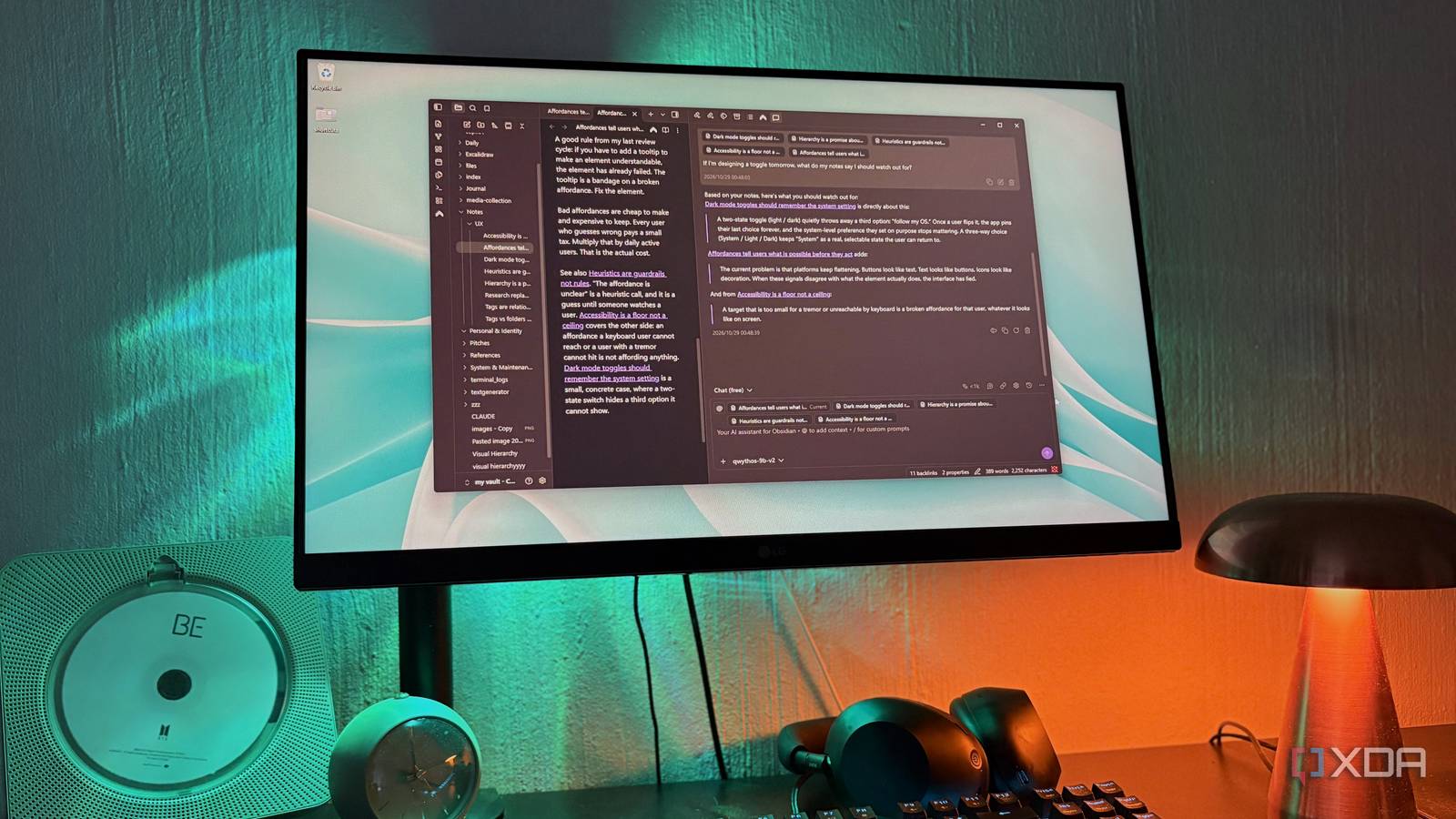
Published Oct 29, 2026, 4:00 PM EDT Nolen began their writing career in 2019, with three years dedicated to editing the Creative section at MakeUseOf. Their expertise lies at the crossroads of technology and creativity, covering areas like photography, video editing, and graphic design. Outside of work, you'll often find Nolen diving into a good book, writing their own stories, or playing video games. Most note-taking setups are great at holding onto things, which is kind of the whole point, but they're perhaps not the best at handing them back to you. What I mean by this is that you write your note, maybe tag it or link it to a couple of other notes, and then it just gathers dust until you remember the right word to search for. Obsidian's Graph view is good at making your note stack look alive, but let's be real, we all have a couple of notes somewhere in that soup of nodes without a clue of how they found themselves connected to everything else. Plenty of plugins have tried fixing that with AI, but many of them end up sending your notes off to a cloud model. This feels like a bit of an odd trade for a notes app that's meant to keep the workflow local. But there's one plugin that actually lets you connect to local AI, called Copilot. Getting Copilot talking to a local model Just a few minutes and you're all set up Copilot for Obsidian is a free, open-source plugin made by Logan Yang, and despite the name it has nothing to do with Microsoft's Copilot (it took me embarrassingly long to learn this). It has almost 3 million downloads and is one of the biggest AI plugins in Obsidian's community lists. The base plugin gives you a chat panel that can read your notes, and since version 4 it can also run agents like Claude Code and Codex inside your vault. There's a paid tier with its own models on top, but anything you connect yourself works on the free version. Copilot doesn't run models itself, you have to bring your own key, and it also connects to a local server. Most of my local models run inside LM Studio so that's what I use as my server - just ensure you have CORS enabled when you set this up. Once your local model is loaded in your server, head to the Copilot settings, go to BOYK > Add Provider, and select your local server from the Self Host list. Then, you should be able to see all the models you have loaded and select your picks. The chat itself confused me a little at first. On desktop, Copilot now opens Agent Chat by default, which is built around agents like Claude Code and Codex, and my local model wasn't anywhere in it. The classic chat is still there but under a new name, Quick Chat, and you have to bring it up from the command palette - just type "Quick Chat" and it'll open in the side panel. Asking my notes instead of searching them My notes talk back now, which is like having a second brain A new Quick Chat attaches whatever note you have open by default, and you can pull in others by typing [[ or picking them from the @ menu. There's a small token counter in the chat bar showing how much context you've attached, which is handy on a local model since they tend to run out of context quickly if you've set yours lower due to limited hardware. I keep my context window around 30k and always offload a couple of layers because I'm working with an 8GB card. And here, I went with my favorite new model, Qwythos 9B v2 at Q4_K_M, which is built on top of Qwen with Claude's reasoning. I recommend something from the Qwen family because you need a model that's strong at tool calling, and if you have a smaller card like me, something in the 4-12B range will do. Asking about things you can't search for is the obvious first use. Obsidian's search needs the word you actually used, and half the time I remember the idea but not the phrasing. For example, I asked which of my UX notes talked about buttons that look like plain text, and it found the right one and quoted my exact line with a link to the note underneath. Clicking the link opens the note which is pretty neat. You can add a whole folder as context too, which turns something like a journal into something you can ask for patterns, like what keeps coming up in a busy month you barely remember. Obsidian's Web Viewer, a core plugin that opens web pages in a tab, works with it as well. On desktop, Quick Chat can attach whatever page you have open in there, and the + button lets you add other open web tabs, so you can read an article inside Obsidian and ask where it lines up or clashes with notes you've already written without copying anything over. Pretty much anything you have in a tab can get the Copilot layer on top with your local AI, turning the entire vault into content that can talk back to you. This is the easiest way to turn a vault into a second brain because you can approach your files and content from any angle, and it's interactive. Bringing the AI into a specific page Everything I've mentioned above happens in a sidebar panel. But probably the most underrated feature of Copilot is that you can use it directly in your notes. Highlight any text in a note, right-click, and select Copilot, and it will pop up as a chatbox inside the note. Depending on how you configured Copilot, the highlighted text usually acts as the immediate target for your command or prompt, though it can also bring in other context. Personally, I just check the Note box so my model has the whole note in its context The cool thing is that once it replies you can actually insert its reply directly into the note or have it replace the highlighted text. This means you don't have to copy-paste from the sidebar, and it's also great for things like grammar improvement on messy notes. Saved commands can show up in the editor's right-click menu as well, if you tick Show in context menu when making one, so a prompt you use often is one click away on any highlighted text. Anything you insert becomes part of the note, which means Quick Chat has it the next time you ask about that topic. My old notes are now answering back My vault has mostly been a filing cabinet with a nice graph view, and I hadn't really noticed how one-directional that was until it started quoting my own notes back at me. It's almost like interviewing your own notes, and I also love how user-friendly the whole setup is as well as the Copilot UI itself, making it easy for pretty much anyone to keep an interactive note stack entirely locally. Obsidian OS Windows, macOS, Linux, iOS, iPadOS, Android Individual pricing Free normally; $4/month for Obsidian Sync
I connected Obsidian to a local LLM, and it's the closest I've come to a second brain that actually answers back
Full Article
Original Source
Read the full article at Xda-developers →KhanList aggregates and links to publicly available news content. We do not host full articles from third-party sources. Always verify important information with original sources.