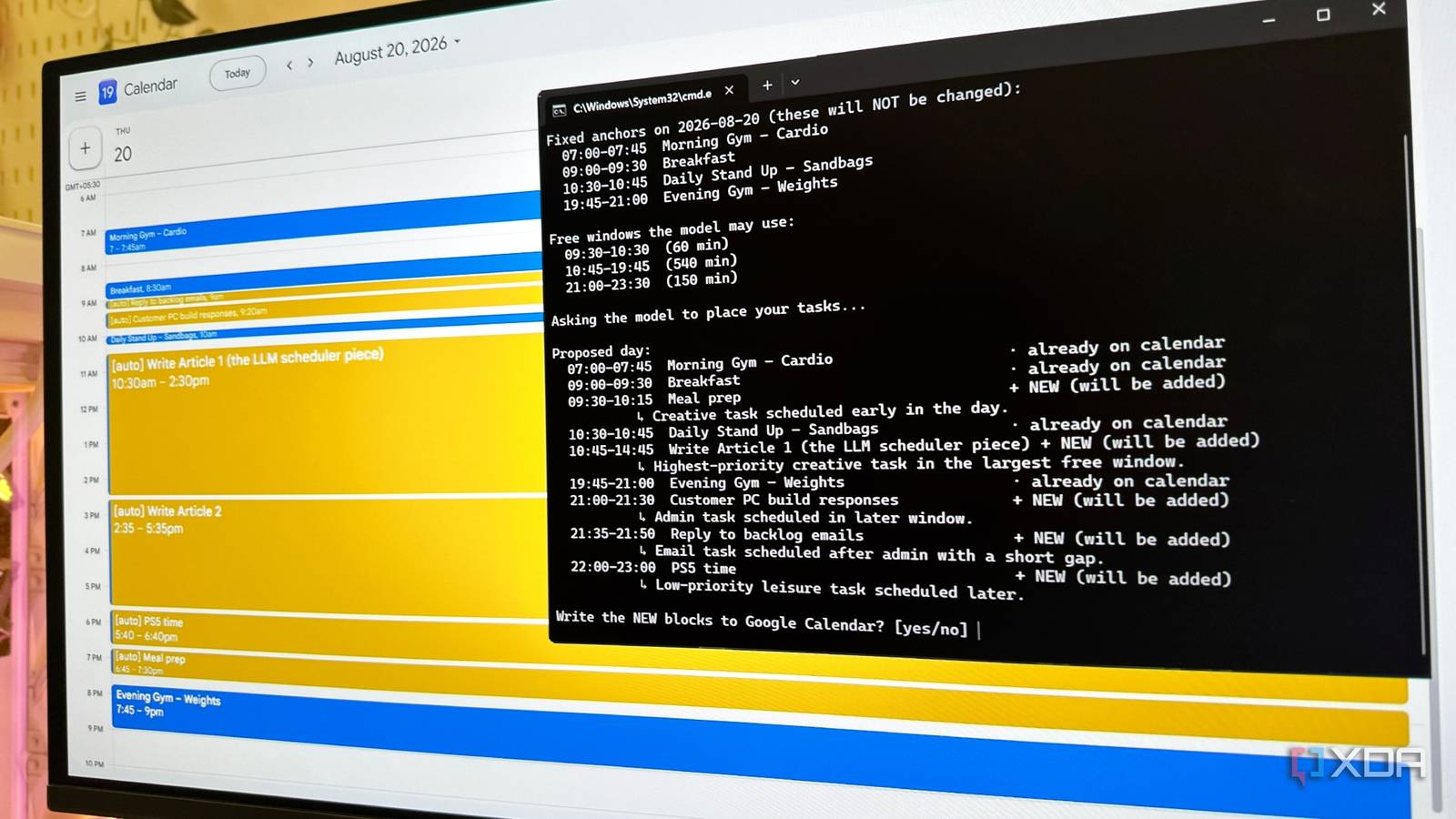
Published Aug 19, 2026, 7:01 PM EDT Gaming has been Samarveer’s greatest passion, and the Literature graduate in him takes immense joy in dissecting games for their themes, messages, and impact. Samarveer holds a deep appreciation of gaming, and considers the platform to be the most immersive and impactful across all media. He can be found engaging with gaming communities online, always ready to debate the finer points of ray tracing or itching to write an 8-page collegiate thesis on any game that impacts him emotionally. I've spent enough time letting my calendar tell me what I should be doing next, only to realize that a calendar is really just a list of commitments. It knows when a meeting starts, but it doesn't quite know when I am at my most productive, what I can manage to fit between two calls or before lunch, or when I'm asking too much of my own self. As such, I decided to give that job to my local LLM. I connected Qwen3.5 to my calendar through llama.cpp, and let it work with the actual shape of my day rather than another generic productivity template off of LinkedIn. Of course, I did try other local models as well, and as always, one became my favorite at planning my day for me every morning. My days were wide open, and that was the problem I needed something to structure my day instead of just another productivity app There are only a few things in my day that are genuinely set in stone. I have a weekday stand-up for my business, and with the wedding getting closer, I've started doing a gym session in the morning and another in the evening. Everything else is technically free. Somehow, I still kept struggling to get everything done on time. Writing takes up a significant chunk of my day, but I also need to respond to customer PC-build requests, check my mail, meal prep, and, preferably, spend some time with my PS5. With no real structure beyond those fixed commitments, I'd routinely find myself pushing important tasks into tomorrow. So I vibecoded a Python script that took a task list I'd write in Notepad, along with an estimated duration and priority for each task, and turned it into a schedule. Instead of deciding what I should do next, I wanted my local LLM to make that decision for me. Getting a local LLM into Google Calendar was harder than the LLM itself Google made me earn the right to automate my calendar The Google Calendar API was easily the trickiest part of the entire experiment. I had to slowly work my way through several menus, create the right credentials, make sure I had dotted the right i's and crossed the right t's, and finally download the JSON file that my Python script needed. This part wasn't particularly difficult after a few YouTube tutorials, but still, there were plenty of opportunities in those layers of menus to click the wrong thing. That's perhaps why I'm not exactly itching to do it twice. With the credentials created and the JSON file in place, I was glad I didn't have to look back at those menus again. The heavy lifting could now be done by my own local LLM, with llama.cpp handling the models and Python handling the calendar. The vibecoded scheduler itself required little to no tweaking. The only meaningful change I made was telling the LLM that my stand-up meetings and gym sessions were immovable, and that it had to work within those constraints. Everything else was fair game for it to arrange around them. I tried three of my favorite local models for the job The difference wasn't whether they could schedule my day I started with Qwen3-8B (Q5_K_M) and it did a surprisingly good job of working around the tasks I had given it. This proved to be a remarkably solid proof of concept, but it tried moving my stand-up meeting around to fit in the rest of the tasks. Qwen3.5-9B (Q4_K_M) swooped in to do an equally-good job, but both models tried to move things that were supposed to be set in stone, including my morning cardio and daily stand-up. I initially thought GPT-OSS-20B (MXFP4) would finally understand the distinction, but that didn't happen either. This is where I realized that I had to change the Python schedule itself, editing the instructions so that the LLM could never touch those fixed events. Anything that must be true should never be left to an LLM to interpret. A prompt can always request a restraint, but to truly enforce one, code must always step in. All testing was done at llama.cpp's default context size (4096). This calendar API-calling experiment didn't require any long context testing. The script worked out the free gaps between them and only allowed the model to place tasks inside those gaps, then checked the result and rejected anything that fell outside those boundaries. GPT-OSS-20B happened to be the first model I used after that guardrail was in place. As such, its better understanding was really just the architecture doing its job right. I loaded the model into system RAM with nommap but this didn't mean that I had discovered a magical new scheduling ability. Qwen3-8B, with the new script, still failed to put in meal prep into my calendar, which rendered it the weakest model of the three, even though it was the fastest. Qwen3.5-9B, on the other hand, being second fastest (or second-slowest), accounted for everything I required, and did a genuinely impressive job of charting out my day. RTX 4070 Ti (12GB) + Ryzen 5 7600X + 32GB DDR5 CL30 RAM @ 6000MHz Model Params Quant Gen speed (tok/s) Prefill (tok/s) TTFT Output Tokens Total time Qwen3-8B 8B Q5_K_M 74.4 tok/s 1,505 tok/s 0.47 s 208 3.3 s Qwen3.5-9B 9B Q4_K_M 74.7 tok/s 1,641 tok/s 0.53 s 1,111 15.4 s gpt-oss-20b 20B MXXFP4 95.5 tok/s 800 tok/s 0.71 s 2,476 26.6 s Lastly, GPT-OSS-20B took eleven seconds more than Qwen, but in those additional seconds, it presented what was clearly the better-thought-out structure for the day. This model ensured that the flow of my tasks never put me into a whiplash, where I'm working on my PC for a straight three hours and suddenly dashing to the kitchen as soon as it ends. An amusing pattern I noticed across all three models was that they all kept sweeping my gaming time off the edge of the day. I first took it as a sign that my local LLM had its priorities straight. With writing, meal prep, customer requests, and other important tasks to fit in, gaming was clearly the least essential thing on the list. Impressive, but it still stung a little. Even my local LLM needed me to stop sabotaging my own calendar. Then I realized I had set the end of my day at 9:30PM, even though I usually have time until around 11:30PM. I'd been forcing my models to cram my entire life into an artificially short window, so I extended that limit to 11:45PM, and gaming suddenly found its way back onto the schedule. Apparently, even my local LLM needed me to stop sabotaging my own calendar. llama.cpp Llama.cpp is an open-source framework that runs large language models locally on your computer. I just have to follow my calendar instead of planning it myself The biggest benefit of this setup is that I no longer have to spend the first part of every morning figuring out what I should be doing. I run the scheduler once, give my GPT-OSS-20B the tasks for the day, and let it structure everything around the commitments that are already there. Once the schedule is written into Google Calendar, my day is essentially laid out in front of me. This has genuinely turned my calendar into something much more useful than a list of appointments. Its widget sits on my phone's homescreen, and it stays open on my second monitor, so I always know what I'm supposed to be doing at any given moment, and the next. It also gives me a little accountability without another productivity app nagging me all the time. My day has already been written for me, and all I have to do is follow the instructions. Strangely enough, that has made getting things done feel considerably easier.
I connected my local LLM to Google Calendar, and it schedules my day better than I ever could
Full Article
Original Source
Read the full article at Xda-developers →KhanList aggregates and links to publicly available news content. We do not host full articles from third-party sources. Always verify important information with original sources.