
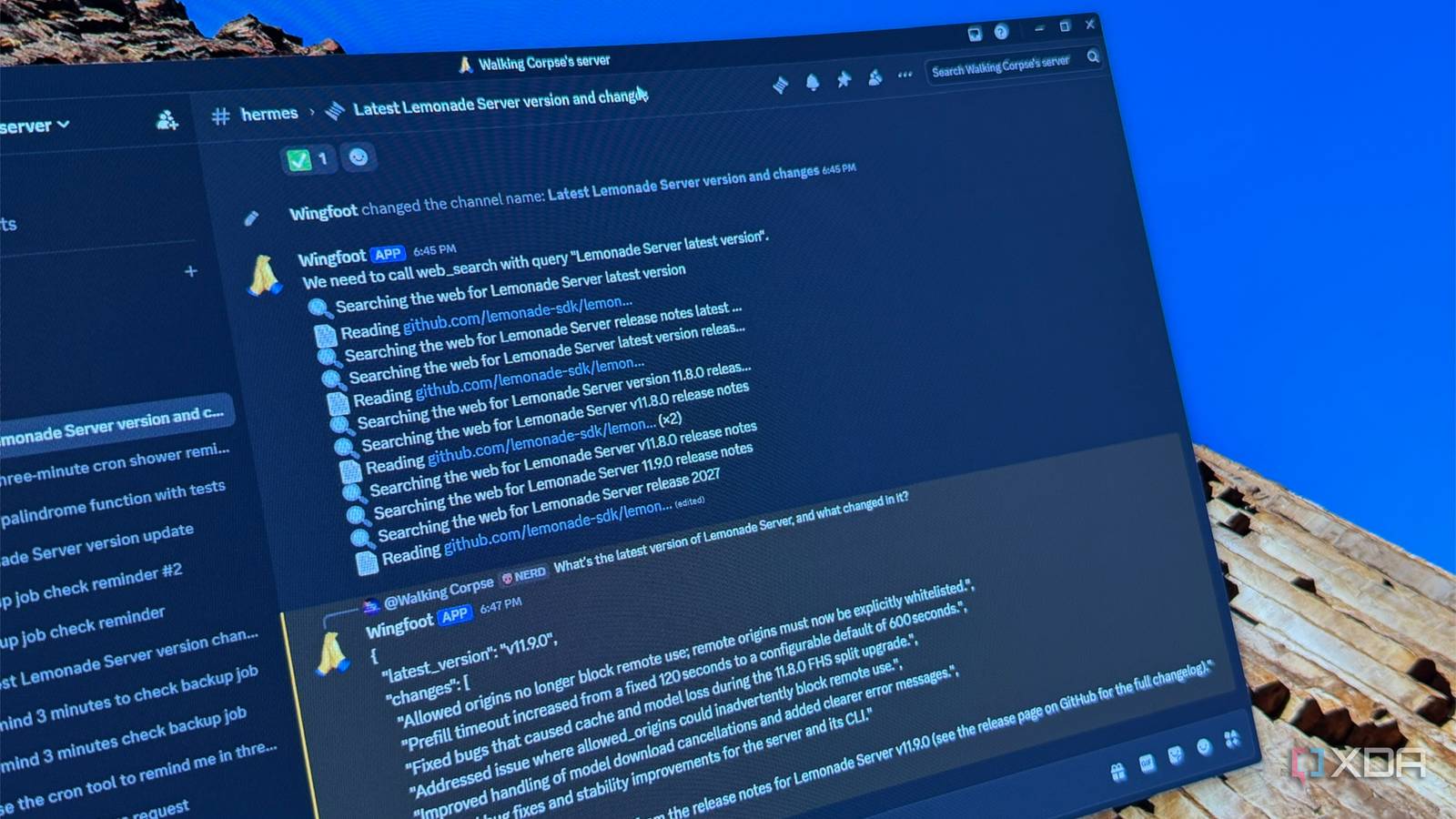
Published Oct 7, 2026, 10:30 AM EDT Maker, meme-r, and unabashed geek, Joe has been writing about technology since starting his career in 2018 at KnowTechie. He's covered everything from Apple to apps and crowdfunding and loves getting to the bottom of complicated topics. In that time, he's also written for SlashGear and numerous corporate clients before finding his home at XDA in the spring of 2023. He was the kid who took apart every toy to see how it worked, even if it didn't exactly go back together afterward. That's given him a solid background for explaining how complex systems work together, and he promises he's gotten better at the putting things back together stage since then. I've spent a lot of time making my local LLMs faster. I run Lemonade on a Strix Halo box in my home lab, and it's genuinely quick, but every way to talk to it from outside my house meant homework. A reverse proxy and a certificate, a forwarded port I'd rather not open, or a VPN client I had to remember to switch on before asking a simple question. The thing is, I already have an app always open on my phone and laptop that's built for chatting. It's Discord. So I gave my local model a Discord account and an agent harness to sit between them, and now I can ask my local LLMs to build things for me from anywhere. Discord fixes the hardest part of self-hosting AI Remote access is always a pain and I still had to figure out a chat interface before this My model lives on a box on my network rack, and getting to it from a coffee shop has always been the annoying bit. Running it locally is the easy part these days. Discord turns the problem inside out, and there are three things I think anyone trying this should understand before they start. Nothing reaches into your network. The bot never waits for a connection. It opens one outbound link to Discord's servers and listens for messages to arrive down that line, the same way the Discord app on your phone does. The container running it has an ordinary DHCP address, nothing on it listens for inbound traffic, and there's no DNS record, certificate, or router rule to maintain. It works exactly the same behind NAT or CGNAT, and my router didn't need a single change. I've done this the hard way plenty of times. Over the past few months, I've had Caddy replace my existing reverse proxy with a wildcard certificate, set up tunnel-based ingress to get around CGNAT, and used Tailscale's subnet routing to make my home lab feel like it's on my laptop. Each of those was a project in its own right, with its own set of issues. Here, the remote access layer is an app I'd have opened anyway. I'm using Discord as the relay, and I know the trade-offs here. You don't need a tunnel because Discord carries every message between you and the bot, which means Discord sees every message. The model and anything it can reach stay at home, but the conversation itself doesn't. If you wouldn't send it into a Discord DM to a friend, don't type it to your bot either. And if Discord goes down, you lose access entirely, whereas a Tailscale setup only fails when your own network does. For me, that trade is worth it for a chat assistant. Since Discord already sees my conversations anyway, sending search queries to a cloud search API doesn't change much, so I stopped fretting about keeping everything local. I wouldn't route anything sensitive through it, but for quick questions and research away from my desk, the convenience wins. Your chat history sticks around There's one other big win for this setup. Every conversation with Wingfoot lives in Discord, searchable from my phone or laptop, for as long as I want it. That's not a given with AI tools. Claude Code deletes local session transcripts after 30 days unless you change its cleanupPeriodDays setting, and I've had cloud chat histories vanish with no explanation at all. A Discord thread is boring, durable, and mine to scroll back through. Setting up Hermes Agent in a Proxmox LXC These things never go quite to plan There are lighter ways to do this. llmcord is a small Python bot that turns Discord reply chains into a chat front end for any OpenAI-compatible API, and it's perfect if you just want a chat window. I wanted something that could actually do things, so I went with Hermes Agent from Nous Research. It's an agent with tools, memory, and scheduled tasks, plus a gateway that connects it to Discord, Telegram, Slack, and others from a single process. I gave it its own unprivileged Debian 13 container on my Proxmox node, with four cores, 4GB of RAM, and 16GB of disk. That keeps anything the agent runs inside a box I can throw away. Installation is a single script, and then you point it at your model server. I'm not going to put the curl command here because you really should always use one from the official site, so head over to Nous to find that. Choosing the custom endpoint option lets you enter Lemonade's OpenAI-compatible URL, which sits with an /api/v1 suffix. Hermes then lists every model Lemonade serves. I picked gpt-oss-120b because an agent lives or dies on tool calling, and the smaller models on my server are far more likely to mangle a tool call. Lemonade doesn't check API keys by default, so any placeholder string works. The first launch threw a red error about a bundled provider plugin missing the httpx Python module. I went down a rabbit hole here. The hermes command is a shell script that calls another shell script, which finally runs a Python interpreter Hermes manages for itself. Installing httpx into that interpreter cleared the error, but Hermes integrity-checks its own runtime, and its doctor command promptly reported the files no longer matched. I restored the clean runtime and learned to ignore the warning, since it's about a provider I don't use. Next, I trimmed the tool list. Hermes ships with 39 tools enabled, and every one adds to the prompt the model reads on each turn. I turned off image generation and text-to-speech because both default to cloud services, and computer use needs a desktop the container doesn't have. Web search stayed on with a Brave API key, so search queries do leave my network. Then came the Discord bot. You create an application in the Discord Developer Portal, copy its token, and turn on Message Content Intent so the bot can read what you send it. I also wanted the bot private, but Discord wouldn't let me save the Public Bot toggle until I went to Installation -> Install Link and changed it from Default Link to None. Nothing on the bot page tells you that. With the token and my Discord user ID added to Hermes's allowlist, I installed the gateway as a service and sent my first message. My bot replied with an error. Twice. The log explained why: Hermes requires a context window of at least 64,000 tokens, and I had Lemonade serving gpt-oss-120b at 32,768. Oops. I reloaded the model at its full 131,072-token context, told Hermes the new number, restarted the gateway, and it answered. Using a local LLM from anywhere Great for chat, shaky as an agent Threads are where Discord shines as a front end, because each one is its own conversation. When I asked for a Python palindrome checker with test cases, the model wrote it, saved it to a file in the container, and the tests passed when I ran them. Search took more work. My first attempt at asking for the latest Lemonade Server release got a confident, outdated answer, plus a few pointless calls to a password vault tool along the way. It turns out, Discord gets its own tool list in Hermes, separate from the one I'd trimmed in the CLI. Once I trimmed that too, explicitly set the API mode to Chat Completions, and started a fresh session, it got the answer right. Brave's free tier only returns search snippets, so the bot can find pages but never actually read them. Reminders never worked from chat, and this is where local models still fall short. gpt-oss-120b spent 11 iterations searching for the right tool before asking which shell command I wanted cron to run. Qwen3-Coder told me the reminder was set when it had never called a tool, and gpt-oss later refused to remind me to shower. The scheduler itself is fine. A job I created with hermes cron create posted to Discord right on time, so I set reminders from the CLI, and then those chat-made jobs actually exist. Simple requests come back in about 30 seconds. Most of that wait is the model reading Hermes's long system prompt and tool list, so short questions aren't much faster than long ones. My Lemonade server also keeps only two models loaded, so if another app asks for a third, Wingfoot's next reply waits for a reload. Discord turned my local LLM into something I actually use I've built plenty of slick web UIs for my local models, and I've used almost none of them away from my desk. Wingfoot gets used because it lives in an app I check dozens of times a day. Reaching it never meant opening a port or connecting to a VPN, and every conversation is still there when I go looking for it. Sure, the agent features need babysitting, and you shouldn't trust a reminder you haven't seen in hermes cron list. But as a way to chat with your home lab's model from anywhere, it's the easiest setup I've found. Next, I want a self-hosted page reader so Wingfoot can read the pages it finds instead of guessing from snippets.
I connected my local LLM to Discord, and now I can reach it from anywhere without opening a single port
Full Article
Original Source
Read the full article at Xda-developers →KhanList aggregates and links to publicly available news content. We do not host full articles from third-party sources. Always verify important information with original sources.