
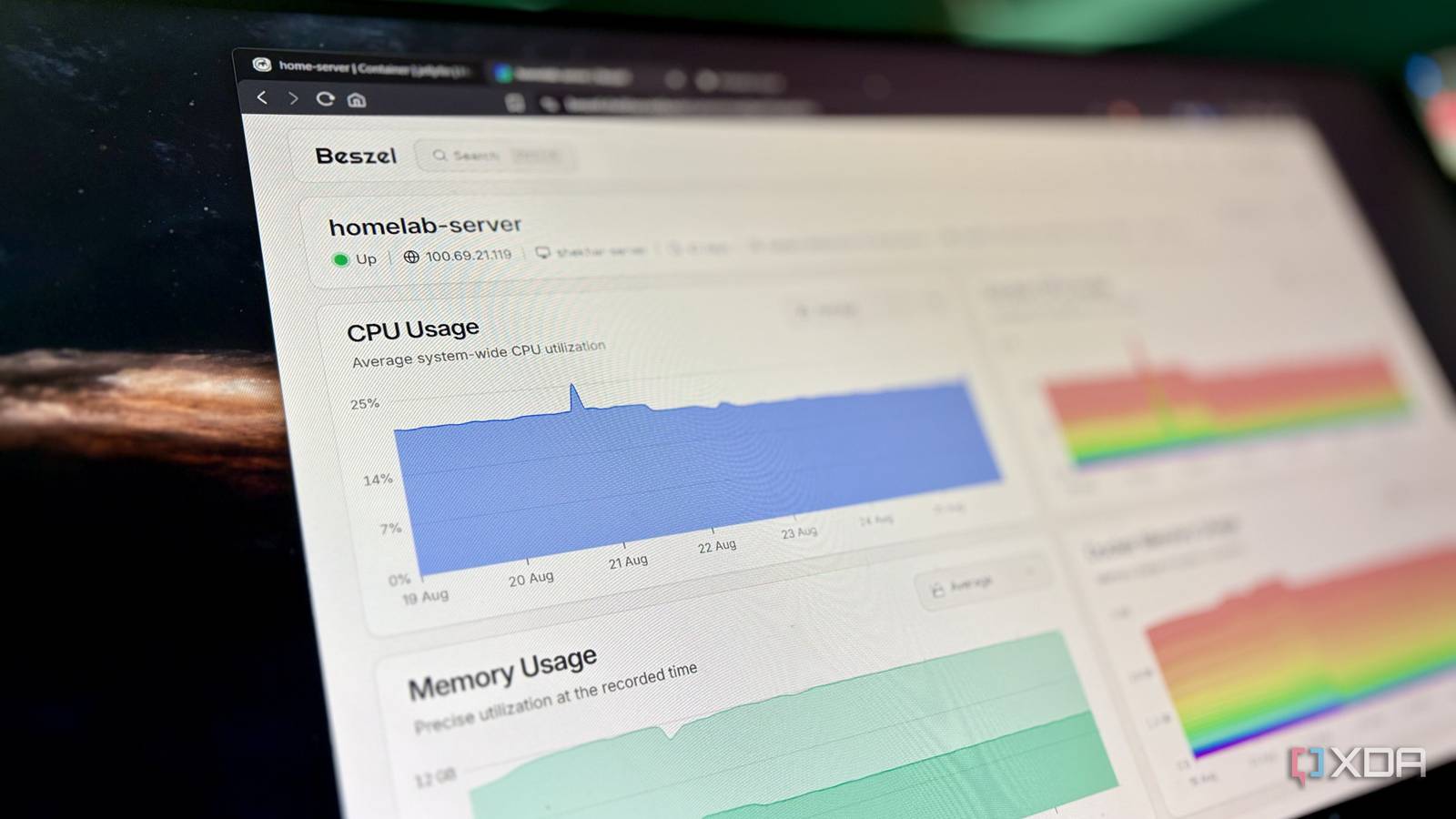
Published Aug 31, 2026, 1:00 PM EDT Shekhar Vaidya is a veteran technology journalist and computer science engineer. He is the founder of TechLatest, where he has spent years providing technical analysis on hardware and Windows ecosystems. Now a Computing Writer at XDA, Shekhar leverages his deep background in NAS, storage solutions, and PC internals to help readers master their tech. The worst nightmare for a homelab isn’t a crash. It's when everything is working fine, but the server feels sluggish from time to time. I run a bare-metal Debian server at my home with an i5-6300U, 2C/4T, and 12GB RAM. Each morning, when I checked the resource graph, I noticed a spike I could never predict. The resources were not the issue. 12GB of memory is enough for what my homelab actually needs. But none of the containers had an explicit resource ceiling. Out of twenty-plus services, when a few of them hit their peak load at their respective workloads, that's when it became a problem. So, before upgrading the hardware, I decided to experiment with CPU and RAM limits on my containers. Every container wanted more than it needed Nothing was crashing, but nothing felt fast either I repurposed an 8-year-old business laptop as my home server. The laptop is a Dell Latitude 7480 with a Core i5-6300U (2 cores/4 threads), 12GB of memory, and 256GB of storage, running bare-metal Debian. I started with Portainer and Jellyfin, then added a few new ones every week. Today, I have more than 20 stacks running on this machine. For something this old, it’s already overwhelming. The more interesting part is that none of those stacks had any explicit CPU or RAM limits, and the machine still handled the workload — not perfectly, but not broken either. None of the containers were constantly overloading the hardware, because not all of them were being used at the same time. The server only got sluggish a few times, and only when a few large services were running at once. 2 cores, 4 threads, and 12GB RAM aren't bad specs for a small homelab like mine. Most of the time, it has enough resources to handle the workload but not enough guaranteed headroom when workloads overlap. For example, until a few weeks ago, five stacks from my homelab — Omada, Pulse, Jellyfin, Immich, and Stirling — alone were consuming more than 5GB of memory. Most of them were idling then and had no ceiling. So, when any of them got a load and needed more memory or CPU, it could expand freely into the available headroom. Individually, each one treated the full 12GB as its own headroom, so whenever any stack was under load, it took whatever was available without considering other services. I stopped letting Docker decide how much each container could take The math that decides who gets what Do you know the hard part of this process? The publisher might mention the minimum requirement to run that service, but no upper limit is defined anywhere. Let’s take the example of Jellyfin. In my case, while idle, it takes around 800 MB of memory and ~0.02% of the CPU. Since the server doesn't have a dedicated GPU, it uses the integrated GPU for transcoding. So, even with a couple of streams and one or two transcoding sessions, Jellyfin's CPU usage can still peak at 100%, and RAM usage can climb to a couple of GBs. This was all fine if the server had only one service running. But since it has many other services running side by side, Jellyfin's usage disrupts the others for a few minutes while it transcode video. So limiting these was an important step. CPU and RAM limits behave differently. If a container reaches a memory ceiling, it simply gets OOM-killed. But for a CPU ceiling, the scheduler throttles it rather than killing the container. But coming back to the main point, I didn’t have a perfect number for any of those containers. So I opened Beszel and looked at actual usage from the last week to see how the graph looked. From those observations, I sorted out two things. One: which container needed a limit and how much. Two: which of them were already stable with insignificant peaks. After that, I started adding CPU and memory limits to most of the containers. I left a few untouched; I will explain later why. I added around 20% extra for steady services like AdGuard Home, NetAlertX, Ntfy, and around 50% for job-based workloads like Jellyfin, Stirling PDF, etc. These numbers are based on my practical experience; I didn’t refer to any Docker documentation to cross-check anything. So I don’t recommend blindly following these, because the numbers depend on the hardware and the workload. Also, I kept a few containers untouched, like Portainer and Postgres. Not because they didn’t need a ceiling, but limiting them would do more harm than good. Like limiting memory on a database service could cause an application failure, potentially during a write operation. So I weighed reliability against the risk of failure before putting a limit on any container. Lastly, I wasn’t trying to blindly limit each job; I was deliberately trading peak performance for homelab reliability. A download, media transcode, and machine learning job could wait, but a DNS query, a DB write, or a management service needed room to breathe. The goal was predictable behavior at peak hours, not maximum hardware efficiency. The limits changed how the whole server behaved The dashboard that finally got boring So, what changed after using it for a week? Honestly, there weren’t any sudden and dramatic benchmark improvements, but I also didn't see those unusual peaks on the resource graphs. I agree those graphs used to be interesting but concerning at the same time; now they are just flat and boring. On a broader note, boring is actually a perk here, not a bad thing. Now, none of them are constantly fighting each other for the available resources. A peak load from qBittorrent, Jellyfin, or Immich Machine Learning could hit the ceiling and wait rather than eat other containers' memory and CPU. Yes, the workload took more time to complete, but that was an acceptable trade-off. Most of them worked, but a few took more than just memory and CPU limits to work perfectly. For example, Stirling PDF didn’t work as expected even with the memory limit in place. I initially limited it to 1024 MB of memory, but it required more. So, I switched it from the full image to the ultra-lite version to reduce its footprint, and honestly, I didn’t need the full version anyway. Limiting the resources may look like weakening the server, but in practice, the experiment made the whole server more predictable. But don’t take this as equivalent to adding new hardware. Limiting RAM and CPU isn’t a universal fix for other underlying issues. This won’t solve a broken container, bad network configuration, or database issues. It just prevents any one container from overloading available resources. As mentioned earlier, not all containers need to be limited under a ceiling. Important workloads should have open sky to grow when needed. Limits aren't a punishment; they're a boundary The surprise wasn’t that each container was under a limit, but how predictable the whole server became. A few services struggled under load, but they didn’t affect other services, and that was the whole point. In my case, the server didn’t need a redesign or an expensive hardware upgrade, but a boundary. Reliability isn’t about blindly upgrading hardware; it's about preventing a couple of services from deciding the server's fate.
I capped CPU and RAM on my Docker containers, and my entire self-hosted homelab became reliable
Full Article
Original Source
Read the full article at Xda-developers →KhanList aggregates and links to publicly available news content. We do not host full articles from third-party sources. Always verify important information with original sources.