
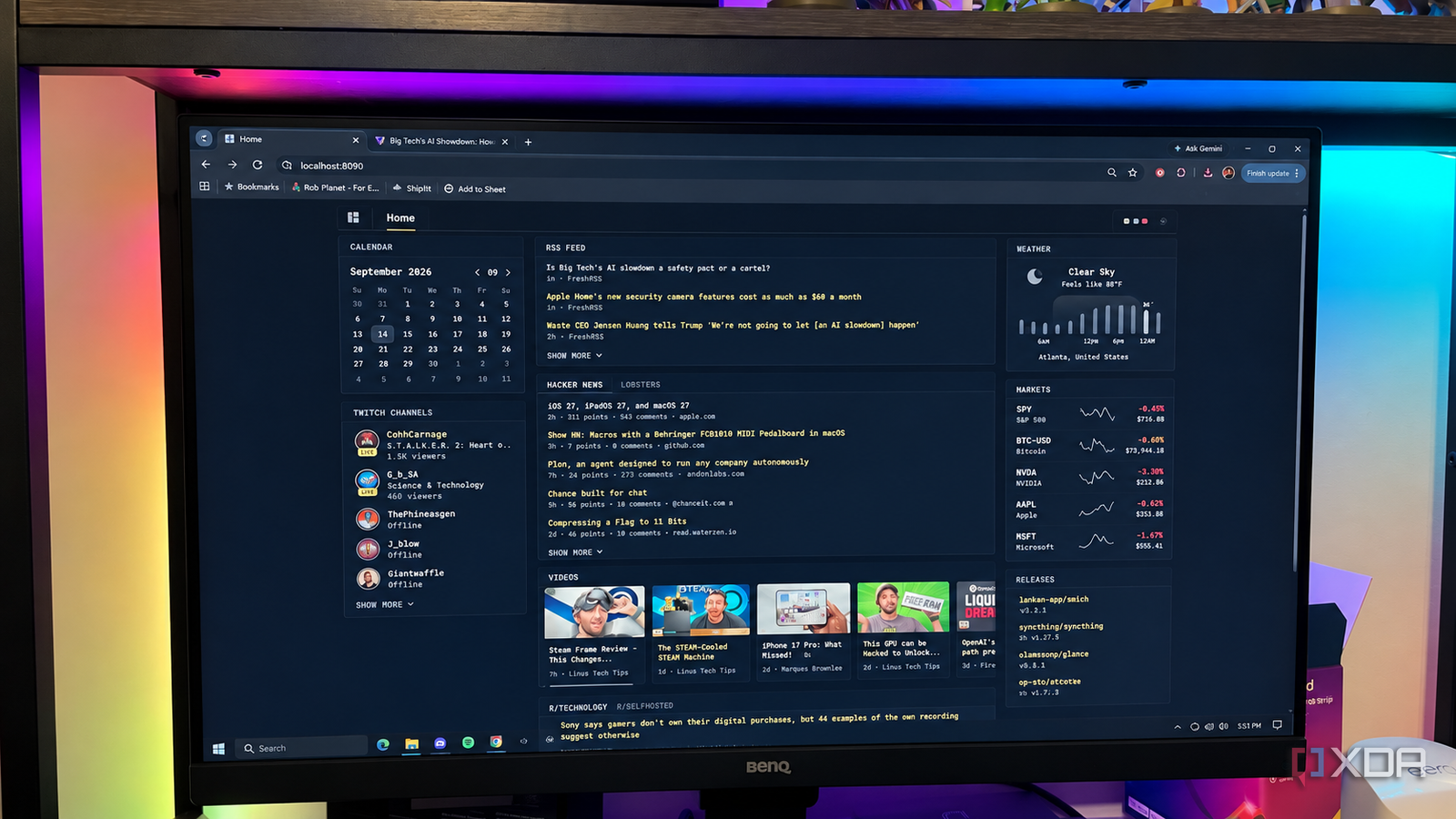
Published Sep 21, 2026, 11:00 AM EDT Patrick is a seasoned writer with more than a decade of experience, specializing in any and all things tech. His work has been featured on platforms like CNET, Yahoo, Xfinity, and many other outlets. When not typing away, he can be found with his nose in a book. As a tech journalist, I spend a huge amount of time reading and researching. Part of my daily routine is to sift through headlines to make sure I'm always aware of what's going on, even if it isn't something I'm directly going to write about. Feedly has been my go-to app for years, but I've always felt like something was missing. I just couldn't quite pinpoint what. I decided I wanted to create my own RSS feed, customized to exactly what I wanted. As it turns out, that process was both easier and more complicated than I expected, but I'm quite satisfied with the end result. The way it works is with two distinct self-hosted tools: FreshRSS and Glance. It's definitely not as straightforward and easy as a hosted tool like Feedly, but the level of control and customization it provides is well worth the trade-off. It gathers the stories FreshRSS is the foundation of my setup. It's where all of my RSS feeds go, and it hosts all of my custom settings that determine exactly which stories appear front-and-center. Feedly worked great for a long time, but FreshRSS gives me more granular control without the associated subscription that comes with Feedly. I'll be honest: while I probably should keep up with news outside the tech sphere, most of my sources focus on computing, emerging technology, and software. It's not without its trade-offs, though. FreshRSS is a more bare-bones interface, and adding content and feeds is more work than simply clicking "subscribe" through Feedly. But there's also an upside: because it's harder to add feeds, the ones I choose are deliberate. Glance turned all of my random RSS feeds into an actual news homepage It gave the stories a proper home FreshRSS isn't what I'd call "easy on the eyes." It's a utilitarian interface; it delivers information in what resembles an email inbox, and while that isn't necessarily a bad thing, I wanted something a little sleeker and more aesthetically pleasing. Glance is the solution. Out of the box, Glance isn't the most aesthetic, either — but it's customizable through CSS and configuration options and can look exactly how you want. My current Glance page is more than just tech headlines; it also displays the weather, stocks, keeps me apprised of software updates on select apps, and more. It also shows a calendar (although I haven't fully explored what the calendar widget can do yet), as well as Twitch channels, video streams, and more. You can set all of these to show what you want, and some Glance users have created homepages that are incredibly impressive. I've only just scratched the surface of what Glance can do, and I have to remind myself to actually read the articles it displays rather than spend all of my time tweaking it. Clicking a link takes me to the original site Most RSS readers will show you the headlines and the major news stories, but they're also designed to keep you inside the app. They'll tease other stories, hint at more information. These are built around continuous consumption, while my Glance homepage is a dashboard. I can open it, look at the headlines, scan for anything relevant to my interests, and then leave. It gives me a snapshot of what's happening in the tech world. I don't necessarily need to read every single headline; sometimes, just knowing that Apple announced a new iPhone is enough. I don't need to memorize the specs. And because Glance only shows stories from sources I have deliberately chosen, it presents an easier stopping point; I'm less likely to fall into whatever rabbit hole the algorithm thinks will keep me hooked. I probably spent too much time building it This combination isn't beginner-friendly I love the way Glance looks and the operation, but it wasn't the smoothest experience. For starters, I am self-hosting both FreshRSS and Glance. If you haven't self-hosted anything before, there's a learning curve involved; even if you have, FreshRSS requires you to set up all of your feeds, categories, tags, and more, and after all of that is finished, you have to enable sharing settings and provide Glance with the relevant information. Glance itself is easy to install, but it tries to use the same default port as FreshRSS. That means you'll need to navigate through several layers of folders, change the relevant config files, and deal with the results of that (in my case, it meant restarting Glance several times through Docker to see the changes take effect). Doable? Absolutely. But if you're not familiar with this kind of work, don't expect to blow through it in a few minutes. Take the time to read the documentation carefully, or you'll run into bugs. I had an awful habit of saving far too many stories to "read later" when I used Feedly. By the time I sat down to actually read any of them, I had to parse through the list and find the most relevant ones. FreshRSS and Glance make it easy to see what stories are of interest, scan over them, and go on about my day. Fresh RSS FreshRSS is a self-hosted RSS and Atom feed aggregator.
I built my own front page out of RSS, and stopped opening five news apps a day
Full Article
Original Source
Read the full article at Xda-developers →KhanList aggregates and links to publicly available news content. We do not host full articles from third-party sources. Always verify important information with original sources.