
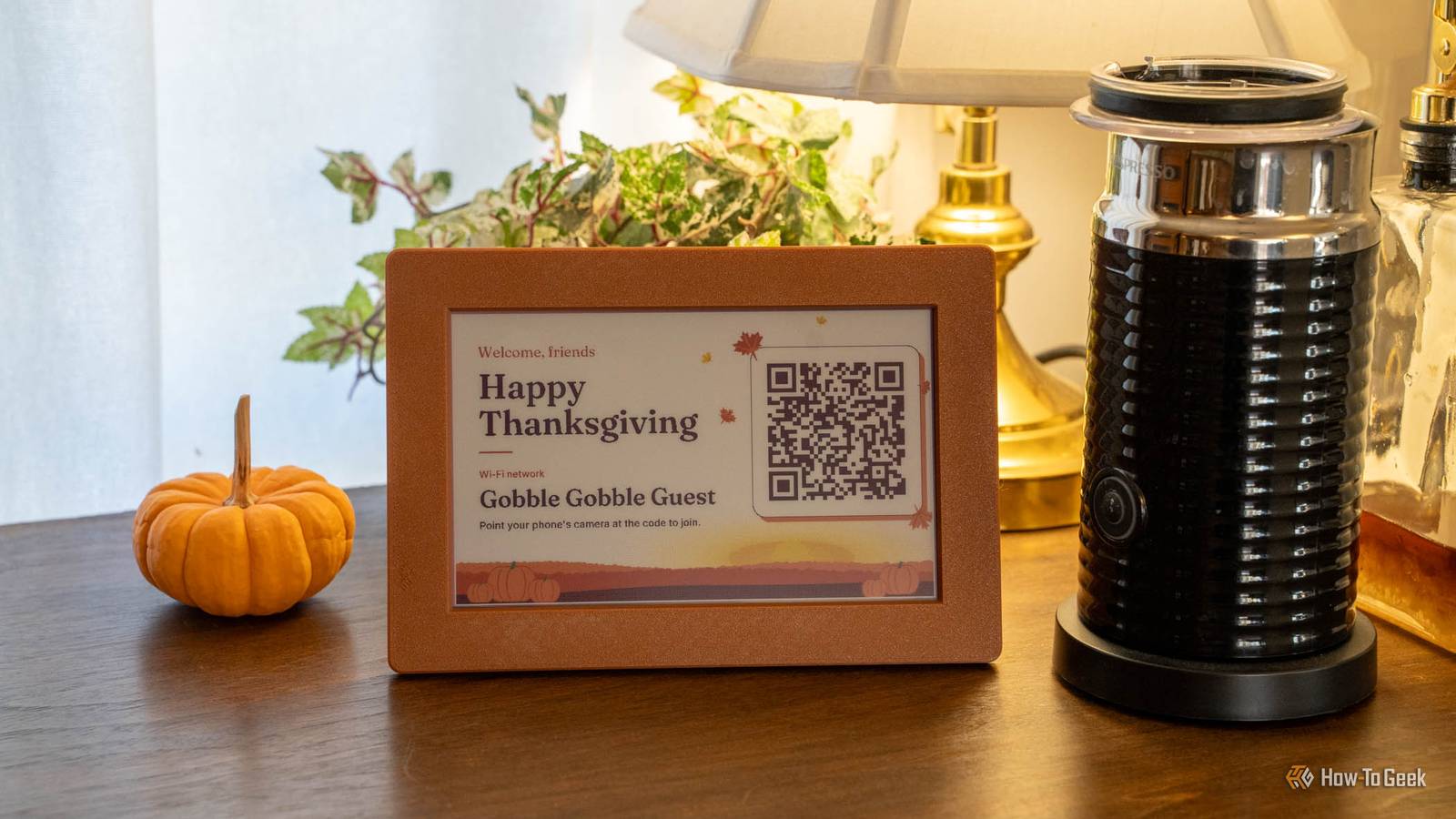
Published Nov 19, 2026, 6:00 AM EST Patrick Campanale has been in the tech space for well over a decade, specializing in PC/gaming news and reviews, as well as maker-focused products to build small businesses. With a start in technology back in 2010 surrounding the Palm/webOS ecosystem, Patrick spent his formative years developing mobile applications as well as blogging for various publications, eventually leading to starting his own website in 2014. After running a technology blog for a few years, he stepped out of that role and into the world of high-end custom PC manufacturing and building, with a focus on YouTube video production and overclocking. Then, in 2017, Patrick joined the 9to5Toys team as an editor/writer/reviewer with over 14,000 articles being published during his time there, ranging from deals and roundups to in-depth reviews on the latest technology, video games, 3D printers, and more. In his free time, Patrick loves to create projects from wood using various robots and methods, including leveraging the technologies of CNCs and lasers. If Patrick isn't working on a computer or playing video games, he's likely in his 2-car garage workshop creating something unique. In addition to all this, Patrick is also the media director at his local church where he feels God has called him to serve, and he loves every minute of it. I got tired of having to give guests my Wi-Fi network name and password every time they came over. With Thanksgiving coming up, I wanted to deploy a solution that would make it simple for guests to connect to my network without having to constantly spell the complicated Wi-Fi password for them. So, I turned the task into a project like any good DIYer with ADHD would do, using nothing more than a Raspberry Pi, an e-ink display, and Claude. Here’s the result of what I was able to accomplish in under 30 minutes with Claude to create a sign to help my guests connect to Wi-Fi without ever typing in a password. Your Wi-Fi password shouldn't live on a sticky note A guest network with isolation on keeps visitors off your NAS Listen, you should have a guest Wi-Fi network. It’s not even a question at this point. A guest network can keep guests isolated from your main network and main connected devices while still providing guests with internet access inside your house. The problem with many guest networks is they either have simple passwords or no password at all. I get why though—when someone comes over to the house, you don’t want to have to provide them with a 32-character randomly-generated password just to be able to check email or Facebook. I don’t care to do that either, so I decided to take matters into my own hands by creating a little display sign that I can place around the house with Wi-Fi information in the form of a QR code. All you need to give your guests is a simple QR code It actually holds both the network name and password QR codes can hold an insane amount of information. For this project, I’ll use a QR code to hold Wi-Fi information that can be easily scanned. For Wi-Fi, all you need to encode in the QR code is: WIFI:T:WPA;S:mynetwork;P:mypass;;. That’s it. S is the SSID and P is the password. You can optionally add H:true if the SSID is hidden, and you’ll want to escape \ ; , " : with a backslash if that’s part of your password or network name. Also, T:WPA works for WPA2 and WPA3 networks. Now, you could print these QR codes on physical paper and put them around the house or even in a picture frame mounted on a wall. I’ve seen many doctors offices and other places do that very thing, and it does work, but it’s not very “Patrick. I decided to take this project up a notch by using electronics I had around the house that didn’t have a clear purposes at the time: a Raspberry Pi and a seven-color e-ink display. Throw in a little 3D printing and you have a really fun weekend project that is both useful and aesthetic. An e-ink display retains the image even with no power It’s customizable and it still looks like a sheet of paper in a frame I’m using my seven-color Waveshare e-ink display (which has since been discontinued and replaced with a Spectra 6 model) for this project, but you could use any e-ink panel you have. If you want something cheaper than my $100 display, Waveshare has a small 2.13-inch e-ink display HAT that’s under $30 and displays only black and white, which is all you really need for a project like this. I used Claude to build the entire package for how I run this e-ink display. There are definitely other, simpler ways to do this—like just showing a picture. But, I wanted it to be a program that had multiple graphics that could display at different times of the year with cute greetings for my guests. It took me less than 30 minutes to build the entire project with Claude, and that includes a 15-minute revision round where I had it completely change up the aesthetics of the project. The overall project is simple though, and can spin up in about two minutes with whatever Wi-Fi network name and password I tell it to. I open-sourced the code on GitHub so that way you can take it and modify it to fit your needs. I’ve built it to not show the password on the display and just the network name and the QR code to make it easier for guests, but you can change that and have it display the password if you want to. This Thanksgiving, don’t give our a Wi-Fi password, just put up a QR code Having an e-ink display that has a QR code for guests to scan is just so convenient. I can change the guest network name or password and people can just re-scan the QR code the next time I come over. I could even have a system set up to rotate the credentials every 24 hours for security and it would barely affect people. So, this Thanksgiving, don’t set up a guest network without proper security or make people type in a forever long password—just set up a QR code for them to scan when they come over. It’s simple, looks great, and way more secure. Waveshare 7.3-inch Color E-Ink Display with Solid Wood Photo Frame This Waveshare 7.3-inch color e-ink display is perfect for pairing with your Raspberry Pi. The 7.3-inch color e-ink screen comes pre-installed in a solid wood photo frame, and even includes an 1,800mAh battery to power the screen without being plugged into the wall.
I built an open-source e-ink Wi-Fi sign so I could finally give my guest network a real password
Full Article
Original Source
Read the full article at Howtogeek →KhanList aggregates and links to publicly available news content. We do not host full articles from third-party sources. Always verify important information with original sources.