
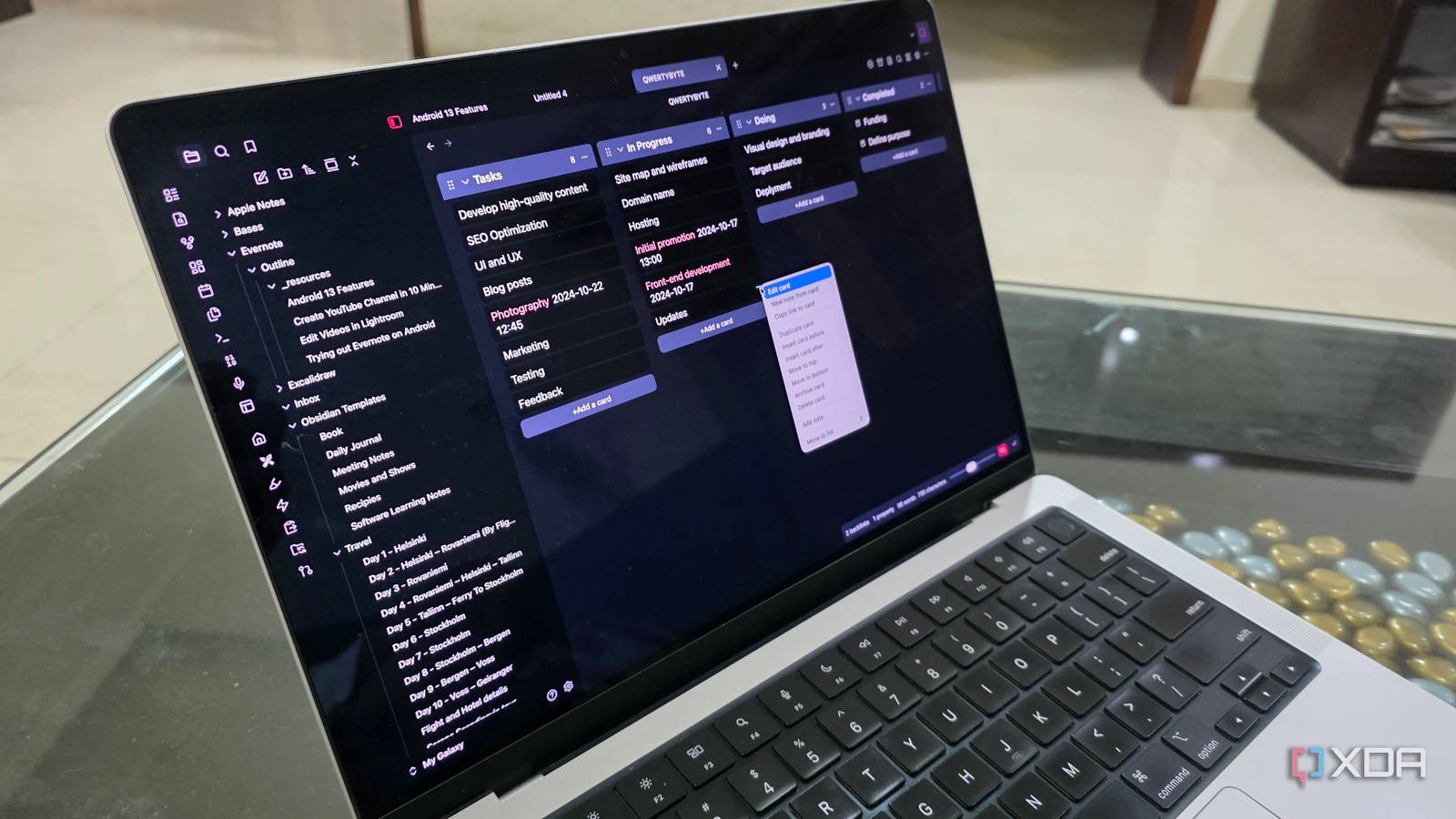
Published Sep 21, 2026, 10:30 AM EDT Parth, a seasoned tech writer, wields the keyboard (or pen) with finesse to unravel the intricacies of both Windows and Mac operating systems. He has covered evergreen content on mobile devices and computers for multiple publications over the last six years. You can find his work on AndroidPolice, GuidingTech and TechWiser. Whether it’s demystifying system updates, deciphering error codes, or exploring hidden features, Parth’s prose guides readers through the binary maze. When not immersed in tech jargon, you’ll find him sipping chai, pondering the next software review, and occasionally indulging in a friendly debate about mechanical keyboards. My productivity setup had slowly become a collection of apps that each did slightly different versions of the same thing. I had one for notes, another for tasks, a separate tool for project planning, something else for journaling, and yet another place to dump ideas I wanted to revisit later. Eventually, I started wondering how much of that setup I could create in Obsidian. Over the last month, I experimented with Obsidian features and plugins and tweaked my vaults to match how I actually work. And after weeks of tweaking plugins, templates, and dashboards, I ended up with an Obsidian setup that now handles a huge chunk of my productivity system. My home dashboard replaced my daily planner My dashboard became my daily headquarters My home dashboard is probably the biggest reason I stopped reaching for a separate daily planner. I built it around Obsidian’s built-in Daily Notes feature, so every day starts with a fresh page where I can jot down priorities, quick notes, reminders, and anything I need to get out of my head. It gives me the same structure I used to look for in dedicated planning apps, but now everything lives in the same vault as my projects and research. As you can see from the screenshot above, I also added a third-party Calendar plugin, which makes the setup feel far more practical. I can jump to any date, open previous daily notes, and move between days without digging through folders. It turns Daily Notes into something that feels much closer to a proper planner. The final piece was visual. I switched to the Encore theme to give the whole setup a cleaner, more polished look. That may sound cosmetic, but it made a real difference. It killed my Trello habit The Kanban plugin was one of the additions that made Obsidian feel much more like a complete productivity app. It basically unlocked Trello-style boards inside my vault, with familiar columns and cards that I can drag from one stage to another. For small personal projects, that is often all I need. I use simple boards with columns like Backlog, In Progress, Waiting, and Done, and then add individual tasks as cards underneath them. It works especially well for things like planning a home project, building a client website, or tracking smaller writing ideas that don't justify a full-blown project-management app like Trello or Asana. The best part is that these cards can still live alongside my notes and project pages, so I don't have to switch between Trello and Obsidian just to check context. For larger team projects, I would still use a proper collaboration tool. But for personal work, the Kanban plugin gave me just enough structure to get the job done. Canvas became my visual thinking space Canvas ended up replacing another app I used purely for brainstorming. Instead of opening a separate whiteboard tool whenever I wanted to map out an idea, I can now do the same thing inside Obsidian. I use cards for individual thoughts, connect them with arrows, drop in images, and arrange everything freely until the idea starts making sense visually. I find it useful when I am planning a complex article, mapping out a personal project, or trying to see how several ideas connect. The biggest advantage is that Canvas is not isolated from the rest of my setup. I can pull existing notes into the board, link cards back to project pages, and turn a rough visual brainstorm into something I can actually continue working on. That integration is what won me over. I am not just sketching ideas on a blank canvas and abandoning them later. The brainstorming stays connected to the notes, research, and projects already sitting inside my Obsidian vault. Beautitab turned my vault into a search engine Turn Obsidian into Google Beautitab was another small addition that changed how I use Obsidian every day. Instead of opening to a blank tab or another note, I now get a polished start page with a large search bar right in the middle. It almost makes Obsidian feel like my own private search engine. Whenever I need an old project note, a piece of research, a saved idea, or something I remember writing weeks ago, I can start searching immediately without digging through folders. The search box has become one of the fastest ways for me to get anywhere. I can customize the new tab page with backgrounds, shortcuts, quotes, and other visual elements, so Obsidian no longer opens like a plain Markdown editor. This plugin hasn’t been updated in the last two years. So I am worried about its future development. My blueprint for an organized vault What started as a simple note-taking setup has turned into the center of my productivity system. I am also digging Obsidian Bases to organize structured information without leaving the vault. I still use dedicated apps where they make sense, but I no longer need a separate tool for every small workflow. Obsidian OS Windows, macOS, Linux, iOS, iPadOS, Android Individual pricing Free normally; $4/month for Obsidian Sync Obsidian is a PKM tool that rivals Notion and Anytype.
I built an Obsidian setup that made half my productivity apps unnecessary
Full Article
Original Source
Read the full article at Xda-developers →KhanList aggregates and links to publicly available news content. We do not host full articles from third-party sources. Always verify important information with original sources.