
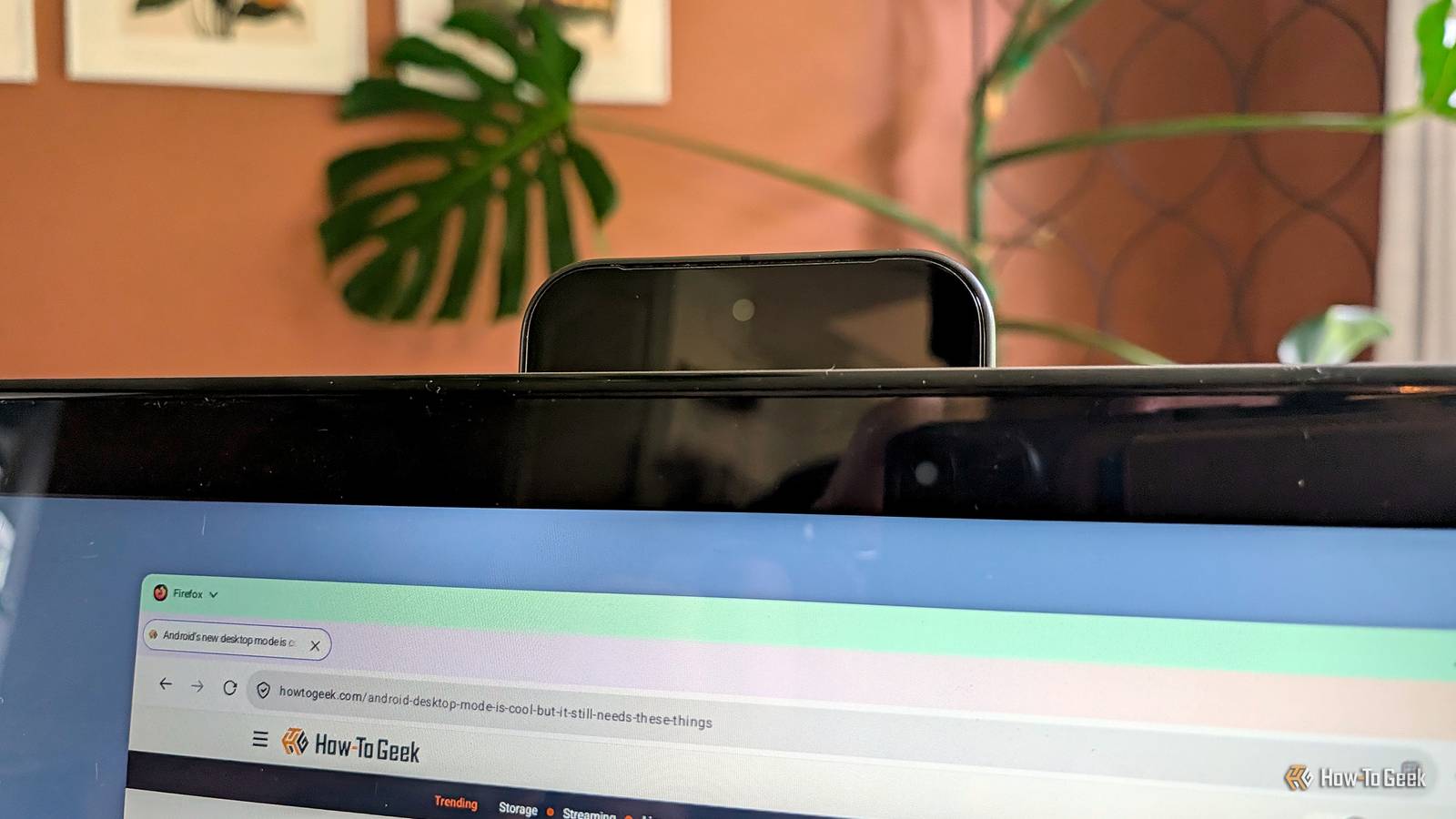
Published Aug 19, 2026, 9:00 AM EDT Joe Fedewa has been writing about technology for over a decade. Android and the rest of the Google ecosystem have been a focus for years, as well as reviewing devices, hosting podcasts, filming videos, and writing tutorials. Joe loves all things technology and is also an avid DIYer and food blogger. He has written thousands of articles, hundreds of tutorials, and dozens of reviews. Before joining How-To Geek, Joe worked at XDA-Developers as Managing Editor and covered news from the Google ecosystem. He got his start in the industry covering Windows Phone on a small blog, and later moved to Phandroid where he covered Android news, reviewed devices, wrote tutorials, created YouTube videos, and hosted a podcast. From smartphones to Bluetooth earbuds to Z-Wave switches, Joe is interested in all kinds of technology. After several years of jailbreaking and heavily modifying an iPod Touch, he moved on to his first smartphone, the HTC DROID Eris. He's been hooked ever since. Desktop mode isn’t new to Android, but it’s having a renaissance. Google finally added proper desktop mode to Pixel phones this year, and as a long-time Pixel owner, I’ve been having fun with it. My latest project is a throwback to the Moto LapDock. For those who weren’t following Android in the early 2010s, you missed a weird period of transformational devices. Asus made an Android phone that could be docked inside an empty 10-inch display to become a tablet. Motorola went the laptop route, with the aptly named “LapDock”—a laptop shell with a dock for the Atrix 4G. The latter was my inspiration for taking advantage of my Pixel’s desktop mode. I made it happen with a cheap laptop shell and a couple of 3D printed parts. Choosing the parts for an Android lapdock The difficulty level is up to you The most important part of this project is picking out the components for the lapdock. There are two very different directions you can take, depending on your budget and DIY level. I took the easy route this time, but I’ll outline a craftier option as well. 10 years ago, a company called Nex Computer released the NexDock. It was a 14-inch laptop without an onboard operating system. The desktop interface was designed to be provided by a connected phone—Windows 10 Mobile, at the time. Eventually, Android devices started getting desktop modes, and subsequent NexDock models supported them as well. Credit: Joe Fedewa / How-To Geek The company still exists today (and is making a phone), but those old NexDocks can be found for cheap on eBay. I snagged a NexDock 2 for less than $100 ($300 in 2020). It has all the components needed for an Android laptop: display, trackpad, keyboard, HDMI, and USB-C input. Now, if you prefer a more hands-on approach, it’s definitely possible to build the whole thing from scratch. For example, YouTuber Macro USB designed a system for a Pixel 9 running Graphene OS. The parts list includes an 11.6-inch display for Raspberry Pis, a 2,000mAh powerbank, Bluetooth keyboard, Bluetooth mouse, and a couple of USB cables. The setup costs more than my second-hand NexDock, but I’ll admit it looks a lot cooler. If you’re interested, you can find the full parts list and 3D printer files right here. Making the phone dock Taking inspiration from Asus and Motorola As I mentioned, Asus and Motorola both dabbled in this product category in the early 2010s, but they did it very differently. Asus thought the phone should completely disappear into the larger device, while Motorola kept it more visible. I wanted to try both methods to see which I preferred. For the Asus approach, I took careful measurements of my Pixel 10 and designed a “holster” to mount behind the NextDock display. The USB-C cable is built-in as well, so the phone can easily slide right onto it. In addition, I positioned the holster so the front-facing camera on the phone just barely peeks over the laptop display, allowing it to be used for video calls. The Motorola approach was a bit trickier. It’s LapDock held the phone horizontally in a dock behind the display, and it could pivot on a hinge to make room for the laptop display. I wasn’t confident in my ability to make a sturdy hinge, so I simply created a dock that holds my Pixel 10 behind the laptop display at a 25-degree angle. Now that I’ve tested both methods, I think the Asus approach is the better one. It’s more compact and could actually fit in a backpack laptop sleeve. I also like that I can slide the phone into the holster and connect to the laptop without even looking. The front-facing camera is an added bonus. With a right-angle cable, better cable management, and a more refined holster design, this would be pretty legit. The year of the Android desktop There’s never been a better time to use an Android phone as a legitimate desktop PC replacement. Docking stations make it easy to do with a monitor, keyboard, and mouse—you have to get more creative if you want an Android laptop. NexDock is not the only lapdock brand out there, but it has been doing it longer than most, making second-hand devices a great option.
I built an Android laptop by 3D printing a dock for my Pixel phone
Full Article
Original Source
Read the full article at Howtogeek →KhanList aggregates and links to publicly available news content. We do not host full articles from third-party sources. Always verify important information with original sources.