
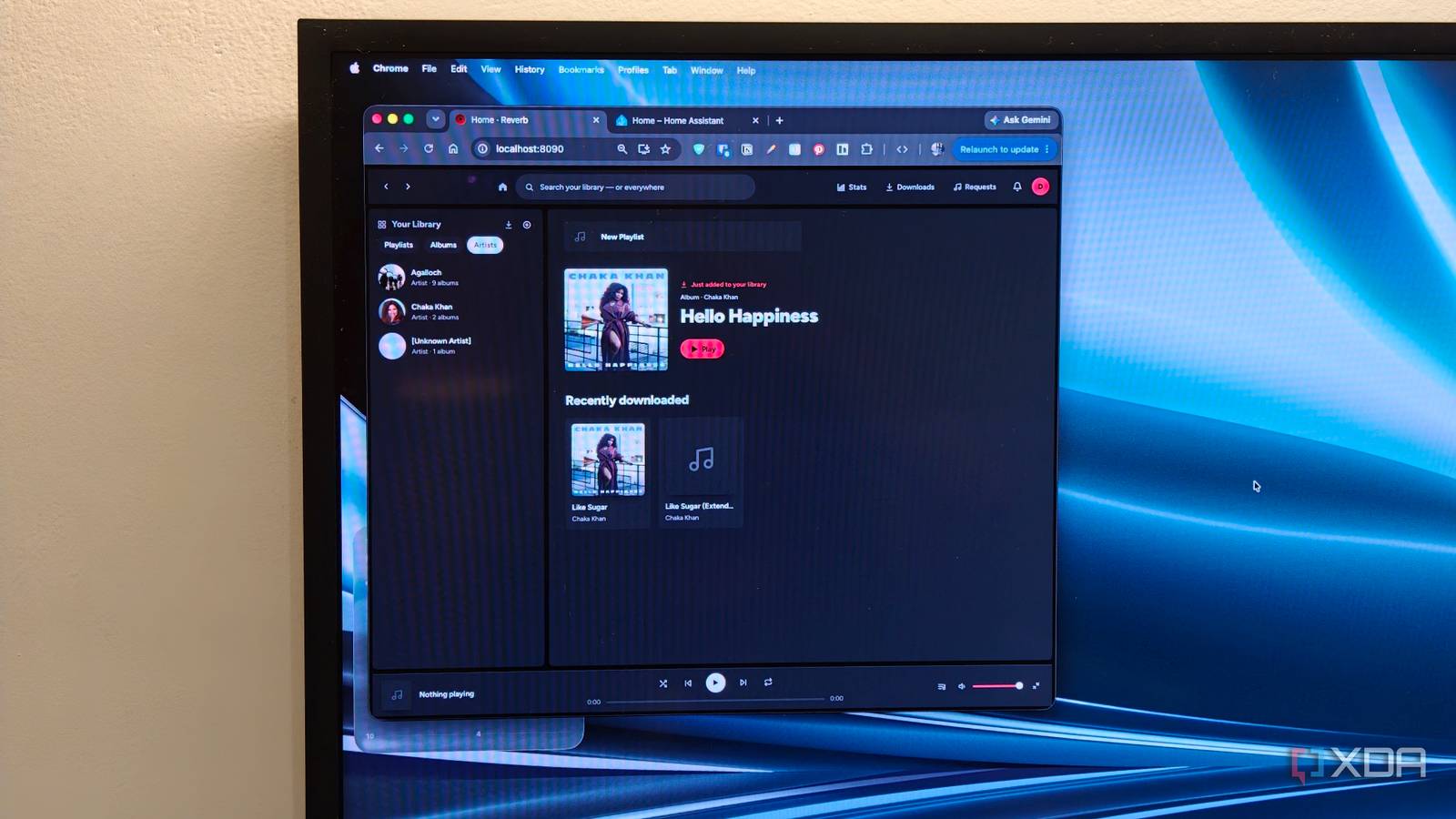
Published Aug 10, 2026, 2:00 PM EDT Dhruv Bhutani has been writing about consumer technology since 2008, offering deep insights into the personal technology landscape through features and opinion pieces. He writes for XDA-Developers, where he focuses on topics like productivity, networking, self-hosting, and more. Over the years, his work has also appeared in leading publications such as Android Police, Android Authority, CNET, PCMag, and more. Outside of his professional work, Dhruv is an avid fan of horror media spanning films and literature, enjoys fitness activities, collects vinyl records, and plays the guitar. Working remotely, one of my favorite things to do is to crank up my favorite artist every morning when I sit down at my desk. It'd explain my hundreds of thousands of listens on Last.fm. Of course, in the spirit of self-hosting everything, I've moved most of my music library to a self-hosted setup. Between Navidrome and Plexamp, I can comfortably stream on every device I own without paying a dime. The only downside is that the music selection is only as good as the music curation. Anytime I discover a new song or artist, or someone recommends one to me, I usually look for ways to add it to my music collection. It's a fairly long-winded process in today's world of automation. So, when I came across this open-source app called Reverb, I was instantly curious. The app claims to integrate with Navidrome and lets you grab fresh music straight from a single unified interface, with no extra dependencies. It's the one feature I was missing in my self-hosted setup, so I decided to give it a shot. Getting started takes very little effort Use your existing library or start fresh; it's your call Before we dive into the software itself, it's worth calling out that the developer has done an incredible job of combining a range of dependencies, including its own Navidrome instance and YouTube-DL, into what is basically a single-command installation. Reverb includes a beautifully designed and, more importantly, well-explained process that lets you get started with the right settings practically instantly. With that said, let's talk about using Reverb. There are two ways to use the service. You can point it to an existing Navidrome instance on your server or run an isolated instance. It's totally your call, and you don't miss out on any features. I decided to start off with a fresh instance, copying a few albums over to make sure my main library remained untouched. I needn't have worried. Within seconds, Reverb scans through the metadata and presents the artists and albums within the interface. Moreover, it is verbose in explaining that it has matched the artists and albums to online metadata sources. Regarding metadata, Reverb relies on Deezer's API to pull in the correct metadata. You can start playing your music right there in the interface, of course. That said, the real reason to install Reverb isn't the music player. I'd argue standalone Navidrome does a better job at that. Instead, it's Reverb's ability to fill in the gaps. Here's how that works. Universal search finds missing music in your library Spotify playlist sync makes it a cinch to switch Reverb uses the concept of universal search. When you search for an artist or a song, it'll first search through your personal library. If it can't find the track, the app automatically populates results from Deezer. When you click one of these results, the app by default falls back to downloading and streaming the track from YouTube. It uses YT-DL in the background to fill in the gaps, so you know that it's going to be a very reliable experience. You can also configure SpotDL with your API key details to use that as a fallback. Like Reverb's integration with an existing Navidrome instance, it offers a lot of flexibility. You can tap into an existing Lidarr instance as your preferred source for media. Similarly, the app can scrobble your metadata to Last.fm to keep you on top of your stats. The other feature I found very interesting is that you can connect your Reverb account to Spotify. The app lets you sync your playlists from Spotify to Reverb one time. But that's not all. If you subscribe to a weekly playlist, you can use the app to auto-sync and refresh it as well. Reverb will automatically download fresh tracks anytime the playlist gets updated. It's pretty cool. It's worth noting that, although the app uses your own YouTube cookies and Spotify API keys, it sits in a bit of a morally grey area. While it offers no file-sharing capabilities, you should know if you're allowed to archive tracks for your own use before using the app. Elsewhere, the audio quality isn't the best. Personally, my music collection is an archive, and I try to keep my music at the highest quality I can buy or rip from a CD. Reverb, on the other hand, largely rips it from YouTube. I might use it to fill in a random playlist, but if there's a track or album I really enjoy, I make sure to purchase it and upgrade the audio quality while at it. Finally, the developer expects the app to be used in a multi-user environment. To that effect, secondary users can be restricted from downloading music. Instead, you'll find a request-based system in which the admin must approve a download request. I like that, as it prevents others from messing with my carefully curated library. The missing element in my self-hosted music setup At its core, Reverb is an expansion of Navidrome that allows downloading music directly from the same interface. But it goes a step further by integrating the entire experience and packing it beautifully. Anytime I want to listen to a new track, I just search for it as I would on Spotify instead of jumping through hoops, and that's dramatically reduced the friction I used to face with my self-hosted setup. If you are self-hosting your music setup, it might be worth experimenting with the app to see if it can help you fill in the gaps. It's certainly helped me. Reverb Reverb is a self-hosted music playback and discovery platform that can auto download music from YouTube.
I built a Spotify killer that fills in my self-hosted music library automatically
Full Article
Original Source
Read the full article at Xda-developers →KhanList aggregates and links to publicly available news content. We do not host full articles from third-party sources. Always verify important information with original sources.