
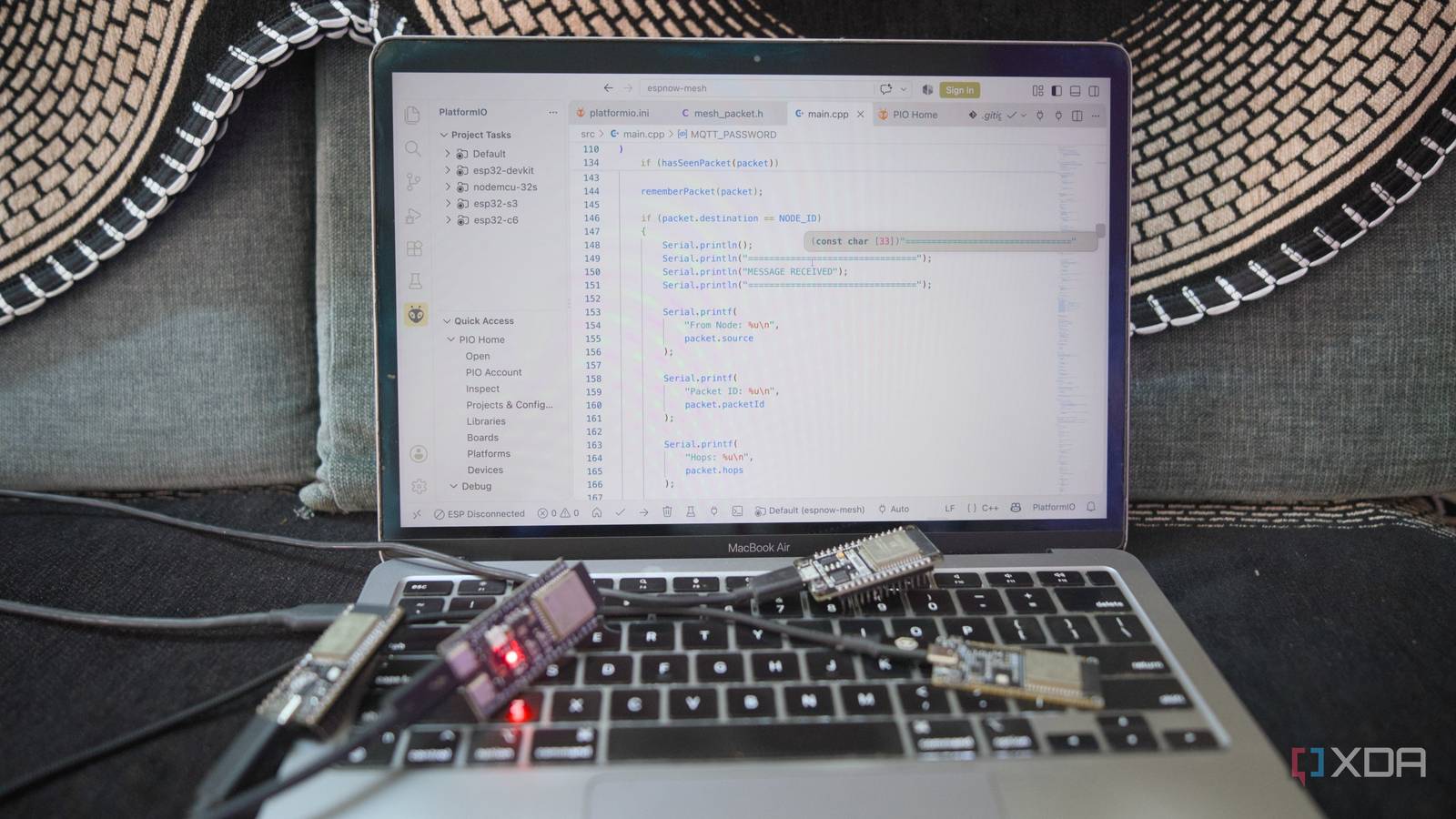
Published Sep 30, 2026, 8:00 AM EDT Samir Makwana is a technology journalist and editor from India since past 18 years and his work appears on MakeUseOf, HowToGeek, GSMArena, BGR, GuidingTech, The Inquisitr, TechInAsia, TechWiser, and others. He has written news, features, and gadget reviews for national technology media publications. His passion is to help people with their technology problems and gadget purchases. For that, he has worked for some of the biggest international technology publications, covering news, explainers, how-to guides, listicles, and product-buying guides. He has worked as an editor and managed teams since 2015. His expertise broadly covers computers, smartphones, game consoles, headphones, smart home products, browsers, and apps. I’ve got a few ESP32 boards sitting in a drawer, left over from past projects and doing nothing. Meanwhile, a few sensors stationed around the house struggle to report back because of a Wi-Fi coverage problem. A motion and light sensor in the other bedroom would drop off some evenings and turn into decorative pieces. I’d priced out a mesh Wi-Fi upgrade before I realized that the fix was already sitting in my drawer. The spare ESP32 boards just needed to talk to each other without a Wi-Fi network. My Wi-Fi coverage problem wasn’t the router I ruled that out before touching the ESP32s I run an ASUS RT-AX88U, and it’s not a weak Wi-Fi 6 router, so the hardware wasn’t the issue. The problem was its placement in my bedroom, right next to my desk, which left the living room and the other bedroom with patchy coverage. Some Zigbee-based lights stayed connected fine, but the Wi-Fi-dependent sensors struggled to stay online. This wasn’t the usual “my Wi-Fi is bad” complaint. Two specific spots in the house never got a clean signal. A mesh Wi-Fi setup would have cost me around $150, which is more than I wanted to spend. I considered relocating the router to a better spot, but running new Ethernet and even a power point wasn’t happening. So, I dug out my old ASUS RT-AC66U router as an access point, but I couldn’t wire it to my main router, and it still needed a back haul connection I didn’t have there. A range extender was the cheapest option, but I’ve used one before, and the slower speeds on an extended network aren’t worth it for sensors that barely need any bandwidth. ESP-NOW skips Wi-Fi entirely Four different boards for one project ESP-NOW is a protocol built into the ESP32 that lets boards talk directly to each other without needing Wi-Fi connectivity. So there’s no password, no router, and no network to join. Every message that the boards pass between each other can be about 250 bytes, which is more than enough to include sensor data. The catch is that ESP-NOW only reaches boards within radio range, so it doesn’t automatically relay a message across the whole house. To get a message from one end of the mesh to the other, I had to write a small relay protocol on top. Every message that isn’t addressed to it is checked to see whether it has already seen the same ID. If not, and the hop counter hasn’t hit its limit, it bumps the counter and rebroadcasts the message for the next board to pick up. That’s the entire mesh logic. Rebroadcast the message once, ignore duplicates, and skip a handful of hops, so messages don’t circle the house forever. I used an ESP32 DevKit, a NodeMCU-32S, an ESP32-S3, and an ESP32-C6, all mixed together to form the mesh network. Using a single PlatformIO IDE project in VS Code, I set up a separate build for each board type, differentiated by a single ID number. In the end, I flashed the same code four times and never touched the actual sketch. Thanks to the Serial Monitor, I could test the flashed boards before attaching any sensors. Sending a message to a specific board or broadcast it to all of them at once. I added a few-millisecond delay before each rebroadcast so boards that hear the same message at the same time don’t all shout it back simultaneously. One board talks to the Home Assistant server The gateway board is the only one on Wi-Fi Only one board joins my home network. It listens to the mesh like the others, but when a message arrives, it forwards it over to MQTT to the broker already running in Home Assistant. MQTT is a lightweight messaging protocol that Home Assistant already understands, so each message becomes a readable entity with just a short config entry. Since this gateway board follows my router’s Wi-Fi channel, every other board needs to match it, or they won’t hear each other. I’ve set my router’s 2.4Ghz band to channel 6 and matched all the boards to it. Other boards stay off Wi-Fi completely, which keeps their code short and simple. Dropouts don’t take down the mesh network Messages look for another path Every board is part of the mesh network, and each one of them rebroadcasts a message along whichever route is available. If one board goes offline, a neighboring board within range still carries the message forward. I pulled out the ESP32-C6 to test, and the message still got forwarded. One thing I miss is a delivery receipt. A message occasionally goes missing, since ESP-NOW broadcasts don’t confirm delivery. But because the boards report fresh data regularly, a lost message gets corrected in the next report and doesn’t pause the system. I’m holding off on buying another smart device If I find a new dead zone in my home, I’ll flash another spare board with the next ID and drop it into place. The boards that were doing nothing in my drawer are doing real work now, and the only thing this project cost me was time spent troubleshooting and building it. This project helps me skip the need to shop for another expensive device that just tethers to the same router.
I built a mesh network from old ESP32 boards instead of buying a new router, and my smart home coverage is better now
Full Article
Original Source
Read the full article at Xda-developers →KhanList aggregates and links to publicly available news content. We do not host full articles from third-party sources. Always verify important information with original sources.