
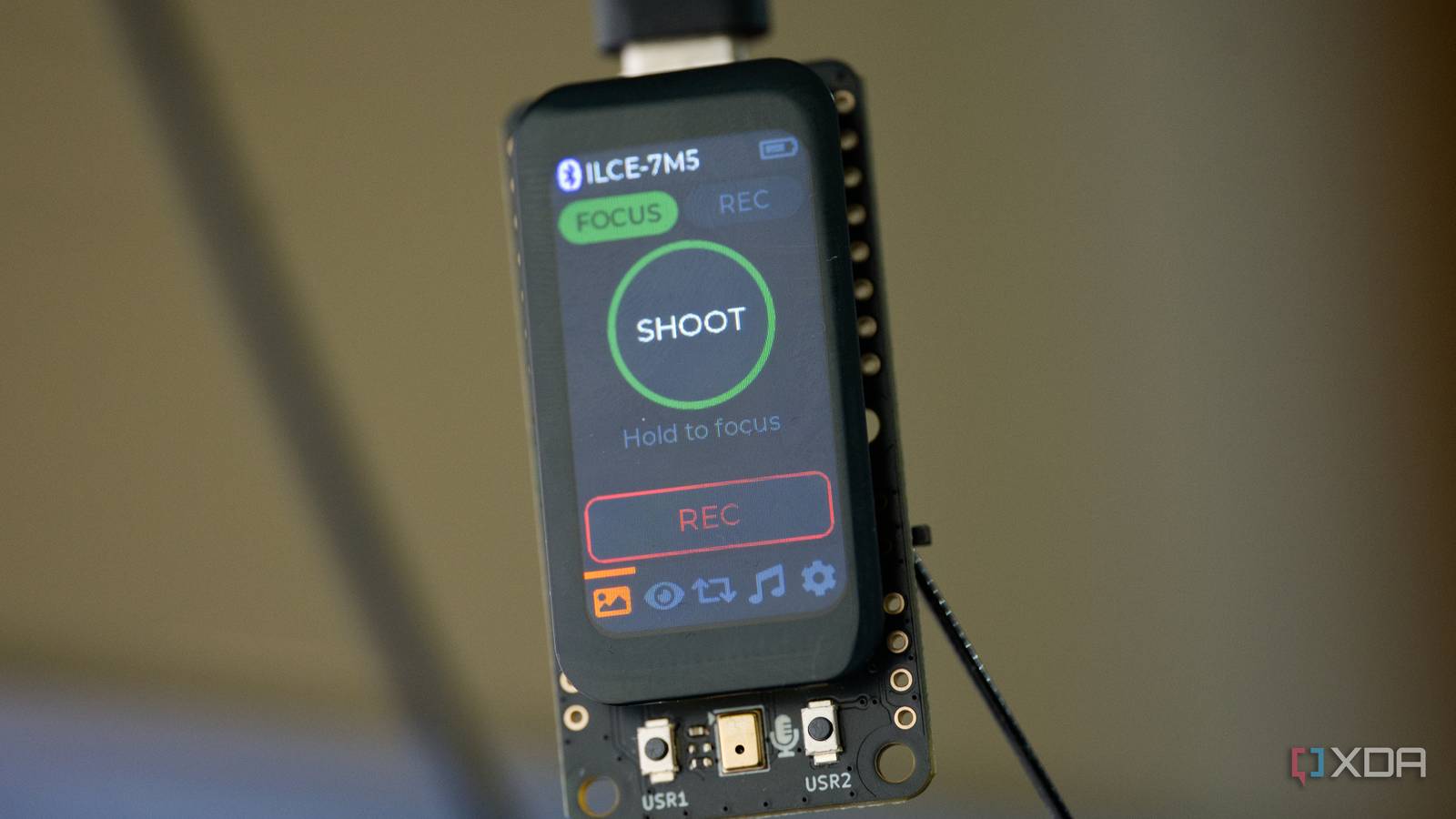
Published Nov 29, 2026, 3:30 PM EST I’m Adam Conway, an Irish technology fanatic with a BSc in Computer Science and I'm XDA’s Lead Technical Editor. My Bachelor’s thesis was conducted on the viability of benchmarking the non-functional elements of Android apps and smartphones such as performance, and I’ve been working in the tech industry in some way or another since 2017. In my spare time, you’ll probably find me playing Counter-Strike or VALORANT, and you can reach out to me at adam@xda-developers.com, on Twitter as @AdamConwayIE, on Instagram as AdamConwayIE, or u/AdamConwayIE on Reddit. Sign in to your XDA account Sony's RMT-P1BT Bluetooth camera remote launched for $80 in 2019, and it doesn't really do a whole lot. It has a shutter button, a record button, zoom and focus controls, AF-ON and C1 buttons, and a single LED. For what it is, it works well, but it has no way to automate any of those controls, and a single LED is the only feedback you get from the camera. However, utilizing a cheap ESP32 board and some reverse-engineered Bluetooth commands, I was able to build something a whole lot better. That "something" was built on Seeed's XIAO 1.47-inch Touch Display, a $19.90 ESP32-S3 board with a touchscreen, two physical buttons, and a microphone. It supports Bluetooth Low Energy, the same protocol as Sony's remote, meaning that my a7 V pairs with it like any other device through the native Bluetooth remote control menu. I've implemented all the usual camera controls, along with live focus and recording indicators, programmable shooting intervals, timed long exposures, and automatic video recording. I can even take a photo by clapping twice. Everything here runs on the ESP32, which allows me to work around some limitations of the camera's built-in shooting modes without relying on a smartphone app. I can't change camera settings remotely, but you can still do quite a lot by automating the same commands that Sony remote can send. XIAO 1.47-inch IPS Display (ESP32-S3) The XIAO 1.47-inch IPS Display packs an ESP32-S3, two buttons, a display, and more into one tiny package. About this article: Seeed Studio sent us the XIAO 1.47-inch IPS Display for the purposes of this article. The company had no input into its contents. A $20 ESP32 board has nearly everything I need A touchscreen, microphone, and physical buttons on one board The XIAO 1.47-inch IPS Touch Display from Seeed Studio is built around the XIAO ESP32-S3 Plus, packing 16MB of flash storage, 8MB of PSRAM, and a 172x320 touchscreen. The board itself is tiny, coming in at just 26.4x51.4x12.6mm, and it's less than half the length of Sony's RMT-P1BT. Despite how small it is, it has two physical buttons, a PDM microphone, an LSM6DS3 motion sensor, a microSD slot, and a JST connector for a LiPo battery. It's more than enough hardware for some decent firmware. If you wanted to turn this into a truly portable remote, you'd have to bring your own LiPo battery and make an enclosure for it, too. If you have a 3D printer, there's a community-designed enclosure endorsed by Seeed that you can 3D print. On top of that, there's no on-board charging status signal, so I implemented the on-screen battery gauge using voltage readings from a divider connected to one of the ESP32's analog inputs. To get it up and running, I wrote the firmware in Espressif's ESP-IDF framework with LVGL to build the interface, rather than using Arduino and Seeed's Seeed_GFX2 library. For the AXS5106L touch controller, I wrote my own driver adapted from Seeed_GFX2. While there are already ESP-IDF components published that can do this, they're a lot larger than we needed here. As for the JD9853A controller, I adapted the display initialization sequence from Seeed's library, as it understands ST7789 commands but requires vendor-specific configuration. The display and microSD slot share an SPI bus, while the touch controller and motion sensor share an I2C bus. To get this much hardware on one small board does reveal a handful of constraints, though. While routing serial console through the native USB interface is quite common for the ESP32-S3 anyway, the usual UART pins are actually used by the touch interrupt and the microSD chip select. Right now, I don't use the motion sensor or a microSD card, so there's definitely more I could explore with this in future. My camera thinks it's talking to Sony's own remote Years of reverse engineering made this possible There's no official documentation from Sony on how its Bluetooth protocol works, but developers have been reverse engineering parts of it over the years. In January 2021, Mark Kirschenbaum at HYPOXIC documented how Sony cameras advertise themselves over Bluetooth, and later that year, Greg Leeds captured Bluetooth traffic between a third-party JJC remote and his a6100 to identify how button commands are sent. Finally, I found the freemote project by coral, targeted at the nRF52840, as it documents the status messages that the camera replies with. My implementation builds on all of that previous work (rather than having to work it all out myself), while also fixing some other quirks along the way. My camera exposes a Bluetooth Low Energy (BLE) service with two useful GATT characteristics. The first can receive two or three-byte commands representing button actions, such as pressing the shutter halfway, releasing it completely, or zooming towards the telephoto end of a lens at a specified speed. On the camera, these are then implemented as press and release commands. The second characteristic sends notifications back to the remote when the camera acquires focus, fires the shutter, or starts or stops recording. Those notifications enable my remote to do a lot more than just emulating a set of buttons. To discover Sony cameras, the ESP32 looks for Sony's BLE advertisements, which contain Sony's own Bluetooth identifier and a flag that says whether the camera is accepting new pairing requests. When I enable Bluetooth remote pairing on my a7 V, the ESP32 spots it right away, sending a pairing request that I can accept on the camera. There were some interesting quirks along the way, and the most interesting one came about from my pairing implementation. Even though it's the ESP32 that initiates the Bluetooth connection to the camera, acting as a GATT client, it turns out that the camera also needs to read the remote's device name before displaying a pairing prompt. As a result, I had to implement a small GATT server on the ESP32, too. Once that was in place, my a7 V showed a typical pairing prompt, and my ESP32 was able to reconnect automatically once it had been accepted. I implemented some basic failsafes and recovery mechanisms as well, just so the ESP32 can actually stay connected. For example, if the camera loses its pairing information, the ESP32 will detect the encryption failure, clear its own keys, and ask the user to pair again. If the camera rejects a connection attempt, the firmware will also use a short backoff period before trying again. My remote knows when the camera is ready to shoot Bluetooth notifications make automation possible Sony's cameras support status notifications, meaning that I can use those to determine when to send commands rather than simply relying on a predefined sequence of button presses. Pressing the shutter button from the ESP32 sends a half-press command and waits for the camera to say that it's acquired a focus. After that, it sends a full-press command and only releases it once it's confirmed that the shutter fired. If your camera struggles to focus, the ESP32 has a 1.5-second timeout, so a failed focus is going to lock up the remote and leave it waiting indefinitely. It's essentially an automated version of half-pressing the shutter, watching the LED, and then fully pressing it. I've packed a lot of functionality into that button as well, because I was having a lot of fun realizing all of the things I could do from an ESP32! If you press and hold it, it'll engage autofocus, then you can release it to take a photo, or you can slide your finger off the button to cancel the shot. The physical button also works, too: clicking once will take a picture, long pressing engages autofocus and shoots on release, and a double-click starts or stops video recording. On the screen, above the shutter button, I've put two separate indicators for the camera's autofocus and recording status. These are also controlled by notifications from the camera rather than assumptions made based on the last command that was sent. With this, I can tell if my camera is actually recording without having to look at the screen. There were some less obvious things I had to keep on, like how holding the shutter halfway will prevent the a7 V from starting a video recording. As well, shutter commands need to be released in a specific order, and a full press has to be released before a half-press. For manual-focus shooting, I've included an option to bypass the autofocus confirmation entirely, avoiding an unnecessary delay before taking each photo. I can automate my camera without modifying its firmware The ESP32 removes some of the camera's built-in limits There are some pretty annoying limitations when it comes to Sony's firmware, and this remote lets me get around quite a few of them. I've built five automated shooting modes: self-timer, interval, bulb, burst, and video clip. Each one's timing can be configured that on the screen, and the ESP32 handles everything once you've pressed the Start button. You can stop them by pressing a button on the board. My a7 V already has built-in interval shooting and bulb timer functions, with a maximum camera shooting interval of 60 seconds, a maximum of 9,999 photos per sequence, and a bulb timer capped at 900 seconds. With my remote, I can set an interval ranging anywhere from one second to one hour, without a shot count limit, and the shutter can be held open in bulb mode for up to an hour, too. I even made the self-timer more flexible, with time periods ranging from one second to 60 seconds instead of using Sony's predefined two-, five-, and ten-second options. I focused on building the interval mode around an actual shooting schedule, rather than introducing delays caused by the completion of one shot and the start of the next. Otherwise, you could accumulate drift over a longer period of time. As well, if the camera takes too long to take a shot and the firmware falls behind schedule, it resets its timing rather than attempting to catch up by firing several shots in rapid succession. Unlike the a7 V's built-in interval mode, which locks you out of the camera's menu, my implementation also keeps the remote's zoom, focus drive, AF-ON, and C1 controls available to use. Something the a7 V can't do out of the box is timed video recording. You can delay the start of the recording, but you can't set a specified time for when it should automatically stop. If you configure a duration for recording, the remote can start it, wait out the timer, then stop it, all automatically. Taking photos in bursst mode simply holds the shutter down for a specified duration while the camera is in continuous shooting mode, though some modes require more setup. That still requires enabling continuous shooting mode, and the same goes for bulb exposures. Sony's Bluetooth protocol doesn't expose commands for changing many of these settings directly, so the remote can't replace that. I can trigger my camera by clapping Two claps for a photo, three for video Remember how I mentioned that this board has features I'm not using yet? Well, the microphone was one of those as well, but I had an idea that I could quickly implement, and it ended up being a lot of fun to play around with. By clapping twice, you can take a photo, and clapping three times will start or stop a video recording. If I want to take a photo, I can trigger the shutter without even having to physically touch either the camera or the remote. The ESP32's job is to process samples in 10ms windows, filter out low-frequency noise, and calculate a decibel level that you can also see on the screen. The detection mechanism for claps is fairly rudimentary, as it groups consecutive threshold crossings that occur within 650ms of each other, so that different clap sequences can be identified. There's also 6dB of hysteresis, meaning that sound levels must fall below the threshold by at least 6dB between claps to be detected. In other words, it recognizes the loudness of a sound rather than explicitly recognizing the sound of a clap. You could trigger it just as easily by laughing in a certain way, for example, so it's not going to be fully accurate. You can set a custom trigger threshold by looking at the live sound meter on the device. To reduce power consumption, especially if used on a battery, the firmware will only use the microphone if the Sound tab is open or a sound trigger is armed. As well, because I ran into issues with having both the microphone and the display enabled, I had to reduce the GPIO drive strength of the microphone's PDM clock signal so that it didn't interfere with the display. That's another, often forgotten about consequence of having so many components packed into one board. There are still some things my remote can't do Lens compatibility and battery life are the biggest considerations In the Lens tab, you can control power zoom and electronic manual focus controls, and there are dedicated AF-ON and C1 buttons, too. Zooming requires a compatible power-zoom lens, and focus drive requires the camera to be in manual focus (MF) or direct manual focus (DMF) mode. I've labelled the controls as "In" and "Out", because Sony's protocol doesn't actually say which focus direction corresponds to nearer or farther distances. Battery life is a bigger issue, on both the camera and on the remote. We hold a persistent Bluetooth connection across both devices, and I only switch the backlight off on the ESP32 rather than drop the connection. It means it's ready to go as soon as you tap the screen to wake it up, but it'll drain any connected battery and the camera's battery, as Sony also disables automatic power-saving when a Bluetooth remote is connected. On top of that, the a7 V is only capable of connecting to one Bluetooth remote at a time, so you can't use my remote alongside an RMT-P1BT simultaneously. If you want to disconnect the remote, you can unplug it, or you can select "Forget camera" in the Setup tab. If you want to try this out on your Sony camera, it's available on my GitHub under the MIT license. While I've only tested it with my a7 V, it's a replica of Sony's own protocol from the RMT-P1BT, so it should work on any compatible camera including the a7 IV, a7C II, and the a6700, though I can't guarantee every feature will behave identically. Sony's own camera still has a number of key advantage dust and drip resistance, a proper enclosure, and it's designed to be somewhat rugged and tossed into a camera bag without needing to worry. What I love about this ESP32 remote, though, is how much functionality I can easily build on regular old Bluetooth commands. Combining those with feedback from the camera turned a $20 development board into a full on camera controller that can automate all kinds of camera-based workflows. Maybe I'll try to get it working with Home Assistant next.
I built a $20 ESP32 remote for my Sony camera, and it does more than Sony's $80 one
Full Article
Original Source
Read the full article at Xda-developers →KhanList aggregates and links to publicly available news content. We do not host full articles from third-party sources. Always verify important information with original sources.