
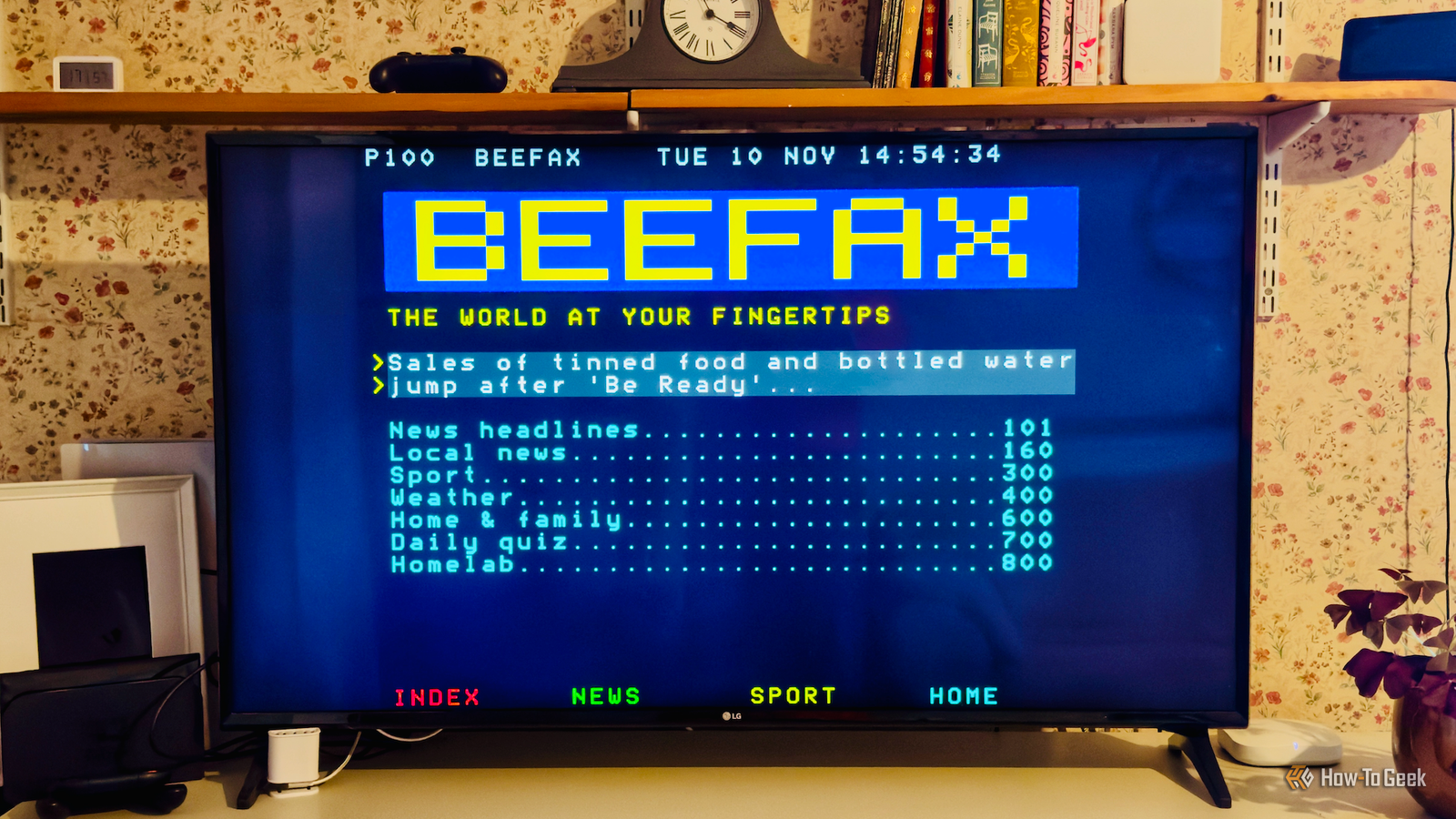
Published Nov 11, 2026, 2:00 PM EST Adam has a degree in Engineering and has a life-long interest in technology. He has been writing for over a decade for various print and online publications, with a focus on consumer tech. He joined How-To Geek in 2024 while working at Pocket-lint. As well as being a long-term fan of Apple products, he also has a strong interest in smart home tech, running a Home Assistant server at home to automate all his smart home devices. He believes that the ideal smart home should work with minimal interaction from the user, with automations running as if by magic rather than requiring you to push buttons on a control panel. You can find more of his work on Muck Rack. Reddit is full of posts from people who have designed yet another launcher for their rooted TV. There's so much more that's possible, however. I decided to bring back a TV feature from the good old days before the internet was even a thing, and it's become a genuinely useful part of our lives. Teletext was the internet before there was the internet I wanted to bring back something modern TVs have lost Credit: North American Teletext Archive Long before the internet was a thing, you could get up-to-date information through your television. Teletext was a system that could hide packets of data in the unused portions of a TV broadcast signal. These packets could be decoded and converted into text that would appear on the TV screen. The system was very popular in the UK and Europe in the 80s and 90s but never caught on in the same way in the US. One of the longest-lived US teletext services was Electra, which started life on local stations before being picked up for broadcast around the nation. Anyone with a suitable TV or decoder could access news, weather, sports, and more. My personal teletext system runs locally The pages look old, but the data is fresh I didn't create my personal teletext system by myself, because it was far quicker to get an AI tool to help. Whatever your opinions on vibe coding, it can be a great way to build your own projects that might not otherwise be possible or would take an age to complete. If it's your own vibe-coded project running on your local network, then it's not harming anyone else. A small service runs on my home server that gathers information from various sources such as news feeds and Home Assistant. It's written in Python, running in a container in Proxmox on my old Dell OptiPlex PC. The frontend runs in an app installed on my rooted LG TV. It's designed to look like teletext services of old, with a 40-column, 25-row layout and bright primary colors against a black background. Each page has its own number that you can navigate directly to using the numbers on the TV remote, as well as sub-menus you can access via the red, green, yellow, and blue buttons. If you're wondering why those buttons exist, they were originally intended to make navigating teletext faster, so it's good that they're finally getting used for their original purpose again. As well as using the page numbers and sub-menus, you can also navigate through the screen using the arrow buttons. You can select specific pages to open, without needing to enter their page numbers. My family can look up information without phones or tablets It covers school lunches, trash collections, and more My teletext system includes a lot of things that I used to use it for in my youth. There's a section for the main news headlines and another for local news. The section I used most back in the day was the sports pages, so I recreated it with the same page numbers that I remember from the old days, and added a dedicated section for my favorite team. While all of this is great, what makes my teletext system really useful is that I've been able to include personal information pulled from Home Assistant. For example, there's a page that shows the kids what school lunches are booked for them this week, another page that shows which garbage collection is due this week, and another that shows the current energy prices as well as the cheapest upcoming times. It's become a genuinely useful way to access information. The kids can find out what they have for lunch without having to look on a phone or tablet, and it's a quick way to catch up on the news and sport without getting sucked into doomscrolling. Old tech is surprisingly useful in a modern home Sometimes a simple option is the best I decided to see if I could recreate teletext just for a bit of fun, but it turned out to be incredibly useful. We spend a lot of our lives sitting in front of the TV, and it's quick and easy to pick up the remote, open the teletext app (which has its own dedicated button on my remote) and browse through the information. I've added more pages as I've gone along, including a list of upcoming birthdays, a family noticeboard, and a house status page that shows the states of various devices and the temperatures of the different rooms. My favorite addition is a multiple-choice quiz similar to the one that I used to do back when teletext was still a thing. Using new tech to revive old tech There's something oddly satisfying about using a powerful AI coding tool to recreate technology from almost 50 years ago. While there have been incredible technological developments in that time, it goes to show that sometimes the old methods are still the best.
I brought a forgotten 1980s TV feature back to life and it's just as good as I remember
Full Article
Original Source
Read the full article at Howtogeek →KhanList aggregates and links to publicly available news content. We do not host full articles from third-party sources. Always verify important information with original sources.