
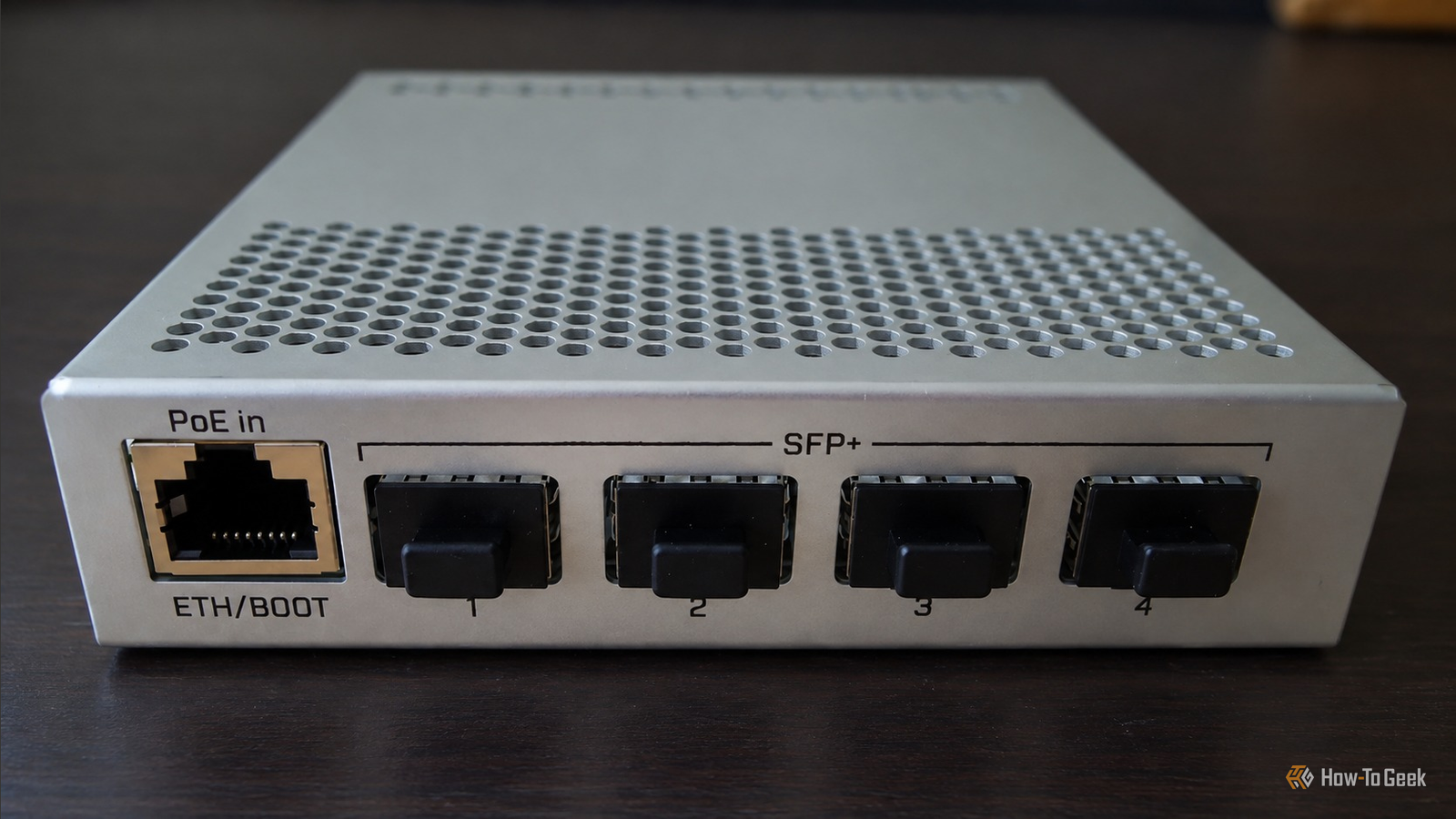
Published Sep 21, 2026, 7:00 AM EDT Umair Khurshid is a technology writer and developer with a strong focus on Linux, FreeBSD, cloud infrastructure, and automation. Before focusing on writing, Umair worked as a developer and DevOps engineer building and automating cloud-native systems. Buying a 10GbE switch for a network where almost everything still runs at 1GbE sounds unnecessary. If your computers, access points, printers, and other devices still have Gigabit Ethernet, spending money on a 10GbE switch can look like buying hardware for a problem you do not have. That was my situation, and I still bought a 10GbE switch. My network did not need a complete 10GbE upgrade The switch can be faster than the devices connected to it A network does not have to operate at one universal speed. A Gigabit Ethernet device connected to a 10GbE-capable switch still establishes a 1GbE link. The device does not become faster, but it continues working exactly as before. The useful part is that 10GbE-capable devices can use their faster links without requiring every other device to be upgraded. I got a good old CRS305. It is particularly suited to this approach because it has four SFP+ ports capable of 10GbE alongside a single Gigabit Ethernet port. It is not designed to replace a conventional 8-port or 24-port Gigabit switch. It can instead sit alongside an existing network and provide high-speed connectivity for a smaller number of devices. That is exactly how I am using it. Most of my network devices do not need 10GbE. My storage and servers are a different story. Moving a large dataset between a workstation and a NAS can saturate a 1GbE connection very easily. The same applies to copying virtual machine images, restoring large backups, or moving files between servers. Those workloads don't automatically get faster with a faster Ethernet link. The storage system still has to keep up, and the CPU, filesystem, protocol, and disks can all become limiting factors. Once the storage can deliver more than 1GbE, however, the network should not be the component holding it back. 1GbE Ethernet link has a theoretical maximum of 125 MB/s (85–90 MB/s in my experience) before protocol overhead and other factors. That is enough for most everyday network activity such as web browsing, streaming media, printers, and many ordinary file operations, which do not come close to saturating it. Large storage transfers are different. If I am moving large files between a workstation and a NAS, the network can become the limiting component long before the storage system reaches its own limits. A 10GbE link raises the network ceiling to roughly 1.25GB/s (you will get around 1–1.2GB/s in the best case). That does not mean a NAS will automatically deliver 1.25GB/s. A hard drive array may not sustain that rate for every workload. The important part is that the network has considerably more capacity available. If the storage can deliver 300, 500, or 800MB/s, I would rather have enough network bandwidth to exhibit that performance than have Ethernet impose an 85–90MB/s ceiling. That said, I would not suggest getting 10GbE when it is clearly overkill. If your NAS uses hard drives that max out at around 150MB/s, for example, a 10GbE link will not make those transfers any faster. In that case, the network is not your bottleneck, and the money is better spent on storage or left in your pocket. Virtualization makes 10GbE more useful Hypervisors can generate much more network traffic than file copies 10GbE is not only useful when I am copying large files to a NAS. A virtualization host can generate substantial network traffic during routine operations. I run Proxmox across multiple nodes, and live migration moves a running VM’s memory and storage data between hosts. ZFS replication also generates large send and receive streams, while VM templates and images stored on NFS or iSCSI can also move significant amounts of data across my network. Moving a large VM disk or replication stream over a 1GbE link takes a long time and also competes with other network traffic. Using a 10GbE link, the network is rarely the bottleneck. This matters for me because I usually automate my virtualization workloads, and faster migration and replication make it more practical to move VMs between hosts, replicate datasets, refresh test environments, and perform large backup operations without tying up a Gigabit link for extended periods. The CRS305 has plenty of switching capacity The switch itself is not the bottleneck The CRS305 has four 10GbE SFP+ ports and one Gigabit Ethernet port. It has around 41Gbps of non-blocking throughput and 82Gbps of switching capacity for the device. Those specifications describe the switching hardware rather than the speed of an individual endpoint. A 1GbE client remains limited to 1Gbps. A 10GbE client can use its faster link. The switch needs enough internal capacity to move those flows without becoming the limiting component. This becomes relevant when several devices are communicating at once. A NAS might be serving files to one workstation while another machine performs a backup and a server communicates with several clients. Each endpoint remains limited by its own link speed, while the switch provides considerably more aggregate capacity. For my setup, that is more useful than replacing every Gigabit interface simply to get a higher number on the network diagram. I can upgrade individual machines later I can choose the physical connection that fits the setup The CRS305 does not use four ordinary RJ45 10GbE ports. It uses SFP+, you might think it is less convenient because most of your equipment uses standard Ethernet cables. In practice, SFP+ gives me several options. For short connections between nearby equipment, a passive DAC cable is convenient. Fiber can be used for longer runs, and compatible SFP+ copper modules can provide RJ45 connectivity where necessary. That flexibility is useful in a homelab because I am thinking about changing the physical layout next year and doing a makeover, and the same SFP+ switching hardware can accommodate different connection types depending on the distance and equipment. If a computer primarily accesses the internet and occasionally prints a document, there is little reason to give it a 10GbE connection. If another machine constantly moves large datasets to a NAS, that machine is a much better candidate. The switch lets me make those upgrades based on workload rather than simply replacing hardware because a newer specification exists. I should also mention the alternatives I tried before settling on a switch. I experimented with a Thunderbolt-to-10GbE adapter and with direct-attach copper between two machines without a switch. Both approaches have their place, but neither worked well for me. The Thunderbolt adapter was limited to the machines that had Thunderbolt ports, and it added another piece of hardware to manage. Direct-attach copper worked for a single point-to-point link, but it did not scale once I wanted more than two devices talking at 10GbE, and it left me without a central place to manage those connections. My 1GbE network is still mostly a 1GbE network After installing a 10GbE switch, most of my network can remain exactly as it was. The devices that only need Gigabit connectivity continue using Gigabit connectivity. The router does not need to become 10GbE. My internet connection does not need to change. What changes is the path between the devices that generate large amounts of local traffic. I did not need a 10GbE network everywhere; I just needed a faster section of the network where a Gigabit link had become an obvious limitation. For a homelab, that is a practical way to adopt 10GbE without replacing hardware that still does its job. Keep the existing Gigabit equipment, connect the demanding devices at 10GbE, and upgrade additional endpoints when the workload justifies it.
I bought a 10GbE switch for my 1GbE network, and it’s not as crazy as it sounds
Full Article
Original Source
Read the full article at Howtogeek →KhanList aggregates and links to publicly available news content. We do not host full articles from third-party sources. Always verify important information with original sources.