
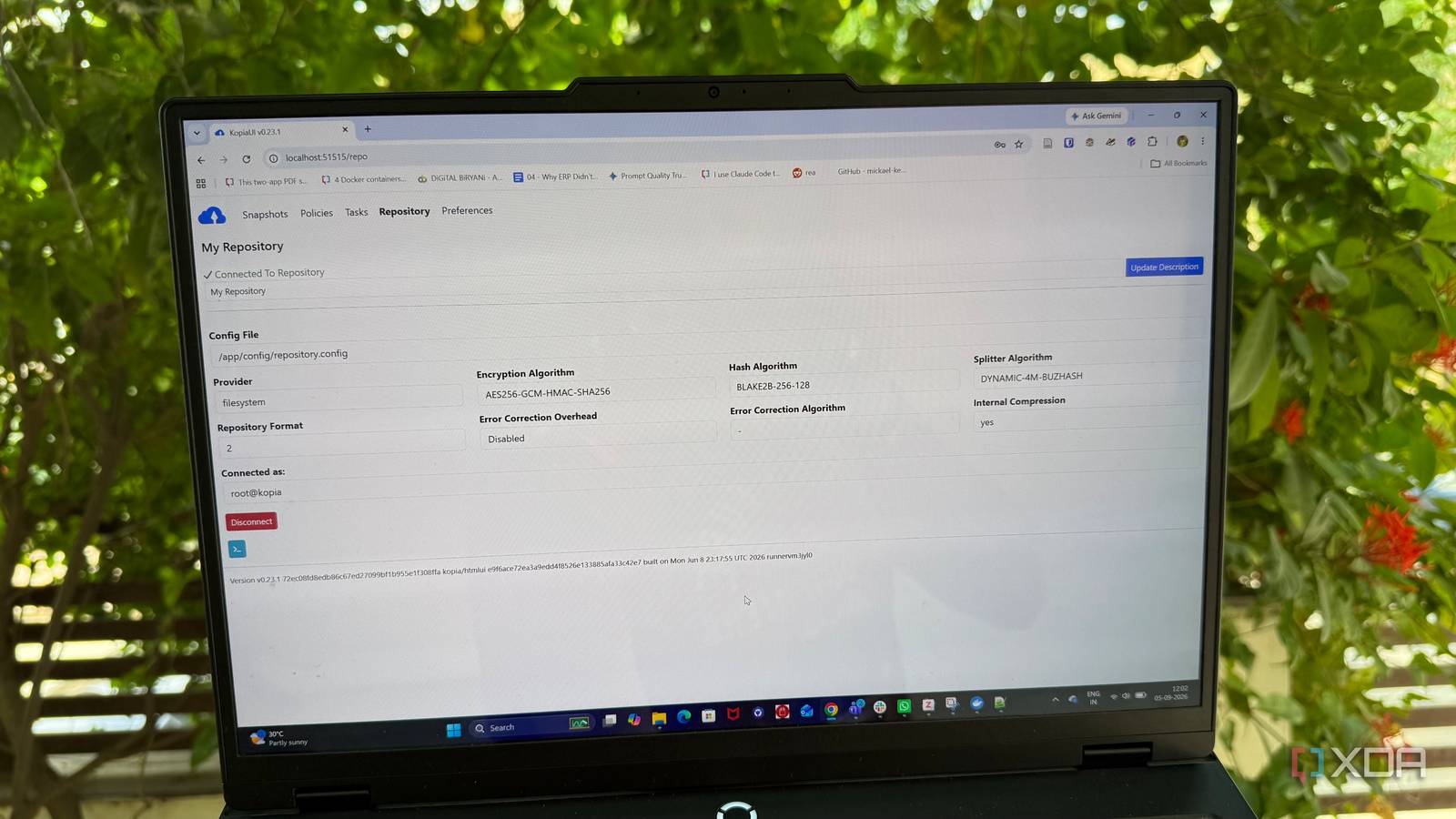
Published Sep 5, 2026, 7:01 PM EDT Beginning his professional journey in the tech industry in 2018, Yash spent over three years as a Software Engineer. After that, he shifted his focus to empowering readers through informative and engaging content on his tech blog – DiGiTAL BiRYANi. He has also published tech articles for MakeTechEasier. He loves to explore new tech gadgets and platforms. When he is not writing, you’ll find him exploring food. He is known as Digital Chef Yash among his readers because of his love for Technology and Food. Sign in to your XDA account I love the freedom of self-hosting, but it also means I am responsible when something goes wrong. As my Docker setup grew, I started thinking more about how easily a failed drive or bad update could cause problems. I wanted backups that could run quietly without adding more work to my routine. And for that I had to replace my temporary script-based backup approach. That's when I set up a backup strategy for my Docker services to protect the data I actually care about. I also introduced a self-hosted backup tool into my workflow to automate the backup process. My self-hosted services had become too important to ignore The containers were replaceable. The data wasn't. When I first started self-hosting, I didn't have much data to worry about. Most of the services I ran were experiments or tools I could easily reinstall. If something went wrong, I could rebuild the container and move on. That changed as my setup grew. I started using self-hosted services for things I actually relied on every day. My documents, photos, notes, and other personal files were no longer scattered across random folders on my PC. They were sitting inside services I had spent time configuring and organizing. The containers themselves weren't what worried me. I knew I could recreate most of them. What bothered me was the data sitting behind them. Losing a container would be annoying. Losing years of photos, documents, or service data would be a completely different problem. At that point, treating backups as something I could worry about later didn't make sense anymore. My old backup routine wasn't working I knew, but I always procrastinated My old backup routine was simple: I would copy important Docker folders to another drive whenever I remembered to do it. It worked for a while, but I couldn't rely on it. If I was busy with work or setting up another service, backups were easy to forget, and sometimes weeks would pass before I made another copy. With multiple Docker services using different volumes and directories, it also became difficult to keep track of what I had backed up and when. I eventually wrote a script to partially automate the process, but as my stack grew, that approach started to feel like another thing I needed to maintain. That's when I moved to Kopia. I automated the whole backup process Backups on autopilot I decided to use Kopia for backups instead of building a complicated setup myself. I installed it alongside my Docker services and pointed it at the folders that actually contained my important data. The setup was fairly straightforward. I created a backup repository and configured Kopia to snapshot my selected folders. These snapshots gave me different versions of the data instead of keeping just one copy. I also set a schedule, so the backups could run automatically. I didn't need to open the backup tool or start anything manually. Once everything was configured, it could run in the background while I continued using my services normally. Another thing I liked was that Kopia only needed to deal with the data that mattered. I didn't have to back up the Docker containers themselves or waste storage on files that could easily be recreated. I also enabled encryption for the backup repository. That gave me another layer of protection without adding extra steps to my daily workflow. The biggest change was simple: the backup process finally became part of my setup rather than another task on my to-do list. Backups are no longer a headache Adding services no longer worries me This has made adding new services much easier for me. Earlier, every new Docker container came with another small worry: where does its data live, and how do I protect it? Now, I have a backup setup I can build around. When I deploy a new service, I only need to make sure its important data is stored in a location covered by my backup setup. After that, I don't have to create a separate backup routine for that service. It has also changed how I manage my self-hosted stack. I can experiment with new services without worrying that one mistake will leave me with no way back. I still keep an eye on my backups, but I don't constantly think about them. That's probably the biggest improvement for me. Backups have gone from something I had to remember to something I can simply rely on as part of my setup. I wish I had done this earlier The biggest lesson I learned is simple: backups are much easier to set up than to recover from data loss. Kopia gave me a simple way to protect the data behind my Docker services without adding another complicated system to manage. I don't think backups need to be perfect from day one. They just need to be reliable enough to get you back when something goes wrong. If you have important data sitting inside your self-hosted services, setting up backups is one task worth doing before you actually need it.
I automated backups for my self-hosted services, and I finally stopped worrying about data loss
Full Article
Original Source
Read the full article at Xda-developers →KhanList aggregates and links to publicly available news content. We do not host full articles from third-party sources. Always verify important information with original sources.