
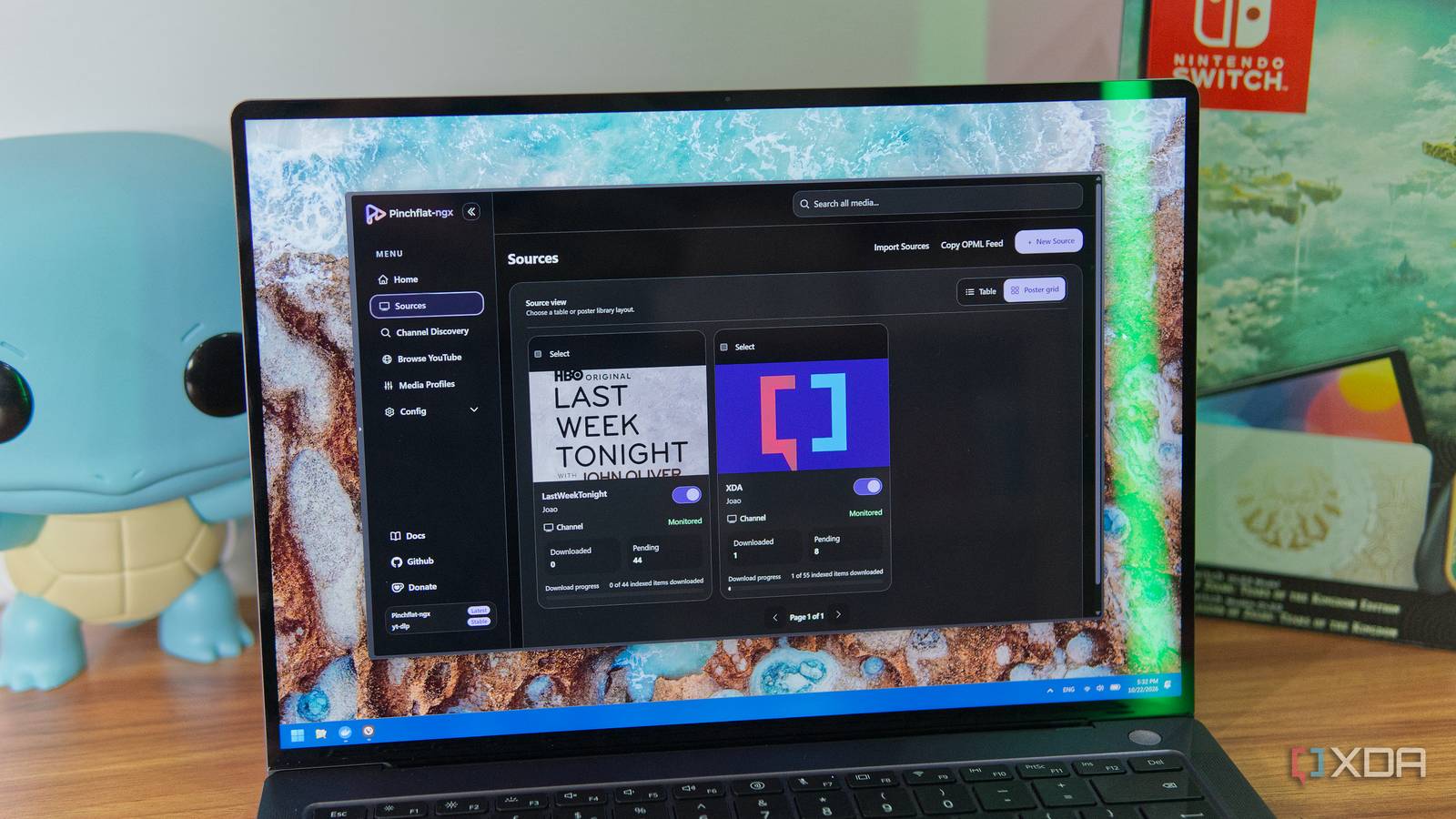
Published Oct 23, 2026, 10:00 AM EDT João has been covering the tech world for over 7 years, with a heavy focus on laptops and the Windows ecosystem. I also love all things tech and videogames, especially Nintendo, which he's always happy to talk about. Prior to joining XDA in 2021, he worked at Neowin: https://www.neowin.net/news/poster/jo%C3%A3o-carrasqueira/ If you're interested in archiving YouTube videos from your favorite channels, there are multiple ways to do it, but one of the more popular options used to be Pinchflat. The problem with Pinchflat is that the project was seemingly abandoned, with the latest release happening in 2025. Thankfully, someone has gone ahead and revived the project with a fork, Pinchflat-NGX. This new release carries the spirit of the original, with some small tweaks to the UI and, of course, updated packages to improve compatibility. And it's great. What happened with Pinchflat Staying up to date is important Pinchflat was first made available in beta form in the first half of 2024, and for about a year and a half, it received consistent support. However, in September 2025, the developer announced he would have to take a break from working on the project. The message predicted a minimum of four to eight weeks before development would resume, and over a year later, there have been no new releases. The problem with tools like this is that YouTube is constantly making updates that break the way programs are able to pull data and download video files. Naturally, the service doesn't really want users to watch content away from YouTube, where ad revenue is lost. So when a project like Pinchflat goes on hiatus, it's only a matter of time before things stop working. That's not to mention potential security issues that may crop up and need addressing. Without updates, you could be exposing your NAS, computer, or entire network to serious risks. Pinchflat-ngx brings it all back Plus some big enhancements In June 2026, the Pinchflat-NGX project appeared on GitHub, bringing back the features you know and love from the original Pinchflat, with frequent updates released since. I actually never used the original Pinchflat while it was around (I used a different tool called TubeArchivist), but Pinchflt-NGX includes all the major features of the original. When you first set it up, you can create a media profile, which you can think of as a user account, defining certain preferences for how files are stored and media is handled. You can choose presets, making your media more tailored to use with something like Plex or Jellyfin, or focusing on audio playback. You can then easily add sources, be it channels, playlists, or — new to Pinchflat-NGX — single video links. There are options for configuring whether subtitles should be downloaded and embedded directly into the video file, and the same goes for metadata. You can configure auto-downloads, how far back indexing should go, and whether videos should be marked for automatic deletion after a while. Pinchflat-NGX includes other improvements for different kinds of users. There's a new, more modern-feeling theme, support for PostgreSQL 18, and an improved download pipeline that makes the tool more suitable for use with a NAS. Otherwise, I can manage my sources, see downloaded and pending videos, or items excluded from the task list by filters I may have set. Pinchflat-NGX supports downloading live streams and YouTube Shorts content, but this isn't something I'm usually interested in, so I disabled these, and I can see them in a separate list. Of course, I can also play any videos I've downloaded directly inside Pinchflat-NGX, so it's a solid tool on its own if you're mostly interested in archiving videos and plan to watch them using a PC. You can also get away with using it on your phone, but if you're using a TV, that may be more complicated. I can watch my videos anywhere Integration with media centers is easy That's where media centers such as Jellyfin come into the picture. If you want to watch your videos on any screen, or simply integrate them with shows and movies you have on your NAS, Pinchflat-ngx makes that very easy as well. Since I have Pinchflat-ngx running on TrueNAS, I first needed to create an SMB share for the downloads folder in the container. Then, I went into Proxmox (where my Jellyfin server is running) and added the SMB share to the host, and then I added that share as a mount point in my LXC container. This made the files available to my Jellyfin app. If you're planning to do this, I do recommend using the provided template for media centers in Pinchflat-ngx when creating the media profile. I didn't do this at first and my media didn't look great on Jellyfin, but if you use the template structure as a basis, you'll have each YouTube channel (or playlist) labeled as a show, with each year labeled as a season of episodes. Plus, it puts everything under a shows folder, so when you go to add a library to Jellyfin, you can open that folder specifically to get the structure right. The best way you preserve YouTube videos While I never used the original Pinchflat, I had previously tried a solution similar to this with TubeArchivist, but Pinchflat-ngx is actually a good bit better. It has a more modern interface, more flexible options for downloading, and it can embed metadata right into the downloaded files. TubeArchivist actually required me to install a Jellyfin plugin to properly work, but this one does all the work for me so it's even easier to use. Suffice it to say, Pinchflat-ngx comes highly recommended, and you don't even have to do it on a NAS. You could reasonably have this running on any PC just to preserve the videos, and handle the Jellyfin integration another way. Pinchflat-ngx Platform(s) Self-hosted (Docker)
I archive my favorite YouTube channels to my NAS with Pinchflat-NGX, and it's better than the original
Full Article
Original Source
Read the full article at Xda-developers →KhanList aggregates and links to publicly available news content. We do not host full articles from third-party sources. Always verify important information with original sources.