
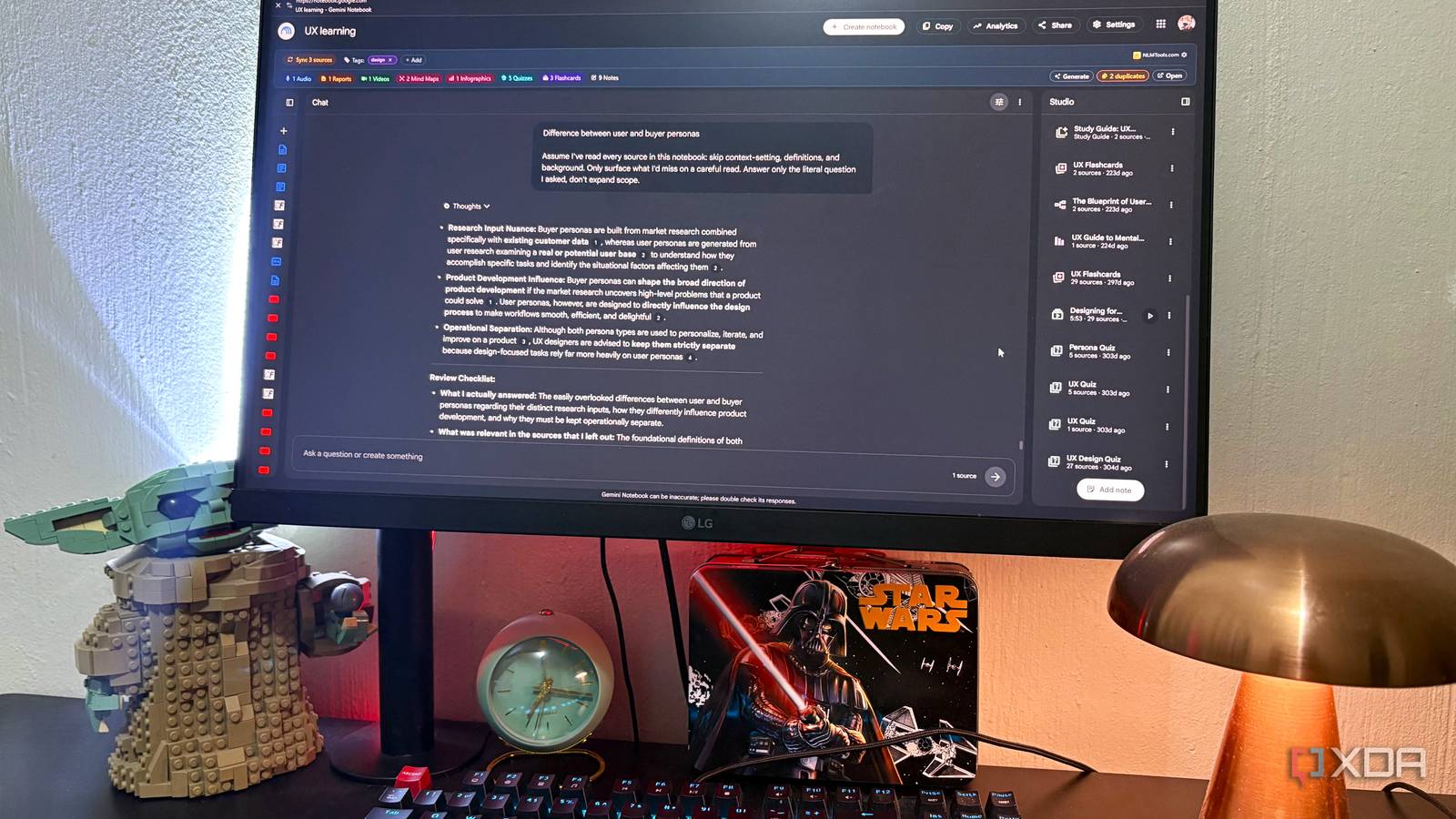
Published Aug 22, 2026, 10:30 AM EDT Nolen began their writing career in 2019, with three years dedicated to editing the Creative section at MakeUseOf. Their expertise lies at the crossroads of technology and creativity, covering areas like photography, video editing, and graphic design. Outside of work, you'll often find Nolen diving into a good book, writing their own stories, or playing video games. NotebookLM is still one of the best tools out there for actually getting somewhere with your research. But it's built to be helpful, and sometimes helpful means giving you more than you asked for or losing track of the thing you asked. A question about one specific point in a source often comes back with a paragraph of setup, definitions you didn't need, and the actual answer only somewhere in the middle. So it's not wrong, or even bad, it's just doing too much or veering a little off topic. There's now one line I add to most of my prompts to get around this problem, and one smaller instruction I add to a notebook's configuration to keep things honest. Neither is complicated, it's just about steering the tool where you need it to go. Want to stay in the loop with the latest in AI? The XDA AI Insider newsletter drops weekly with deep dives, tool recommendations, and hands-on coverage you won't find anywhere else on the site. Subscribe by modifying your newsletter preferences! NotebookLM changed There was a design update, which might explain why things feel different Quick bit of housekeeping before I dive into it: NotebookLM was officially renamed to Gemini Notebook in July 2026. It's the same product with the same team behind it, and your content remains the same in the app. I think the majority of us are still calling it NotebookLM just out of habit (or perhaps out of protest), and Google's own redirect accepts both names. The rename isn't the main thing I want to talk about here, though. What changed since this rebrand is the feel of using it. NotebookLM has built its reputation on feeling distinct from chatbot-style experiences, and pulling it under the Gemini brand seems to have made it inherit some of that broader chatbot behavior, at least on the surface, at least according to some users. Google shipped some backend changes alongside the rename (actually before the rename was announced), and there have been ongoing user reports about more hallucinations - just check this Google support thread titled "notebooks are rife with hallucinations", and you'll find a bunch more on Reddit. There have also been reports of NotebookLM feeling like it's "glazing" users, meaning doing too much with insights, or even veering into compliment territory. Personally, I haven't experienced fabricated content from NotebookLM, but I have felt it get chattier. It gives more setup and adjacent context before actually getting to the answer. And even before these architectural changes, I'd still need to reel it in sometimes. I wouldn't say this is a broken feature, it just seems like the balance tipped toward being helpful in the general chatbot sense. Here's how I make it keep behaving like a research tool… The line I now add to my prompts It changes the tone and shape of the answers that come back Here's what I add to my prompts when I plan on having a more serious session: Assume I've read every source in this notebook: skip context-setting, definitions, and background. Only surface what I'd miss on a careful read. And to really pack a punch, I often add this to it: Answer only the literal question I asked, don't expand scope. That's all. It's two instructions bolted together and they solve different branches of problems on the same tree. The first half kills the tendency to overexplain, the second half kills the tendency to answer a wider question than you asked. Removing either half brings back a chunk of the behavior I'm trying to avoid, but sometimes that's alright - I mainly use them together when I'm highly focused and looking for specific information. Before I started using this, a question like "what do these articles say about the second argument" would come back with paragraphs summarizing the articles first, sometimes even a definition of the terms I've used in my prompt, and only then the answer. This line helps me cut through all of that and just get the answer. The reason it works is that it directly counters what Google has shipped. NotebookLM is designed to explore sources from multiple angles by default, so telling it you've already done that flattens the assumption. The second half narrows the scope, which stops the model from deciding what you actually meant and just accepts what you said at face value. I keep this as a per-prompt paste rather than adding it to the notebook's Custom Instructions, because I don't actually always want this behavior - sometimes I do want it to explore and overexplain so I can get insights I might not have had otherwise. I just keep it in a note in the notebook so I can easily grab and paste it in. To ensure NotebookLM stays on track This might actually contrast what I had just discussed about reeling NotebookLM in, because this prompt will add more to the response, but I've found it pretty useful so far. And it's something I add to the Custom Instructions because I prefer to see it every time, but it might make more sense to keep it per-prompt as needed. At the end of every response, list three things: -what you actually answered -what was relevant in the sources that you left out -what you couldn't answer from the sources It turns every answer into a mini audit. You get what you asked for at the top, then a line telling you what NotebookLM chose not to include, then a note about what it couldn't answer from the sources at all. The middle one is the reason I do this. The natural instinct with any LLM answer is to trust that what came back is the complete relevant picture, but we should all know better by now: it's not, especially now that NotebookLM is seemingly re-ranking and choosing angles for you. Making it name what it dropped gives you a hint about whether you need to follow up. I don't use this for casual notebooks that are meant for exploration though, only for curated study notebooks. Making NotebookLM feel like a research tool again Most NotebookLM advice tells you how to make the model do things, such as instructing it to be a peer reviewer or acting like a tutor. But if you really want to speed up a workflow and remove the noise, you need to tell it what not to do, or to do less.
I added one thing to my NotebookLM prompts, and it stopped giving me answers I never asked for
Full Article
Original Source
Read the full article at Xda-developers →KhanList aggregates and links to publicly available news content. We do not host full articles from third-party sources. Always verify important information with original sources.