
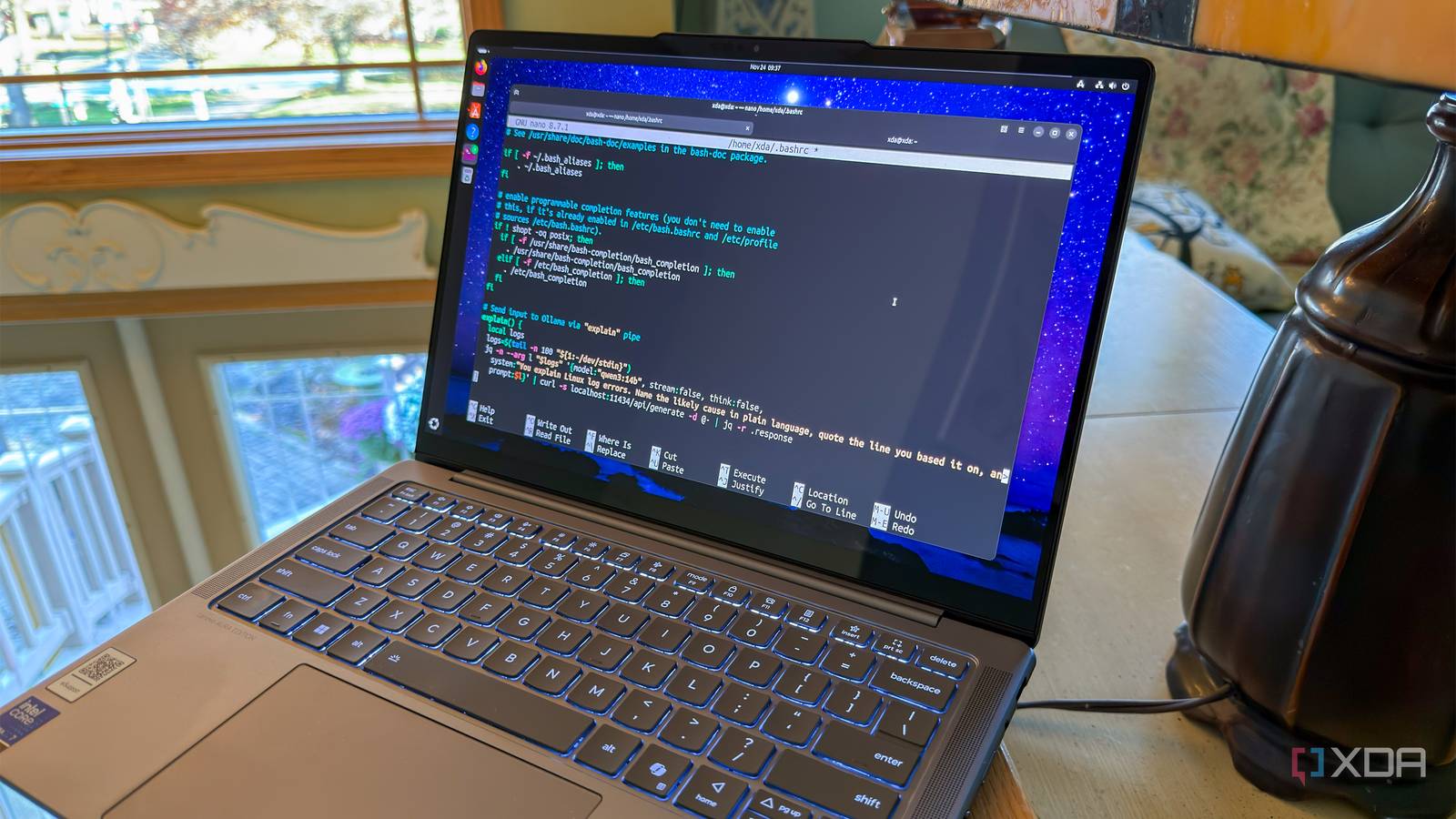
Published Nov 24, 2026, 2:30 PM EST Korbin is a Linux system administrator who spends most of his time in a terminal figuring out how things actually work. Over the last decade he's written hundreds of articles about Linux configuration, troubleshooting weird problems, and using open-source tools in the real world. He also works a lot with Windows systems and networking, especially in mixed environments where things don't always behave the way the documentation says they should. Writing things down is how he makes sense of it all and hopefully saves someone else a few hours. Log entries do not typically contain the most user-friendly messages. Usually they're downright cryptic. To decipher a message or error code, I used to paste it into my browser's search bar and scroll through documentation or forum posts for a clue about what it meant. Sometimes that worked, but all too often it led me nowhere. Pasting log snippets into a chatbot is the "new and improved" way of doing the same thing. It's not perfect, but it instantly delivers a handful of suggestions to try, and I've had more luck with it than using the old search-and-pray approach. The trouble is that logs frequently contain sensitive information like hostnames, IPs, file paths, and usernames, which is the type of stuff I'd rather not hand off to a third party. So, I wrote a small shell function that pipes log output into a local LLM, and now I get AI to explain perplexing logs right from the command line. I can pipe anything into the local LLM A Bash function is the bridge between my terminal and Ollama Credit: Almost all of my troubleshooting takes place in the terminal already, so tabbing over to a browser to look up error codes or ask a chatbot about a log entry always felt like a weird step. Being able to get feedback from within the terminal is a much more cohesive workflow. Ollama exposes an API, accessible on port 11434 by default, so I can send input to it using curl. I added a function to my system's .bashrc file, which looks like this: explain() { local logs logs=$(tail -n 100 "${1:-/dev/stdin}") jq -n --arg l "$logs" '{model:"qwen3:14b", stream:false, think: false, system:"You explain Linux log errors. Plainly state the likely cause, while referring to the lines you base your diagnosis on, and make suggestions on how to verify it. If unsure, say so.", prompt:$l}' | curl -fSs localhost:11434/api/generate -d @- | jq -r .response } There are a few parts to this that make it work smoothly. tail -n 100 prevents the input from being too long and exceeding the LLM's context window, while jq -n --arg safely handling quotes, newlines, and special characters like backslashes. The stream setting makes the LLM return only a single response, and turning off think makes it reply faster. The system prompt is very tweakable, but the one above is a simplified version of what I've been using. That "If unsure, say so" bit has helped more than anything, because it gives the LLM the opportunity to admit when it doesn't know something, rather than hallucinate facts to force an explanation. To run it, output gets piped to the explain function, so I can type something like journalctl -p err -b | explain or docker logs --tail 100 plex 2>&1 | explain. Qwen3 14B is quick on my machine, and should be suitable for most setups. If you want another step up, I'd go for Qwen3.6 27B. Or, if you're on a lightweight or outdated system, you could go with a slightly older model like Qwen2.5 14B. Either way, it'll beat a search engine. The LLM is already familiar with my machine Giving context results in targeted advice My biggest gripe with the search engine approach is that the advice I receive (when I find any) is generic, and it requires some translation to apply it to my personal environment. An LLM has the same problem, unless you give it enough context to make a more accurate assessment. I did this by supplying a few extra sentences in my prompt. It helps to tell the LLM exactly what you're running, like Ubuntu or Fedora. I also stated that my setup has a ZFS pool and runs Plex and Docker. The LLM now takes these services into consideration when making recommendations about what to check. What I appreciate the most is the privacy afforded by this setup. Divulging this level of context to a cloud AI would allow it to collect more information about my environment and what's on it than I'm comfortable with. Plus, even if I'm just pasting log files, it's a hassle to sanitize dozens of lines before sending them to a third party. Perhaps the biggest advantage, though, is the fact that it's free. Private and free is an alluring combo. I'm still reading log files There's no substitute for that To be fair, a 14B local model can't compete with what the cloud AI companies are offering. It has helped me out of a jam plenty of times, but it's also proposed fixes that turned out flat wrong. Agentic AI like Claude Code can run commands on its own to help pinpoint an issue, which is much more thorough than the piping excerpts with the function I wrote. The custom prompt I showed above has made the local AI far more serviceable, because it has to cite the lines it's reasoning from, and then it gives me a command that I can type myself to verify its hypothesis. That allows me to check its claim in just a few seconds, so I don't need to worry as much about chasing a dead end. Mostly I use explain as a way to generate a lead, the same way I'd treat a forum post. This is just way faster and way easier. My terminal can finally explain logs to me My explain function has quickly become one of the commands I reach for the most when I'm in the terminal. The most useful part about it is how it seamlessly integrates into my workflow. I execute this function as if it were just another Linux command on the system.
I added an AI command to my terminal that explains cryptic logs without leaking my data
Full Article
Original Source
Read the full article at Xda-developers →KhanList aggregates and links to publicly available news content. We do not host full articles from third-party sources. Always verify important information with original sources.