
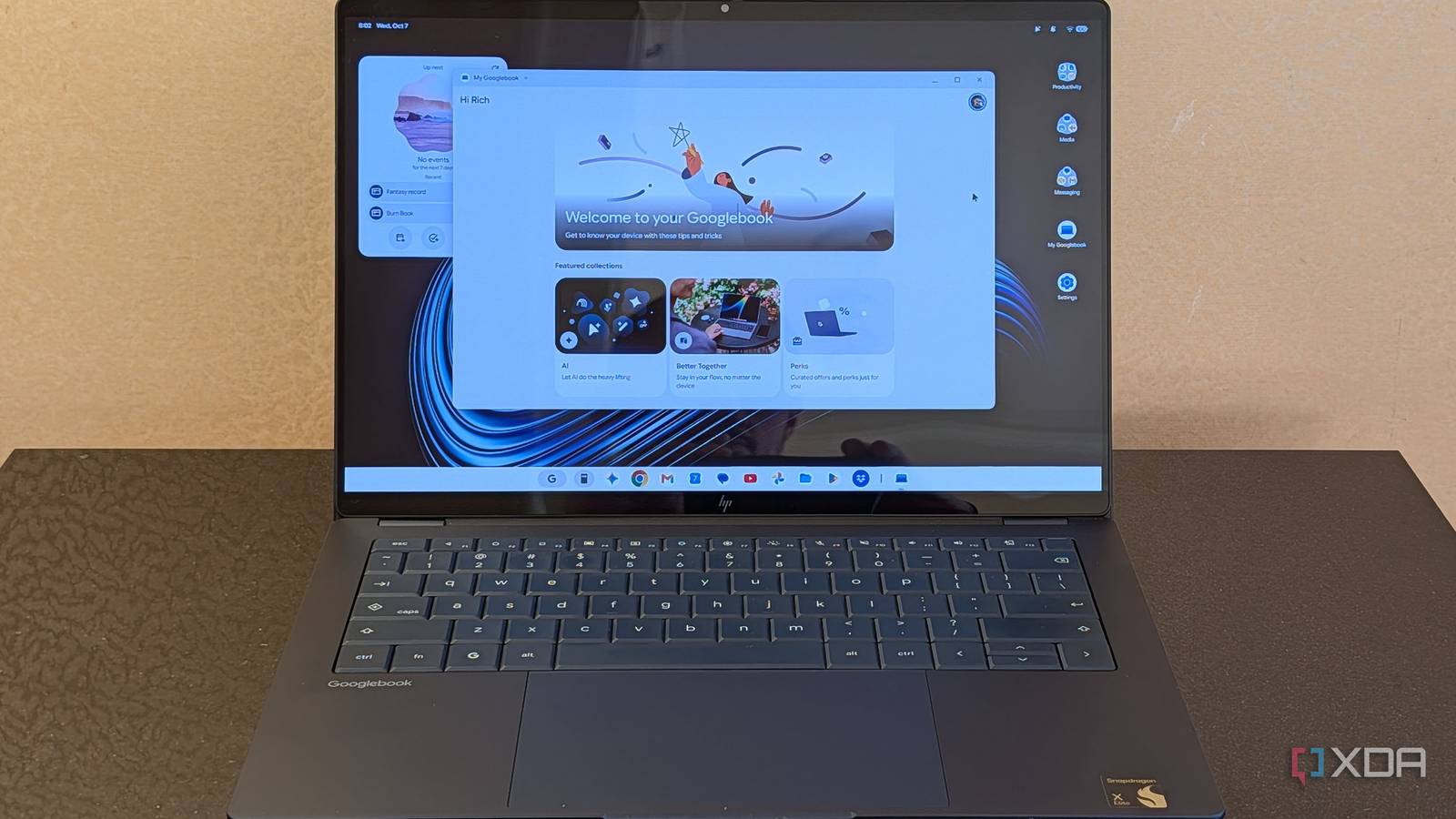
HP is just so good at making laptops, and the Googlebook 14 is no exception to the high bar it's set for itself. I want to be clear about that, because when I talk about how bad it is, you need to know that this is Google's fault. Indeed, this laptop is truly delightful, with the best-in-class keyboard I've come to expect from HP, a 3K OLED display, Snapdragon X Elite speed and battery life, and a 2.74-pound chassis. It's a shame you should never buy one (you should buy an OmniBook Ultra or OmniBook X though). Googlebook OS is simply bad. It's not unfinished. I'm not criticizing bugs. It's simply a weak concept in 2026. HP sent XDA the Googlebook 14 for review. It had no input on the content of this article. HP Googlebook 14 5/10 Operating System Googlebook OS CPU Snapdragon X Elite X1E-80-100 GPU Qualcomm Adreno GPU RAM 16GB, 32GB LPDDR5x-8448 MT/s Pros & Cons Great hardware from HP Googlebook OS is bad and no one should use it Great Chromebooks still exist HP Googlebook 14 pricing and availability The HP Googlebook 14 starts at $1,299.99 on HP.com and Best Buy, including 16GB RAM and 512GB storage. You can also grab one with 1TB storage and otherwise similar specs for $1,449.99. At the time of this writing, HP.com lists it as coming soon, so Best Buy is the only place you can grab one. HP Googlebook 14 Specifications CPU Snapdragon X Elite X1E-80-100 GPU Qualcomm Adreno GPU Display (Size, Resolution) 14" diagonal, 3K (2880 x 1800), OLED, multitouch-enabled, up to 120 Hz, 0.2 ms response time, UWVA, edge-to-edge glass, Corning® Gorilla® Glass 3, Low Blue Light, 500 nits, 100% DCI-P3 RAM 16GB, 32GB LPDDR5x-8448 MT/s Storage 256GB, 512GB, 1TB PCIe Gen4 NVMe M.2 SSD Battery 4-cell, 70 Wh Li-ion polymer Charge speed Supports battery fast charge: approximately 50% in 45 minutes Ports 1 headphone/microphone combo 2 USB Type-C 10Gbps signaling rate (USB Power Delivery 3.0, DisplayPort 1.4) Operating System Googlebook OS Webcam 5MP camera with temporal noise reduction and integrated dual array digital microphones Wi-Fi connectivity Qualcomm FastConnect 7800 Wi-Fi 7 (2x2) and Bluetooth 5.4 wireless card Dimensions 12.25 x 8.53 x 0.43 in Weight 2.74 pounds Colors Atmospheric blue Price Starts at $1,199 HP just makes banger laptops I really do love the hardware so much The HP Googlebook 14 is a great laptop. It just screams premium HP. It comes in that deep blue color that's super-popular with companies that like selling their products at Best Buy. It's a beautiful, all-aluminum laptop. The 3K OLED display is colorful and delightful. It would be even better when paired with software you'd use where a wider color gamut matters, but alas, it is a Googlebook. But at least, your photos that so seamlessly carry over from your phone will look great. The keyboard is best-in-class, something that I've been saying about premium HP laptops for years now. It started with the company's EliteBooks, but that standard has now crossed barriers into its consumer products. It's a zero-lattice keyboard, something that I typically wouldn't care for too much, but HP's design nails it. The chamfered edges do wonders for accuracy, and as always, it's one of the most comfortable typing experiences around. The Snapdragon X Elite X1E-80-100 is probably the perfect chipset for a product like this. It's snappy with great battery life. It's not X2 Elite, but I just don't care. Even my daily driver laptop is still Snapdragon X Elite, and I have X2 units that I could be using. It's still a fantastic chip. It does have one drawback on Googlebooks, which most users won't notice. There's no x86 emulation like you get on a Snapdragon Windows laptop. If you're using it like Google wants you to, you won't notice. That's why there's no emulation. The only time you'll run into an issue is if you try to run a Linux app that's not native to Arm64. Googlebook OS really isn't good Did anyone ask for Android on a laptop? Imagine if you took ChromeOS and tried to remake it using Android. You've just imagined Googlebook OS. Except, ChromeOS wasn't broken. There are lots of new features included. It's decidedly focused on Gemini and Android phone integration, neither of which is particularly great. Phone integration didn't even work out of the box; it's much better now, but still not perfect. Gemini integration is fine, but if you care about that, don't you care about other AI apps and services that you simply can't use? I tried to install the Linux version of VS Code so I could set up my normal Claude Code workflow, and it didn't install. I pondered the idea of a machine built for AI that can't run VS Code, and was reminded by my colleague Justin Duino that it's not built for AI, it's built for Gemini. So, why couldn't I install VS Code? I'm glad you asked. As mentioned above, there's no emulation support, and VS Code for Linux is for x86. But also, Google has severely nerfed Linux app support. You have to install all Linux apps on Googlebook OS (and newer versions of ChromeOS) from the Terminal. There's no more installing from double-clicking a .DEB file. After you install them, they won't show up in your app drawer either. It's a terrible system if you were hoping to make up for the lack of proper apps with Linux support. And yes, there's Android app support, of course, but Android apps are notoriously terrible on large screens. I ended up using Slack in a browser tab. There are a lot of other annoying hiccups too. For password protected sites, the browser won't let you leave the tab while it's prompting you for the password. Hoping to copy and paste the username, and then do the same for the password? Think again. I just don't understand the problem that this solves that you're making severe compromises for. Even the Gemini integration and phone mirroring stuff could have been added to ChromeOS. I truly don't understand why Google did this Googlebook OS doesn't solve any problems, and it creates new ones Going back a decade or so, there was a lot of sentiment that the rise of Chromebooks was going to overthrow the dominance that Windows had on the PC industry. And why not? It was becoming increasingly clear that the average person didn't use their PC for much, wanted to spend as little as possible on it, and really only needed a browser. A lightweight system that provided that with fast performance and long battery life seemed like something Microsoft simply couldn't compete with. Moreover, Google's strategy always seemed like it was to start small and build. Sure, it was "just" a browser. But then Android app support was added, and after that, Linux app support. There was a gaming push with streaming, and even support for things like Parallels and native OneDrive. But then in 2020, people started working from home, and there was a resurgence in the PC industry. As it turned out, people needed real computers that could do everything they needed to do, even at work. Six years later, it almost seems foolish that we ever believed that ChromeOS could overtake Windows. And now, in 2026, we have Googlebook OS, never mind how infuriating it is that there's no space in ChromeOS and there is in Googlebook OS, or that they didn't just call it GoogleOS. First of all, this is, more or less, ChromeOS 2. ChromeOS always did updates in the background, so it doesn't have major updates like Windows has every few years and macOS has every year. Google just called it something else. But why? Why try to rebuild ChromeOS on top of Android? It seems like a pointless effort. I don't think there's anything about it that couldn't have been done on ChromeOS. And Google shipped this without an app strategy. When the company announced Googlebooks, it seemed like it was saying very little, just that it was built for Gemini and all of that jazz. People asked me what I thought about it and my response was always, "Well, they haven't told the app story yet." There wasn't one coming though. It turned out that they were telling us everything there was to tell. But why? Why not build a platform with the actual apps that people need to use? It's not that hard. All it would really have to be is a Google-fied Linux machine. Sprinkle some Android apps on top and you're golden. Instead, Google built a new ChromeOS that doesn't solve any of the glaring problems that ChromeOS had. And if you're a Chromebook user, then Googlebooks are fine, but...so are Chromebooks. Should you buy the HP Googlebook 14? You should buy an HP Googlebook 14 if: You've got a plan for installing another operating system on it You should not buy an HP Googlebook 14 if: You're someone buying a laptop Seriously, I can't recommend a Googlebook right now. It's a Chromebook but not as good. If you get down with Chromebooks, I still absolutely love the Lenovo Chromebook Plus, which has MediaTek's Kompanio Ultra processor under the hood. It's also a couple hundred dollars less at Best Buy. Seriously, the Kompanio Ultra Chromebooks are awesome. If you're heading down the Google route, do that. HP Googlebook 14 5/10 Operating System Googlebook OS CPU Snapdragon X Elite X1E-80-100 GPU Qualcomm Adreno GPU RAM 16GB, 32GB LPDDR5x-8448 MT/s
HP Googlebook 14 review: Not worth buying as long as it runs Googlebook OS
Full Article
Original Source
Read the full article at Xda-developers →KhanList aggregates and links to publicly available news content. We do not host full articles from third-party sources. Always verify important information with original sources.