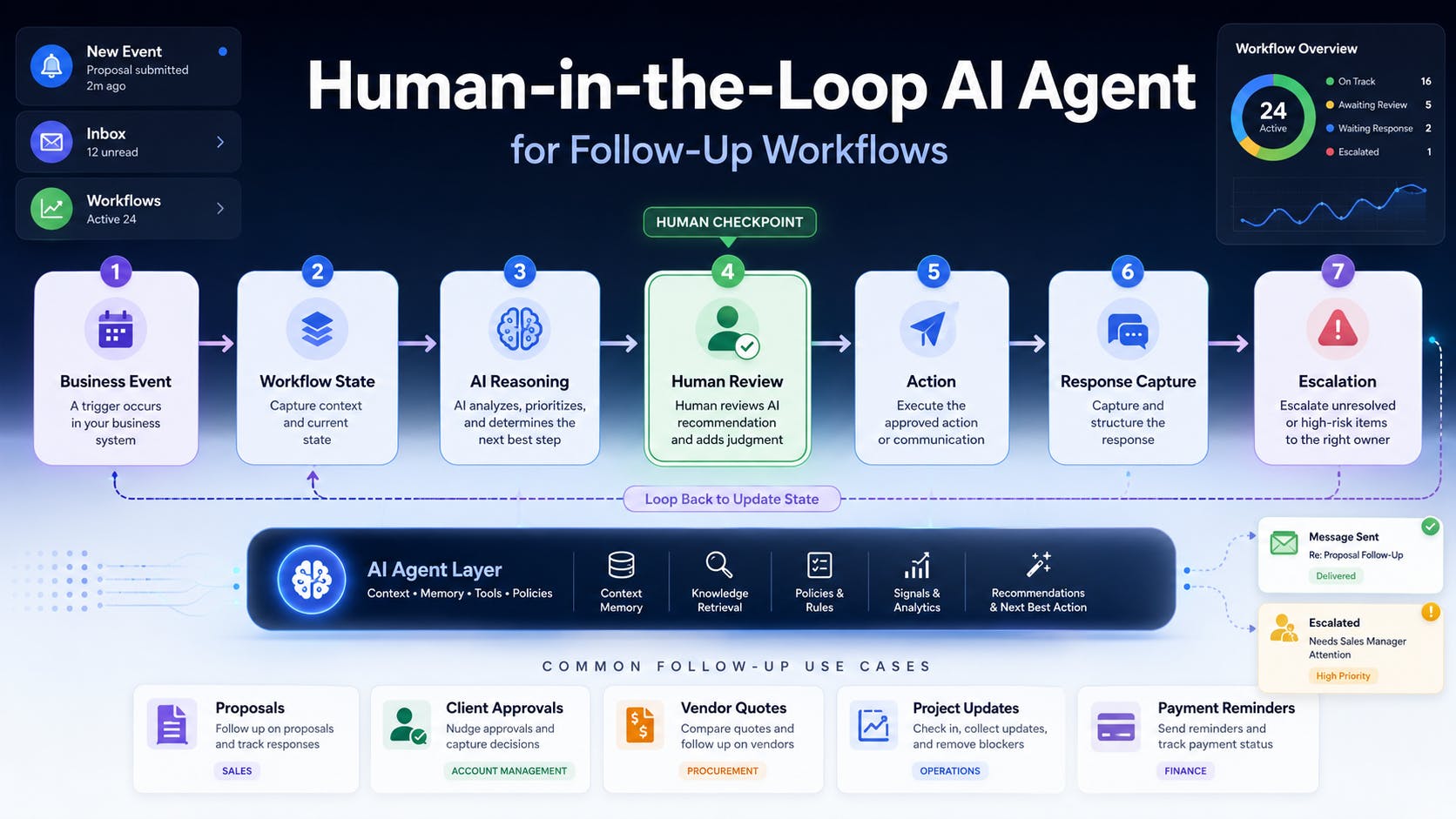
Most follow-up automation is not really automation. It is a timer attached to an email template. That works until the client replies through another channel, the deadline changes, or the item becomes commercially sensitive. The system then keeps sending reminders because it understands elapsed time, not workflow state. A useful AI agent for follow-up workflows must understand what is pending, who owns the next action, what the delay is blocking, and when a human should take over. Consider a project-led interior design or fit-out firm. Its team may be waiting for a proposal response, design approval, vendor quote, procurement confirmation, site update, variation sign-off, or payment milestone. These are different processes, but they share the same architecture. Start With a State Machine, Not a Prompt The biggest mistake in AI agent workflow automation is starting with: “Write a polite follow-up.” Start with a state model instead: created → waiting → reminder_due → response_received → action_required → resolved Each record needs enough context for the system to recommend a safe next step: Workflow type and project Owner and external contact Expected response date Last interaction and current status Business impact and escalation level Permitted agent actions The model should not invent this state. It should read it from a CRM, project management tool, procurement tracker, ERP, accounting system, or connected database. For project-led businesses, this automation layer may sit above existing interior design project management software or project workflow software rather than replacing it. Separate Rules From AI Reasoning A reliable human-in-the-loop AI agent combines deterministic rules with model reasoning. Rules should decide whether: A deadline has passed A reply has been received An invoice is overdue A specific employee owns the item Automatic sending is permitted Escalation is required The model can handle work involving language and context: Summarising the previous conversation Classifying the reply Drafting a context-aware message Extracting a promised date Identifying an approval, rejection, question, or exception Recommending the next action This hybrid design matters. Rules create predictable boundaries, while the model handles ambiguity inside those boundaries. Give the Agent a Narrow Trigger Every workflow needs an explicit starting event: A proposal is marked as sent A client approval request is created A vendor quote is requested A purchase order is issued A project update becomes due An invoice reaches its due date The trigger creates or updates a workflow record. The agent then evaluates that record against the current time, communication history, and escalation policy. Without a clear trigger, follow-up automation becomes a periodic search through messy data. That produces false reminders and makes the system difficult to trust. Build a Real Human Approval Gate “Human in the loop” should not mean sending everything to a manager with an Approve button. The review gate needs explicit criteria. A HackerNoon article on better review gates for human-in-the-loop AI makes the same architectural point: reviewers need predefined acceptance conditions rather than vague instructions to check the output. The agent may send automatically when: The message is a routine reminder The approved template fits the situation The recipient and project are confirmed No commercial term has changed No sensitive information is involved Human approval should be required when: Scope, price, payment, or delivery commitments are discussed A variation or dispute is involved The client is dissatisfied The agent has low confidence about the reply The action may affect an important relationship The next step is irreversible The NIST AI Risk Management Framework similarly emphasizes defining human roles and oversight responsibilities rather than treating human involvement as an undefined safeguard. Capture Responses Across Channels A follow-up agent is only useful if it knows when to stop. Responses must be captured from the channels the business actually uses: email, CRM, project software, forms, and—where integrations permit—messaging platforms. The response-processing layer should: Match the reply to the correct contact, project, and workflow item. Classify it and extract dates, decisions, questions, or commitments. Update the workflow state. Create the next task. Cancel unnecessary reminders. Escalate exceptions. Many CRM automation projects fail here. They automate outbound communication without maintaining an accurate operational record. Escalate by Impact, Not Just Age A reminder that is three days late is not automatically more important than one that is one day late. Escalation should consider: What the pending item blocks Project value or risk Procurement lead time Financial exposure Number of previous attempts Whether the responsible owner has acted How confidently the agent understands the situation A delayed material approval blocking a long-lead purchase should escalate faster than a missing non-critical document. That is the difference between basic follow-up automation and useful business process automation. Log Every Action and Keep It Reversible A production AI workflow needs an audit trail. Record: What triggered the action What information the agent used What it generated or changed Which rule permitted the action Whether a human approved it What happened next Where possible, actions should be reversible. Drafts can be edited, status changes corrected, and classifications overridden. The audit log is not only for compliance. It helps diagnose missed follow-ups, poor prompts, broken integrations, and weak escalation rules. A Practical Follow-Up Agent Flow A proposal follow-up workflow could operate like this: Proposal sent→ record follow-up date and owner→ monitor inbox and CRM→ detect no response by deadline→ retrieve proposal and communication context→ draft follow-up→ check autonomy policy→ send or request approval→ capture and classify reply→ update CRM→ create the next action or escalate The same pattern can support client approval tracking, vendor quote follow-up, procurement tracking, approval workflow automation, project update automation, and payment milestone follow-up. Roll It Out in Stages Do not begin with full autonomy. Observe: Identify overdue items without taking action. Draft: Prepare messages and next-step recommendations. Approve: Require human review for outbound actions. Automate selectively: Send low-risk reminders automatically. Expand: Add workflows after the data and rules prove reliable. Track response time, overdue items, manual touches, missed handoffs, false reminders, and time to resolution. These metrics show whether the AI workflow automation is improving operations or merely generating more messages. The Best First Agent Is Usually Boring Businesses often search for an impressive AI use case when a repetitive operational workflow would create more immediate value. Follow-up is a strong starting point because it is frequent, measurable, and connected to revenue, project delivery, procurement, and cash flow. The agent does not replace professional judgment. It keeps the workflow moving and brings the right exception to the right person. The goal is not to automate every conversation. It is to stop important work from disappearing between systems, inboxes, and people.
How to Design a Human-in-the-Loop AI Agent for Follow-Up Workflows
Full Article
Original Source
Read the full article at Hackernoon →KhanList aggregates and links to publicly available news content. We do not host full articles from third-party sources. Always verify important information with original sources.