
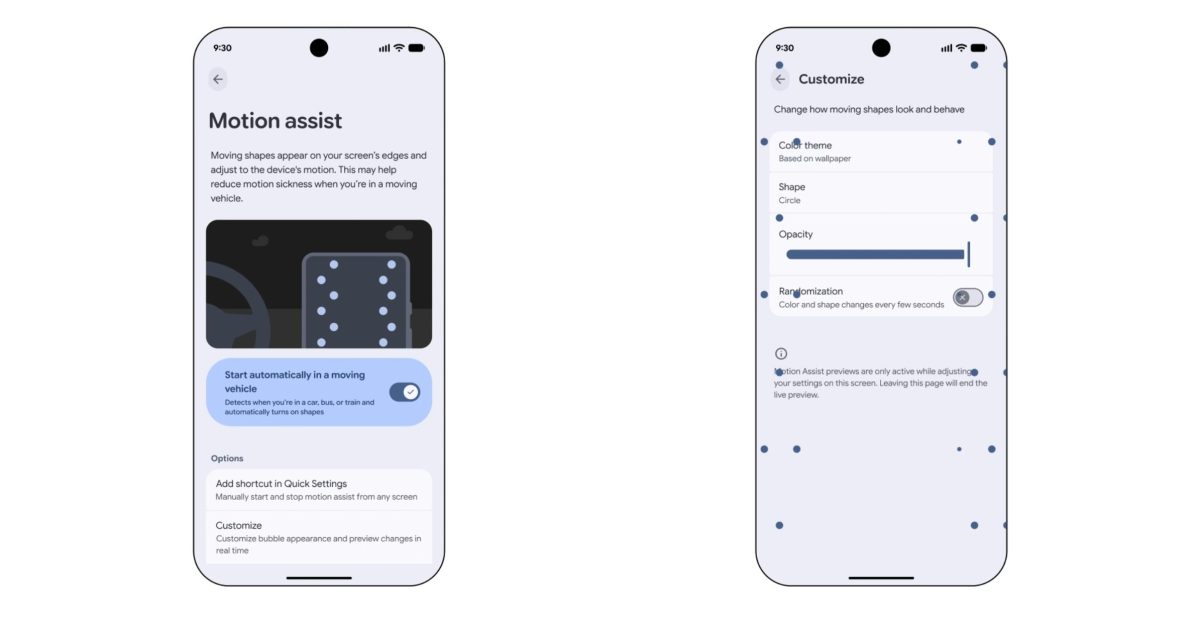
Following the announcement on Tuesday, Google is slowly rolling out Motion Assist to phones running Android 17. Once rolled out, you can search for “motion assist” in the Settings app. The long way is Settings app > Google > All services tab > Personal & device safety > Motion assist. Appearing alongside Advanced Protection and Theft protection, this new feature is part of Google Play services. The preference menu lets you have Motion Assist automatically “Start in a moving vehicle,” but Google also recommends adding the Quick Settings Tile. This lets you manually enable and disable “from any screen.” You can add it from this page or the usual edit screen under “From system apps.” Once active, there’s also a system notification that lets you disable with a tap. The Customize menu lets you adjust: Color: Based on system, Red, Yellow, Green, Blue Shape: Circle, Square, Pentagon, Diamond Opacity: Slider Randomization: “Color and shape change every few seconds” The moving shapes adjust to the device’s motion and “may help reduce motion sickness when you’re in a moving vehicle.” On the Pixel 11 Pro Fold, you get three columns of shapes on the left and right edges, while Google’s phone example shows two. Motion Assist is not yet widely rolled out. We’re seeing it with version 26.33.32 of Google Play services, but there’s a server-side component. As of today, it’s only appearing on one of our devices. FTC: We use income earning auto affiliate links. More.
How to check if Motion Assist has rolled out to your Android 17 phone
Full Article
Original Source
Read the full article at 9to5google →KhanList aggregates and links to publicly available news content. We do not host full articles from third-party sources. Always verify important information with original sources.