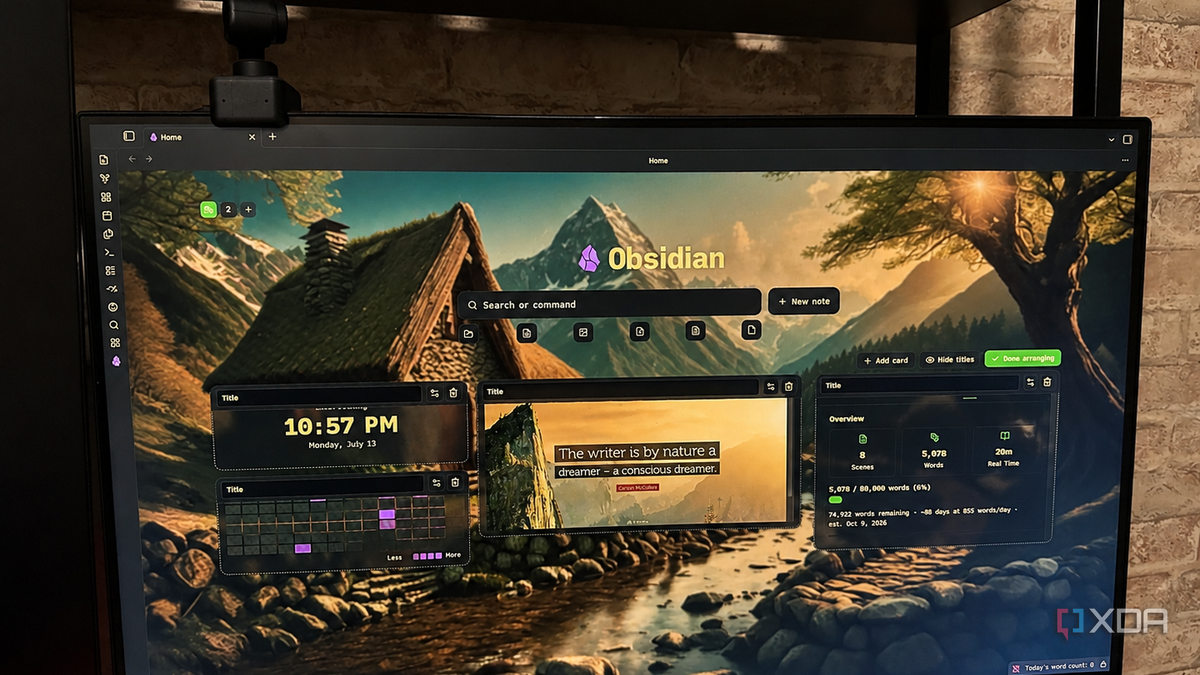
Published Jul 19, 2026, 7:00 AM EDT Patrick is a seasoned writer with more than a decade of experience, specializing in any and all things tech. His work has been featured on platforms like CNET, Yahoo, Xfinity, and many other outlets. When not typing away, he can be found with his nose in a book. Obsidian is a productivity tool, yes, but it's also built for tinkerers. There's no denying that tooling around with plugins, themes, and building your own homepage is part of the fun of a vault, and it's something I've admittedly sunk quite a bit of time into. Some of the solutions I've tried were pure jank, utilizing a dozen plugins and CSS formatting that could most kindly be described as haphazard. Last week, I discovered Hearth. This plugin makes it easy to customize your homepage to look however you want, with a few caveats. That said, it's still the easiest homepage tool I've ever used for Obsidian, and one of the best ways for someone new to the app — or someone who isn't comfortable making serious changes to the CSS — to tweak things. I built a polished, professional dashboard without touching CSS It's the closest thing to a WYSIWYG editor I've seen in Obsidian Hearth is appropriately named. Opening my vault feels like stepping into a familiar, comfortable space (especially since the example vault is the one I use for all of my cozy fantasy novels). The most complicated part of my homepage was finding the correct file path to set the background image; besides that, everything else was drag-and-drop or intuitive menus. Hearth makes it easy to navigate homepage customization without requiring technical knowledge, and it's more than just positioning. I can adjust the opacity of a given card, its spacing, create individual card colors, and much more. There are a variety of options to pick from, such as RSS feeds, embedded images, and much more. Beyond that, I can create multiple dashboards that I can jump between just by selecting the icon in the top-right corner of my homepage. And since my current work in progress is about a magical farm, I swapped the icon to a tractor. The Hearth search bar is impressively powerful It's more than an afterthought Front and center of your homepage (unless you turn it off, of course) is a search bar that lets you quickly find file names, tags, and a whole lot more. The ability to instantly navigate around the vault with just a few keywords is invaluable, but you don't have to use it if the look just kind of kills your vibe. The search bar can easily be disabled, giving you more space to customize your homepage. There's also a row of icons under the search bar that let you quickly jump to specific file types, grouped into Folders, Notes, Images, PDFs, Documents, and Other. And here's the thing: by default, the search bar uses a standard fuzzy search, but you can enable Omnisearch in Hearth's settings. This opens up the potential for smarter search results, including typo resistance. You'd think a writer would be more accurate on a keyboard, but if anything, I make more mistakes in my haste to get the words out. But my homepage is more than just decorative It tells me the stats of my vault at a glance If I were using Hearth on my primary vault, I would use it to jump to my most-used notes and files. My writing vault helps me track progress. I can see at a glance how many words are in the manuscript, how consistently I've worked on it, and more. In this case, I've tossed a quote in that I particularly like to help keep me motivated. But Hearth isn't just pretty. It brings a lot of utility to bear, especially since I can use it to create daily notes, check my calendar, and much more. I can also create other dashboards that cater to different aspects of the writing process; for example, I could have one for worldbuilding, one for drafting, and one for editing. I haven't gone that far into Hearth yet — for a reason I'll come to in a moment — but the potential is there. Hearth is new and still under development It can do a lot, but there's a lot it can't do, too The biggest downside to Hearth is that it's a new plugin with a single developer. It works wonderfully, but there is still quite a bit of room for improvement. A recent update broke the ability to tweak the plugin's settings, but, to his credit, the developer responded quickly to user questions and released a series of updates within two days to fix the problem. There have been a respectable number of updates since the plugin launched, but I find myself wishing for more customization, such as the ability to change Obsidian's logo to something else — perhaps an icon of my own design. A pretty workspace is good for productivity Sure, tweaking Obsidian so it looks nice isn't the most strictly productive thing to do, but we aren't machines. We weren't built to work without end. Having a personalized homepage can make the workday more enjoyable, and Hearth offers an easy way to do just that. Obsidian OS Windows, macOS, Linux, iOS, iPadOS, Android Individual pricing Free normally; $4/month for Obsidian Sync Obsidian is a feature-rich note-taking app that's available on different platforms and offers a neat and clean interface. It's also free-to-use for individuals.
Hearth is the drag-and-drop Obsidian homepage builder I've been waiting for
Full Article
📰 Original Source
Read full article at Xda-developers →KhanList aggregates and links to publicly available news content. We do not host full articles from third-party sources. Always verify important information with original sources.