
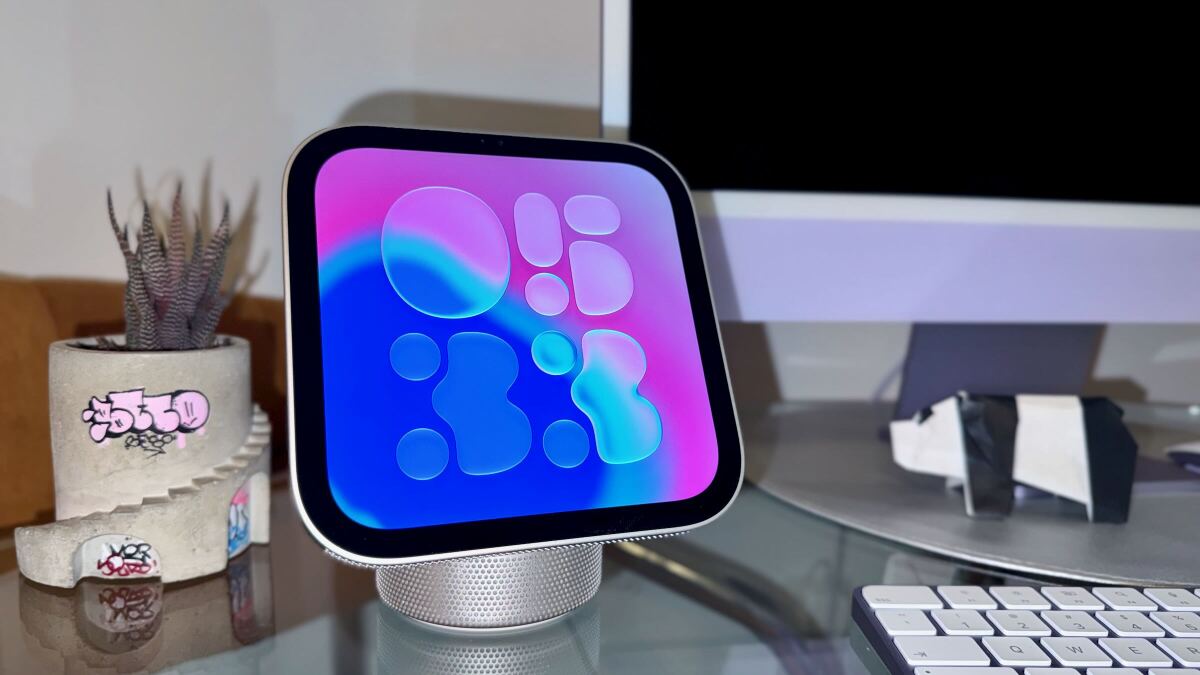
I think the HomeView is going to take over marble countertops. If you don't have marble countertops, then it's probably not for you. By Timothy Beck Werth Timothy Beck Werth Tech Editor Timothy Beck Werth is the Tech Editor at Mashable, where he leads coverage and assignments for the Tech and Shopping verticals. Tim has over 15 years of experience as a journalist and editor, and he has particular experience covering and testing consumer technology, smart home gadgets, and men’s grooming and style products. Previously, he was the Managing Editor and then Site Director of SPY.com, a men's product review and lifestyle website. As a writer for GQ, he covered everything from bull-riding competitions to the best Legos for adults, and he’s also contributed to publications such as The Daily Beast, Gear Patrol, and The Awl. Read Full Bio on November 12, 2026 Share on Facebook Share on Twitter Share on Flipboard All products featured here are independently selected by our editors and writers. If you buy something through links on our site, Mashable may earn an affiliate commission. Credit: Timothy Werth / Mashable The Apple HomeView finally arrives on doorsteps (and in Apple Stores) on Friday, and I think this gorgeous little smart display is about to become a common sight in homes around the world. I've been testing the HomeView ahead of its release, and I would definitely recommend it to homeowners, parents, and anyone looking for Christmas gift ideas.From the moment I saw the HomeView up close, I've had a premonition: Apple is going to sell a million of these things. And after adding it to my own home, I'm even more confident in that prediction. $289.99 at Amazon $299.99 Save $10 As a product reviewer, you get a sixth sense for this. The last time I felt this way about a product? Back in March, when Apple debuted the MacBook Neo, which proved to be extremely popular. Is the Apple HomeView really worth $300? Good for fans of Apple Music, bad for Spotify users. Credit: Timothy Werth / Mashable For someone like me, who lives in a one-bedroom New York City apartment and tries not to think about whether or not I'll ever be able to afford a down payment, the Apple HomeView is an awesomely unnecessary sidekick. Personally, I'd buy an iPad stand before a HomeView, but YMMV. However, for my parents, my big sister, and my better-off friends who do own their own homes, I would definitely recommend this device. For upper-income homeowners, the HomeView is a beautiful digital butler for the modern smart abode. (Side note: Apple products have always been high-end, but after the latest price increases, it feels more and more like a luxury brand to me.) If you plan on investing in Apple's other new smart home gadgets — the new Apple TV 4K, HomePod Mini 2, new home security cameras, and video doorbells — I'd even say the HomeView is a necessity. Thanks to the Apple Home app, you can use the HomeView to adjust smart thermostats, view live security camera footage, dim the lights, and turn connected devices on or off. An intercom function lets you use connected speakers to send messages around the house. For this type of user, the wall-mounted model is ideal, though the mount is sold separately and brings the total to $378.99. For those of you who can afford all those smart home gadgets, why not get a HomeView for your entryway and your kitchen? I suspect many wealthy homeowners will do exactly that.The HomeView doesn't just act as a smart home hub. You can also listen to Apple Music, watch Apple TV, FaceTime with family, browse for recipes in Safari, and check your Apple calendar. The App Store is conspicuously missing, so Safari is your only option for services like YouTube, Gmail, TikTok, and Disney+. (The HomeView runs on its own custom OS that Apple calls HomeView software.) That lack of apps is the biggest problem with the HomeView so far.But if you're already a happy little pea in the iOS pod, you can get a lot done with Apple's own apps and widgets, and I think the HomeView justifies its $299 price for the right user.The Apple HomeView has a near-perfect design The Apple HomeView has a ton of clockfaces to appreciate. Credit: Timothy Werth / Mashable After Apple announced the HomeView, I said on Mashable's Instagram that this was a 10/10 product design. I might revise that down to 9.5/10, as it does have larger bezels than most modern displays. But I'm still enamored with the design. The HomeView actually comes in two models: one with a domed speaker base and an adjustable hinge for the display, and a wall-mounted version. Whether you set it on your kitchen counter or mount it in your entryway, it looks beautiful. For this review in progress, I'm going to focus on the speaker version I tested, which I also think will have a wider appeal. Mashable Light Speed The HomeView has no internal battery and and must be connected to a power adapter. Credit: Timothy Werth / Mashable Wall-mounted Apple HomeView on display. Credit: Timothy Werth / Mashable The HomeView has a premium design, with a recycled aluminum body and a stainless steel adjustable hinge for the display. It has perforations on the bottom of the display and speaker base for audio, and a camera and sensor in the upper bezel. The 7-inch Liquid Retina display looks clear and bright whether you're catching up on the latest Silo cliffhanger on Apple TV or admiring the lava lamp-inspired home screen. The best tech deal this week The Apple iPhone 18 Pro is free right now with T-Mobile The Apple HomeView with my latest origami friends. Credit: Timothy Werth / Mashable The HomeView defaults to a swirling abstract clock face that responds to light and movement. The shapes on the display will darken in low light and track your movements. Like the opening/closing animation on the iPhone Duo, it's the kind of subtle design flex that reminds you Apple does consumer tech design better than anyone. You can also cycle through a variety of widgets and clock faces at your leisure.The Apple HomeView has some cool tricks (plus Siri AI) The recipe tool on the Apple HomeView smart display. Credit: Timothy Werth / Mashable Apple's new smart display may lack third-party apps, but Apple taught it some pretty cool tricks. The HomeView recognizes up to six people in your household by face and voice (if they have a connected iPad or iPhone running iOS 27.2). So, when you step up to the HomeView, it instantly pulls up your messages, your calendar, and your preferences. But if your husband or wife walks up to it, they'll see their own information, or personal context, as Apple calls it.What about visitors? Settings for unrecognized visitors let you toggle off explicit content, device control, and sensitive data, protecting the family's privacy.The HomeView also has a custom recipe experience, which recognizes a recipe on Safari and breaks it down into simple lists of ingredients and steps. (I'm not sure how recipe writers will feel about this feature, but it's undeniably useful.) And if you don't have a smart thermostat, the HomeView has its own temperature and humidity sensors.The HomeView also makes good use of the new Siri AI beta. When you say, "Hey, Siri...," the new Siri logo drops from the top bezel with a nifty teardrop animation. But if you've tried the new Siri AI, then you know it's still not done cooking. Siri sometimes makes stupid mistakes, though in general, the combination of broad world knowledge and personal context results in useful answers to my questions. The Siri AI teardrop animation on Apple HomeView. Credit: Timothy Werth / Mashable ...almost there Credit: Timothy Werth / Mashable Siri AI has been improving with each OS update, and hopefully that continues to be true.The Apple HomeView speakers and camera are fineLike most new Apple products, the HomeView has a 12MP Center Stage camera for video calls. It works well enough for FaceTime calls, which is good, because that's its main job. The Liquid Retina display angle can be adjusted. Credit: Timothy Werth / Mashable I did find the speakers a little disappointing. Because the HomeView is more speaker-shaped than a MacBook, I expected more from it. The new MacBook Pro PROLED has much better speakers, for instance. I found the bass disappointing, not in terms of volume, but in depth and mix. The speaker system isn't bad exactly. It's just not quite as good as I expected. But for jamming out to music while you work or cook, it's just like the Center Stage camera: good enough.What about privacy?Look, there's no way around this fact: If you're a privacy-sensitive person, adding another camera and microphone to your home isn't a good idea. Not because Apple is using your data or accessing the camera in inappropriate ways, but purely on principle. The HomeView would benefit from a physical switch that blocks the camera and shuts off the microphone, however. Unfortunately for our privacy, most of us already have plenty of devices with cameras and microphones planted all over our homes. So, it comes down to personal preference. The top bezel hides the Center Stage camera. Credit: Timothy Werth / Mashable Apple HomeView smart display: Just the specsProcessor: Apple A18 chipColors: Silver, Starlight, Rose Pink, and Space GrayMemory: 8GB RAMDisplay Panel: 7-inch Liquid Retina displayResolution: 1,088 x 1,088 at 220 ppiDisplay Brightness: Up to 500 nits (0.3 nits minimum brightness)Power: Wired USB-C 30W power adapter (wall-mounted model comes with 20W power adapter)Connectivity: WiFi 6E, Bluetooth 6.0, ThreadCamera: 12MP Center Stage cameraMicrophones: 4-microphone arrayAudio: 2 full-range drivers, 1 down-firing woofer, and 2 passive radiators (wall-mounted model has two custom full-range drivers)Spatial Audio: YesDolby Atmos: YesSensors: Temperature, humidity, ambient light, and accelerometerSystem Requirements: Setup requires an iPhone running iOS 27.2 or an iPad running iPadOS 27.2Dimensions: 5.73 inches × 6.82 inches × 5.13 inches (wall-mounted model is 5.73 × 5.73 × 0.39 inches)Weight: 2.1 pounds (wall-mounted model weighs 0.63 pounds)Want to learn more about getting the best out of your tech? Sign up for Mashable's Top Stories and Deals newsletters or get Mashable push alerts today. Timothy Beck Werth is the Tech Editor at Mashable, where he leads coverage and assignments for the Tech and Shopping verticals. Tim has over 15 years of experience as a journalist and editor, and he has particular experience covering and testing consumer technology, smart home gadgets, and men’s grooming and style products. Previously, he was the Managing Editor and then Site Director of SPY.com, a men's product review and lifestyle website. As a writer for GQ, he covered everything from bull-riding competitions to the best Legos for adults, and he’s also contributed to publications such as The Daily Beast, Gear Patrol, and The Awl.Tim studied print journalism at the University of Southern California. He currently splits his time between Brooklyn, NY and Charleston, SC. He's currently working on his second novel, a science-fiction book.
Hands-on: The Apple HomeView is gorgeous, costs $299, and has no App Store
Full Article
Original Source
Read the full article at Mashable →KhanList aggregates and links to publicly available news content. We do not host full articles from third-party sources. Always verify important information with original sources.