
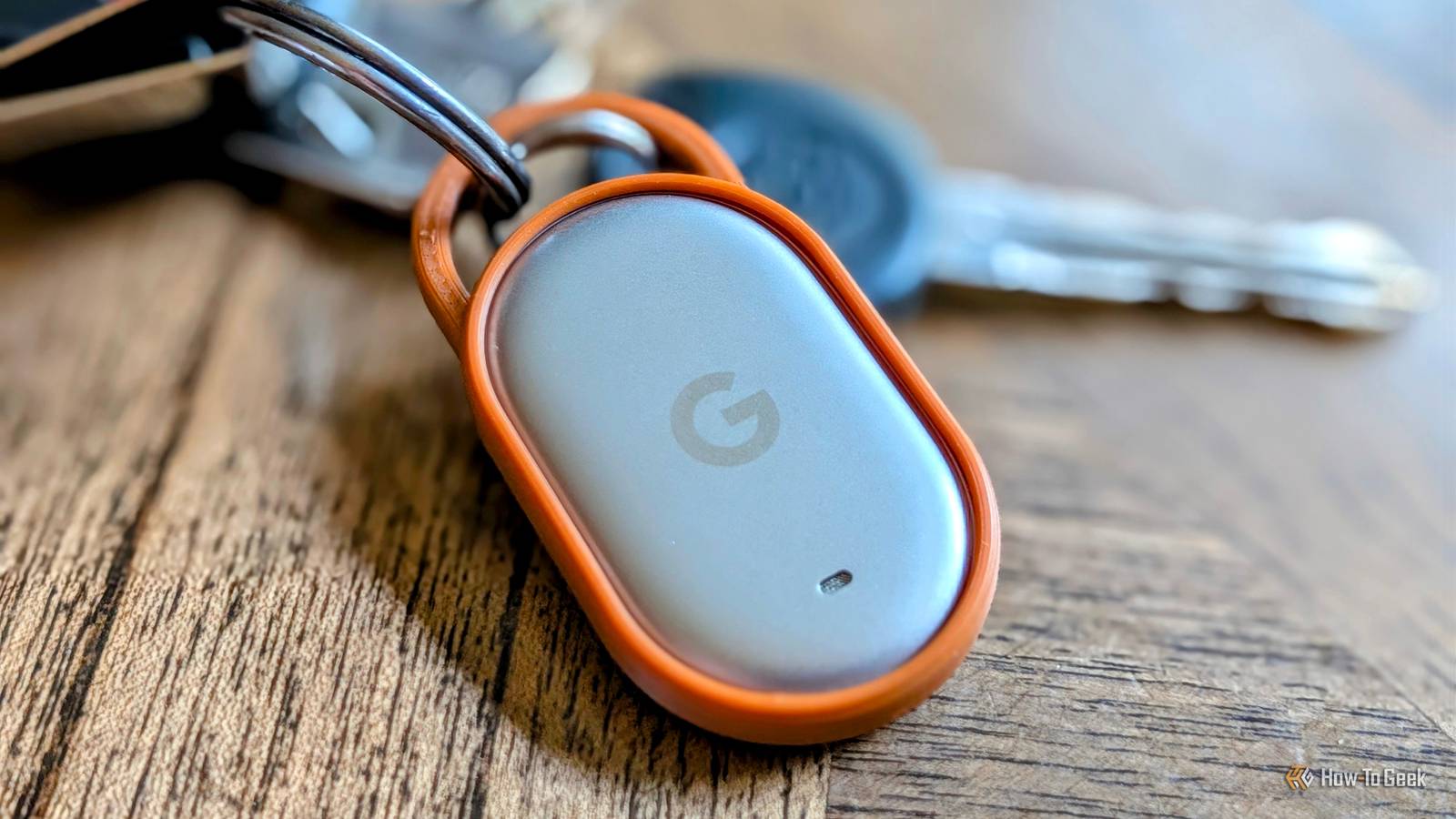
Published Nov 12, 2026, 6:30 AM EST Joe Fedewa has been writing about technology for over a decade. Android and the rest of the Google ecosystem have been a focus for years, as well as reviewing devices, hosting podcasts, filming videos, and writing tutorials. Joe loves all things technology and is also an avid DIYer and food blogger. He has written thousands of articles, hundreds of tutorials, and dozens of reviews. Before joining How-To Geek, Joe worked at XDA-Developers as Managing Editor and covered news from the Google ecosystem. He got his start in the industry covering Windows Phone on a small blog, and later moved to Phandroid where he covered Android news, reviewed devices, wrote tutorials, created YouTube videos, and hosted a podcast. From smartphones to Bluetooth earbuds to Z-Wave switches, Joe is interested in all kinds of technology. After several years of jailbreaking and heavily modifying an iPod Touch, he moved on to his first smartphone, the HTC DROID Eris. He's been hooked ever since. Android’s answer to the iPhone’s “Find My” network rolled out a couple of years ago, but it’s struggled to find its AirTag competitor. Google hopes to change that with its own branded Pixel Tag, and it has a few tricks that set it apart from previous Android trackers. And there have been plenty of Android trackers launched since the “Find Hub” debuted in 2024. Chipolo, Pebblebee, and Motorola make some of the best options. However, even before you start talking about the networks, many of these devices are lackluster compared to an AirTag. Google has a big hill to climb. Google sent us the Pixel Tag for review. It had no input on the content of this article. Google Pixel Tag 9/10 Brand Google Material Polycarbonate and metal Connectivity Bluetooth and Ultra Wideband Water Resistance IP67 The Pixel Tag is Google’s first item tracker, a thin stainless steel pill you can clip to your keys or slip into your wallet. t taps into the Find Hub network of over a billion Android devices, so you can find it even when it’s out of Bluetooth range. Dimensions 1.1 in x 1.8 in x 0.2 in Pros & Cons Ultra Wideband (UWB) support Physical button for finding phones Super thin, sleek design Loud speaker and replaceable battery No mounting point, and very few accessories Limited by Google's Find Hub network Price & Availability The Google Pixel Tag is available now for purchase from the Google Store. It costs $29.99 for one tag, or $99.99 for a pack of four (saving $20). The Pixel Tag comes in one colorway: silver and "Fog" green. Specifications Brand Google Material Polycarbonate and metal Connectivity Bluetooth and Ultra Wideband Water Resistance IP67 Dimensions 1.1 in x 1.8 in x 0.2 in Excellent design with one major flaw Underdogs can’t afford missteps The first thing I noticed about the Pixel Tag was how thin it is. At only 5.4mm, it’s thinner than the AirTag and practically every other coin-style tracker on the market. The lightweight, pill-shaped design allows the Pixel Tag to practically disappear wherever you put it. The top half of the Pixel Tag is made of metal, and it features the Google “G” logo along with a tiny speaker grille. The bottom is made of soft-touch polycarbonate. That’s where you’ll find the battery cover (CR2032) and the stealthy button. Speaking of the speaker, it was loud enough for me to easily hear it from across my house. Google doesn’t list decibels, but people have measured it at around 80dB. That’s in the same ballpark as the latest AirTag and Moto Tag 2. It’s a simple, elegant design, but there’s one thing missing: a mounting point. Apple’s AirTag is famous for this, and there’s a huge ecosystem of accessories to make up for it. That’s not a luxury that Android brands — including Google — can afford. The lack of a built-in mounting mechanism is an immediate friction point. Buyers pay $30 for the Pixel Tag itself, then have to immediately think about spending more money just to use it. The options aren’t great, either. At the time of writing, Google is offering a $15 Spigen keychain at checkout. Bellroy Leather will soon have a 2-pack for $25 or a leather loop for $30 as well. You shouldn’t have to pay extra for one of the basic functions. I designed a 3D-printable key ring case (pictured above) for the Pixel Tag to solve the problem, and I expect more models to appear online. It checks two very important boxes UWB and a physical button make all the difference I mentioned that many of the previous Android trackers were lackluster. That’s mainly due to one thing: UWB (Ultra Wideband) support. Before the Pixel Tag came around, the Moto Tag and Moto Tag 2 were the only universally compatible Android trackers with UWB. Samsung’s Galaxy SmartTag trackers have UWB, but they’re locked to Galaxy phones. UWB is a critically important feature for trackers. It’s a form of short-range wireless technology that enables devices to detect each other down to the centimeter. Without UWB, you’re relying on Bluetooth, which can only provide a general radius to look in. UWB puts an arrow on your screen, points you in the precise direction, and shows how close you’re getting. Simply put, there’s no reason to buy a tracker without UWB, and the Pixel Tag wisely checks that box. The second feature that sets the Pixel Tag apart from some other Android trackers is it’s physical button. Many of these products — including AirTags — can ring the tracker from a phone, but not the phone from the tracker. The Pixel Tag’s physical button allows for ringing the connected phone. If you have one, you can always find the other. These two features alone put the Pixel Tag at the top of the Android tracker food chain. Only the Moto Tag and Moto Tag 2 can match both features. Software and actually finding stuff Does it do what it’s supposed to do? Pairing the Pixel Tag to my phone was essentially the same as Bluetooth earbuds. The packaging instructs you to pull a tab from the battery, which puts it into pairing mode. A prompt to connect on my phone quickly popped up. Find Hub asks where you intend to put it, allows you to adjust volume, and sets up ringing the phone. When it comes to actually finding something, my results were a bit of a mixed bag. Find Hub first attempts to connect to the Pixel Tag and update its location on the map. If it can’t be connected, the app shows the last known location and how long ago it was seen. When you’re close enough, you can tap “Find Nearby” and be guided to it. You also have the option to play a sound from the Tag at any time. This is where things weren’t consistent. Sometimes I’d see the handy arrow pointing me in the exact direction; other times I’d only get a general distance reading. However, both methods, along with the alert sound, were enough to help me find the Tag. The ability to adjust the volume of the tracker while you’re looking for it is a nice touch, too. I should also mention that the UWB tracking works exactly the same with a Pixel phone, a Samsung Galaxy phone, or any other Android device that supports it. The tag may be Pixel-branded, but it’s certainly not locked to Pixel phones. To find things outside of your general vicinity, you’ll need to rely on the Find Hub network. In the past, this has been the big thing holding Android trackers back. They’re not very useful if you can’t find something out in the wild. Google has made a concerted effort to walk back its initial decision to disable the network outside of crowded areas, but it still relies on people to opt in. So, finding the Pixel Tag in areas where lots of people frequent is usually possible, but not in less crowded places. AirTags don’t have this problem since Apple essentially opts every device in automatically. Google’s privacy-minded approach was well-intentioned, but it has unquestionably limited the functionality of the Find Hub network. Should you buy the Pixel Tag? Google did a good job of making sure the Pixel Tag checked every box it needed to check. For that reason, there’s really only one other Android tracker worth considering: the Moto Tag 2. The Pixel Tag and Moto Tag 2 are nearly identical in features. They both support UWB, have physical buttons for finding the connected phone, alert at similar decibel levels, and neither has a built-in attachment point. The price tags are also the same, both coming in at $29.99. If there’s one advantage for either tracker, it’s accessories. Since the Moto Tag 2 is almost the same size as an AirTag, it works with many AirTag accessories. As mentioned, there are very few accessories available for the Pixel Tag at the time of writing, and there will never be as many as there are for AirTags. That's a solid point in the Moto Tag 2's favor. However, if accessories aren’t super important to you, there’s no reason to avoid the Pixel Tag. It’s super thin, loud, supports UWB with any Android phone, can help you find your phone, and doesn’t cost any more than the competition. It’s up there among the best Android trackers, and I hope it can push the Find Hub network in the right direction. Google Pixel Tag 9/10 Brand Google Material Polycarbonate and metal Connectivity Bluetooth and Ultra Wideband Water Resistance IP67 The Pixel Tag is Google’s first item tracker, a thin stainless steel pill you can clip to your keys or slip into your wallet. t taps into the Find Hub network of over a billion Android devices, so you can find it even when it’s out of Bluetooth range.
Google Pixel Tag Review: Basically perfect
Full Article
Original Source
Read the full article at Howtogeek →KhanList aggregates and links to publicly available news content. We do not host full articles from third-party sources. Always verify important information with original sources.