
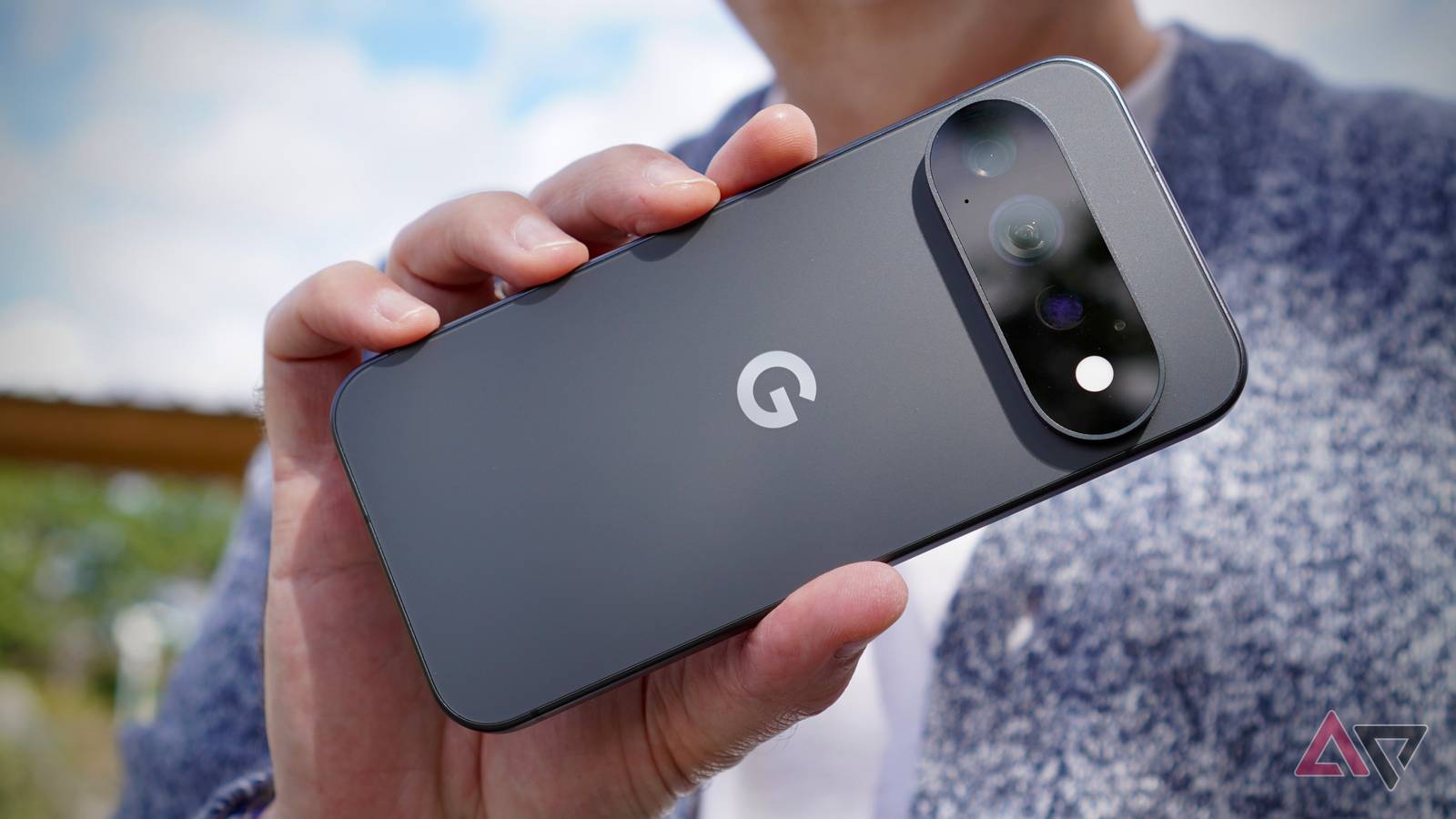
It’s hard to look at the Pixel 11 Pro and think Google is doing anything other than coasting. It’s so close to the Pixel 10 Pro, it’s hard to see any upgrade path at all, and anyone who dismissed the Pixel series before won’t find much to change their minds here either. However, this is the wrong way to look at the Pixel 11 Pro, and overthinking it will mean you're in danger of missing out on Google’s most refined Pixel phone yet. You'll regret ignoring this one. Google Pixel 11 Pro 9/10 SoC Google Tensor G6 Rear camera 50MP main / 48MP wide-angle / 48MP telephoto 5x optical zoom Display 6.3-inch Super Actua display Brand Google The Google Pixel 11 Pro may not look very exciting, but it's a phone to be ignored at your peril. The camera and software are among the best you can get, and refinements elsewhere make it a superb everyday partner. Pros & Cons Stellar camera Two-day battery life Rambler feature is effective Stylish and durable Clean and easy to use software Long software update commitment HiLight is useless Slow charging 12GB RAM on base model may be a future issue Price, specs, and availability The Google Pixel 11 Pro is available to buy now from Google, Amazon, and various other retailers. The base 12GB/256GB model is $1,099, the 16GB/512GB version is $1,219, and the 16GB/1TB model is $1,449. This is more expensive than the Pixel 10 Pro, and while you do get more base storage, you get less RAM. It comes in Obsidian, the matte color seen in our photos, Fog, Olive, or Canyon color schemes. Its closest rival is the Google Pixel 11 Pro XL, which has a bigger 6.9-inch screen. Outside Google, the Samsung Galaxy S26 Ultra, Oppo Find X9 Ultra, Xiaomi 17 Ultra, and Apple iPhone 17 Pro should all be considered before buying. Specifications SoC Google Tensor G6 Display resolution 1280 x 2856 RAM 12GB / 16GB Storage 256GB / 512GB / 1TB Battery 4850 mAh Ports USB-C 3.2 Operating System Android 17 Front camera 42MP Rear camera 50MP main / 48MP wide-angle / 48MP telephoto 5x optical zoom Wi-Fi connectivity Wi-Fi 7 Bluetooth Bluetooth v6 Dimensions 152 x 71.9 x 8.4mm Weight 204 grams IP Rating IP68 Colors Canyon, Olive, Fog, Obsidian Display 6.3-inch Super Actua display Google Pixel 11 Pro design Beautifully refined The Google Pixel 11 Pro is everything a modern smartphone should be. It’s beautifully made, well-thought-out, durable, and stylish. The stadium-shaped camera module is more subtle now it’s entirely covered in glass, and its upper-central position and overall width means the Pixel 11 Pro doesn’t wobble about on a table. The Pro model is just the right size too, fitting comfortably in your palm and pocket. The 204 gram weight is reasonable, and the 8.4mm thickness has been neatly disguised, so it’s easy to pick up and hold for long periods of time. It looks and feels expensive, and a quality piece of kit. Like the Pixel Watch 5, Google didn’t need to ‘fix’ much here, and instead has wisely refined the Pixel to make it one of the most desirable phones I’ve used this year. It’s not all good news. The phone lacks grip so you may want a case, and the screen bezels are surprisingly noticeable for a modern, high-end phone. The worst part of the hardware is the HiLight notification light. I won’t go over what’s already written about its lack of functionality, but it hasn’t redeemed itself during more than two weeks of use either. It’s entirely useless at the moment, and I haven’t thought about it once. Google Pixel 11 Pro camera One of the best you can get The Pixel 11 Pro’s camera is a return to form, after a few generations where Google has focused on niche AI features. This time, the Pixel’s camera is stellar, and I don’t think you can get much better. The app is fast and feature packed, and I really recommend playing around with them. Google’s AI features like Add Me are clever and worth experimenting with, but my favorite is Action Pan, which adds motion blur to photos of moving vehicles or people. I also love the 5x telephoto, especially in Portrait mode. Again, it requires quite specific circumstances to shine, but the software is so good at isolating subjects, you aren’t limited to taking photos of people. I enjoyed how it made cars look, turning street shots into something more special. Lowlight photography is class-leading, and Google’s AI makes photos of the night sky look amazing. Throughout, the camera colors are vibrant yet remain natural, exposure is balanced, and photos are always sharp and detailed. The only disappointment is the Camera Looks filters. Not only are they hidden away, making them awkward to access quickly, but I haven’t found any situation where they make photos look better than standard. I also think that if you want to change images so dramatically, it’s better to edit after the fact, rather than hope a Camera Look does a good job. I’ve loved using the Pixel 11 Pro’s camera, and don’t relish the thought of switching away from it to review another phone, as I know I'll miss its ability. It took on the Galaxy S26 Ultra in a comparison and easily beat it. It’s one of the Pixel 11 Pro’s biggest selling points. Google Pixel 11 Pro screen and performance Good, but the competition is better The Pixel 11 Pro uses Google’s latest Tensor G6 processor, and you look at a 6.3-inch Super Actua screen. The Corning Gorilla Glass Victus 2 has a tactile feel under your finger, reflections are minimal, and the screen is bright enough for outdoor use. However, it can’t match the stunning Galaxy S26 Ultra’s screen for brightness, and its effective anti-reflective coating makes it the phone to beat for outdoor use. The always-on screen is bright and clear, showing sensible-sized icons which are visible from a distance, along with the remaining battery percentage, and a dimmed version of your wallpaper. How about the Tensor G6? It’s fine. No problems here. At least, for me. Previous experience tells me not every Pixel is born equal though, and while my phone has been great, others may not be so lucky. Time will tell here. Phone 3DMark Wild Life Extreme Stress Test Best Loop Stability Battery drain Google Pixel 11 Pro 3325 64% 11% Samsung Galaxy S26 Ultra 7431 55% 13% Xiaomi 17 Ultra 5928 71% 19% I've played Asphalt 9: Legends, which is fast and smooth, and the phone has never become hot to the touch. Provided you aren't a very demanding gamer, it should be more than powerful enough. Perhaps the biggest performance consideration is the 12GB of RAM on the entry-level version. Phone Geekbench 7 Single-core Multi-core GPU Google Pixel 11 Pro 2335 7245 3286 Poco F9 Ultra 2066 8784 16728 Samsung Galaxy S26 Ultra 2970 10269 17107 Blame the cost of RAM for this, and if you plan to keep your Pixel 11 Pro for years, spending more to get 16GB of RAM would be wise. For reference, I’m using the 16GB Pixel 11 Pro. Screen and processor performance is very good in general, but when you look at the competition more closely, you can get better. The Galaxy S26 Ultra's fantastic screen blows it away, and there's more performance available from phones with the Snapdragon 8 Elite Gen 5 if you're into gaming. Google Pixel 11 Pro Android 17 and AI Getting the fundamentals right Android 17 is installed on the Pixel 11 Pro, and Google will support it with seven years of OS and security updates. I have not experienced any reliability problems, no overheating, and find the clean, logical Android system simple to learn and navigate. Google Gemini is everywhere, as are a host of Google AI features. I make most use of the photo editing tools, which are fun and varied, but for my lifestyle, features like Magic Cue simply don’t activate often enough to be game-changing. The context-aware features either don’t operate in WhatsApp, my most commonly used messaging app, or my life is too ordinary to trouble the AI. Most of the foreign-language content I watch already has subtitles to use the live translation, and when I do give it a try, it’s not very good. What happens instead is, Google’s flashy demonstrations during its launch events feel increasingly marketing-driven and further away from how normal people live and use their phones. Google Pixel 11 Pro Rambler and the death of real-talk Interesting, but I don't want to use it all the time Let's talk about Rambler, the new keyboard feature for Gboard on the Pixel 11. What it does is tighten up voice-to-text and remove filler words, so you can use it more naturally. It works across any app which supports Gboard, so pretty much anything you put on your Pixel where something can be typed, you'll be able to use Rambler. A really great example of how effective it can be was when I was messaging a friend about a Formula 1 race. Rambler knew to capitalize the names of drivers, and understood technical terms related to Formula 1. It recognized when I wasn’t being very clear and tidied up the text accordingly. I've also used Rambler in public settings to reply to some emails in Gmail, and it wasn't confused by background noise. It removed all my ums and ahs, and formulated sentences correctly, so it didn't appear like I was voice typing. I wouldn’t ordinarily use it in public. Rambler is fine in private settings, but I don't really need to hear other people speaking to their phone, and in turn, I don't want other people listening to me speaking to my phone. This is what bothers me about the hyperbole of people saying 'I'm never typing again' or 'I've not touched the keyboard since I tried Rambler.’ I don't think that's true. Rambler is a great addition, but I do not think it will replace the keyboard, or I certainly hope it won't. I'd rather people typed as well as spoke. I'm not entirely comfortable with the way it turns natural spoken language into polished, character-free text. Rambler is an engineer's dream. It takes away all the bits that don’t add value, boiling speech down to the basics for easy, efficient consumption. There’s a time and place for it, but it’s not something I’d want to use all the time. Speech shouldn't be free from flourish, and typing should reflect how we sound in real life. Using Rambler is really simple. There's a microphone button above Gboard, and a nice little waveform animation shows Rambler is listening to what you're saying. You dictate as normal and then press a tick icon, and it takes no time at all for it to suddenly put everything you've said into words on the screen. The final thing to say is, everything you've read in this section about Rambler was dictated using Rambler into Google Docs, and it did a fantastic job of tightening up what I was saying without losing any of the nuance or point of what I was talking about. It did need a little bit of tidying up, but the tidying up wasn't to fix Rambler mistakes, it was to fix my own mistakes or to clarify what I was saying. Google Pixel 11 Pro battery life and charging A two-day phone for many The Pixel series doesn’t have the best reputation for battery life and efficiency, but in my general use, the Pixel 11 Pro is an improvement on what has come before. Without gaming, the Pixel 11 Pro’s 4,850mAh battery lasts for between four and six hours screen-on time on a single charge, which I think is very good performance. It’s enough for just about two days between charges for me. Add in gaming and this use time will drop. A 30-minute session of Asphalt 9: Legends takes 6%, and the 20-minute 3DMark benchmarking stress test takes 11%. A 30-minute YouTube video at 1440p over Wi-Fi takes just 3%. This mostly competes with performance from other top phones using the Qualcomm Snapdragon 8 Elite Gen 5 processor, but the Pixel 11 Pro may not be quite as efficient under load. The Pixel 11 Pro supports Qi2.2 wireless charging using Pixelsnap and other compatible accessories, and wired charging too. Google says the battery will reach 75% in 30 minutes, but this is charger-dependant. The best I achieved with my Anker charger was 60%. It takes a full 90 minutes to reach 100%, which is not very fast. There’s an Extreme Charging option in the settings menu, which can be selected when the battery falls below 50%. It freezes background processes to enable a faster charge. Some have found the feature unreliable, but not to worry, as it didn't seem to make much difference to the overall charge time. Should you buy the Google Pixel 11 Pro? Yes, you should absolutely buy the Pixel 11 Pro. I’m going to sing the praises of the camera first, which I adore, followed by the software in general. It’s neat, simple, uncluttered, and a joy to use each day. The hardware is excellent, performance is great, and the battery life has been a pleasant surprise too. Outside of Gemini, Google’s AI is underwhelming and may only show up in specific circumstances. The features are not a reason to buy the phone. Rambler is the most interesting addition, but should be used with care. The Pixel 11 Pro is a return to what Google has always done best: camera and software. All the AI nonsense, and half-baked features like HiLight threaten to overshadow them if you only pay attention to the marketing, but this would be a terrible shame. Google’s back to its old self with the Pixel 11 Pro, and provided you ignore all the surrounding fluff, you’ll get yourself a superb smartphone. Google Pixel 11 Pro 9/10 SoC Google Tensor G6 Rear camera 50MP main / 48MP wide-angle / 48MP telephoto 5x optical zoom Display 6.3-inch Super Actua display Brand Google The Google Pixel 11 Pro reminds you of what Google has always done best with its superb camera and wonderful software, then refines battery life and performance to create a well-rounded smartphone that's a highly recommended purchase.
Google Pixel 11 Pro review: I love it, and it has nothing to do with the AI
Full Article
Original Source
Read the full article at Androidpolice →KhanList aggregates and links to publicly available news content. We do not host full articles from third-party sources. Always verify important information with original sources.