
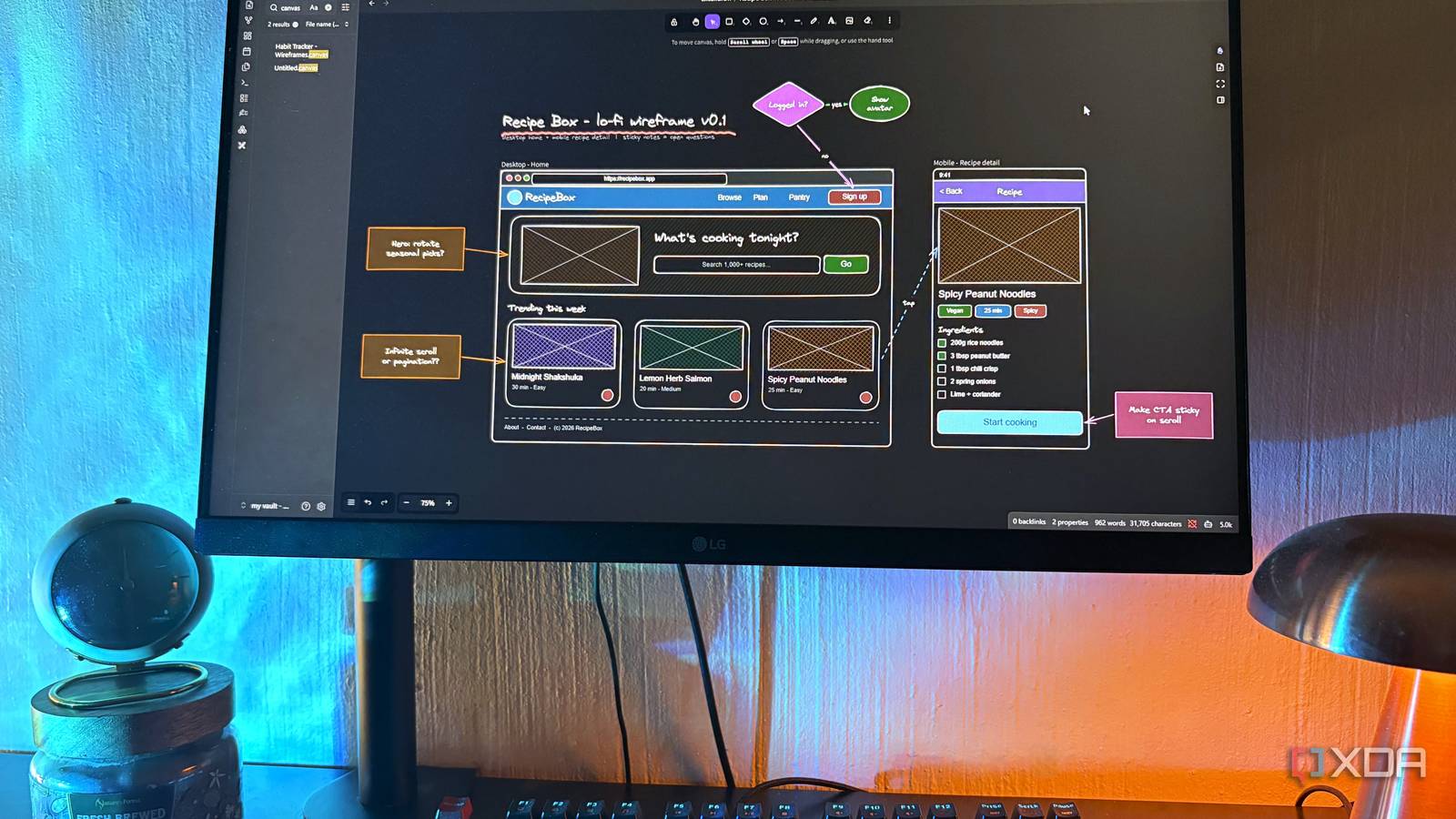
Published Sep 25, 2026, 7:30 AM EDT Nolen began their writing career in 2019, with three years dedicated to editing the Creative section at MakeUseOf. Their expertise lies at the crossroads of technology and creativity, covering areas like photography, video editing, and graphic design. Outside of work, you'll often find Nolen diving into a good book, writing their own stories, or playing video games. The big whiteboard apps like FigJam and Miro are really good at what they do, but whatever you end up sketching or drawing in them just ends up in a browser tab somewhere, instead of near the notes it actually came from. That's fine for something you want to be more polished, but less so for the early-stage lo-fi work and brainstorming. Obsidian's own Canvas tool gets closer since it lives in the vault; all you have to do is drag your notes onto the canvas and connect them. However, it has the opposite problem of Figma and Miro; there aren't really enough features to work with for a wireframe or full-fledged diagram. So I needed something in the middle, and the Excalidraw plugin ended up being exactly that. It's free, lives inside my vault alongside my notes, and has all the features I need without being too complex. The problem with Figma, Miro, and Canvas Great tools, just nowhere near my notes Figma is still where my serious design work happens, and FigJam and Miro both handle whiteboarding really well. The free plans cap you though, Figma's Starter plan allows 3 design files and 3 FigJam files plus unlimited drafts, and Miro's free plan gives you up to 3 editable boards. This alone is probably enough to annoy some users. Most of my workflow already lives in the cloud somewhere anyway, so the storage side doesn't bother me much. The bigger thing for me is how convenient plain local files are. A wireframe in FigJam can't link to the research note that shaped it and won't show up when I search my vault, so getting it anywhere near Obsidian means exporting a PNG and dropping it into a note. Canvas handles that part and I actually like the plugin and use it all the time; it's also convenient that all the files sit in my vault next to my notes in the open JSON Canvas format. The trouble is everything on a canvas is one of four node types (text, files, links, or groups), so there's nothing to actually draw with, and the connecting lines and groups only exist on the canvas and don't modify the notes. Meet Excalidraw for Obsidian The open-source whiteboard that lives in your vault Excalidraw for Obsidian, made by Zsolt Viczian, is based on Excalidraw, the open-source whiteboard Christopher Chedeau (who also co-created React Native) started in January 2020. That sketchy hand-drawn look comes from a library called Rough.js - I just think it's a pretty iconic look for an app. It's meant to resemble that unfinished feel of rough sketches, outlines, and diagrams. The plugin runs that same editor inside Obsidian. Drawings get saved as files in the vault, and they can link out to notes or be embedded inside them. Not everything from the website comes along, though. Real-time collaboration, end-to-end encryption, and shareable links belong to excalidraw.com rather than the editor, so there's no built-in multiplayer. The dev's workaround is to collaborate on excalidraw.com and then embed the room or paste the drawing into your vault. Also, Excalidraw+ isn't supported at all. What you get instead is stuff the website can't do, like local Markdown links and text transclusion. It works fully offline by default and only contacts an AI provider if you add a key and use those features. It's also a one-person hobby project built alongside a full-time job, and the dev openly says he builds features primarily for himself, which probably explains why the settings menu goes on as long as it does. How I make the most of Excalidraw in Obsidian From lo-fi wireframes to messy mind maps A tool like Excalidraw is the perfect place for drawing anything in the first stages of a build - in this case, I'm talking about lo-fi wireframes, or anything that typically goes on a physical scratchpad before making its way into software. I like that the hand-drawn style makes it obvious a screen is still a rough idea, so nobody starts nitpicking fonts and exact pixel placement. I use it for personas and journey maps too, and affinity maps when I'm sorting research into themes. User flows are probably the quickest since Ctrl plus an arrow key spawns a connected shape in that direction and I can just keep going. Mind maps are another big one. Or any type of diagram - whatever topic or project requires me to do a little brainstorming and planning first. When I'd rather type than draw on my physical whiteboard, the Mermaid-to-Excalidraw turns diagram code into shapes I can drag around after. The toolbar has the usual shapes and a free-draw pen, and arrows actually bind to whatever they point at. There's more tucked in the extra tools menu, like a Frame tool and a laser pointer, plus Draw to shape, which tidies up my wobbly circles. Shape libraries can be stored as vault files now too. And if you want AI in there, since version 2.23.0 you can pick between OpenAI, Claude, Gemini, Grok, or an OpenAI-compatible local endpoint. Another part of this setup I love is that I can drag my notes directly from the vault panel onto the Excalidraw canvas. They land as links to those files, so I can build a wireframe around the research note behind it and clicking opens the real note in Obsidian. This usually requires extra import steps to get your notes into other whiteboard tools. My drawings are secretly Markdown files Which means Claude can also read my whiteboard Excalidraw doesn't use a proprietary format, it uses a mix of Markdown and JSON… Every Excalidraw drawing is actually a Markdown file, and has been since version 1.2.0, so drawings take tags and frontmatter like any other note. When I open one as Markdown, the properties sit at the top, and anything typed between those and the Text Elements heading is left alone by Excalidraw, which makes it a handy spot for notes on what a drawing is for. The Text Elements list holds every bit of text on the board including links, so I can transclude text from a drawing into other notes and drawings show up in graph view. The picture itself is JSON in a Drawing block at the bottom, compressed with LZ-String by default, which is why that part looks like nonsense. Marker frames let me embed just one framed section of a board in a note too. The reason this matters is that my entire vault is practically run by Claude Code now, so I can get Claude involved in my Excalidraw canvases too. It can read the text and links straight from the Markdown, but building or editing a board needs the JSON, so you'd decompress the file from the command palette or switch compression off in the Saving settings first. I'd work on a copy if you're trying it for the first time since the JSON can get pretty fussy. Figma can stay open for the polished stuff, but Excalidraw is where my rough sketches now live Hi-fi design and big team sessions are still Figma and Miro jobs. But for those early ideation stages that you'd normally wing on a physical scratchpad, Excalidraw couldn't be a better fit. I love that it integrates directly with the very notes I actually base my wireframes and diagrams on, and the format is open, meaning I can have an agent read or write it too. Obsidian OS Windows, macOS, Linux, iOS, iPadOS, Android Individual pricing Free normally; $4/month for Obsidian Sync
Forget Figma and Miro: I turned my Obsidian vault into a whiteboard with one plugin
Full Article
Original Source
Read the full article at Xda-developers →KhanList aggregates and links to publicly available news content. We do not host full articles from third-party sources. Always verify important information with original sources.