
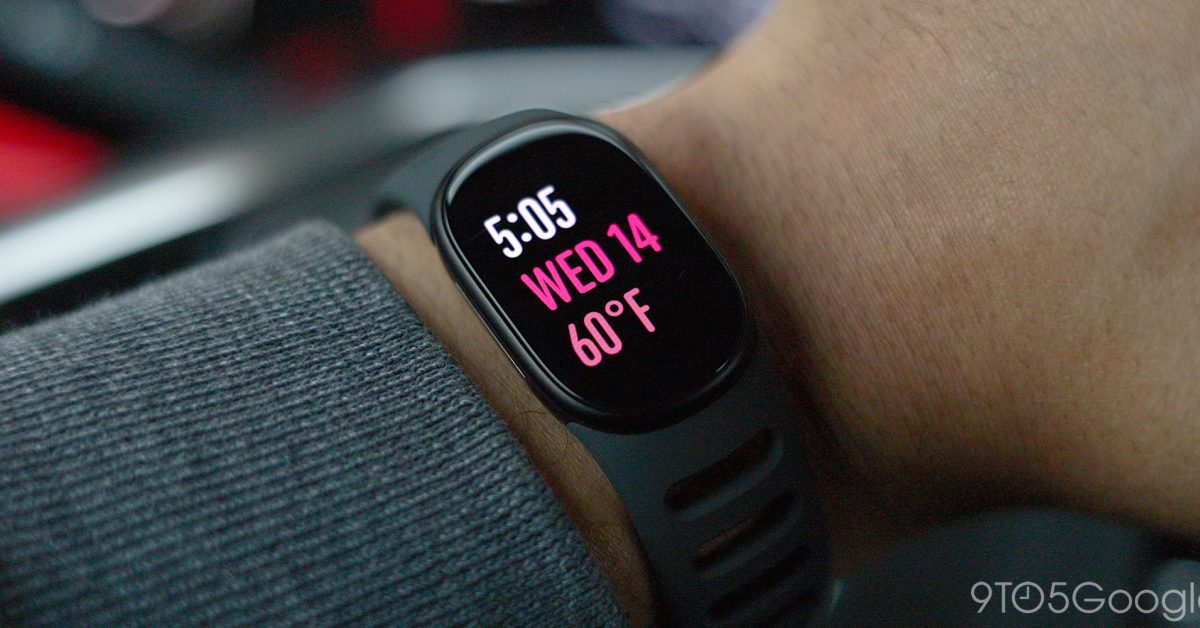
The biggest compliment you can pay Google at the moment is that alongside the Pixel Watch, recent Fitbit releases have been a huge return to form – the Fitbit Edge included. I need to nail my colors to the mast; I’m a Fitbit Air fanboy. I’ve talked about it multiple times on the Pixelated podcast, here on the site, and it made me switch away from the Pixel Watch 5 because of how easily it fit into my existence without insisting on itself. Fitbit Edge Review: Too much and too little at the same time The Fitbit Edge worried me at first because it comes with a screen, which is something I realized isn’t that important to me day-to-day. After 30 days of wear, I’m conflicted because maybe I was too hasty to ditch a display on my wrist. For more video content, subscribe to 9to5Google on YouTube. More but simultaneously less The design is somewhat in a halfway house because it feels like it’s trying to be both a classic Fitbit while integrating some of the Pixel Watch features we know and love. Initially, I loved it, but it has become something that isn’t quite enough in either direction to suit my own tastes. My love for the simplicity of the Fitbit Air has colored how I feel, but the Edge has an excellent core design. The display bezels remind me heavily of the original Pixel Watch; yes, they’re there, but you only notice them when the light catches the frame edge. After a month of daily wear, the display has lost a bit of its luster. The oleophobic coating is just about holding up, but now we’re into the cooler months; it’ll be put through a barrage of jacket cuffs and hoodie sleeves. This is one of the only durability concerns I have had so far. Despite that admittedly minor concern, the Fitbit Edge is not something you need to baby. I’ve bashed it with weights, caught my wrist on zips (zippers for you, my American friends), and bashed it around with reckless abandon. It’s solid and hasn’t picked up as much as a single scuff. I don’t care too much if a fitness tracker gets a beating, whereas I would be more concerned about damaging my Pixel Watch. What it’s like to use If you come in wanting a smartwatch-like experience from the Fitbit Edge, I think you’ll instantly be frustrated by the UI. It can feel cramped when you see notifications, and the large bezels don’t help all that much, but Google has well optimized almost all of the key sections outside of this. Tiles are very well implemented; they’re just a smaller, squatter take on the Pixel Watch tile system, and it’s one of the best things about the Fitbit Edge interface. It’s also really snappy, which is something that isn’t the case with cheaper fitness trackers such as this. I’m constantly checking the weather or using the Google Health tile, but I have loved the quick access complication on the default watch face. I tried a few of the other designs over the past 30 days; a lot of them are great. The default has become my favorite. It’s information-dense without being too overloaded. Tapping the complications takes you to the exact data point. I genuinely love how fuss-free an experience it is, save for a few minor complaints. We could criticize the accuracy of the data or the lack of tracking for certain types of workouts, but I think that misses the point of the Fitbit Edge. It’s a simple tracker with a screen, and the fact that you get even basic ECG on a device of this size is impressive. I truly have worn the Edge daily for a full month, and while the bands are comfortable, I have found that they cause me to get a rash on the underside of my left wrist just under the palm. It’s actively stopping me from wearing it all the time now. I hope that the new connector doesn’t slow down third-party development for bands, because I’m desperate for a fabric band to alleviate this issue. This is exacerbated when the rubber band gets wet or sweaty. If you have sensitive skin, you might have the same problem as I have. Using some moisturizer has helped, but it is something I wasn’t prepared to suffer with before the Fitbit Edge turned up. I get that this is likely a “me” problem, but I wanted to note it. When the screen gets wet or moist, it can bug out quite a lot. Taps don’t register properly, and a few water droplets can activate all the menus and submenus. Luckily, it won’t force your phone to place a call or anything like that, but the water protection mode is a must. I have kept it on extensively. Swimmers will probably get super frustrated; heck, I was on a rainy day as the screen kept bugging out. Overall, though, I have enjoyed the fitness tracking. Unlike on the Fitbit Air, it is nice to have a screen to start a workout rather than head over to my phone. That said, the experience is the same as on your phone, but scaled down to fit the watch face. I dislike that you don’t get a phone notification to show the current workout progress by default, like the Fitbit Air. I had become accustomed to that. Luckily, you can enable it in the Google Health settings. I like having this as I forget to stop workouts so often without a prompt to hit “stop.” With audio playback, you’re also getting the partial benefits of watch-phone controls, but it’s a two-step process unlike on Pixel Watch. You either have to go to the “Media” app or have the tile active and navigate to it to access play/pause and all your other streaming app controls. I tend not to bother using these as it’s finicky. This had me thinking about NFC. I think a lot of people would have liked NFC for Google Wallet on the Fitbit Edge, but I think having to enter a PIN on such a small screen would really have been a nightmare. I’ve made wireless payments with my watch less than five times, as it’s just easier to use my phone rather than contort my wrist to a wireless payment terminal. I figure this was something that was thought about and makes a lot of sense given the constraints. One of my other complaints is that the DND and Bedtime modes from my account haven’t synced or at least don’t appear to sync. Unless I’m mistaken, you need to activate these settings manually every time, which has been super annoying when in bed, as a flick of your wrist can blind you in a dark room. I figure this is something that can be fixed with an update, so here’s hoping. I’ve been super impressed with the battery life. A week is easily attainable for me with up to three gym visits per week, so I’ve charged 5 times in a month. That, to me, is excellent. I picked up a cheap charging dock, as the Edge uses the same charger for the Fitbit Air, so I figured why not. It’s not the best-looking dock, but I quite like how it airs off my Edge so it’s not as stinky after gym sessions – as I wipe with an alcohol pad and clean as regularly as possible. Who is this for? The experience is fine; it’s almost a third of the price of the Pixel Watch and lacks a few features due to the various compromises – compromises I can deal with, as smartwatches have become information overload for me over time, and I like that the app selection is ultra-refined. At no point does the Fitbit Edge give you information overload. Coming from a Charge 6 or an older Fitbit, this is an amazing replacement. It’s the new “default” fitness tracker for people who want all the hallmarks of what makes a great Fitbit. There is just enough. Nothing more, nothing less. To me, this feels like the perfect middle ground for a lot of people. You want something simple, touchscreen-enabled, and that doesn’t get in the way. As impressed as I have been with the Edge, though, I’ve loved a fuss-free tech accessory so much recently that I’ll probably go back to the Fitbit Air. More on Fitbit: Fitbit Sense & Versa losing 3rd-party watch faces this month, existing downloads remain Fitbit Edge doesn’t have Google Wallet because ‘less than 1%’ of Charge owners used it FTC: We use income earning auto affiliate links. More.
Fitbit Edge after 30 days: Life in the middle lane [Video]
Full Article
Original Source
Read the full article at 9to5google →KhanList aggregates and links to publicly available news content. We do not host full articles from third-party sources. Always verify important information with original sources.