
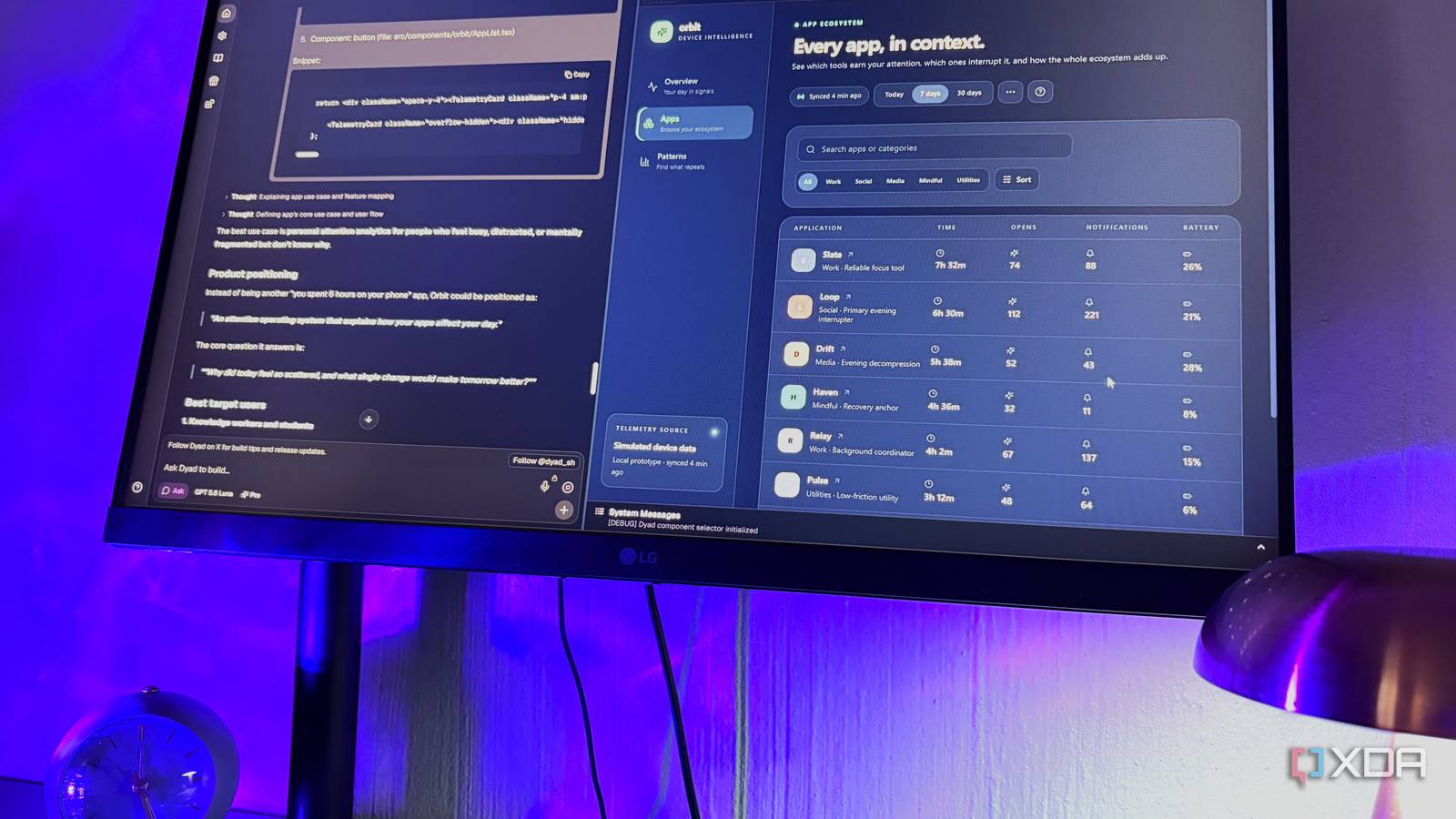
Published Sep 29, 2026, 6:00 AM EDT Nolen began their writing career in 2019, with three years dedicated to editing the Creative section at MakeUseOf. Their expertise lies at the crossroads of technology and creativity, covering areas like photography, video editing, and graphic design. Outside of work, you'll often find Nolen diving into a good book, writing their own stories, or playing video games. Vibe coding tools have made building small apps pretty easy and more accessible than ever. All it takes is writing a prompt, technically. But I'd argue that the workspace you're in matters more than the ideas you have, because you'll eventually need to learn how to iterate, what a codebase is, and potentially how to publish your build. And the vibe coding tool you're using determines the quality of this experience. Unfortunately, most of the good ones are paywalled or run on some type of credit system. This means that half the time you're paying before you even get to poke around and truly understand what you're building, so the dumb side project that had the potential to turn into something useful now never even gets a prompt. But I've found a free and open-source vibe-coding tool that's way more forgiving of your early, throwaway ideas, called Dyad… Want to stay in the loop with the latest in AI? The XDA AI Insider newsletter drops weekly with deep dives, tool recommendations, and hands-on coverage you won't find anywhere else on the site. Subscribe by modifying your newsletter preferences! Dyad is an app builder that lives on your computer It doesn't feel like a restricted free trial Dyad is a free, open-source AI app builder, and works similarly to tools like Lovable or Bolt. You describe the app in a chat and watch a working preview render next to it. Dyad runs on your own machine, and every file it generates gets saved to your disk as regular code. That code can go straight into VS Code or GitHub later. You don't even have to make an account to get it running, which I always appreciate about a tool. The free version gives you almost the full product. There aren't any project limits, and Build mode, which does most of the work, has no usage caps for anyone. The paid Pro and Max plans ($20 and $79 a month) mostly add Dyad's own AI additions and Pro modes, but you don't need them for basic usage. Like many vibe-coding tools, Dyad is meant for developers as much as non-developers. Dyad's creator actually says he enjoys helping non-developers build things they didn't think they could, and the entire pipeline runs through chat. I didn't write or touch a single line of code while testing it, though the code's right there and available to edit if you need to, or in my case, hand it off to someone who actually codes. You probably already pay for the AI it needs Dyad's brilliant AI usage system Dyad doesn't ship with its own AI, so you bring one. Local models are the fully free route. Ollama gets picked up automatically on localhost, as well as LM Studio, and anything else with an OpenAI-compatible API can be added as a custom provider. Dyad admits smaller local models can struggle with its instructions, so your VRAM will determine your experience with the local route here. Regular API keys cover OpenAI, Anthropic, Google, and OpenRouter, which is the usual pay-per-token setup. The newer option is the one I actually used. Since version 1.16, you can build with your ChatGPT subscription, even as a free Dyad user. As far as I can tell, usage comes out of the Codex allowance bundled with ChatGPT plans. Dyad itself just calls it your ChatGPT usage allowance, though. The optional Fast mode hints at how it works, since it uses twice as much of that allowance. I'm on ChatGPT Pro at the moment, so the pool goes pretty deep for me, and Free Dyad users don't pay Dyad anything extra beyond the usual free-tier limits. You can still pick the exact model from your chosen provider and the reasoning effort yourself. At first I just stuck with GPT 5.6 Luna because it was all about experimenting initially. Dyad reckons this gets you up to 5x the usage of Pro credits alone, which I'll take their word on since I never bought any. I just think this is overall a brilliant "payment" model. You hook up to the AI tools you already use and it pulls from that existing pool, so you're not paying anything extra. Or just go the local route to keep it completely free. This ultimately makes you more likely to expand on your dumb ideas because you don't have to watch every single credit like a hawk. Plan it, then build it Dyad holds your hand along the way Plan mode is where you go with your half-baked ideas. You do not need to know exactly what you want or how it's even going to work, that's what this mode is for. I gave it a vague idea for a screen-time dashboard running on fake phone data, and it asked a short multiple-choice questionnaire before getting started. Once your plan is ready, you get the option to continue building in the same session or hop over to a fresh one with the plan. The building happens in either Build mode or Basic Agent. Build now runs in a loop, checking the app and its own changes over several steps, and it's unlimited. The Agent can also catch and fix bugs on its own, but free users get 20 Agent messages a day. Once it's running you just watch it tick through its own to-do list file by file, and then the build will eventually run and your preview will start rendering in the split panel. Every edit saves a new version automatically, restoring an older one doesn't wipe anything, and the history stays intact. The right side holds the live preview and the full codebase. Visual editing is locked to Pro, but you can select components in the preview and attach them to the chat. For example, I grabbed the category filter buttons and asked about them in Ask mode, and it gave me a full synthesis of the purpose of the buttons. Once you're happy, you connect the app to GitHub from inside Dyad, and hitting Sync to GitHub pushes whatever's on your drive up to a repo. Dyad's own guide suggests Vercel from there, since it has a decent free plan. It rebuilds the app each time you sync, so the live link stays current. A tool for the ideas you'd normally skip That screen-time dashboard runs entirely on made-up data and will probably never leave my hard drive. It was just an experiment. And most of my designs and builds end up in a graveyard. But that's exactly the point with Dyad, that you get to experiment without having to worry about a credit pool draining. Dyad
Every vibe-coding tool wants your subscription, but this one wants your bad ideas
Full Article
Original Source
Read the full article at Xda-developers →KhanList aggregates and links to publicly available news content. We do not host full articles from third-party sources. Always verify important information with original sources.