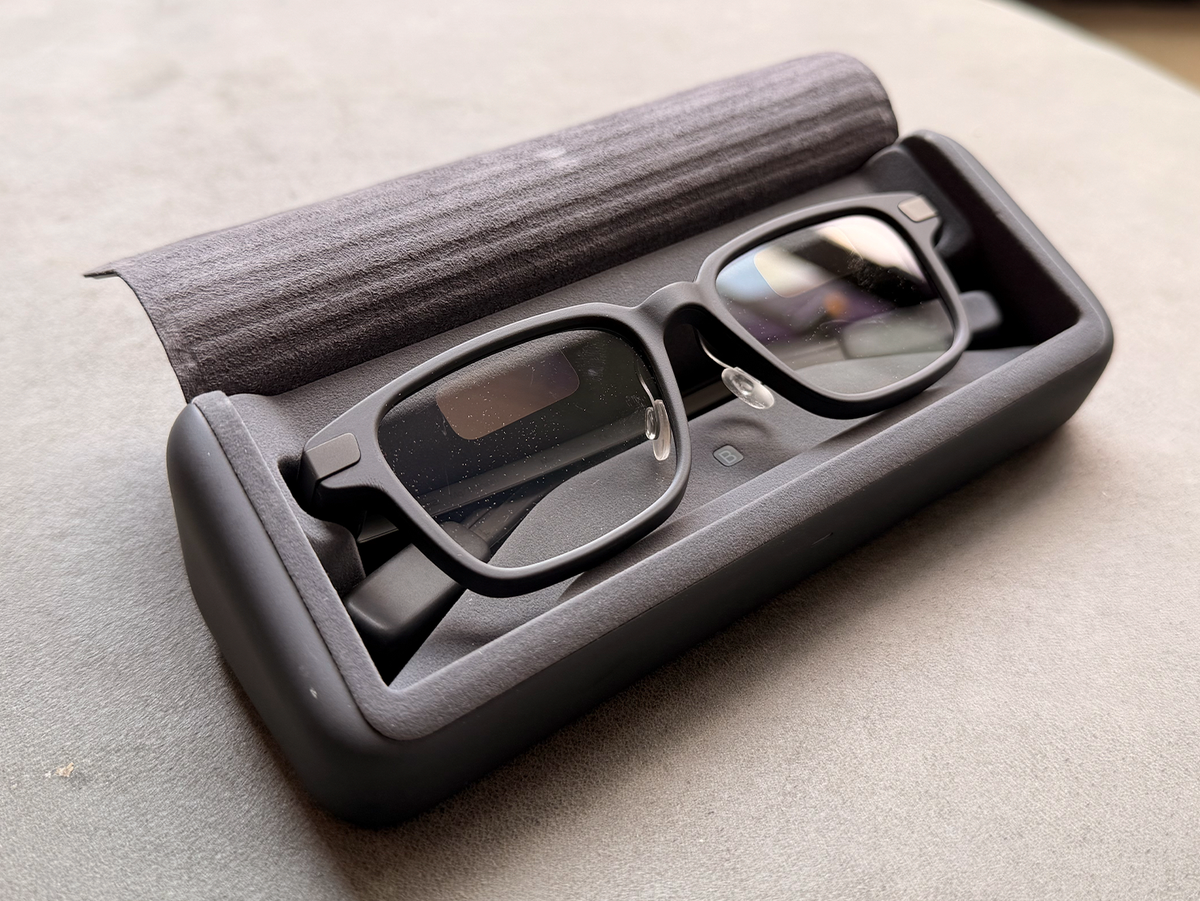
8 min readWhen people think of smart glasses, they tend to think of a wearable that offloads features from your phone that enhance your everyday life—cameras, music, and a virtual assistant that can answer questions on the fly. The Even Realities G2 falls under that umbrella, too, but flips the script with tools that help you stay focused at work.It has a pair of tiny green monochrome displays, one tucked into each prescription-ready lens, that quietly surface lists, notes, translations, reminders, and other prompts right in front of you whenever you need them. And unlike Meta Ray-Bans and Oakleys, they’re designed to look like a pair of reading glasses, so they blend with an office outfit just as well as your weekend fit.That understated approach is mostly effective. Unlike Meta’s glasses, the G2 feels focused on its task, surfacing information you need at work. Believe it or not, that focus made me more interested in integrating its tools into my workday. At the same time, many aspects of the device feel unpolished, including an inconsistent artificial intelligence tool, finicky controls, and an awkwardly placed touch strip.Smart glasses are still evolving, and this is absolutely a piece of work-in-progress tech. If you’re open to finding the utility as Even Realities irons out the kinks, the G2 is a novel and potentially effective way to seamlessly integrate tech-based tools into meetings, project presentations, and any kind of work where you’d rather not look at a phone.ProsGreen display is easy to see and read in different lighting conditions Even Hub has useful plug-ins to help with daily tasksLong battery lifeConsAI had trouble transcribing in noisier environmentsControls are awkward to use Key SpecsKey FeaturesMicrophones, companion app, monochrome display Battery LifeUp to 48 hours with charging caseConnectivityBluetooth 5.4 Weight32 grams Prescription Range-12.00 to +12.00SFW Smart GlassesSubtlety is one of the G2’s biggest strengths. Without the added bulk of cameras, the glasses feel significantly lighter and thinner than other smart glasses I’ve tried, and only weigh 32 grams. The frames are narrow, and the metal arms are skinny enough to not block your peripheral vision. It’s hard to believe there’s any tech built in, but the thin construction makes them more comfortable to wear for longer periods of time without feeling weighed down. Not for nothing, but that also means they won’t get the added attention—and often derision—from your co-workers and clients who may not love the idea of you wearing a camera on your face.Amber JoglarThe G2 glasses are relatively thin, and feel like standard glasses on your head.The only real giveaway that you’re wearing smart glasses is the pair of binocular Micro-LED green monochrome waveguide displays at the top of the lenses, which project digital text and data into your field of view. At certain angles, someone looking at your eyes might see a bright green light, but they wouldn’t be able to read what you’re looking at. It may seem strange to them, but I wouldn’t consider it to be a privacy issue for you.Amber JoglarYou can see the Micro-LED green monochrome displays at the top of each lens.The G2 simulates a focal distance of about 6.5 feet from your eyes, so the screen is projected away from you instead of directly in your eyeline. While this is better than having the screen shove text and images into your field of view whenever it wants, it does force your eyes to readjust every time you wake or use the display after looking at things close up. I found that constant shifting back and forth felt a little unnatural for the first few days: There’s no picture anchor mode, so the bobbing screen felt distracting at times. I felt like my eyes had to readjust anytime I went from my laptop or phone screen to the projected screen, so I never really got used to it.Easy to Navigate (Mostly)You interface with the glasses using capsule-shaped touch controls at the ends of the temple arms. Double-tapping wakes the display, a long press opens the menu, sliding your finger scrolls through dropdowns, and single-tapping allows you to select. There are no advanced shortcuts, which makes the controls easy to learn and remember.That said, the controls feel a bit out of the way situated at the back of the stems. This likely won’t be an issue for everyone, but I had more difficulty keeping my hair away from the touch controls. I was often moving strands aside or feeling around until I made contact with the capsules. I wish the controls were a little closer to the front, where they’d be less likely to get brushed accidentally.Voice is also a viable alternative for navigating the A.I.-powered features. The four built-in microphones are (mostly) capable of picking up spoken commands like asking Even AI questions, dictating text, and translating.If all the above sounds like a nightmare, you can use Even Realities’ smart ring, the Even R1, to control the glasses, but that’s a $250 add-on for a pair of $600 glasses, and that assumes you aren’t already using another wearable for biometric tracking. Plus, I’d rather the onboard controls just function better, rather than having to purchase a separate device to maximize usability.The Even Hub in the App Is the Most Promising FeatureThe G2 features an “app store” called Even Hub where third-party developers can launch plug-ins with new features for the glasses. Though the hub only launched in April 2026, there’s already a pretty wide range of features to try, including everything from entertainment and education to health and lifestyle tools.You can access an array of plug-ins, chat histories, and settings in the Even app.I tinkered with a few apps that felt like an easy fit for my day-to-day, like a notes app to keep a running to-do list throughout the day. Another I added to my dashboard was “DocuLens,” so I could upload and view pdf files.The feature that I returned to the most was the “G2 Shopping List” plug-in, which completely overhauls the experience of running through a grocery list by letting you add your own items, categorize them by store, and then scroll and check them off as you shop. Call me old-fashioned, but I actually enjoy putzing around a grocery store, and using an AR list allows me to stay heads-up so I can check out new products and explore different foods without distraction. I didn’t feel compelled to pull out my phone every 30 seconds to make sure I’ve picked up every ingredient.Not every plug-in feature I tried was so successful. “Recall,” a voice memos–style feature designed to dictate your thoughts, completely misfired a couple of times, failing to record what I said. And most of the games, like Chess and Blocks, did not work well because they relied exclusively on the onboard controls, which didn’t feel intuitive or engaging.I’ve said it before, but every pair of smart glasses feels kind of like a work-in-progress right now. The G2 wears that on its sleeve for better and for worse. It can be annoying when things don’t feel seamless, but it also feels unlike anything I’ve tested to date.A.I. Is Only So-SoThe G2 is branded as an A.I. gadget, so it’s unfortunate to point out that some of the core A.I. functionality falters compared to other versions like Meta.The G2’s standard A.I. assistant is voice-activated, or accessible by double-tapping the left touch control to wake the dashboard, long pressing for the main menu, then scrolling to access Even A.I., the brand’s virtual assistant. The voice controls work well but, as I mentioned, the onboard controls make the hardware-based route a little rough, especially compared to other glasses and phones that let you call up the A.I. with a single button.For workers, the G2’s signature feature is “Conversate,” a live speech-to-text transcription function. It’s simple to use, and very helpful in theory, but it couldn’t always transcribe meetings accurately. In testing, the glasses’ A.I. struggled to keep up with quick conversations, and occasionally misidentified names or complete words and phrases.The issue is not entirely the A.I.’s fault, I believe. While Even Realities has upgraded the G2 glasses with a four-microphone array, double the number of mics in the original version, they clearly still struggle to pick up some voices and cancel out ambient noise. I actually had more success transcribing casual conversations with colleagues than large meetings in conference rooms.Amber JoglarEven with a four-microphone array, the glasses have trouble picking up voices in large, crowded settings, like meetings.That said, Even A.I., the brand’s large language model (LLM), was more effective at summarizing my transcripts than it was at capturing them. It could effectively pick out key points from its own transcripts, and generate a checklist of action items to take away from my meetings. That’s a staple of workplace A.I. efficiency, and it works decently well, though given the glasses’ transcription issues, I’m not sure it can be trusted to capture more than a high-level snapshot of any given conversation.And while it faltered in what I felt was its strongest use case, it excelled in other places. Another plug-in, “Teleprompt,” projects your script in front of you during presentations, and seems like a natural fit for workers. When I input a test script via the app, I was able to adjust the speed to match my natural cadence, which allowed me to read naturally without looking down at a sheet. If you give a lot of presentations at work, I could see this becoming an invaluable tool. Likewise, it features a helpful live translation app, though it’s worth pointing out that every A.I. tool, including most smartphones, has this feature now.Battery Life Is One Less Thing to Worry AboutEven Realities claims the G2 has the battery life to last through up to two days of regular use on a single charge, and my experience backs up that estimate. However, the case deserves some credit: You’re effectively carrying around a battery pack that can charge it up seven times over. I didn’t need to actively plug in and charge my glasses for about a month. In this one specific way, the G2 absolutely will fade into the background of your daily routine, and that’s important.Who Should Buy the Even Realities G2 AI Smart Glasses?The Even Realities G2 Smart Glasses serve an obvious niche for smart glasses, optimizing for work and everyday productivity without diving into the category’s more common (and complicated) features—namely cameras. Having a more lightweight smart-glasses experience makes it easier to use in some ways, and it’s really made to go with you everywhere.At the same time, this is definitely a device for tinkerers and early adopters: Not every plug-in or app is going to work as planned, and its A.I. functionality is not consistent. You can argue that’s true of all A.I. tools at this point, though: I’d recommend letting your tolerance for its fumbles on your phone and PC (or lack thereof) be your guide to how much to trust it.And, finally, keep in mind that picking the G2 means you’re actively avoiding cameras in your glasses. In a workplace, where you may not know how everyone feels about smart glasses, this allows you to take advantage of their A.I. capabilities without inadvertently raising your co-workers’ concerns about privacy.As a tech person, I liked my time with the Even Realities G2. If you value productivity and organization in your daily life, using them feels like a glimpse into what practical smart glasses could become.More Smart Glasses We RecommendRay-Ban Meta Scriber Optics (Gen 2) Smart GlassesMeta Ray-Ban Skyler (Gen 2) Smart GlassesMeta Oakley HSTN AI GlassesAmber is a Reviews Editor with bylines on Popular Mechanics, Runner’s World, Bicycling, and Best Products sites. Specializing in kitchen gadgets, small appliances, lifestyle, and consumer tech, she brings hands-on testing and a detail-oriented approach to every review. In her free time you can likely find her trading trinkets at an EDM festival, searching for hidden gems at thrift stores, or cuddling with her two cats.Mike Epstein is a Senior Commerce Editor at Hearst Enthusiast Group, producing reviews for buying guides Popular Mechanics, Runner’s World, Bicycling, and Best Products. Prior to joining Hearst, he was a video game and technology critic for over 10 years, with bylines at IGN, Gamespot, Variety, Lifehacker, Kotaku, GamesRadar, Flavorwire and Digital Trends, among others. Now, he’s a jack of all trades, helping reviewers share everything they know about all kinds of technical gear, from snowblowers, to running shoes and bicycles, and every kind of gadget imaginable.
Even Realities G2 A.I. Smart Glasses Review: A Rough Draft of A.I.’s Wearable Workwear Future
Full Article
Original Source
Read the full article at Popularmechanics →KhanList aggregates and links to publicly available news content. We do not host full articles from third-party sources. Always verify important information with original sources.