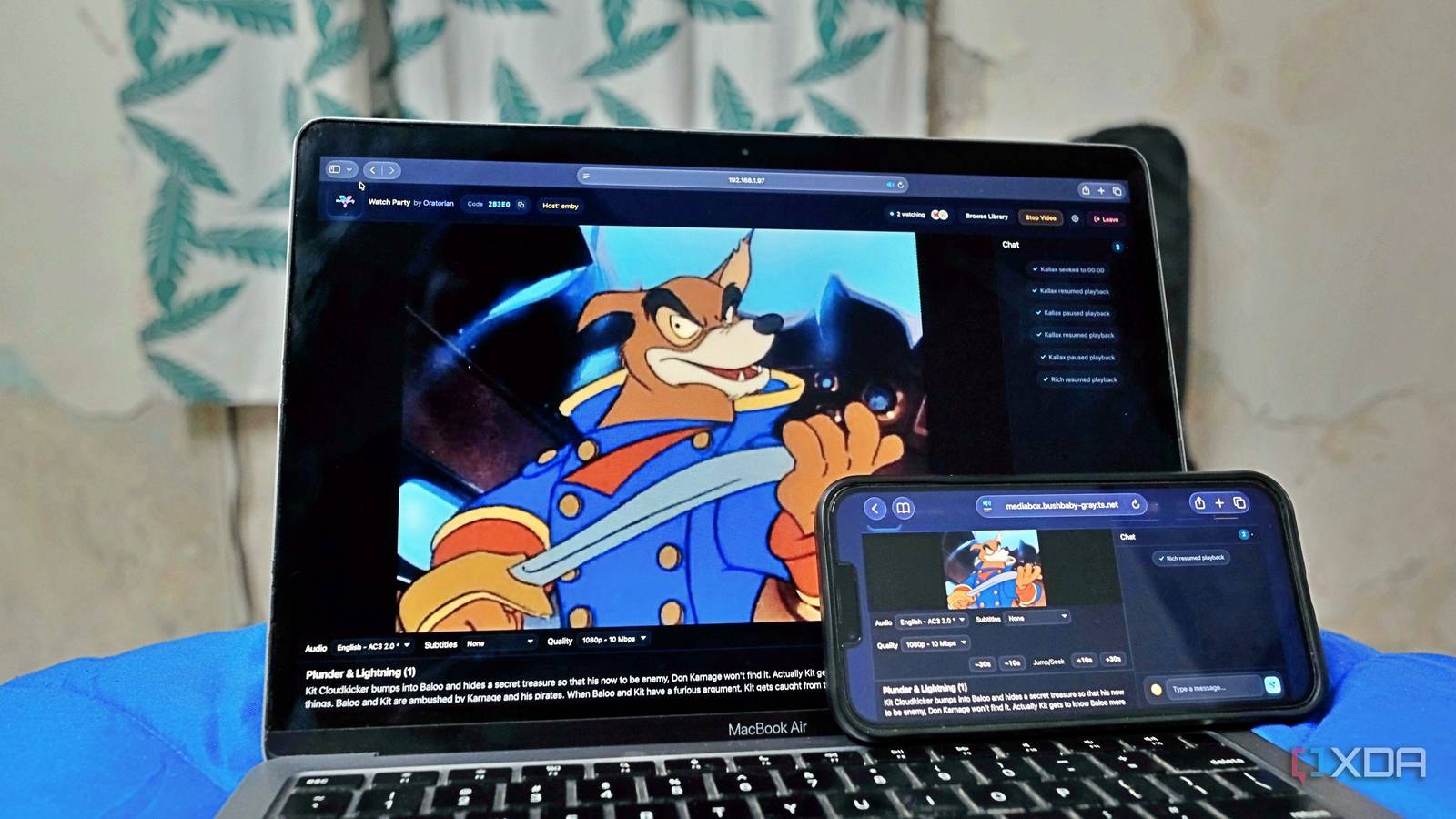
Published Aug 7, 2026, 3:00 PM EDT Samir Makwana is a technology journalist and editor from India since past 18 years and his work appears on MakeUseOf, HowToGeek, GSMArena, BGR, GuidingTech, The Inquisitr, TechInAsia, TechWiser, and others. He has written news, features, and gadget reviews for national technology media publications. His passion is to help people with their technology problems and gadget purchases. For that, he has worked for some of the biggest international technology publications, covering news, explainers, how-to guides, listicles, and product-buying guides. He has worked as an editor and managed teams since 2015. His expertise broadly covers computers, smartphones, game consoles, headphones, smart home products, browsers, and apps. I've been enjoying my Emby server a lot lately. Every movie and show I own lives in one place, sorted like a streaming service, and everything works. While I keep recommending it to my friends, I've never gotten around to watching anything with them since they don't live with me. With friends living in different cities and time zones, it's mostly sharing photos and quotes of the best parts. Plex's version (Watch Together) required everyone to be a Plex user and have access to your server. Turns out, there's no native option of that sort in Emby. However, I stumbled upon a community-built project to watch movies and TV show episodes with my friends from my Emby Server. Anyone with the link can join with just a display name. This runs as a proxy and not as a plugin Emby doesn't ship with a native synchronized viewing feature. There are still open requests from people asking for this very feature on Emby's community forums. That's where I stumbled upon an open-source project called Emby Watch Party, built by Oratorian. It's not a typical plugin that you need to install inside the Emby server. Instead, it runs as a separate self-hosted app that sits in front of the Emby server and proxies the video stream through itself. That's how the Watch Party app handles video stream syncing. Emby isn't reachable outside my network, and I only expose the proxy. So Emby stays behind my firewall. Getting the Watch Party running in less than an evening Things needed before spinning up the container To set up the Emby Watch Party app, you'll need Docker, an admin API key from the Emby server, and the server's URL. That's most of it, and all I did was to add those details into an environment file. Though it's not spelled out in the docs, you need to create an empty config.json file before launching the app. If you skip this step, the container keeps crashing when attempting to write to a file that doesn't yet exist. Also, you'll need to generate a SESSION_SECRET value with the openssl rand -hex 32 command from your server's terminal. That helps the container validate everyone's session. Otherwise, you'll get a text saying everyone was logged out before the movie even started. I keep Emby off the internet with Tailscale and Caddy Putting my server on the public internet was never the plan While my Emby server lived on my home network, I wanted my friends to experience minimal friction to join a watch party. One obvious solution was to host my Emby server on a registered domain with a publicly issued certificate. I didn't want the hostname and what it was running on visible to anyone looking. I chose Tailscale to keep the whole thing entirely off the public internet. I run Caddy in front of the Watch Party app purely to terminate the HTTPS on my tailnet's own hostname. It uses a certificate pulled from Tailscale itself. The catch is that every friend had to install Tailscale and have their machine join my tailnet. Alternatively, I could add them as a shared device before they can reach the link. It's a one-time step that every person had to undertake, and not something we wanted to do every time we wanted to watch something together. After some convincing, everyone agreed to install Tailscale and joined my tailnet. Tailscale Tailscale is a tool that allows you to create specific network connections so you can remotely access resources within a private network. No one needs an Emby login to join the Watch Party How "Login to Become Host" actually works I assumed that creating a party and letting people in would be a headache. But it wasn't once I stopped conflating two separate steps. I run the Watch Party container on my network and share the URL with my friends so they can access it just like any other website. My friends can open that link in a browser and click on 'Create Party' without an Emby login. That just spins up an empty room since no one else has access to my Emby server. Only when I click 'Login to Become Host' and enter Emby server details does the room come alive. That's when I pick what we're watching. Since I'm the only one running an Emby server, I create the party and become the host in the same step. Then I share the room URL (which includes the code at the end) with other friends who join, using only their display name. The host isn't a special role. It's just whatever access the Emby account already has, and it borrows it till the party lasts. The host login is temporary and lasts only till the party session ends. It's like a one-time access key that unlocks the library for that sitting only. Everyone gets their own subtitles and quality controls That detail is actually impressive I assumed that Watch Party might cause delays in the stream and mess with quality and subtitle control for everyone. But I was wrong. Everyone at the party gets an independent stream with controls to adjust their own subtitles, audio, and video quality without affecting others' streams. That actually removes the friction and discussion around the audio language and subtitles for a movie or show. My friends pick an audio and subtitles language they're comfortable with, and it doesn't impact the overall quality of the stream. No one needs to bother others with the resolution or check whether the subtitles are on. This relief feels less like a workaround and more like a feature that Emby needs to package into the server. Note that the subtitles don't work with all web browsers, as it didn't work in Safari on iPadOS. Emby Watch Party needs only the link that has the code The Emby Watch Party app sitting in front of the Emby server doesn't create a direct link to a specific movie or a TV show episode. The Tailscale URL you create for a party already includes the code at the end, and that's all your friends need to join. Once they use the code to join and pick a display name, they can enjoy what everyone's watching, with control over stream quality and subtitles. The only setback is that, for anyone joining the party mid-movie, a quick vote to restart from the beginning, so no one is catching up alone. If the voting isn't successful, the latecomer needs to keep trying again. Late to the watch party does mean losing out on the fun. Emby Emby is a paid-for alternative to Plex that has a few unique features you won't get anywhere else, like smart home integration and HDR tone mapping. The only disadvantage is that it'll cost you money to use some features that you get free elsewhere, like caching your video files.
Emby doesn't have watch parties, so I found a community solution that actually works
Full Article
Original Source
Read the full article at Xda-developers →KhanList aggregates and links to publicly available news content. We do not host full articles from third-party sources. Always verify important information with original sources.