
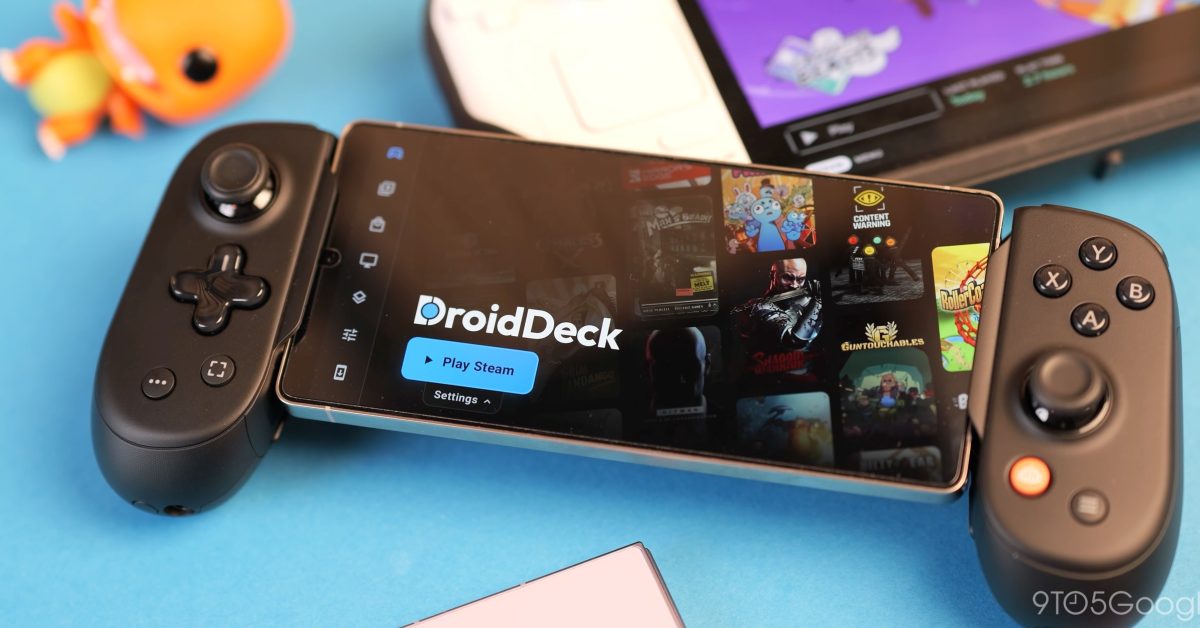
The gaming landscape has changed drastically over the past year to the point where you’re able to effectively turn a capable phone into a fully fledged Steam Deck with projects like DroidDeck. Android gaming is having a renaissance If you’ve been living under a rock for a bit, all you need to know is that it’s now technically possible to run full PC games directly on a high-end Android smartphone without relying on cloud streaming or rooting your device. Table of contentsWhat is DroidDeck?What phone do I need?How good (or bad) is it?Could this be the future of mobile gaming? For more video content, subscribe to 9to5Google on YouTube. In effect, this turns a recent, compatible (more on that in a second) flagship phone into a de facto Steam Deck. I am still trying to wrap my head around how well it actually works, but we’ll try to give you a fair summation here with all the pros and cons. A quick preface: I am a sucker for mobile gaming (I easily have over 30 hours clocked in Balatro across my devices), though the most taxing things I usually run are retro emulators. Being able to play full x86 PC titles locally on the device you already carry everywhere is a completely different beast – and why I am so excited by this project as a Steam Deck aficionado. What is DroidDeck? DroidDeck is a project that allows you to launch Valve’s Steam Big Picture interface natively on many recent Snapdragon-powered Android phones. It comes complete with the all-important Proton translation that has been so game-changing for Linux gaming, and it also includes custom graphics drivers for mobile devices. What makes DroidDeck so approachable is that you do not need to mess around with terminal commands or complex emulation configurations. No piracy or ROMs required. It boots directly into the familiar Steam interface, allowing you to download and store titles locally on your internal storage, completely legally. It’s very simple to get started; you simply grab the APK file from the official DroidDeck GitHub page. Install, sign in to your Steam account, and you’re 95% of the way to gaming. During the initial DroidDeck setup, there is one critical step you cannot skip: select the appropriate Proton translation layer and enable the custom Mesa Turnip drivers in the application settings. This unlocks proper 3D acceleration on Snapdragon Adreno GPUs. If you boot up a game and cannot figure out why it is failing to launch, check that driver setting first. It was an issue I initially ran into, but I found out it was essential after some digging around in forums and Reddit posts. Once you log into your Steam account, your library works exactly like it does on a Steam Deck. You get full access to the store, automatic cloud saves plus backups, and even Steam Workshop support. When I booted up Brotato, all of my modded Workshop content carried over seamlessly. Better yet, because the games are installed locally, the entire experience works fully offline. Services like Nvidia GeForce NOW are great when you have a rock-solid connection, but because you’re running locally rather than streaming, DroidDeck makes PC gaming on your phone viable for a commute or a flight where you just want to play games unhindered. Some of this may sound vaguely familiar if you have heard of another similar project called GameNative. It differs by acting as its own custom Android launcher rather than booting directly into Valve’s official Steam Big Picture interface. It is also built on top of existing open-source tools like Pluvia and Winlator; GameNative feels much more like a traditional mobile app that pulls in your libraries from Steam, Epic Games, GOG, and Amazon. Although you can add games from those platforms on DroidDeck if you really want to. It has been around a bit longer and automatically applies community-shared configurations to get games running out of the box, though it relies on separate background containers per title rather than giving you that unified, console-like Steam Deck environment that makes DroidDeck feel like a better implementation strictly for gaming, in my opinion. Just a quick cursory glance at Reddit of people using both, and it seems most people are having a better time with this implementation. What phone do I need? There is some good news and bad news with compatibility. According to the official GitHub documentation, DroidDeck requires an Adreno 730 GPU or newer. That is the graphics chip paired with the Snapdragon 8 Gen 1, a processor that is roughly four years old now, meaning millions of phones out in the wild technically meet the minimum spec. Sadly, that list does not include any recent Google Pixel device. You could try to run on the beta track, but it’s not recommended. Minimum specs and enjoyable specs are two very different things. Because DroidDeck is actively translating x86 PC instructions to run on ARM architecture, there is plenty of overhead. For a smooth experience right out of the gate, I recommend starting at a processor one generation newer than the Snapdragon 8 Gen 1. If you want to pick up an older, cheaper flagship specifically to tinker with this, the OnePlus 12 is in a great sweet spot because it’s cheaper, has a great screen, and plenty of power. Make sure whatever device you use has at least 12GB of RAM (16GB is even better) and fast UFS 4.0 storage to help with in-game asset loading. For my testing, I have been using a Galaxy S25 Ultra with DroidDeck installed for about 4 or 5 weeks so far. Talking about phones for my day job puts me in the privileged position of having last year’s flagship sitting around as a backup device, and its hardware is ideal for this. Modern flagship displays arguably outshine dedicated handhelds anyway. The 120Hz anti-glare AMOLED panel on the S25 Ultra is gorgeous and not much smaller than the Steam Deck OLED screen, meaning the Steam Big Picture UI scales cleanly with zero tiny, illegible text. How good (or bad) is it? I wish I could say every single title in my library runs flawlessly, but that wouldn’t be completely honest. Since every game handles translation differently, performance varies wildly depending on the age and complexity of the game in question. Older 3D classics and 2D indies are rock solid. I set my resolution to 1080p and jumped into Portal 2 for what is probably my sixth playthrough. It ran locked at 60fps, which is still mind-boggling to witness natively on a phone. Meanwhile, Burnout Paradise Remastered hit a fairly stable 60fps at 1080p with some dips into the high 40s, and a personal favorite, Dave the Diver, was solid but sometimes struggled to hit 45fps when lots of things were going on on-screen. Dipping down to 720p is absolutely necessary for heavier titles, though let’s be honest, 720p (or 800p) is native for a Steam Deck anyway, so you’re not losing out if you want portability. I was desperate to get Batman: Arkham Knight running nicely since I have been replaying it lately, and it landed right in the “not perfect, but just about playable” category. Even after tweaking the settings at 720p, it hovered around 30-40fps before it tanked hard when the skybox opened up and more assets were loaded in. Cyberpunk 2077 failed to launch for me, which I expected, but I have no doubt in the future it will be running with some added work. Beyond raw framerates, there are a few practical caveats you will run into immediately, starting with internal storage limits. Unless you bought a 512GB or 1TB phone, you cannot realistically keep three or four 50GB+ PC games installed alongside your daily apps and camera roll. I need space for photos and videos of my dog, so giving that up isn’t something I’m willing to do on my “main” phone. A backup or dedicated gaming handheld is fine, though, but with storage prices ballooning, it might be a costly side arm. Thermal throttling is another unavoidable hurdle on a wafer-thin device with no active cooling. When a Snapdragon chip does this much heavy lifting, the chassis gets scorching hot fast, and performance eventually drops as the system throttles to protect itself. Because of that excessive heat, a dedicated controller is practically mandatory just to keep from scalding your hands. All that thermal output also translates to rapid battery drain, meaning a demanding 3D game can easily wipe out a full charge in under an hour. Gaming phones with built-in cooling fans do exist, though I certainly wouldn’t recommend buying one just to squeeze out an extra twenty minutes of playtime here. Could this be the future of mobile gaming? Even with the heat and storage hurdles, we are in the very early days of this project. Think of it this way: right now is the absolute worst that DroidDeck will ever be. I don’t doubt we would have seen something like this without recent AI development progress, but talented devs have accelerated the work by tenfold in recent months. To go from a standing start to being able to run PC games on your phone almost natively is a heck of an achievement no matter which project you prefer. As drivers mature and translation layers become more efficient, the ceiling for native PC gaming on Android is massive. At a time when dedicated gaming hardware and handheld PCs are ballooning in price, you no longer need to spend a fortune to play your Steam backlog on the go if you already own a powerful smartphone. DroidDeck is completely free to download and tinker with, so you have nothing to lose by giving it a shot. Just make sure you have a spare controller handy before you boot it up. Follow Damien: Threads, Bluesky, Instagram FTC: We use income earning auto affiliate links. More.
DroidDeck review: This could change how you game on your phone [Video]
Full Article
Original Source
Read the full article at 9to5google →KhanList aggregates and links to publicly available news content. We do not host full articles from third-party sources. Always verify important information with original sources.