
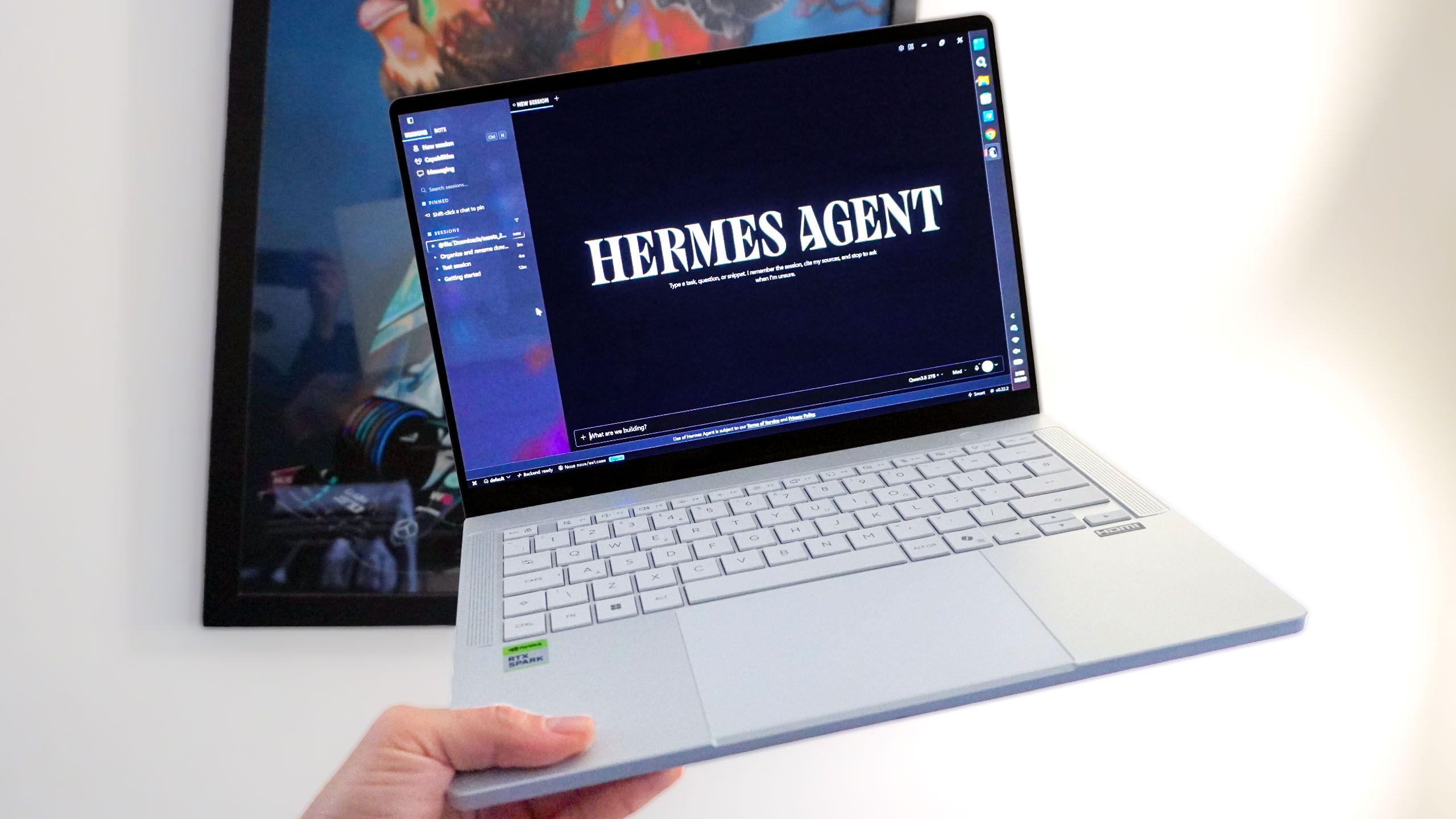
Right now, you are probably paying a monthly subscription to rent a sliver of a server farm in middle America. You ask a cloud chatbot to write an email, it pings a data center and you get an answer.It’s fast, magical and a massive trap.We are handing our personal data, our workflows and our wallets over to massive tech conglomerates, and for what? To prop up a cloud AI bubble that looks ripe for bursting, encourage more aggressive build-outs of data centers nobody wants, and feed an ever-learning black box with more and more of our sensitive information.But there’s a different way. It’s a way I’ve always believed in. The future of AI is local. (Image credit: Future)After spending the past two weeks stress-testing the new Nvidia RTX Spark laptops — and with Apple’s M6 MacBook Pro rumored to arrive next week with vast AI acceleration — the hardware has finally crossed the threshold.You no longer need the cloud. It’s time to build your own personal, local moat. But to do so the right way is different to what you’re used to. And I’m going to start from the beginning and break some things down for you.What is an AI agent? (Image credit: Shutterstock)A standard chatbot waits for you to ask a question. An agentic AI has autonomy.Sign up to the Tom's AI Guide weekly newsletter summing up all the biggest AI news you need to know. Plus, analysis from our AI editors and tips on how to use the latest AI tools!You give it a goal, a set of tools (like access to your file system or a web browser) and permission to execute tasks on its own using a ReAct (Reason + Act) loop. It thinks, acts, checks its work, and continues until the job is done.Now, this is all fair and good, and you see cloud options available like Meta Muse. But I’ll be real, the difference in control and privacy between a zippy cloud agent and a local agent makes the time you’ll wait for your on-device one to get things done well worth the wait.P.S. you can make time for other fun things while it works away, but I’ll get to that.How to set it up (the Hermes Agent method)Now I know there’s going to be several enthusiasts out there who may have a debate about which is best between the likes of Hermes Agent, OpenClaw or LM Studio Bionic. Ultimately, this is personal taste and (in my opinion) the easiest to transition to from using a cloud AI like my Gemini Pro subscription. Download Hermes Agent It’s a clean, open-source local installation that runs on Windows and Mac. Just download the package and install. Set it up Hermes Agent has a simple setup process where it’ll ask your name, what app connectors you want to download (the things it can see and interact with), and a color for your app’s overall theme. Pick your brain Go into settings > provider and select “local.” From there, head to model and download a local one to act as the agent’s brain. Your choice here will depend entirely on your laptop’s memory:8-16GB RAM: Stick to smaller 7-8B parameter models like Llama 3.1 8B (as of the time of writing this). They are lightweight and fast for quick tasks, but prone to getting confused if you throw anything complex at it.32-64GB RAM: The sweet spot. You can run 30B-70B parameter models like the Qwen 3.8 27B option I’ve been running on this Asus ProArt P14 I’m testing.128GB+ RAM: The monster tier. Chances are you already know full well what you aim to do with AI with this much memory. But to catch everyone else up, you can run massive, enterprise-grade models like Qwen 3.8 Flash-Next — that can rival GPT-4, completely offline. (Image credit: Future)Now this is the world of open source, so there’s so many to choose from. A great source of reference is going to be modelfit.io. I used it when I got properly started!How to shrink a brain (quantization) (Image credit: Future)Now, there is an extra wrinkle to this that you need to pay attention to. There are some models that sound like massive, multi-billion parameter options that usually require a refrigerator-sized server rack. How does it fit on your laptop?The secret is a process called quantization.Think of quantization like shrinking down a massive, uncompressed RAW photograph into a JPEG. The AI engineers take the incredibly precise, memory-hogging mathematical weights of a model and round them down. You lose a microscopic fraction of absolute precision, but the file size shrinks drastically.For the ProArt P14, I am downloading a model called Qwen3.8-27b-gguf Q3_K_XL. To translate that alphabet soup: it’s a brilliant 27-billion parameter model that has been quantized (that’s the Q3 part) so perfectly that it fits entirely within the 32GB of RAM.Pro tip: When you go to download your models, look for those “GGUF” and “Q” tags — they are the cheat codes that let massive AI brains run on consumer hardware.Cloud vs. Local: the coffee break rule (Image credit: Future)There are two big differences I found between using cloud and local AI. The first is speed.Cloud AI is instantaneous — throwing vast data center computing power at your prompt to give you a millisecond response. Local AI runs on your laptop’s silicon, so naturally it’s slower.If I ask my local agent to parse a 50-page PDF and cross-reference it with my calendar, it might take three to four minutes, whereas on cloud that’d happen in 30-60 seconds.It’s slower for sure, but a trade-off I’d absolutely make for the reasons I spoke about up top: privacy, and the ability to build my own personal brain without spending a penny for the tokens I burn.And when it gets more complex — like me tasking my team of agents to go through my emails and calendar, take note of the previous meetings I had, understand the context of the wider world of tech news, track any analytical trends in the site’s traffic and craft my day of work, it can take a little bit of time.The trick is to treat it like a real assistant: give it the task that would’ve normally taken you a while to do yourself, and spend that time doing something else. For me, it’s that calm breakfast in the morning or a walk around the park. And by the time you sit back down at your desk, the work is done.The 4 rules of “parenting” a local AIBeyond that speed difference, you have to completely rewire how you talk to your computer. Cloud AIs are designed to be frictionless, constantly updated by engineers behind the scenes. Local AI is like a raw blank slate. It’s only as useful as what you give it, so follow these four rules:You are the sole provider of its data diet (Image credit: Future)Cloud AI is constantly scraping the internet and updating its worldview. Your local AI is completely isolated. It only knows what you feed it.If you want it to understand how you format invoices, or the specific tone you use in emails, you have to explicitly provide those documents. It isn’t going to magically know you from the get-go.Make your prompts hyper-specific (Image credit: Future)Since cloud AIs have billions (maybe trillions) of data points of context, they can read between the lines of those vague, half-baked questions you have.Local AI is intensely literal. If you give it sparse instructions, it will give you a sparse, unhelpful output. Instead of “organize my downloads,” think “organize my downloads by file type and rename them to be more contextual with what they are.”The carrot, not the stick (reinforcement) (Image credit: Future)To highlight, I don’t mean the “reinforcement learning” AI engineers are doing across the globe on frontier AI, I mean like I learned from teaching my nephew new skills. Something more human. You have to tell local AI to remember the victory.If it nails that spreadsheet format exactly as you wanted it, reply with: “This is perfect. Save the way you did this into your memory.” Give it a treat so it repeats the behavior.BTW, you don't need to give the agents names like I did. It just helps me organize them.Build its mind map in Obsidian (Image credit: Future)An AI without a long-term memory is just a calculator. To make it genuinely useful, give it a digital filing cabinet. I use Obsidian, a free markdown note-taking app that saves files locally to your storage.Just point your Hermes agent at Obsidian with a prompt like “can you take everything you’ve learned about me over our past interactions and put it into an Obsidian vault?” And from there, you’ll see the synapses start to form and connect.The economics of owning your own brain (Image credit: Tom's Guide)Now, before I sign off on part one, let’s address the elephant in the room: hardware is expensive. It’s actually one of the reasons I believe the future of AI is local, because these damn cloud AI infrastructures have jacked up the price of memory!But you have to look at the math of the cloud tax. Right now, you’re probably paying $20 a month for a mid-premium tier service, and if you try to do anything more adventurous, you’re met with limitations. (Image credit: Tom's Guide)That’s hundreds of dollars a year in digital rent just to borrow someone else’s server. When you run local AI, the ongoing cost is zero. That means no limitations on what you can do, no restrictions on the amount of images and videos you can generate in Comfy UI. You buy the hardware once, and the open-source software is free.It’s the difference between renting a cramped apartment where your landlord reads your mail, versus owning your own house. Over a two-to-three-year laptop upgrade cycle, this machine pays for itself in canceled subscriptions — provided you know how to use it.Outlook (Image credit: Future)And that’s what I’m here to do. Over the next few weeks, I’ll give you a look into my local AI workspace, introduce you to my first agent “Jeeves” and the rest of my team, and show you how to extract the most value out of it really easily.It’s going to be a journey, and I can’t wait to see what you come up with. But any questions whatsoever, throw them in the comments. Follow Tom's Guide on Google News and add us as a preferred source to get our up-to-date news, analysis, and reviews in your feeds. More from Tom's GuideWould you give up ChatGPT to stop AI data centers? Reddit's answer was brutalChatbots and agents like Muse are getting a face — but does that make us trust them more? Here's what this AI expert had to sayJoseph Gordon-Levitt warns the real AI threat isn’t killer robots — it’s the companies building them
Ditch the data center: I fired my cloud chatbot and built a free local AI agent to run on my PC — and you can too
Full Article
Original Source
Read the full article at Tomsguide →KhanList aggregates and links to publicly available news content. We do not host full articles from third-party sources. Always verify important information with original sources.