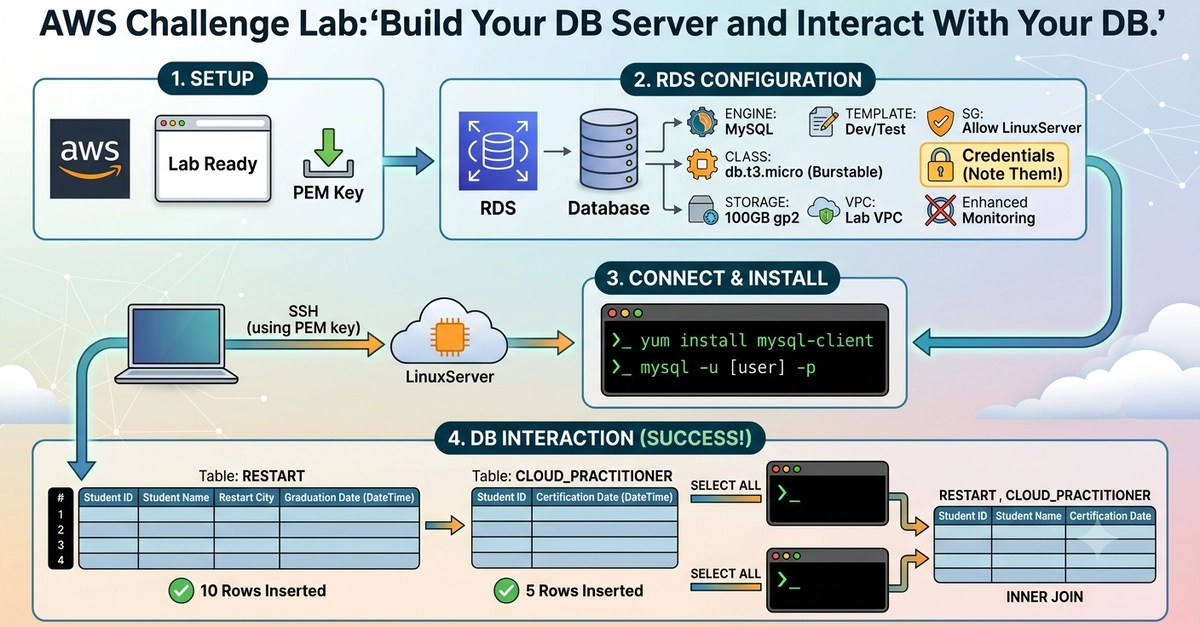
Rds challenge lab devto post 🗄️🐬 aws #rds #database #tutorial Build Your DB Server and Interact With Your DB INTRO Did a hands-on AWS challenge lab on Amazon RDS. Task: spin up a managed database, connect from a Linux server, and run real SQL — create tables, insert data, join across tables. No hand-holding here, just requirements to figure out myself. Here's the walkthrough. SCENARIO Service: Amazon RDS Role: Cloud/DB Admin Goal: Launch RDS under set constraints, connect via EC2, run SQL (create, insert, select, join) ARCHITECTURE LinuxServer (EC2) sits in the Lab VPC — this is the client RDS instance (Aurora or MySQL) in the same VPC Security group lets LinuxServer talk to RDS Flow: LinuxServer -> MySQL client (port 3306) -> RDS -> tables STEP 1: LAUNCH THE RDS INSTANCE Constraints for this lab: Engine: Aurora (Provisioned) or MySQL — no serverless Template: Dev/Test or Free tier No standby instance (single-AZ only) Instance size: db.t3.micro to db.t3.medium Storage: gp2, up to 100 GB — no Provisioned IOPS Network: Lab VPC Security group must allow LinuxServer access MySQL only: turn off Enhanced Monitoring On-Demand only These limits keep costs in check — Provisioned IOPS and Multi-AZ are the fastest ways to blow up an RDS bill. Noted the master username, password, and endpoint — needed next. STEP 2: CONNECT TO THE LINUX SERVER Downloaded the PEM key, grabbed the LinuxServer address, connected over SSH: chmod 400 labsuser.pem ssh -i labsuser.pem ec2-user@ Enter fullscreen mode Exit fullscreen mode This box is just the SQL client — it needs network access to RDS, nothing more. STEP 3: INSTALL MYSQL CLIENT AND CONNECT On the LinuxServer: sudo yum install mysql -y Enter fullscreen mode Exit fullscreen mode Connect using the master credentials from Step 1: mysql -h -u -p Enter fullscreen mode Exit fullscreen mode If it hangs, it's almost always the security group — check port 3306 inbound. STEP 4: CREATE THE RESTART TABLE CREATE DATABASE lab_db; USE lab_db; CREATE TABLE RESTART ( StudentID INT, StudentName VARCHAR(100), RestartCity VARCHAR(100), GraduationDate DATETIME ); Enter fullscreen mode Exit fullscreen mode STEP 5: INSERT 10 SAMPLE ROWS INSERT INTO RESTART (StudentID, StudentName, RestartCity, GraduationDate) VALUES (1, 'Ahmed Khan', 'Karachi', '2024-01-15 10:00:00'), (2, 'Sara Ali', 'Lahore', '2024-02-10 11:30:00'), (3, 'Bilal Hassan', 'Islamabad', '2024-03-05 09:15:00'), (4, 'Ayesha Malik', 'Karachi', '2024-01-20 14:00:00'), (5, 'Usman Tariq', 'Faisalabad', '2024-04-12 10:45:00'), (6, 'Hina Shaikh', 'Karachi', '2024-02-28 13:30:00'), (7, 'Omar Farooq', 'Multan', '2024-03-18 12:00:00'), (8, 'Zara Iqbal', 'Lahore', '2024-01-30 15:20:00'), (9, 'Danish Raza', 'Karachi', '2024-04-02 09:50:00'), (10, 'Mahnoor Aslam', 'Islamabad', '2024-02-15 11:10:00'); Enter fullscreen mode Exit fullscreen mode STEP 6: SELECT ALL FROM RESTART SELECT * FROM RESTART; Enter fullscreen mode Exit fullscreen mode STEP 7: CREATE THE CLOUD_PRACTITIONER TABLE CREATE TABLE CLOUD_PRACTITIONER ( StudentID INT, CertificationDate DATETIME ); Enter fullscreen mode Exit fullscreen mode STEP 8: INSERT 5 SAMPLE ROWS INSERT INTO CLOUD_PRACTITIONER (StudentID, CertificationDate) VALUES (1, '2024-05-01 10:00:00'), (3, '2024-05-03 11:00:00'), (5, '2024-05-05 09:30:00'), (7, '2024-05-07 14:15:00'), (9, '2024-05-09 10:20:00'); Enter fullscreen mode Exit fullscreen mode STEP 9: SELECT ALL FROM CLOUD_PRACTITIONER SELECT * FROM CLOUD_PRACTITIONER; Enter fullscreen mode Exit fullscreen mode STEP 10: INNER JOIN SELECT R.StudentID, R.StudentName, C.CertificationDate FROM RESTART R INNER JOIN CLOUD_PRACTITIONER C ON R.StudentID = C.StudentID; Enter fullscreen mode Exit fullscreen mode Only students in both tables show up — filters out anyone not yet certified. WHY THIS MATTERS RDS constraints = real cost guardrails, not busywork Security groups are the #1 connection blocker Base table + event table + join = same pattern used in production apps Always capture before/after proof at each step TOOLS USED Amazon RDS (Aurora / MySQL) Amazon EC2 Amazon VPC + Security Groups MySQL client / SQL AWS #RDS #Database #MySQL #CloudComputing #SQL
Deploying MySQL on RDS and Joining Tables Like It's Production
Full Article
Original Source
Read the full article at Dev →KhanList aggregates and links to publicly available news content. We do not host full articles from third-party sources. Always verify important information with original sources.